
The best way to keep your inbox tidy, to ensure your email address remains private, to guarantee you never receive another message from a specific sender if needed, is to use a private email address.
You’re [email protected] to friends; to everyone else, you’re [email protected] or [email protected]. If a spammer starts sending to the 123 address, well, you can just delete it. Your original email address is still safe and sound. It’s the same concept as virtual credit card numbers for online shopping, only even more disposable.
Private email addresses are everywhere today, baked into Firefox and iPhones and more. Long gone are the days when they were the domain of slightly sketchy services, of sites with too many banner ads and the feeling that maybe you were doing something shady to need such a service. You had a perfectly good email address; why not just use that one?
Why not, indeed, when over 78 million email addresses were breached in June 2026 alone, from the likes of Sysco, Edmunds, JCPenny, and the University of Nottingham’s databases?
We’d argue it’s worth masquerading your email address if you’re not 100% certain about a service—and it might be worth doing even if your confidence isn’t in doubt. And we’d argue if you’re running a newsletter (or app, or anything else with a signup flow), you shouldn’t worry about the growing numbers of anonymous-seeming addresses in your subscriber list, especially if they’re from reasonable-seeming domains.
Odds are, they’re not bots. They’re people, slightly concealed. And that’s fine.
Private, but not necessarily anonymous
The original idea for private email addresses was, well, privacy. Email addresses tend to wear your identity overtly, with [email protected] or similar remixes with first name or last initial being the most common email address style. Easy to remember, easy to share, and, well, easy to demask if you’d rather keep your name private when emailing (especially when your email header includes your name, too).
“Anonymous on-line speech serves many purposes ranging from fighting oppressive government censorship to giving university professors feedback on teaching,” wrote David Mazieres, then-MIT student and current Stanford Professor of Computer Science, in a 1998 paper about one of the earliest ways to masquerade email addresses.
Two years prior one of the earliest apps to hide your email, the Penet remailer, had been shut down after a battle with the Church of Scientology. That app worked much like similar services today: You’d claim a pseudonymous email address, and it’d forward messages to your real inbox. Simple enough, until it was compromised during the second DefCon hacker convention, then received an Interpol search warrant and was forced to hand over a user’s real email address when Scientology wanted to find out who’d posted on a Usenet newsgroup with a Penet address. Wired called it “the day that Internet anonymity first came in conflict with the law — and lost.” When Scientology came knocking again with the long arm of the law, Penet developer Johan Helsingius decided it’d be better to close up shop.
But the idea wouldn’t die. Everything, soon enough, would be asking for your email address, and everyone didn’t just want to hand out their identity for every signup form only to be bombarded with unwanted mail at best, spam and scams at worst.
Mazieres’ paper focused on another shot at the same idea: nym.alias.net, which both sent emails through multiple servers in almost an early Onion-network-style idea, and removed headers and other metadata from emails making them harder to trace. “Only by compromising multiple remailers can one uncover the full path taken by such a message. Thus, even the administrators of the nym server have no way to expose the identity of someone making proper use of the system,” continued the paper—yet even that level of obscurity couldn’t absolutely guarantee identity could be protected forever from the most determined hacker.
The bad news, if you want absolute anonymity online, is that on the internet, it’s pretty easy to know if you’re a dog. If a service links a private email address to your real email address, and that service is hacked, has a bug that manages to not strip out your original sending address, or you forget and include your normal email signature in the message, well, so much for anonymity. Truly temporary email address services that do not save your real email address could log your IP address, at least. Even Apple’s Hide my Email service is purported to have a vulnerability that could expose the underlying real email address behind a fake one. And that’s not to mention that a determined-enough investigator could use everything from your reply time to your writing style to hone in on your identity.
Yet I’d argue that’s not the real reason to use a private email address. The reason these services have proliferated and stood the test of time is that it’s really nice to be able to turn off an email address at will.
The case for hiding your email
And so, their story goes, a year after they launched, users said they’d started getting spam. Turned out, Orbitz instead had gotten hacked, and anyone who’d used Sneakemail to sign up for Orbitz was now receiving spam. The quick fix was to kill the old address, spin up a new Sneakemail address, update their Orbitz settings, and go back to a spam-free inbox.
That’s the best reason to hide your email today. Another is that unique email addresses make filtering and filing a cinch. I use a Gmail alias, by adding a + and text to the end of my username like [email protected] if I were to, say, sign up for Orbitz. That or putting a period in the middle, like [email protected] for a similar trick (or if you have a custom domain, setting your inbox as the catch-all account then literally any address at your domain works, too). All will still reliably show up in a [email protected] account, but could be easily filtered with a Gmail rule to drop messages into a Travel folder or to send them to spam if the email gets leaked.
It doesn’t convey pure anonymity, enough to rage at professors or worse. But possibly, neither will dedicated email hiding services. And the best reason to use them is for the ability to control what messages you receive, long after you give out your address.
The options to hide your email come in all shapes and sizes. There are tools like Temp Mail with email addresses that last for 10 minutes; don’t use those for newsletters or signups you care about. Others like Maildrop (or, say, signing up for a new Gmail address that doesn’t use your real name) collect messages in a standalone mailbox without forwarding, for a bit more anonymity with the added trouble of needing to check an additional inbox. All of those come with a stronger argument to block them, with their further removal from a real inbox.
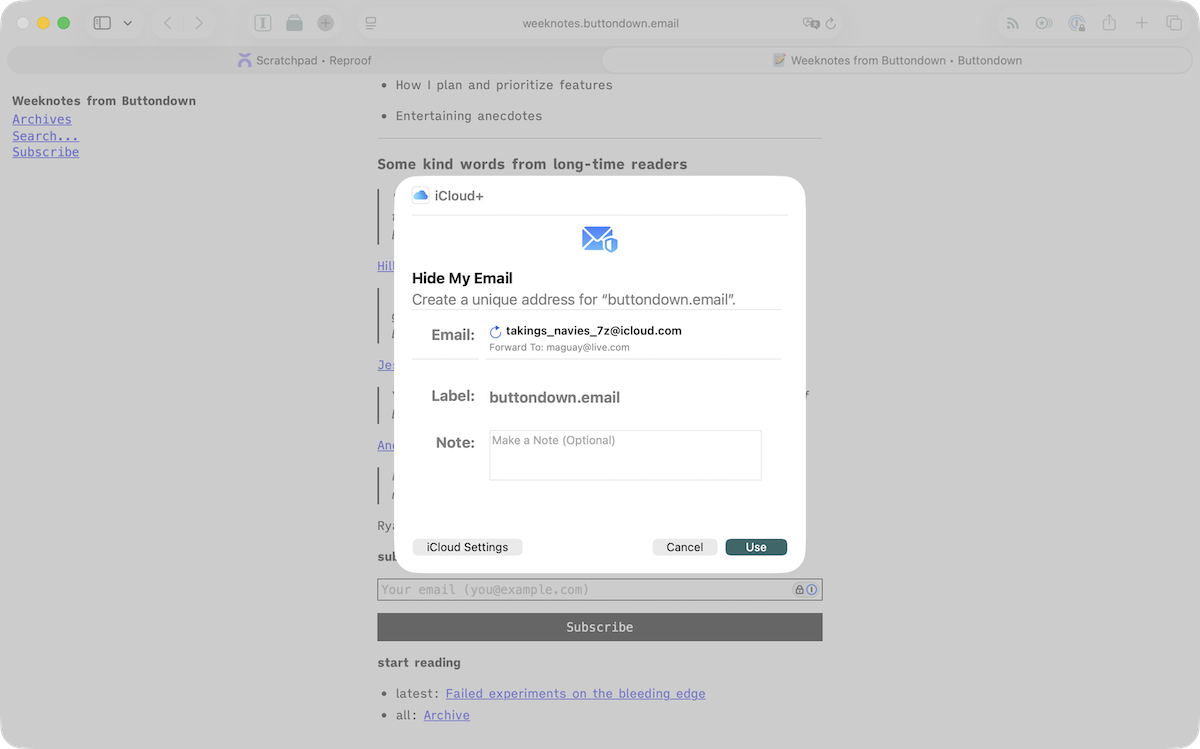
The rest, everything from iCloud Hide my Email, to Firefox Relay, DuckDuckGo Email Protection, Sneakemail, Fastmail Masked email, and Proton Mail work more or less the same but are tied to a real email account. You sign up with your real email address, create new addresses when needed, and get all of your messages in your real inbox just like you would if you never hid your email at all. And you can shut down an address as easily as creating one.
They’re a good way to keep your inbox tidier, your privacy a bit more intact. And that’s worth celebrating.
And not blocking. There are lists galore of disposable email domains, and services to check signups against similar lists. Buttondown even built one, to help fight spam. There’s a fear that Apple’s Hide my Email addresses might start being blocked by such services, since they’ll soon come from @private.icloud.com instead of directly from @icloud.com as real, human emails do.
There’s merit to blocking the truly temporary email addresses, the ones that only stick around for only as long as a browser tab is open and are unlikely in the extreme to be a real subscriber who wants to read your work. But for the most part, for most newsletters, especially if you’re the type to keep email tracking turned off, I’d argue you should leave the doors open for all, private and normal emails alike. Sure, they might mean the reader’s a bit skittish, a bit concerned that you might not keep their data safe or let them off the hook when they unsubscribe. But it also might mean they’re meticulous, detail-orientated, exactly the type of person you’d like to have read your newsletter.
They might look like [email protected] when in reality, they’re your best new reader who can’t wait to read what you write next.
| Image | Credit |
|---|---|
| Header photo | Christina Miller via Unsplash |