

War and Peace is around 1,400 pages, in the public domain, and Gmail did not stop me from pasting its entire 600,000 words in an email body and sending it to a friend.
TL;DR: Gmail clips emails at 102kb (~15,000 words of plain text, or ~5,000 words with formatting). Other providers have different limits or none at all. If your footer gets clipped, subscribers will mark you as spam. Test your emails, keep an unsubscribe link visible, and consider using a platform that warns you about truncation.
As far back as RFC788, the first draft of the Simple Mail Transfer Protocol from November 1981, the Sizes section stated "To the maximum extent possible, implementation techniques which impose no limits on the length of these objects should be used." It's why Gmail lets you send a 998-character subject line or send to an email address with up to 64 characters before the @ symbol and 255 characters after it. But back-end, protocol-level philosophy diverges somewhat from front-end, user-facing choices.
Several email apps, like Outlook, Apple Mail, and Proton, won't constrain your emails beyond the limits set by SMTP. Others do, though. Gmail cuts a received email short once it hits 102kb in size (not counting attachments). That tends to work out to around 17,000 words of plain text, or as low as 7,000 words when there's a reasonable amount of formatting. Any email longer than that, opened inside the Gmail interface itself, will include "[Message clipped]..." and a link to View entire message. And that's where longform newsletters can run into trouble.
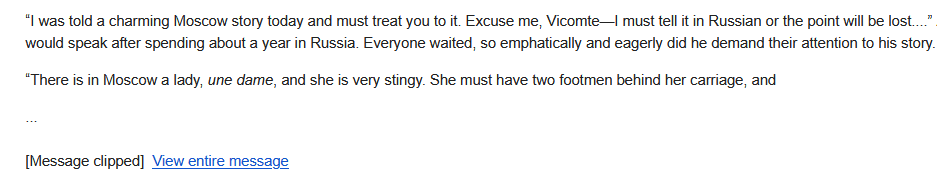
The perils of an obfuscated footer
Every email newsletter must have an unsubscribe button visible somewhere in the email. Full stop. Even if the jury is out on certain edge cases of unsubscribe requirements in CAN-SPAM, GDPR, and Canada’s Anti-Spam Legislation, there is a non-zero number of people who will mark your emails as spam if they can’t immediately find a way to remove themselves from the list. And being marked as spam is just about the worst way to tank your deliverability.
There's probably a Saul Goodman argument that putting the unsubscribe link after Gmail's truncation line is Gmail's problem. Limiting a newsletter to 102kb is arbitrary, after all, with SMTP and clients like Apple Mail displaying entire novels without truncation. Heck, even someone with a Gmail address who reads emails in Outlook or Thunderbird won't see any message clipping. But subscribers viewing your content with Google's apps won't care about your reasoning.
Also, none of this is to say that raw word count or file size by themselves don’t influence whether or not a newsletter goes straight to the spam folder. It’s just extremely hard to measure that vector. Most of my test emails to friends that contained cover-to-cover Tolstoy never landed in their inboxes, indicating that length does seem to impact deliverability, at least in extreme cases.
So, newsletters that are "too long" may have their deliverability dinged and the footers gated by email service providers (ESPs). You can avoid both, for Gmail subscribers, by keeping emails under 15,000 words, or 5,000 if you have a lot of links, formatted text, tables, images, and buttons. But for every 1,000 subscribers, there are around 750 people who use another service or client, each with its own quirks in how it renders your newsletter in subscribers' inboxes.
A universal tolerance for email length
There's a big difference between what's sending and receiving your emails versus what's displaying your emails. Outlook and Yahoo will flat-out refuse to send or receive emails larger than 20mb–25mb, including attachments. Gmail, iCloud, and Proton will allow you to send up to 25mb, while letting emails up to 50mb into your inbox as paragons (in the back-end, at least) of Jon Postel's Robustness Principle to "Be conservative in what you send, be liberal in what you accept."
Keep in mind, though, that when you wire up a Gmail account to be read inside Apple Mail, the sending and receiving limits are Gmail’s while message clipping would be handled by Apple Mail. That’s an important distinction since Apple Mail didn’t trim a single word off War and Peace when I sent it to my friend’s Gmail address, whereas the web and mobile views of Gmail itself stopped short before chapter six.
Very few people need or want to send anything so large, however, either in terms of word count or file size limits. Even 10mb of HTML in a newsletter can slow down rendering and scrolling, which is why some inbox providers truncate messages. But what you compose and what your newsletter platform ends up sending can differ more than you might realize, making cutoff lines extremely fuzzy.
How design layouts affect email size
I ran two tests across the most popular email clients to get some ballpark figures. The first was sending War and Peace from Gmail with zero rich text formatting, no headings, bold text, or URLs, nothing. On both mobile and in a web browser, receiving that in Gmail resulted in a message that was trimmed down to 17,000 words, with Yahoo truncating it to 37,000 words in a web browser and no cutoff in the mobile app. I didn't run into any truncation in Outlook, Proton, or Apple Mail.
The second test was a bit more subjective, copying a random past issue from my personal newsletter, pasting it 44 times into a Gmail message body—around 65,000 words—and sending that to the same list of inbox providers (somehow avoiding my account being blocked the entire time, huzzah!). Weirdly, Yahoo in a browser didn't shorten the content at all this time, while Gmail's allowed word count dropped precipitously to 6,500 words. It's strange that Gmail doesn't warn you about sending anything larger than 102kb, a sort of inversion of Postel's law that doesn't seem to have any upside.
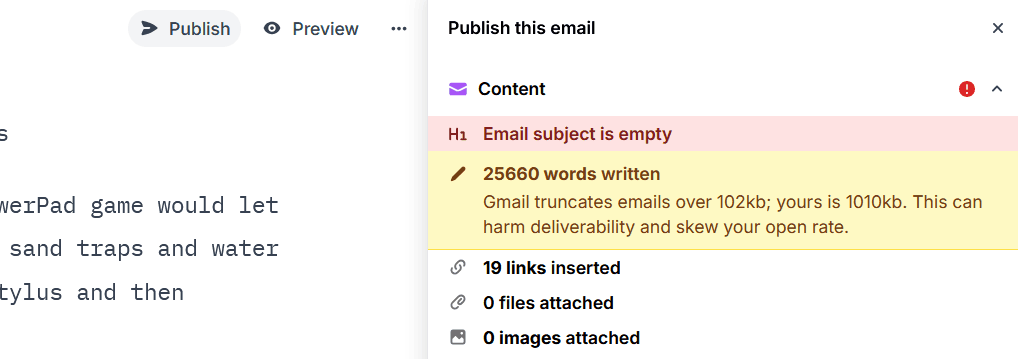
Newsletter platforms like Buttondown do warn you about truncation, which is important because different platforms' design choices come with different HTML overhead. David Fishman's Yak Hotpot and Hidden Tibetan Treasures was clipped after only 2,500 words when it reached my Gmail inbox, at least in part because of the platform he uses. In Buttondown, the footprint of that same newsletter was 33% smaller. That's not to say that minimalism is always better—it comes with its own drawbacks—but it showcases the importance of pre-flight checks for preventing papercuts.
Longform content is awesome, and it's frustrating that newsletter deliverability is tied to Google's opinions on what constitutes a maximum loadable email. If you're sending anything approaching that limit and want to minimize the impact on your writing and your deliverability, there are at least a few options.
Mitigation for hostile shortening
For some senders, the most elegant workaround to Google's truncation line will be to abridge your email just before truncation and throw in a Read the rest CTA button at the bottom of the page. In Buttondown, you can add a webwall component, paste the rest of your writing below it, and everything is handled for you. The button will link to your archives URL and the full-length article.
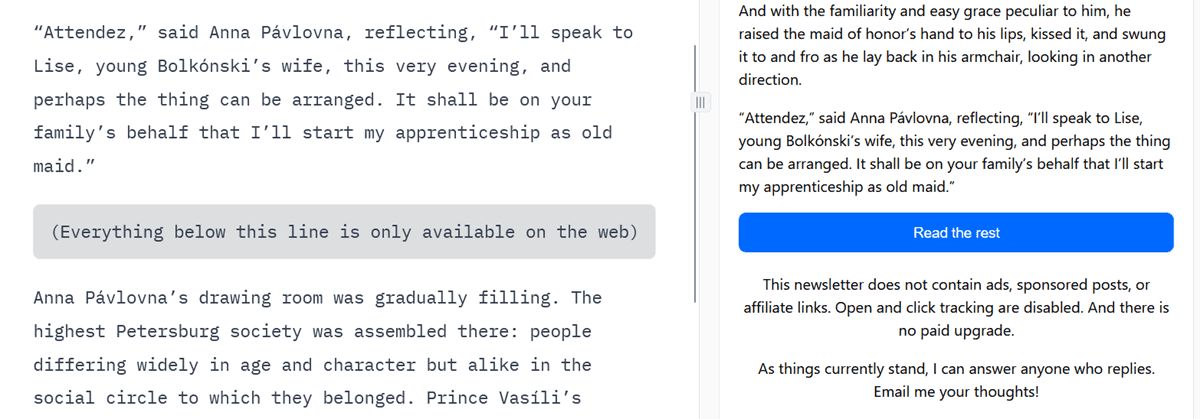
Keep in mind that when another newsletter platform recently made the Continue reading button mandatory for longform emails, people were not happy. In that case, clicking through funneled subscribers into an app (or the app store if they didn't have it installed on mobile), which is a different, less gated experience than a web page. Still, lots of people love email because good senders don't force them to leave their inbox, and respecting that will garner their appreciation.
Another option is chunking your emails into a series of chapters. That’s what Jeff Hicks regularly does with his four-part series like Creating HTML Reports with PowerShell and Creating a GitHub Repository Tool. By breaking these massive walkthroughs into weekly newsletters, he gets to boost deliverability with a faster cadence and spend less time on topic ideation.
There is, of course, the option to simply not worry about truncation. You reduce HTML and formatting cruft to squeeze more words onto the page, put an unsubscribe link higher up on the page, and if Gmail or Yahoo subscribers leave, so be it. Prioritizing list growth over your love of the topic is overrated anyway.
Testing your emails for truncation
Before you hit send, you should test how your newsletter will look to Gmail subscribers. Most platforms offer preview or test email features—use them. Send yourself a test email and open it in Gmail (both web and mobile) to see exactly where the clipping happens. If your unsubscribe link or important CTAs fall below the "[Message clipped]..." line, it's time to trim or restructure. Buttondown shows you a warning when you're approaching the 102kb limit, but you can also manually check the HTML size of your draft by inspecting the source or using your platform's analytics.
Long live longform
To review, 15,000 words of plain text is about the most you can send without running into truncation. That drops to 5,000 words if you're including images and other design flourishes, which is probably fine since longer than that can be a red flag to spam filters. The worst-case scenario, though, is your sending platform adding a bunch of invisible HTML and CSS that drops the word count limit to 2,500. That's especially irritating when you consider that email's main draw is a lack of 140-character limits or Like buttons or restrictions on how many links you can include.
Email is what you make it. There’s nothing forcing you to contort your writing so it fits one app’s design opinions, or to stick with newsletter platforms that force your subscribers out of their inboxes to read your content. You can always move your list to another platform, one that’s less opinionated.
Buttondown’s somewhat minimalist philosophy is intentional. We are careful not to crowd or complicate your writing and believe you should be able to send as much good-faith content as SMTP allows, with flags for all of the corporate limitations that you may or may not want to recognize.