
Buttondown allows increasingly more options for authors to customize their newsletter archives. We've recently shipped better theme settings and customization options so authors can have their newsletter look like them with little effort. We also allow folks to write any kind of HTML in their emails and web archives, even including a Naked mode that lets you import fully rendered HTML from elsewhere, without our templates.
However, much of this customization requires putting a lot of care into how we render this HTML and CSS, making sure that it cannot be used for evil purposes such as phishing and spam, or even taking over other authors' accounts. The main concern here is JavaScript: because both the web archives and the actual author-facing application are served in buttondown.com, having malicious code running in a web archive could mean taking over another authors account by using the same credentials they use for authenticating into the Buttondown app.
Until a few months ago, we relied on semi-manual HTML sanitization on user-provided fields. This means calling backend libraries like nh3 in every place a user-provided string is rendered. These libraries go through all the HTML code, filtering out every inappropriate HTML tag or attribute that could cause code execution. Using these libraries can be error-prone, as accidentally using an author-provided string without sanitizing it opens the door to any kind of HTML — including <script> tags — to be included.
Fortunately, browsers have provided a great tool to filter the content (and specifically scripts) that are allowed to be loaded at all in any page: Content-Security-Policy.
Significantly improve the security of your website with this one weird trick
Content Security Policy (CSP) is a security feature available in every single modern web browser that allows web developers like us to specify exactly which JavaScript scripts and CSS stylesheets to load in any page. Basically, it lets us set up policies such as "only allow loading scripts from buttondown.com and sniperl.ink".
What's great about this feature is that it acts as a stop-gap for any potential misses in our HTML sanitization. If a <script> tag does end up showing up in the page, CSP stops it from loading if it's not in the allowlist.
How to not break stuff
The problem then is how to enable it. As with any allowlist-based system, "just toggling it on" isn't an option for a production application, as one mistake could cause users' web archives to break entirely for all users. Fortunately, CSP also includes a way to get reports when something that violates the policy attempts to load, without actually blocking it: Content-Security-Policy-Report-Only.
It works like this: first, you write down your desired CSP policy, specifying the origins you're OK with loading scripts, spreadsheets, images and others from: script-src 'self' 'https://sniperl.ink' 'https://static-assets.buttondown.com', [..].
Then, you need a "report URI" that the browser will send reports to when it detects something violates the policy. Luckily for us, we already use Sentry, which has Security Policy Reporting monitoring built-in: report-uri https://o97520.ingest.us.sentry.io/api/6063581[..].
Finally, you set this entire policy as the Content-Security-Policy-Report-Only HTTP header, where it can't be further modified even by rouge HTML code. When the page loads, the browser sees this header and uses it as the only policy for the entire website.
Because we set it as Report-Only, policy violations are only reported but not blocked. When you get the reports in Sentry, you can figure out why it happened and either avoid the script from loading or add it to the allowlist.
We initially set this up hoping that we would get one or two reports over the course of a few days and we could just fix them and finish the implementation. Unfortunately, we stumbled upon dozens of reports, where many of them were false positives from users' web extensions injecting script tags into the page.
Bad error messages
Some of the reports we got were straight up confusing. For example, we started seeing a lot of Blocked 'script' from 'sniperl.ink' (Sniper Link is our free service for showing email activation links to users.) However, sniperl.ink was explicitly included in the scripts' allowed origins in our policy, so this made no sense. Apparently, when the remote server returns an error response (like 5xx or 4xx) when trying to fetch the script, CSP interprets it as a policy block with this unhelpful message. This block was caused by Vercel's anti-bot protection probably misbehaving.
We also had to revamp the way we did our content embeds, as they sometimes conflicted with the way our CSP was designed. However, after a few back-and-fourths patching real policy bugs and investigating false-positives, we reached a point where every report over the course of a week had been accounted for, and we were ready to ship the security policy to production.
Uneventfully pulling the lever
When everything was done, we just had one thing to do: remove the -Report-Only part of the HTTP header, so the policy was actually enforced.
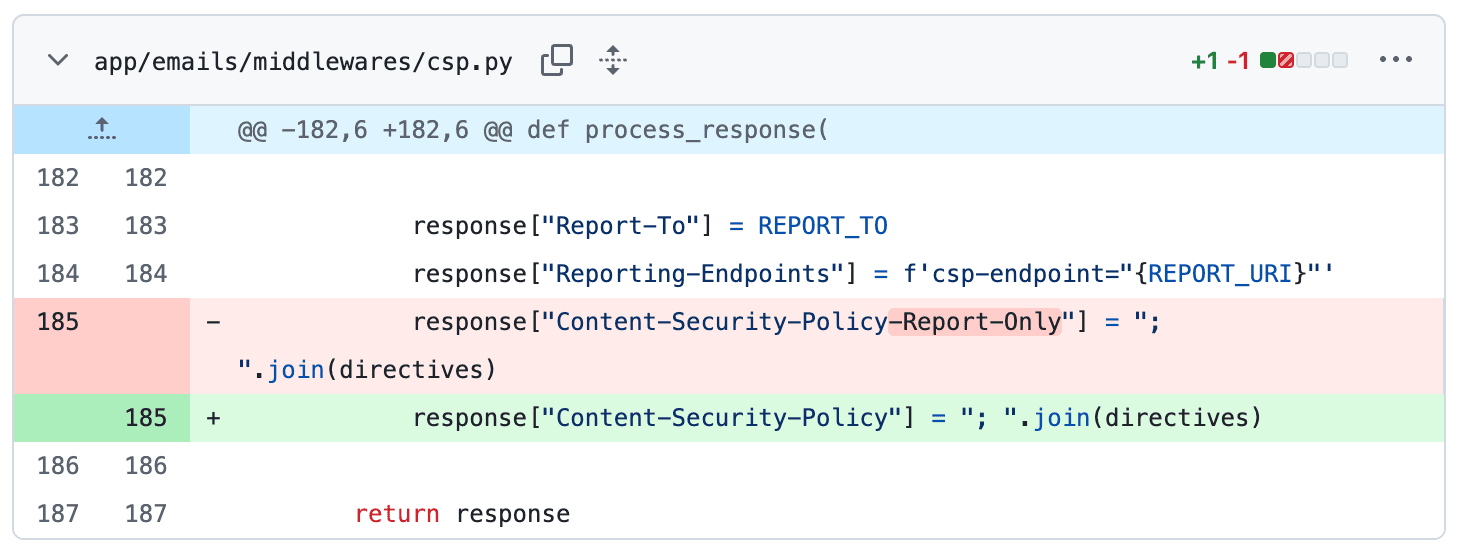
And then... nothing. The policy has been enforced for a few months now, and the only issues we've had were few hiccups when introducing new content embeds, but it was pretty straightforward to fix. Now authors are better protected against targeted attacks.
I wanted to write this blog post for a while as for whatever reason, I couldn't find many "we took CSP to prod" posts that I could learn from. Hopefully this can help someone get CSP to production safely!