GovPossible Updates 1/20/2026: Our New Podcast & Licensing Custom Fields
Hello everyone! Two Announcements for you today! :-)
Podcast
There are so many great stories about how small municipalities are making an impact for their constituents. Mark Partin from the City of Sumter and I decided we need to start sharing them! we've started a podcast series: Mighty Municipalities. You can subscribe in all your favorite podcast networks or at https://mightymunicipalities.com Subscribe and give us a good rating if you're so inclined; I sincerely appreciate it!
-Karl
Custom Fields for License Applications
We have an enhancement to the licensing lodule that gives you more flexibility in what information you collect from applicants.
What Are Custom Fields?
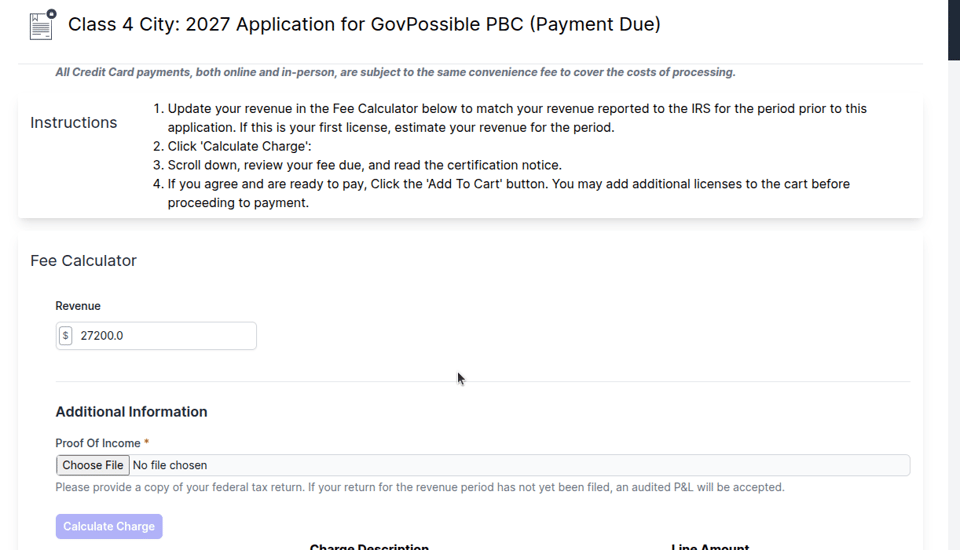
You can now add custom input fields to your online license applications! Whether you need a simple text field, a dropdown selection, or even document uploads, we can configure these dynamically for each license type.

Types of Custom Fields
The system supports three types of custom inputs:
Text Fields Perfect for collecting information like business descriptions, number of employees, square footage, or any other written information specific to your license requirements.
Select Dropdowns When you want applicants to choose from a pre-defined list of options - think business classifications, service types, or operational categories.
Document Uploads Require applicants to submit supporting documents like certificates of insurance, professional licenses, or business registrations. All uploads are automatically scanned for viruses before being accepted.
How It Works for Applicants
When someone applies for a license online, they'll see your custom fields right in the application form alongside the standard fields. The fields are clearly labeled, and for document uploads, they can drag and drop files or browse to select them.
For document uploads, here's what makes it smooth: after uploading, the system runs a virus scan and shows the status in real-time. Applicants see "Scanning..." while it's processing, then "Clean" once it's verified safe. If they need to replace a document, they can upload a new one and the old information is automatically replaced.
Behind the Scenes
All the information collected through custom fields flows directly into your ERP system and gets stored with the license application. Your staff can see all the custom field responses when reviewing applications.
For document uploads, once they pass the virus scan, they're transferred to your ERP system and attached to the application automatically. No manual file management needed!
Setting Up Custom Fields
Custom fields are configured on a per-license-type basis in your system. Once we've helped you setup the custom field types and they're added to the license type (under admin), they automatically appear in the online application portal. You can: - Add or remove fields anytime - Reorder how they appear - Designate if they show up on the customer portal - Mark fields as required or optional - Update dropdown options as your requirements change
Changes sync to the portal automatically, so your online forms are always current with your licensing requirements.
Getting Started
If you'd like to add custom fields to your license applications, let us know what information you need to collect. We'll help you configure the fields and can advise on the best field type for each piece of information you need!