GovPossible: 2026 SC Licensing Guide
Let's take a look at the steps to print and e-mail renewals for the 26-27 licenses
Hello everyone! It's that time of year again: the time when we start processing renewals!
For your convenience, here's the guide for printing and sending annual licenses. You can also find (a potentially more printer friendly version if) it by clicking on the help button at the top of the licensing home page:

... and clicking on the 'Renewals' link. We're always happy to help and answer questions as well!
Best,
Karl
Accessing & Printing Renewal Letters
Once the ‘Renewal Available’ date has passed, you can print the letters for mailing:
Go to ‘Notices’ on the menu:
 Click the link for ‘Renewals’:
 You can now see the renewals available for printing:
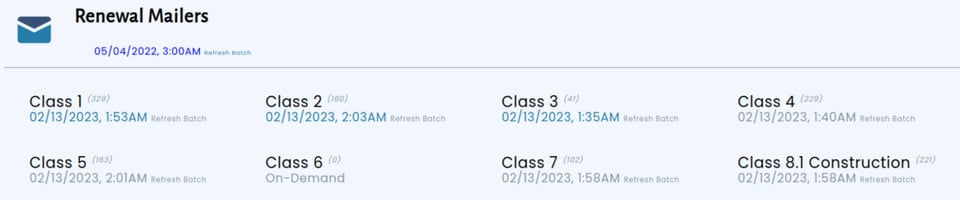
Renewals are broken down by type of license. Let’s take a look at its parts:
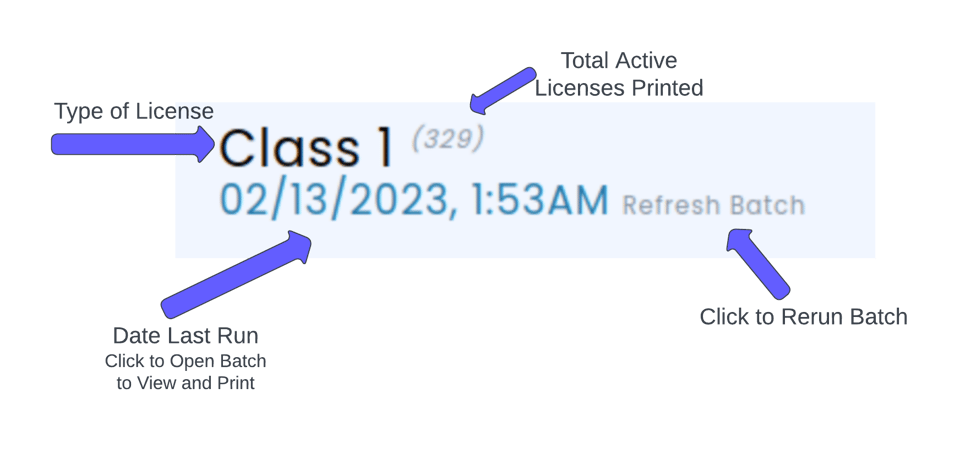
If a batch is small, instead of clicking on the date, you’ll see the words ‘On Demand’. This means it will build the renewal ‘live’ when you click on it:

Click on the link to view the renewal forms. You can then download the pdf and print them.
Refreshing the Batch
Note that the time to refresh a batch can be several hours depending on the number of records.

Click on the ‘Refresh Batch’ link for the type of license you wish to renew. After you click on it, you’ll see an alert letting you know the job is submitted:
Once the rebuild is finished, you’ll receive an email with a link to the refreshed batch.
Downloading Renewals for a Printer
At the top of the renewal page you will see a date below the ‘Renewals’ header:

This is a link to a csv spreadsheet (file of ‘Comma Separated Values’) of all active renewals. The date lets you know when it was last successfully built. Like the renewal forms, you can click on ‘Refresh Batch’ to build an updated csv.
Recording The Mailing As Sent
You can add a note to all renewals so you have a reminder on the business when the renewal was sent. At the Mailing Notices area, you’ll see this section:
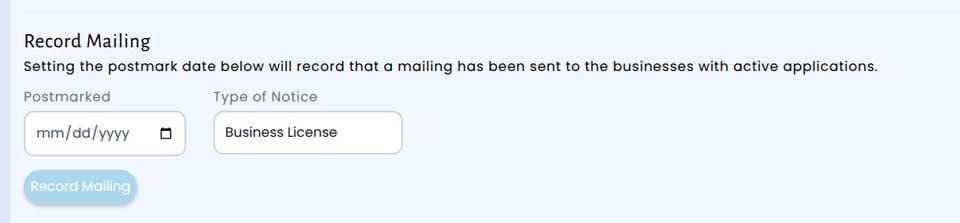
Set the postmark date and, if needed, change the ‘Type of Notice’ to reflect the type of license you sent out (Business License, HTAX, etc.). This will add an interaction into the business:

Emailing Renewals
You can also email the renewal notice to the businesses. The system will only attempt to email if an address is present, either on the primary contact information or of the ‘Owner’. Email notices are managed via the ‘Email’ bar on the menu:

Send A Sample Email
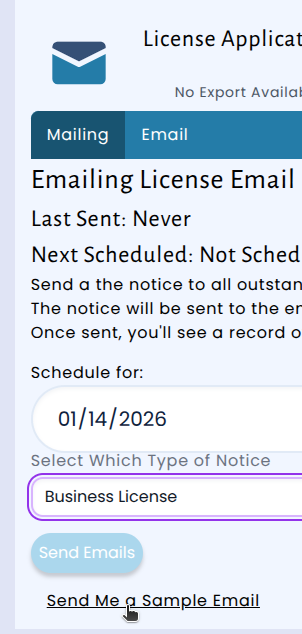
You can send yourself a sample email. The system will pick the first available license application and email it to you. To receive a sample, click on the ‘Send me a Sample Email’ link at the bottom of the page:
Schedule Email Notices
When you’re ready, you can schedule the email to mail out. The e-mail is sent out the morning of the date selected.
Fill in the date and type of notice:
 Click the ‘Send Emails’ Button:
When you return to the page, you’ll see the next Scheduled Date filled in:
 Once it’s sent, you’ll see the ‘Last Sent’ Date filled:
 Emails will also create an interaction on the business record so you can see when it was sent:
