
Malware Analysis: 5 Types, 6 Steps and Tools (with Data)
Malware analysis explained: 5 types, 6 steps, the tools and careers, plus our count of 747 ATT&CK malware entries and how many hide from analysts.
Malware analysis is the process of studying a suspicious file, script or memory image to find out what it does, how it does it, and how to detect and remove it. Analysts use five main types of malware analysis: static analysis, dynamic analysis, code analysis (reverse engineering), memory analysis and behavioral analysis, usually mixed into a hybrid workflow. The work is harder than most glossary pages suggest. On 23 November 2026 we counted the 747 malware entries in MITRE ATT&CK Enterprise v20.1: 392 of them (52.5%) are mapped to Obfuscated Files or Information, and 467 (62.5%) to at least one technique tied to hiding content from analysts or detecting their tools. This guide covers what malware analysis is, each type and what it misses, the process step by step, the tools, what a good report contains, and what malware analysts do for a living.
When a sample hides its code inside a virtual machine: some malware ships wrapped in the same commercial protectors software vendors use, VMProtect and Themida among them. A sandbox still records what the sample did in one run, but a decompiler shows the protector's interpreter instead of the malicious logic. Devirt's malware analysis service analyzes protected or ordinary samples in an isolated service and returns an evidence-backed behavioral report with a coverage ledger that says what was proven and what stayed open. Samples are used only for the analysis you request; they are not shared between customers or used to train models.
What is malware analysis?
Malware analysis is the study of malicious or suspicious software to understand its purpose, its behavior and the traces it leaves, so that defenders can detect it, contain it and stop it from coming back. The input is usually a file (an executable, a document with macros, a script), sometimes a URL or a memory capture from an infected machine. The output is knowledge a security team can act on: indicators of compromise (IOCs) such as hashes, domains and file paths, a description of capabilities, detection rules, and a judgment on how serious the incident is.
Wikipedia's article puts it as determining the functionality, origin and potential impact of a sample. NIST's malware incident guide, SP 800-83 Revision 1 (2013), covers malware handling as part of incident response, alongside prevention.
Two things separate malware analysis from running an antivirus scan. First, a scan answers "is this known?" while analysis answers "what does this do?", which matters most for new or targeted samples, zero-day malware included, that no signature covers yet. Second, analysis produces evidence. A good malware analysis says which behaviors were observed, which were read from the code, and which remain unproven.
Why does malware analysis matter?
Malware analysis matters because every later defensive decision depends on knowing what the malware does. Security teams use it in five recurring situations:
- Incident response. After an intrusion, responders need to know what the malware touched, how it persists and what it contacted, so they can scope the damage and clean every affected host.
- Alert triage in a SOC. An EDR or email gateway flags a file. A quick malware analysis decides whether the alert is a real threat, a nuisance or a false positive.
- Detection engineering. Analysts turn what they learn into YARA rules for files, Sigma rules for logs and network signatures, so the next copy gets caught automatically.
- Threat intelligence and threat hunting. Linking a sample to a known family or campaign tells defenders what else to look for, and gives hunters behaviors to search for across the fleet.
- Research. Vendors, CERTs and academic teams analyze new families to publish reports, which is where most of the public knowledge about malware comes from.
If you want the catalogue of what analysts run into, from ransomware and wipers to infostealers, our breakdown of the types of malware covers 31 classic kinds with dated examples.
What are the types of malware analysis?
The types of malware analysis are static, dynamic, code, memory and behavioral analysis. Most real investigations combine several of them, which vendors call hybrid analysis. Published lists disagree: Fortinet and CrowdStrike name static, dynamic and hybrid analysis, Huntress names static, dynamic and behavioral, and Wikipedia adds memory analysis. Here is the version that matches how analysts split the work: each type answers a different question and fails in a different place.
| Type | The question it answers | What you need | Where it stops |
|---|---|---|---|
| Static analysis | What is this file, and what does it look capable of? | Hashes, strings, headers, imports, YARA, a packer detector | Packed, encrypted or obfuscated code hides the real content |
| Dynamic analysis | What does it do when it runs? | An isolated sandbox or lab VM, monitoring tools | Only the paths that one run takes; samples can notice the sandbox |
| Code analysis (reverse engineering) | Exactly how does it work, including paths that never ran? | A disassembler, decompiler and debugger, plus assembly skills | Slow; code virtualized by a protector is not readable as-is |
| Memory analysis | What was running, including code that never touched disk? | A memory image, Volatility 3 or MemProcFS | Only what was in memory when the image was taken |
| Behavioral analysis | What does it change on a real endpoint or network over time? | EDR or Sysmon telemetry, network logs, Sigma rules | Sees effects, not intent; needs a baseline of normal |
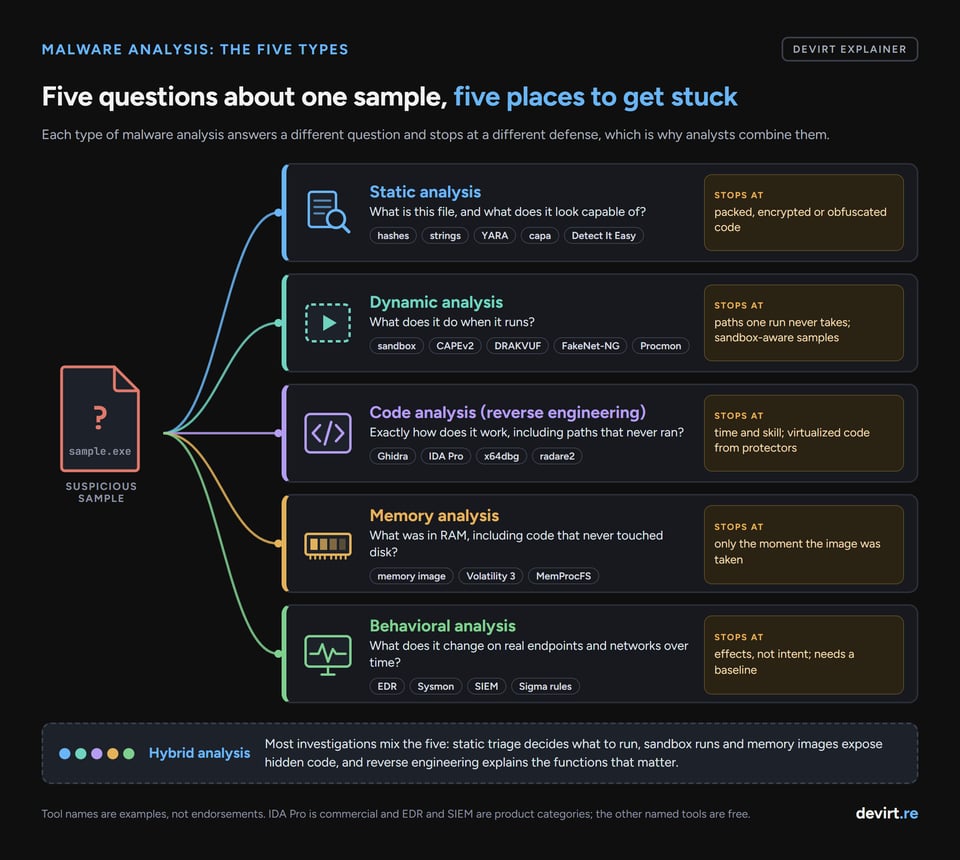
Static malware analysis
Static malware analysis examines a file without running it. The analyst hashes the file and checks the hash against threat intelligence, reads the file format (for Windows, the PE headers, sections and import table), pulls out readable strings, measures entropy, and runs rules: YARA signatures, capa capability rules, a packer detector such as Detect It Easy. Static analysis is fast, safe and good at triage. It answers "is this a known family?" and "does this look like it can encrypt files or talk to a server?" in minutes. For a lot of SOC tickets, that is the whole job.
Static analysis stops where the file hides its content. A packed sample shows a small loader and a blob of high-entropy data; an obfuscated script shows layers of encoding. FLOSS, which recovers obfuscated strings automatically, exists because plain string extraction misses so much.
Dynamic malware analysis
Dynamic malware analysis runs the sample in an isolated environment and records what it does: which processes it starts, which files and registry keys it writes, which domains it resolves and what traffic it sends. Automated sandboxes such as CAPEv2 (a descendant of the now archived Cuckoo Sandbox) and DRAKVUF Sandbox do this at scale and produce a report in minutes. Analysts also run samples by hand in a lab VM with a simulated network, using tools like FakeNet-NG, so they can watch and interact.
Dynamic analysis sees real behavior, but only the behavior of that run. A sample that waits for a date, needs a command from a server that is offline, or checks whether it is inside a virtual machine may show little or nothing. MITRE ATT&CK tracks that last category as T1497, Virtualization/Sandbox Evasion, and our count below shows how often it is documented. Setting up the environment safely is its own topic; our guide to building a malware analysis lab covers isolation, snapshots and network design.
Code analysis (reverse engineering)
Code analysis, usually called reverse engineering, reads the program's instructions directly: a disassembler turns machine code into assembly, a decompiler turns that into C-like pseudocode, and a debugger lets the analyst step through the code while it runs. Ghidra, released by the NSA in 2019, x64dbg and radare2 are the common free choices; IDA Pro and Binary Ninja are the main commercial ones. Code analysis is the only type that can explain paths a run never took, decode a configuration, or describe an encryption routine precisely enough to build a decryptor.
It is also the slowest type and the most skill-dependent, and it stops at code that a protector has virtualized: the protector rewrites selected functions as bytecode for its own interpreter, so the decompiler describes the interpreter rather than the malware. Our explainer on reverse engineering malware goes further into the flow and the point where it breaks.
Memory analysis
Memory analysis examines a snapshot of RAM from an infected machine or a sandbox run. It finds what was executing: injected code, unpacked payloads, decrypted strings, network connections and processes that a rootkit hides from the live system. Volatility 3 and MemProcFS are two widely used open-source frameworks for it. Memory analysis is often how analysts get past packing without touching the packer at all, because the code has to sit in memory in runnable form at some point.
Its limit is timing. A memory image shows the moment it was taken, so code that ran earlier or will run later is missing.
Behavioral analysis
Behavioral analysis watches what malware changes on real systems over time, using endpoint and network telemetry rather than a single sandbox run. Process creation, logons, scheduled tasks, DNS queries and outbound connections go into a SIEM, and Sigma rules or EDR analytics flag sequences that match known attacker behavior. Some vendors fold behavioral analysis into dynamic analysis; it earns its own place because it runs on production telemetry, catches malware that slipped past static checks, and shows the spread across a fleet.
Behavioral analysis sees effects, not intent, and it needs a baseline. A tool that copies files to a network share might be a backup job or a worm.
Hybrid analysis
Hybrid analysis is the combination: static triage to decide what to run, dynamic runs to see behavior, memory dumps to capture the unpacked code, and targeted reverse engineering on the functions that matter. Commercial sandboxes market this as a product category. In practice, almost every malware analysis that goes past triage is hybrid, whatever the tooling is called.
How does the malware analysis process work, step by step?
The malware analysis process moves from cheap, fast checks to slow, deep ones, and stops as soon as the question is answered. A typical flow has six steps:
- Scope and isolate. Decide the question (is this malicious? what did it steal? how do we detect it?) and confirm you are allowed to handle the sample. Work only in an isolated lab with snapshots, never on a production machine.
- Triage. Hash the file, check the hash against internal and external threat intelligence, identify the file type and any packer or protector. Many investigations end here, with a known family and its published IOCs.
- Static properties. Read headers, imports, strings, resources and certificates; run YARA and capa. Note anything the sample hides.
- Dynamic run. Execute in a sandbox or lab VM, capture processes, file and registry changes, network traffic and a memory image.
- Code analysis. Open the interesting functions in a disassembler and debugger: configuration parsing, encryption, persistence, the command set. Use memory dumps for code that only appears at run time.
- Report and detect. Write up the findings, extract IOCs, map behaviors to MITRE ATT&CK techniques, ship YARA and Sigma rules, and state what remains unproven.
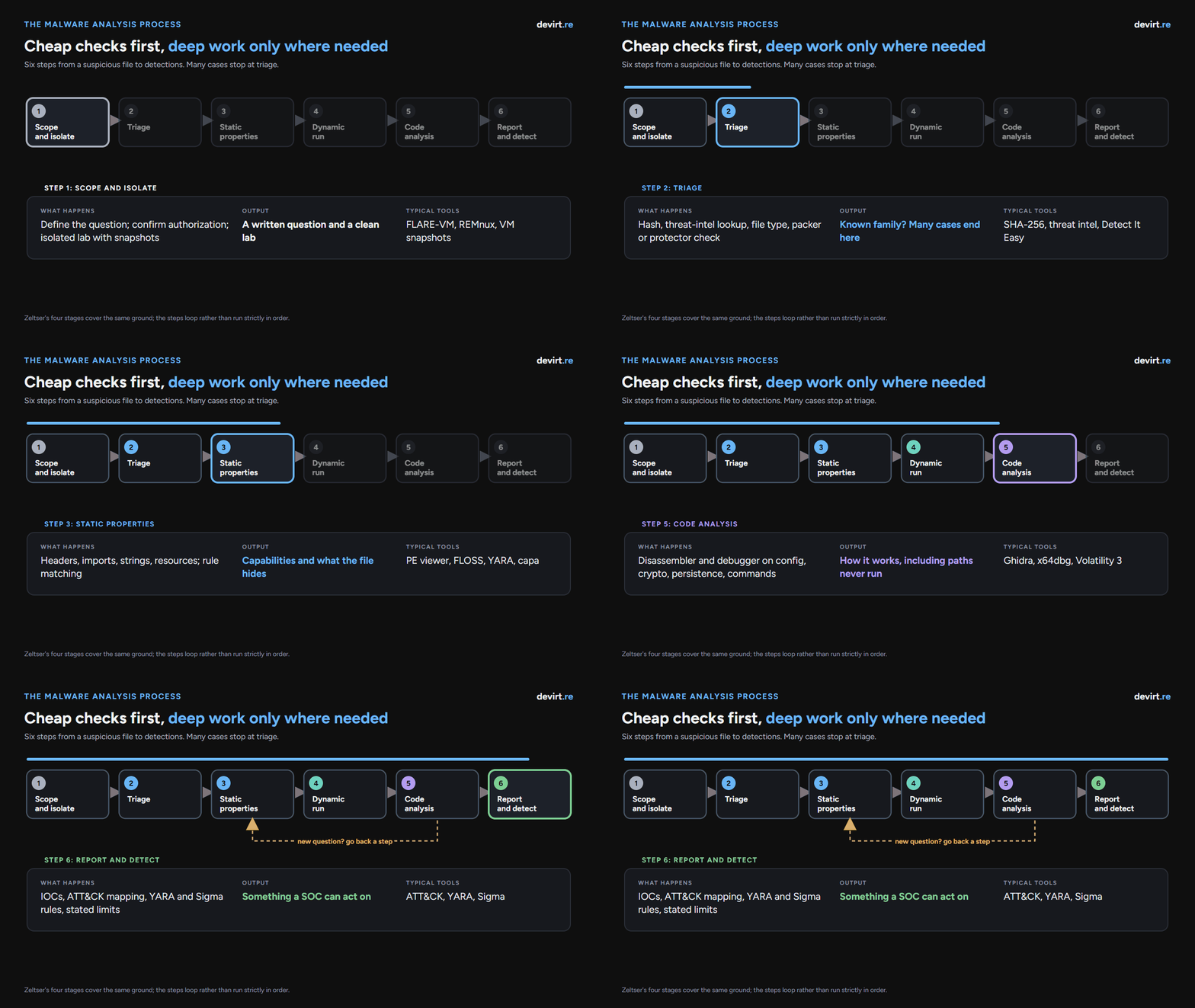
Lenny Zeltser describes the same ground as four stages of malware analysis (2014, updated 2022): fully automated analysis, static properties analysis, interactive behavior analysis and manual code reversing. Most vendor pages copy that list. Zeltser's own caveat is the useful part: the stages are not a strict sequence. A string found in step 3 sends you back to the sandbox with a new question; a function read in step 5 explains a network pattern from step 4.
What does ATT&CK data say malware analysts will face?
MITRE ATT&CK data shows that most documented malware hides at least part of itself from analysis. ATT&CK is the public knowledge base defenders use to describe attacker behavior. Each malware entry in it is linked to the techniques public reporting has seen that malware use. We counted those links for every current malware entry.
Method. On 23 November 2026 we ran a script over MITRE's official ATT&CK Enterprise STIX bundle, version 20.1 (collection dated 5 November 2026). It keeps the 747 malware entries that are not revoked or deprecated, follows their "uses" links to techniques, rolls sub-techniques up to their parent, and counts entries per technique and per tactic. Tools such as Mimikatz are separate ATT&CK objects and are excluded. All 747 entries have at least one technique mapped.
What came back:
| Measure (747 ATT&CK malware entries) | Count | Share |
|---|---|---|
| Obfuscated Files or Information (T1027) | 392 | 52.5% |
| Deobfuscate/Decode Files or Information at run time (T1140) | 300 | 40.2% |
| Virtualization/Sandbox Evasion (T1497) | 110 | 14.7% |
| Software Packing (T1027.002, a T1027 sub-technique) | 72 | 9.6% |
| Debugger Evasion (T1622) | 24 | 3.2% |
| At least one of T1027, T1140, T1497, T1622 | 467 | 62.5% |
| Median technique families per entry | 11 | (range 1 to 57) |
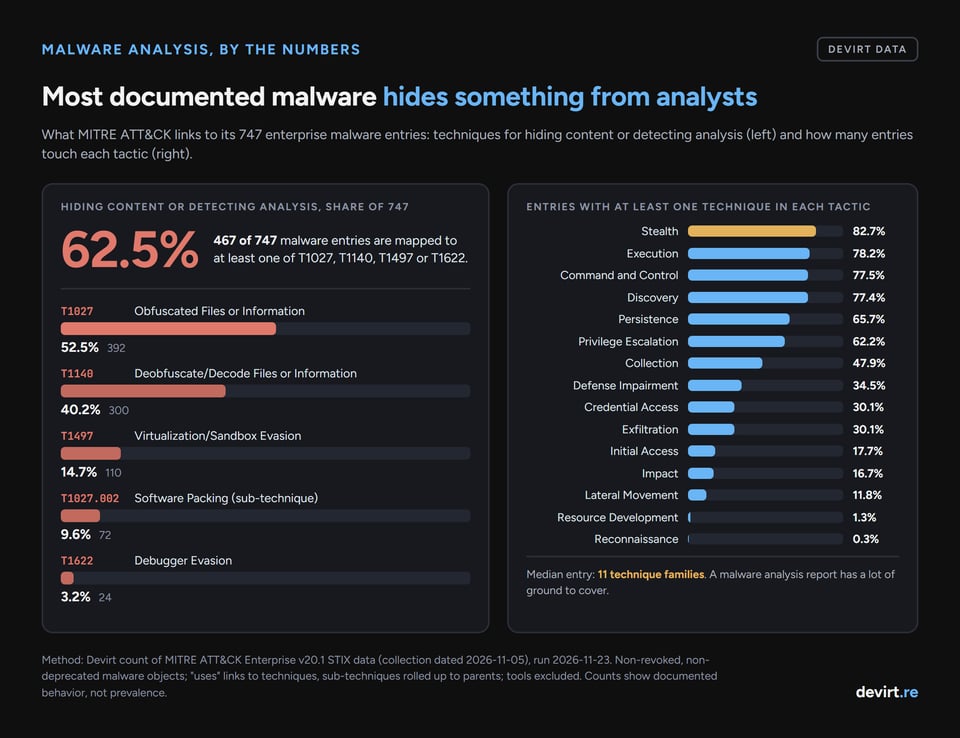
Three things stand out for anyone doing malware analysis.
Static analysis alone usually isn't enough. More than half the entries are documented as obfuscating their files or information, and 40.2% as decoding something at run time. Both mean the interesting content is not sitting in plain sight in the file. That is why the workflow above pairs static checks with dynamic runs and memory dumps.
Sandbox awareness is real but not universal. 110 entries (14.7%) are mapped to T1497. A sandbox run is still the fastest way to see behavior for most samples, but an empty sandbox report on a suspicious file is a reason to look harder, not a verdict.
A report has a lot to account for. The median entry is mapped to 11 technique families across several tactics. By tactic, 82.7% of entries have at least one Stealth technique, 78.2% Execution, 77.5% Command and Control and 77.4% Discovery. The most common single technique families are Command and Scripting Interpreter (T1059, 59.6%), Obfuscated Files or Information (T1027, 52.5%), Ingress Tool Transfer (T1105, 52.3%), Application Layer Protocol (T1071, 49.9%) and System Information Discovery (T1082, 46.9%).
The limits: ATT&CK records what public reports documented, not everything each family can do, and well-studied families have more techniques mapped than obscure ones. The counts describe documented behavior, not prevalence in the wild. The script (attack-analyst-view.cjs) reads only MITRE's public data and can be rerun on the next release.
What tools do malware analysts use?
Malware analysts use different tools for each type of analysis, and most of the core set is free and open source. The table groups the common ones by type. GitHub stars, counted on 23 November 2026 through the GitHub API, give a rough sense of how widely each open project is followed.
| Type | Tools (GitHub stars, 23 Nov 2026) | What they do |
|---|---|---|
| Static | Detect It Easy (11,993), YARA (10,055), capa (6,354), FLOSS (4,236) | Identify packers and compilers; match rules; list capabilities; recover obfuscated strings |
| Dynamic | CAPEv2 (3,701), FakeNet-NG (2,227), DRAKVUF Sandbox (1,378) | Automated sandbox runs; simulated network; hypervisor-level monitoring |
| Code | Ghidra (101,013), x64dbg (50,371), radare2 (25,492) | Disassemble, decompile and debug |
| Memory | Volatility 3 (4,615), MemProcFS (4,430) | Analyze RAM images |
| Behavioral | Sigma (11,550), SwiftOnSecurity sysmon-config (5,736) | Detection rules for logs; an endpoint logging template |
| Lab environment | FLARE-VM (9,347) | Installs a Windows analysis toolkit in a VM |
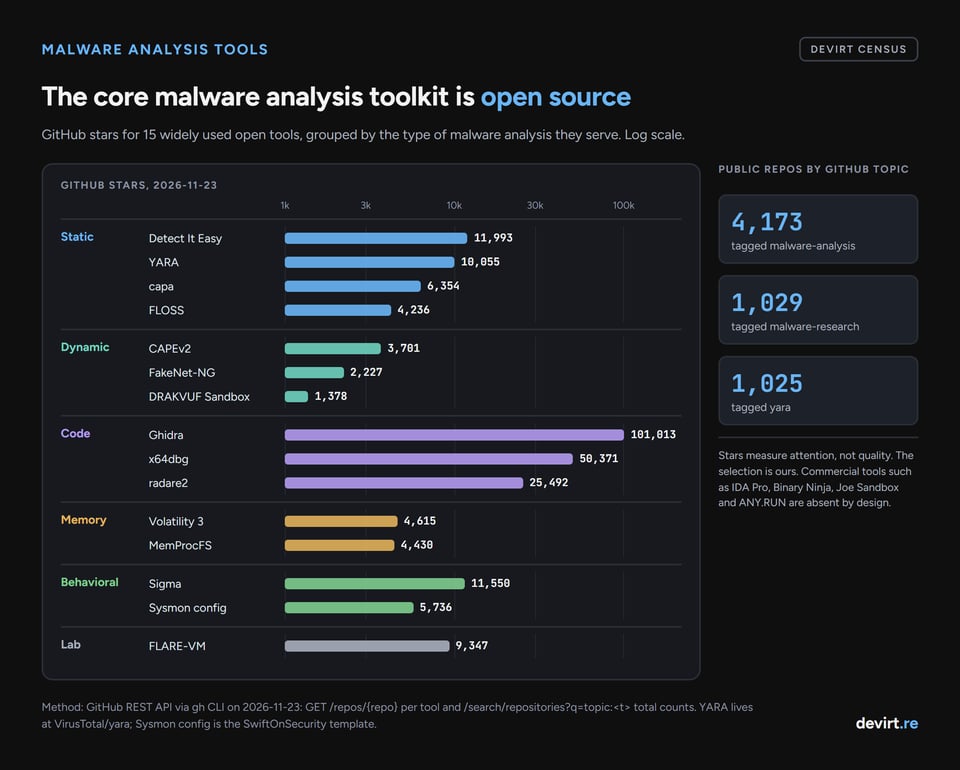
The selection is ours, stars measure attention rather than quality, and commercial tools such as IDA Pro, Binary Ninja, Joe Sandbox and ANY.RUN are absent by design because they don't live on GitHub. Two topic counts from the same run show the scale of the open ecosystem: 4,173 public repositories are tagged malware-analysis and 1,025 are tagged yara. For a stage-by-stage view of what each tool has to deliver, see our guide to malware analysis tools.
Are online malware sandboxes safe to use?
Online malware sandboxes are safe for your machine, because the sample runs on someone else's infrastructure, but they are often not private. Free online sandboxes often publish submissions in feeds that other users can browse and download from, so treat an upload to a free service as publishing the file. In August 2019, researchers at Cyjax watched the public feeds of three free sandbox services for three days and found more than 200 documents, mostly purchase orders and invoices, with some legal, insurance and government paperwork among them, as The Register reported.
Three rules keep online sandboxes useful:
- Search by hash before you upload. If the file is already known, you get the report without sharing anything new.
- Never upload documents that might contain your own or a client's data, and remember that targeted malware can carry internal hostnames or credentials.
- Use a private tier or your own sandbox (CAPEv2 or DRAKVUF Sandbox on isolated hardware) for anything sensitive, and check each service's visibility and deletion terms first.
Where does each type of malware analysis stop?
Each type of malware analysis stops at a different defense, and analysts recognize the signs. Recognizing them is part of the job, because it tells you which type to switch to.
- Packing compresses or encrypts the original code and adds a small loader. Signs: few imports, high entropy, odd section names, a packer detector hit. Analysts switch to dynamic runs and memory dumps, where the unpacked code eventually appears.
- Obfuscation rewrites strings, control flow or scripts so they are hard to read without changing what they do. Signs: encoded blobs, meaningless names, flattened control flow. Analysts use string recovery, emulation and patient code analysis.
- Sandbox and debugger awareness makes a sample behave differently when it suspects it is being watched. Signs: a sandbox report with almost no activity, long sleeps, early exits. Analysts compare runs, examine the code paths that decide whether to continue, and use behavioral telemetry from real endpoints.
- Code virtualization from commercial protectors such as VMProtect and Themida translates selected functions into bytecode for a private virtual machine inside the file. Signs: a protector signature, a large interpreter loop, functions that decompile into dispatcher code. Unpacking does not make those functions readable, and a sandbox only shows what they did in one run. Recovering their logic is a devirtualization problem.
The last item is where most malware analysis toolchains run out, and it is the gap Devirt works on.
What should a malware analysis report contain?
A malware analysis report should give the reader enough to act without redoing the work. Most good reports, from CERT advisories to internal SOC write-ups, contain:
- Summary. What the sample is, what it does, how serious it is, in plain language for decision-makers.
- Sample identity. Hashes (SHA-256 at minimum), file type, size, compile or signing details, packer or protector if any.
- Capabilities and behavior. Persistence, privilege changes, credential theft, data collection, encryption or destruction, spread, each with evidence.
- Network indicators. Domains, IPs, URLs, protocols and any decoded configuration.
- Host indicators. File paths, registry keys, mutexes, scheduled tasks, services.
- ATT&CK mapping. Technique IDs for each behavior, so the findings plug into detection coverage maps.
- Detections. YARA rules for the files, Sigma or EDR queries for the behavior, network signatures.
- Limits. What was not observed or not proven, and why. A report that hides its gaps invites false confidence.
How is AI changing malware analysis?
AI is changing malware analysis mostly at the edges of the workflow so far: summarizing sandbox output, explaining decompiled functions, drafting reports and helping triage large volumes of files. Machine learning has powered malware classifiers in antivirus engines for years; large language models are newer, and analysts use them to speed up reading code rather than replace it. Their limits are the same ones the table above shows for code analysis: a model reading a decompiler's output can only explain what the decompiler shows, so packed or virtualized code is as opaque to it. On the threat side, ATT&CK now includes a handful of entries for malware that uses LLMs, which our types-of-malware piece tracks.
What does a malware analyst do?
A malware analyst examines malicious software to explain what it does, extracts indicators of compromise, and writes detections and reports for a SOC, an incident response team or a threat intelligence group. Day to day, that means triaging submitted files, running samples in a lab, reading code in a disassembler, writing YARA and Sigma rules, and explaining findings to people who are not analysts.
Skills. Job postings for malware analysts commonly ask for:
- assembly for x86 and x64 (and increasingly ARM)
- C and Windows internals
- a scripting language, usually Python, for automation
- networking
- one disassembler and one debugger used well
- clear writing
For the closest occupation the Bureau of Labor Statistics tracks, the typical entry-level education is a bachelor's degree.
Pay and outlook. The U.S. Bureau of Labor Statistics doesn't track malware analysts separately. The closest occupation, information security analysts, had a median pay of $129,180 in May 2025, held 192,900 jobs in 2025, and is projected to grow 21% from 2025 to 2035. Job-board salary estimates for the specific title vary widely, so treat them with care.
Getting started. Many malware analysts move in from SOC, incident response or software development roles. A practical route:
- Build a safe lab.
- Work through a structured text such as Practical Malware Analysis by Michael Sikorski and Andrew Honig (No Starch Press, 2012).
- Practice on training samples and crackmes made for learning.
- Publish write-ups of what you analyze.
Handle real malware only in an isolated lab, and only samples you are authorized to work with.
Malware analysis FAQ
What is malware analysis in simple terms?
Malware analysis is figuring out what a suspicious program does and how to stop it. Analysts look at the file without running it, run it safely in an isolated sandbox, read its code, and examine memory and system logs, then turn what they learn into indicators and detection rules.
What is the difference between static and dynamic malware analysis?
Static malware analysis examines a file without running it, using hashes, strings, headers and rules. Dynamic malware analysis runs the file in an isolated sandbox and records its behavior. Static analysis is fast and safe but stops at packed or obfuscated code; dynamic analysis sees real behavior but only on the paths one run takes.
What are the 4 stages of malware analysis?
The four stages of malware analysis, as described by Lenny Zeltser, are fully automated analysis, static properties analysis, interactive behavior analysis and manual code reversing. They run from fastest to slowest, and analysts loop between them rather than following them in strict order.
How difficult is malware analysis?
Malware analysis is approachable at the triage level and hard at the code level. Checking a hash and reading a sandbox report needs no programming. Reading packed or obfuscated code needs assembly, a debugger and a disassembler, and 52.5% of the malware entries in MITRE ATT&CK v20.1 are mapped to obfuscation.
Is malware analysis a good career?
Malware analysis is a specialist career inside information security. The closest occupation the U.S. Bureau of Labor Statistics tracks, information security analysts, had a $129,180 median pay in May 2025 and a projected 21% growth from 2025 to 2035. The role suits people who enjoy low-level programming and careful written explanations.
Is it legal to analyze malware?
Malware analysis is routine defensive work at CERTs, security vendors and SOCs. Deploying malware is a different matter: in the United States, the Computer Fraud and Abuse Act (18 U.S.C. 1030) makes it a crime to knowingly transmit code that intentionally causes damage to a protected computer without authorization. Rules on possessing samples, analyzing third-party software and sharing findings differ by country and by contract, so check your own basis. This is not legal advice.



