
Types of Malware: 31 Classic Kinds and the New AI Malware
Types of malware explained: 31 classic kinds with dated real examples, signs and defenses, the AI malware documented in 2025 and 2026, and what may come next.
Malware types are labels for what malicious software does: how it spreads, how it hides, and what it is built to take or break. This guide covers 31 classic types of malware, from viruses and worms to infostealers and bootkits, each with a real, dated example, the signs of infection and the defenses that work. It then covers the 7 types of AI malware documented in 2025 and 2026, and ends with a clearly labelled section of possible future types. On 13 November 2026 we also counted how MITRE ATT&CK, the framework defenders use to track real attacks, labels its 747 malware entries: backdoors lead with 231, and only 5 entries mention AI or large language models at all.
Analyzing a VM-protected sample, AI-written or not? Malware authors use the same commercial protectors as software developers, including VMProtect and Themida, and a protector's virtual machine hides the code no matter who or what wrote it. Devirt's malware analysis service analyzes protected or ordinary samples in an isolated environment, applies automated devirtualization to the code inside the protector's virtual machine, and reports every function in scope as proven, runtime-dependent, unresolved or permanently bounded. Samples are used only for the analysis you request and are never used to train models. See what the malware analysis report contains.
Every type of malware at a glance
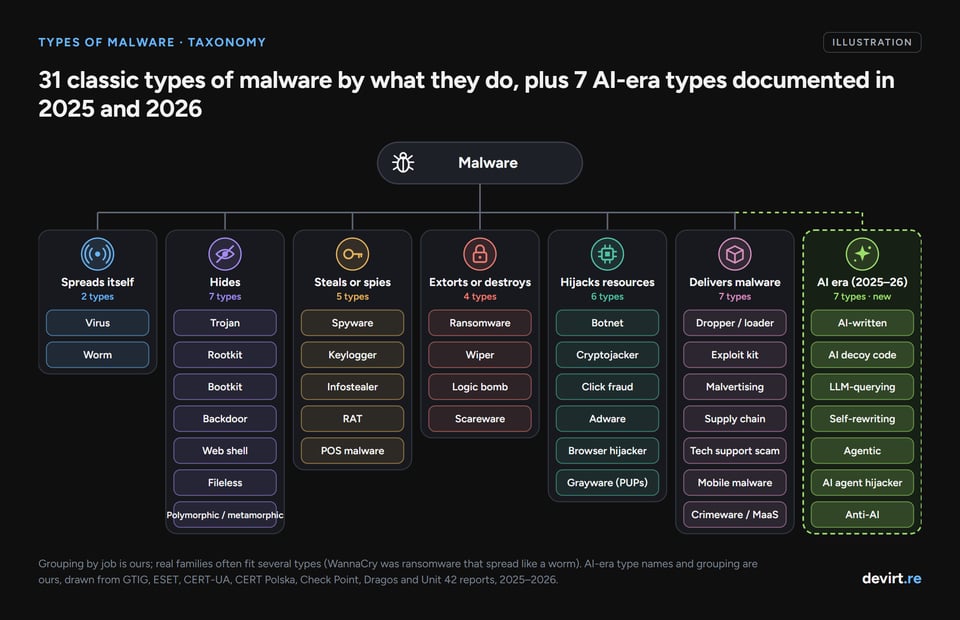
Here is every type this guide covers, one line each, grouped by what the malware is for. Each one has its own section below.
Malware that spreads itself
- 1. Virus: attaches to a file or document and runs when that file is opened.
- 2. Worm: copies itself from machine to machine across a network with no help from the user.
Malware that hides
- 3. Trojan: disguises itself as legitimate software so the victim installs it.
- 4. Rootkit: hides malware inside the operating system so it stays out of sight.
- 5. Bootkit: loads before the operating system, in the boot process or firmware.
- 6. Backdoor: gives an attacker a hidden way back into a system.
- 7. Web shell: a backdoor planted on a web server, operated through web requests.
- 8. Fileless malware: runs in memory and through built-in system tools instead of files.
- 9. Polymorphic and metamorphic malware: changes its own code with each copy to dodge signatures.
Malware that steals or spies
- 10. Spyware: secretly watches what a user does, including stalkerware on phones.
- 11. Keylogger: records keystrokes to capture passwords and messages.
- 12. Infostealer: grabs saved passwords, cookies, crypto wallets and files in one sweep.
- 13. Remote access trojan (RAT): gives an attacker full remote control of a machine.
- 14. Point-of-sale (POS) malware: steals payment card data from checkout systems.
Malware that extorts or destroys
- 15. Ransomware: encrypts or steals data and demands payment.
- 16. Wiper: destroys data for good, sometimes while pretending to be ransomware.
- 17. Logic bomb: hidden code that does damage when a set condition is met.
- 18. Scareware: fake security alerts that frighten people into paying.
Malware that hijacks resources
- 19. Botnet: a network of infected devices controlled together, often for DDoS attacks.
- 20. Cryptojacker: mines cryptocurrency on someone else's hardware.
- 21. Click fraud malware: fakes ad views and clicks on infected machines.
- 22. Adware: forces unwanted advertising onto a device.
- 23. Browser hijacker: takes over browser settings, search and home page.
- 24. Grayware (PUPs): unwanted bundled software, from aggressive ad tools to dialers.
Malware that delivers other malware
- 25. Dropper or loader: installs or downloads the real payload.
- 26. Exploit kit: a web toolkit that infects visitors through software flaws.
- 27. Malvertising: malicious ads that lead to malware.
- 28. Supply chain malware: malicious code slipped into trusted software or its updates.
- 29. Tech support scam: fake alerts and callers selling bogus fixes, often with remote access.
- 30. Mobile malware: malware built for phones, from banking trojans to spyware.
- 31. Crimeware and malware-as-a-service: malware sold or rented as a product.
AI-era types (documented in 2025 and 2026)
AI-written malware, AI-generated decoy code, LLM-querying malware, self-rewriting malware, agentic malware, AI agent hijackers and anti-AI malware. Each one is explained in the AI malware section below.
What is malware?
Malware is software written to harm, spy on, extort or take control of a device, a network or its users without their consent. The word is short for "malicious software", and it covers everything from a 1990s macro virus to a 2026 Android backdoor that asks an AI model what to tap.
Security teams sort malware into types by behavior, and the labels overlap. One family often fits several types at once. WannaCry, for example, was ransomware that spread like a worm. Emotet began as a banking trojan and became a loader for other malware. "Worm" describes how something spreads, "rootkit" how it hides, and "ransomware" what it does at the end, so a single sample can carry all three labels. For a business, the cost of any of them shows up as downtime, recovery work and stolen data, and with ransomware, an extortion demand on top.
Some software sits in a gray zone. Researchers often split software into goodware, grayware and malware: grayware, also called potentially unwanted programs (PUPs), is software that is unwanted but not clearly criminal, such as aggressive adware bundled with a free download.
New types keep appearing because attackers follow whatever defenders miss and whatever pays: polymorphic viruses answered signature scanning, botnets grew with cheap IoT devices, infostealers grew with saved browser passwords and session cookies, and in 2025 the first malware that consults AI models turned up.
How many types of malware are there?
There is no official number of malware types. The pages that rank for "types of malware" list anywhere from 9 to 17, and this guide covers 31 because it keeps delivery routes and umbrella labels that other lists fold away.
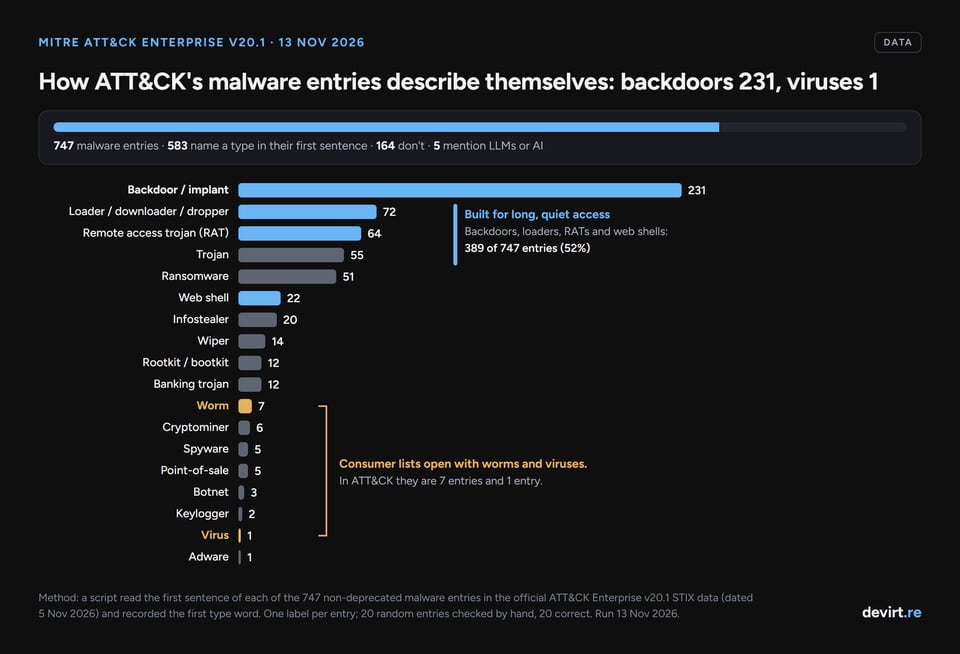
A better question is which types defenders actually see. MITRE ATT&CK is a free knowledge base of real attacker behavior, and each malware family it tracks has a short description written by MITRE. On 13 November 2026, a script we wrote read the first sentence of every malware entry in ATT&CK Enterprise version 20.1 (dated 5 November 2026) and recorded the first type word in it.
| How the ATT&CK entry describes itself first | Entries (of 747) |
|---|---|
| Backdoor (or implant) | 231 |
| Loader, downloader or dropper | 72 |
| Remote access trojan or tool (RAT) | 64 |
| Trojan | 55 |
| Ransomware | 51 |
| Web shell | 22 |
| Infostealer | 20 |
| Wiper | 14 |
| Banking trojan | 12 |
| Rootkit or bootkit | 12 |
| Worm | 7 |
| Cryptominer | 6 |
| Spyware | 5 |
| Point-of-sale malware | 5 |
| Botnet | 3 |
| Keylogger | 2 |
| Virus | 1 |
| Adware | 1 |
| No type word in the first sentence | 164 |
The result turns the usual list upside down.
Consumer guides open with viruses and worms, but in ATT&CK, which tracks the malware used by named threat groups, backdoors outnumber worms 33 to 1, and exactly one entry calls itself a virus. Viruses haven't vanished, but they aren't what tracked threat groups reach for. Malware built for long, quiet access (backdoors, loaders, RATs and web shells) makes up 389 of the 747 entries.
The method has limits. ATT&CK tracks malware tied to known attackers and campaigns, not every sample in circulation, so commodity adware and viruses are rare in it. Another 164 entries use no type word in their first sentence (many say only "malware"). One entry can fit several types, and this count takes the first type word only. We checked 20 random entries by hand and all 20 were labelled correctly. ATT&CK's separate Mobile matrix has 127 malware entries, led by spyware (23) and banking trojans (19). The method note at the end of this post has the details.
Malware that spreads itself
Virus
A computer virus is malware that attaches itself to a file, document or program and runs when that host is opened, copying itself into other files as it goes. Macro viruses hide in documents, and boot sector viruses (an older kind) infect the code a disk runs at startup.
- How it spreads: infected email attachments, shared documents, pirated software and removable drives. A virus needs a person to open the infected file.
- Real example: in late March 1999 the Melissa macro virus spread through infected Word documents and used a macro to mail itself to the first 50 addresses in each victim's Outlook contacts. The FBI arrested its author on 1 April 1999.
- Signs: documents asking to enable macros, files that change size or stop opening, and mail you did not send.
- Defense: block Office macros from the internet, scan attachments, and keep antivirus with real-time protection turned on.
Worm
A worm is malware that copies itself across a network on its own, without a user opening anything. Worms exploit unpatched software, weak passwords or trust between systems, and one infected machine can be enough to reach the rest of a flat network.
- How it spreads: network vulnerabilities, shared drives, removable media and, more recently, code repositories and package registries.
- Real example: Conficker was first detected in 2008 and spread through the Windows flaw MS08-067. A modern example is Shai-Hulud, a supply chain worm first reported in September 2025 that spread through GitHub and npm packages by stealing developers' tokens and publishing poisoned packages.
- Signs: sudden network traffic spikes, slow systems, many machines failing at once, and unexpected new packages published from your accounts.
- Defense: patch quickly, segment networks so one infection can't reach everything, disable unused services, and protect developer and CI/CD tokens with short lifetimes and MFA.
Malware that hides
Trojan
A trojan, or trojan horse, is malware disguised as legitimate software so that the victim installs it willingly. Once running, it can steal data, open a backdoor or download more malware. Banking trojans are a large subtype that target online banking credentials.
- How it spreads: fake installers, cracked software, malicious email attachments and fake updates.
- Real example: Dridex is a banking trojan that first appeared in 2014. By December 2019 the US Treasury estimated it had infected computers in hundreds of banks and financial institutions in more than 40 countries.
- Signs: a "program" that does nothing visible after install, new startup entries, and logins from places you have never been.
- Defense: install software only from official sources, use application allowlisting at work, and keep EDR (endpoint detection and response) watching what new programs do.
Rootkit
A rootkit is malware that hides itself, or other malware, deep in the operating system, often in the kernel, so normal tools can't see its files, processes or network connections. A rootkit is about staying hidden for a long time rather than doing damage fast.
- How it spreads: usually installed by other malware after a break-in, or bundled with software that has admin rights.
- Real example: in 2005 Sony BMG shipped music CDs whose copy-protection software installed rootkit-style code that hid itself on Windows PCs. Under a January 2007 settlement with the FTC, Sony BMG had to offer an uninstall tool and reimburse consumers up to $150 for repairs.
- Signs: security tools that crash or switch off, mismatches between what the system reports and what an offline scan finds.
- Defense: scan from a trusted boot environment, enable Secure Boot and driver signing, and reinstall from clean media when a kernel rootkit is confirmed.
Bootkit
A bootkit is a rootkit that infects the boot process or the firmware (UEFI) so it loads before the operating system and its security tools. Because it sits below the OS, a bootkit can survive a full reinstall.
- How it spreads: installed after an attacker already has admin rights, usually through a flaw in the boot chain.
- Real example: on 1 March 2023 ESET published its analysis of BlackLotus, the first publicly known UEFI bootkit able to bypass Secure Boot, even on fully up-to-date Windows 11. It had been sold on hacking forums since at least October 2022.
- Signs: few visible ones. Secure Boot or BitLocker turning off unexpectedly is a red flag.
- Defense: apply firmware and boot-manager updates, keep Secure Boot on, use firmware integrity checks, and treat a confirmed bootkit as a reason to reflash firmware.
Backdoor
A backdoor is malware or hidden code that lets an attacker get back into a system without going through normal authentication. In MITRE ATT&CK it is the most common type by far: 231 of 747 malware entries describe themselves first as a backdoor or implant.
- How it spreads: dropped after an initial break-in, or hidden inside software the victim trusts.
- Real example: on 29 March 2024 CISA warned that malicious code had been planted in versions 5.6.0 and 5.6.1 of XZ Utils, a compression library used across Linux. The XZ Utils backdoor (CVE-2024-3094) was caught before most Linux distributions shipped it.
- Signs: unknown listening ports or outbound connections, new admin accounts, and logins at odd hours.
- Defense: monitor outbound traffic, review new services and accounts, and verify the integrity of the software you build on.
Web shell
A web shell is a small backdoor script planted on a web server that lets an attacker run commands through ordinary web requests. Because it lives on an internet-facing server, it needs no callback from inside the network.
- How it spreads: uploaded through a vulnerable web application, a file-upload flaw or stolen admin access.
- Real example: in March 2021 attackers exploited flaws in on-premises Microsoft Exchange servers and planted web shells on them. CISA's Emergency Directive 21-02 ordered US federal agencies to patch or disconnect the servers and report any web shell code found. China Chopper is a long-running web shell family used by several threat groups.
- Signs: unfamiliar script files in web folders, web server processes starting command shells.
- Defense: patch internet-facing apps first, restrict what the web server account can run, and run regular website security scans that flag new or changed files in web directories.
Fileless malware
Fileless malware is malware that runs in memory and through tools already built into the operating system, such as PowerShell or WMI, instead of installing its own files. These built-in tools are called LOLBins ("living off the land" binaries). Because there is little on disk, file-scanning antivirus has less to catch.
- How it spreads: phishing links, malicious shortcuts and scripts, and exploits that load code straight into memory.
- Real example: in July 2019 Microsoft's Defender ATP team described an Astaroth campaign that ran its whole attack chain through built-in Windows tools. Microsoft caught it through a spike in WMIC use, which shows that fileless does not mean invisible.
- Signs: system tools behaving oddly, such as script hosts launching from Office apps or unusual PowerShell activity.
- Defense: turn on PowerShell logging, restrict script hosts, and use behavior-based EDR that watches what tools do, as well as which files exist.
Polymorphic and metamorphic malware
Polymorphic malware changes its appearance with every copy, usually by re-encrypting its body with a new key and a mutating decryptor, so copies share few fixed byte patterns for antivirus to match. Metamorphic malware goes further and rewrites its entire body each time. Both are techniques more than families, and our explainer on polymorphic code goes deeper into how analysts catch it.
- How it spreads: the same routes as viruses and worms; the polymorphism is about evading detection, not spreading.
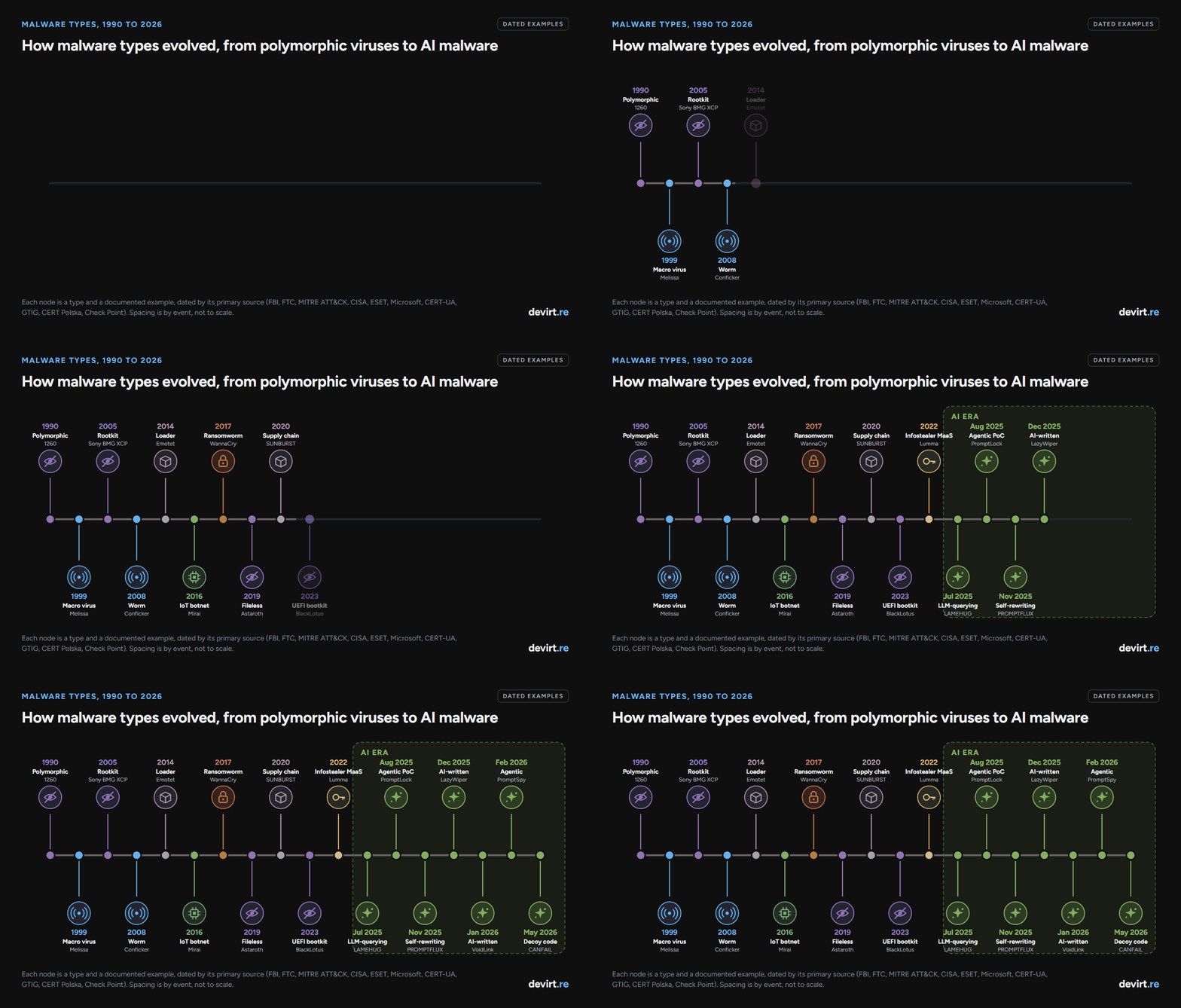
- Real example: the first known polymorphic virus, 1260, was written in 1990. In 1992 the virus writer Dark Avenger built a mutation engine into his viruses so antivirus programs couldn't recognize their signatures. In 2025, PROMPTFLUX tried to do the same thing with an AI model (see the AI section).
- Signs: many near-identical files with different hashes, the same behavior from files that look unrelated.
- Defense: behavior-based detection, memory scanning after the code decrypts itself, and sandboxing. Signature matching alone fails here.
Malware that steals or spies
Spyware
Spyware is malware that secretly collects information about a user, such as browsing, messages, location, microphone or camera, and sends it to someone else. Stalkerware is spyware installed on a partner's or family member's phone to monitor them.
- How it spreads: malicious apps and links, exploits that need no click at all (for high-end commercial spyware), or someone with physical access to the phone.
- Real example: in August 2016 Citizen Lab, working with Lookout, documented a chain of iPhone zero-days used to try to install NSO Group's spyware on the phone of UAE human rights defender Ahmed Mansoor. On 1 September 2021 the FTC banned the stalkerware maker SpyFone and its CEO from the surveillance business.
- Signs: fast battery drain, unusual data use, settings you didn't change, and a partner who knows things they shouldn't.
- Defense: keep phones updated, review app permissions (accessibility and device admin especially), use a lockdown mode if you are high-risk, and get help from a domestic abuse service before removing stalkerware, because removal can alert the abuser.
Keylogger
A keylogger is malware that records keystrokes, and often screenshots and clipboard contents, to capture passwords, card numbers and messages. Keylogging is usually one feature of a larger trojan or infostealer rather than a standalone program.
- How it spreads: phishing attachments, trojanized downloads and malicious macros.
- Real example: Agent Tesla, a spyware trojan for Windows observed since at least 2014, logs keystrokes and steals credentials. It is usually delivered by email.
- Signs: accounts accessed from new locations soon after you typed the password, unknown processes reading input.
- Defense: use a password manager that autofills (nothing to type), turn on phishing-resistant MFA so a captured password isn't enough, and scan email attachments.
Infostealer
An infostealer is malware that sweeps a computer for saved browser passwords, session cookies, crypto wallets, and files, then sends them to the attacker in one go. Stolen session cookies are especially valuable because they can let an attacker skip MFA.
- How it spreads: fake software downloads, cracked games, malicious ads and fake "fix this error" pages.
- Real example: on 21 May 2025 Microsoft announced a disruption of Lumma Stealer with the US Justice Department, Europol and Japan's JC3. Microsoft had found more than 394,000 Windows computers infected with Lumma between 16 March and 16 May 2025, and about 2,300 domains were seized.
- Signs: many accounts compromised at once, sessions hijacked without a password prompt, crypto wallets drained.
- Defense: don't save passwords in the browser on shared or high-risk machines, sign out of sensitive sessions, revoke all sessions after an infection, and block known infostealer download sites.
Remote access trojan (RAT)
A remote access trojan (RAT) is malware that gives an attacker full remote control of a computer: files, screen, webcam, keyboard and command line. Many RATs are sold openly as "remote administration tools", which makes them cheap and common.
- How it spreads: phishing attachments, trojanized software and loaders that install the RAT as a second stage.
- Real example: njRAT is a remote access tool first observed in 2012 and used by threat actors in the Middle East. In ATT&CK, 64 of 747 malware entries describe themselves first as a remote access trojan or tool.
- Signs: the webcam light turning on, the mouse moving by itself, unknown remote-control software.
- Defense: block unapproved remote access tools, alert on new persistent outbound connections, and use EDR that flags remote-control behavior.
Point-of-sale (POS) malware
Point-of-sale (POS) malware is malware that steals payment card data from checkout systems, often by reading card numbers from the terminal's memory before they are encrypted.
- How it spreads: attackers break into a retailer's network, often through a supplier or remote access, then push the malware to tills.
- Real example: RawPOS is a POS malware family that searches victims' systems for cardholder data and has been in use since at least 2008.
- Signs: usually spotted from outside, when banks trace fraud back to a common merchant.
- Defense: end-to-end encryption from the card reader, network segmentation between tills and the office network, and locked-down vendor remote access.
Malware that extorts or destroys
Ransomware
Ransomware is malware that encrypts a victim's files or systems, and often steals the data too, then demands payment for the key and for silence. Most major ransomware today runs as ransomware-as-a-service (RaaS), where developers rent the malware to affiliates who carry out the break-ins.
- How it spreads: stolen remote access credentials, unpatched internet-facing systems, phishing and loaders that sell access to ransomware crews.
- Real example: WannaCry hit more than 150 countries in May 2017, spreading like a worm through the EternalBlue exploit. LockBit 3.0, a RaaS offering, has been in use since at least June 2022.
- Signs: files renamed with new extensions, ransom notes, shadow copies deleted, backups targeted first.
- Defense: offline or immutable backups that you have test-restored, MFA on all remote access, fast patching of internet-facing systems, and EDR that blocks mass encryption.
Wiper
A wiper is malware built to destroy data or make systems unbootable, with no way to recover. Some wipers pretend to be ransomware to confuse responders, but there is no working key.
- How it spreads: usually deployed by state-backed attackers after a break-in, sometimes through a poisoned software update.
- Real example: NotPetya, used by Sandworm Team in a worldwide attack starting 27 June 2017, looked like ransomware but was built to destroy data and disk structures. HermeticWiper has been used since early 2022, mainly against Ukraine.
- Signs: systems that won't boot, mass file corruption, a ransom note with no working payment route.
- Defense: the same offline backups as for ransomware, plus tested recovery plans and network segmentation to limit the blast radius.
Logic bomb
A logic bomb is code hidden inside legitimate software that does damage when a condition is met, such as a date, an event, or a particular employee being removed from the payroll system. It is usually planted by an insider.
- How it spreads: it doesn't spread; an insider with access writes it into code or scripts they maintain.
- Real example: from about 2014 until May 2016 a contractor planted logic bombs in spreadsheets he had built for Siemens, so they would break and he would be paid to fix them. He pleaded guilty in July 2019, according to the US Justice Department.
- Signs: software that fails on a schedule, or right after someone leaves.
- Defense: code review, separation of duties, and removing access promptly when staff and contractors leave.
Scareware
Scareware is malware or a scam that shows fake security warnings to frighten people into buying useless software or services. Rogue security software (fake antivirus) is the classic form.
- How it spreads: pop-ups and fake "scan" pages, malicious ads and bundled downloads.
- Real example: in December 2008 a US court halted an operation that the FTC said had conned more than one million consumers into buying products such as WinFixer, Drive Cleaner and Antivirus XP through fake computer scans.
- Signs: loud pop-ups claiming dozens of infections, pressure to pay now, security software you never installed.
- Defense: close the browser tab rather than clicking the warning, use an ad blocker, and only trust alerts from security software you installed yourself.
Malware that hijacks resources
Botnet
A botnet is a network of infected devices, called bots or zombies, controlled together by an attacker. Botnets send spam, run DDoS (distributed denial-of-service) attacks and spread other malware. Many are built from weakly secured IoT devices such as cameras and routers.
- How it spreads: default passwords on IoT devices, worms, and malware that recruits each infected machine.
- Real example: the Mirai IoT botnet launched a DDoS attack of more than 620 Gbps on the Krebs on Security website on 20 September 2016, and CISA warned about Mirai on 14 October 2016. A week later, Mirai-infected devices were tied to the 21 October attack on DNS provider Dyn.
- Signs: routers and cameras running hot or slow, unexplained outbound traffic, your IP address landing on blocklists.
- Defense: change default passwords, update device firmware, put IoT devices on their own network and block inbound access to them.
Cryptojacker
A cryptojacker (or coinminer) is malware that uses someone else's computers or cloud servers to mine cryptocurrency. The victim pays for the electricity and cloud bills; the attacker keeps the coins.
- How it spreads: exposed cloud services, misconfigured containers, vulnerable servers and pirated software.
- Real example: Hildegard, first observed in January 2021 and attributed to the TeamTNT group, broke into misconfigured Kubernetes kubelets and ran cryptocurrency miners.
- Signs: CPU pinned near 100%, loud fans, a sudden jump in the cloud bill.
- Defense: lock down cloud and container APIs, set billing alerts, and monitor for mining software and mining-pool traffic.
Click fraud malware
Click fraud malware is malware that uses infected computers to fake ad views and clicks, so advertisers pay for traffic that no human ever saw.
- How it spreads: bundled downloads and botnets, often as a quiet second job for already-infected machines.
- Real example: on 27 November 2018 the US Justice Department unsealed charges in the 3ve case, a botnet of about 1.7 million infected computers that faked billions of ad views and cost businesses more than $29 million.
- Signs: hidden browser windows, high network use while idle.
- Defense: standard endpoint protection, plus ad-fraud verification on the advertiser side.
Adware
Adware is software that forces advertising onto a device, through pop-ups, injected ads or redirected searches, to earn money for whoever installed it. Some adware also tracks browsing or can download more software.
- How it spreads: bundled with free software, often through pre-ticked install options.
- Real example: in June 2017 Check Point estimated that Fireball, adware it linked to a Beijing marketing firm, had infected more than 250 million computers. Fireball swapped browsers' search engines for fake ones and could run any code on the machine.
- Signs: ads everywhere, new toolbars, a search engine you didn't choose.
- Defense: choose custom install and untick extras, uninstall unknown programs, reset browsers to defaults.
Browser hijacker
A browser hijacker is malware, usually a malicious extension or a settings change, that takes over the browser's home page, search engine or new-tab page to redirect traffic and earn ad money. Many also read browsing data.
- How it spreads: fake downloads, malicious ads and pirated-game sites.
- Real example: ChromeLoader appeared in January 2022 as a browser hijacker and adware campaign whose final payload was a malicious browser extension. Unit 42 later found variants that also stole browser data.
- Signs: a home page or search engine that changes back after you fix it, an extension you can't remove.
- Defense: allow only approved browser extensions at work, review extensions regularly, and reset the browser profile.
Grayware (PUPs)
Grayware, also called potentially unwanted programs (PUPs), is software that isn't clearly criminal but does things users don't want: aggressive advertising, tracking, fraudulent dialers that once ran up phone bills, or joke programs that fake a crash.
- How it spreads: bundled installers and, sometimes, software preinstalled by the manufacturer.
- Real example: in 2015 researchers found that ad-injecting software called VisualDiscovery, made by Superfish, came preinstalled on Lenovo laptops and intercepted even encrypted web traffic. In September 2017 Lenovo settled FTC charges and agreed to get consumers' consent before preinstalling such software.
- Signs: unknown programs at startup, browser certificate warnings, ads inside pages that shouldn't have them.
- Defense: remove preinstalled extras on new machines, turn on PUP detection in your antivirus, and read install screens.
Malware that delivers other malware
Dropper or loader
A dropper or loader is malware whose job is to install or download the real payload, such as ransomware, a RAT or an infostealer. A dropper carries the payload inside it; a loader or downloader fetches it from the internet. In ATT&CK, 72 of 747 malware entries describe themselves first this way.
- How it spreads: phishing attachments, malicious ads and fake updates; access is then sold to other criminals.
- Real example: Emotet emerged in June 2014 and became a loader for TrickBot and IcedID. When police disrupted it on 27 January 2021, Europol called it the world's most dangerous malware.
- Signs: a small infection followed days later by something much worse.
- Defense: stop loaders early with attachment filtering and macro blocking, and treat any loader detection as a likely precursor to ransomware.
Exploit kit
An exploit kit is a toolkit hosted on malicious web pages that probes visitors' browsers and plugins for known flaws and installs malware through the first one that works, with no click needed beyond visiting the page.
- How it spreads: visitors are sent to the kit by compromised websites or malicious ads (drive-by downloads).
- Real example: in March 2016 malicious ads shown on major news sites including the New York Times, BBC and AOL redirected visitors to the Angler exploit kit, which tried to install ransomware. The sites themselves weren't hacked; the ad networks served the bad ads, as Help Net Security reported.
- Signs: usually none; the visit itself is the infection.
- Defense: keep browsers updated, remove old plugins such as Flash and Java, and block ads on high-risk machines.
Malvertising
Malvertising is the use of online ads to deliver malware or send people to fake sites. Today it mostly means search ads that impersonate real brands and lead to fake download pages.
- How it spreads: paid search results and display ads bought by criminals.
- Real example: on 21 December 2022 the FBI warned that criminals were buying search engine ads that impersonate brands and lead to fake sites that install malware, including ransomware, or steal logins.
- Signs: a "download" site with a slightly wrong domain, reached through an ad.
- Defense: type known addresses directly, check the domain before downloading, use an ad blocker, and get software from official stores at work.
Supply chain malware
Supply chain malware is malicious code slipped into software that victims already trust, such as a vendor's update, an open-source library or a package registry, so the victim installs it themselves.
- How it spreads: a compromised vendor build system, a hijacked maintainer account or a malicious package with a familiar name.
- Real example: SUNBURST was a trojanized DLL inside SolarWinds Orion updates, used by APT29 since at least February 2020 and disclosed in December 2020. The XZ Utils backdoor (2024) and the Shai-Hulud worm (2025) are newer cases.
- Signs: a trusted product suddenly making new network connections after an update.
- Defense: pin and verify dependencies, watch build pipelines, keep a software bill of materials (SBOM), and monitor what trusted software does after updates.
Tech support scam
A tech support scam is a fraud that uses fake security alerts, pop-ups or cold calls to convince victims their computer is infected, then charges for fake repairs. Many scams need no malware at all; the "technician" asks the victim to install a legitimate remote access tool.
- How it spreads: pop-ups that mimic Microsoft or Apple warnings, phone calls, and search ads.
- Real example: on 12 May 2017 the FTC and its partners announced Operation Tech Trap, 16 new actions against tech support scams that used fake security pop-ups.
- Signs: a pop-up with a phone number, a caller who says they're from Microsoft, a request to install remote access software.
- Defense: never call numbers in pop-ups, hang up on unsolicited "support" calls, and remove any remote access tool a stranger had you install.
Mobile malware
Mobile malware is malware built for phones and tablets: banking trojans that overlay fake login screens, spyware, adware and SMS fraud. On Android it often abuses accessibility permissions to read the screen and tap for the user.
- How it spreads: malicious apps (sometimes in official stores), sideloaded apps and SMS phishing links.
- Real example: FluBot, mobile banking malware first seen in Spain in late 2020, spread through SMS phishing in many languages until an international law enforcement operation across 11 countries disrupted it. ATT&CK's Mobile matrix lists 23 spyware and 19 banking trojan families among its 127 entries.
- Signs: apps asking for accessibility access, strange texts sent from your number, fast battery drain.
- Defense: install apps only from official stores, refuse accessibility requests from apps that don't need them, and keep Google Play Protect or equivalent turned on.
Crimeware and malware-as-a-service
Crimeware is an umbrella term for malware built and sold for profit, and malware-as-a-service (MaaS) is the business model: criminals rent infostealers, loaders or ransomware with support and updates, the way businesses rent software.
- How it spreads: whatever route the renting criminal chooses; the developer sells the kit and stays out of the attacks.
- Real example: the original ZeuS banking trojan's source code leaked in 2011, letting others build new trojans such as Zeus Panda on it. Lumma Stealer, disrupted in May 2025, was sold the same way.
- Signs: the same as the underlying malware.
- Defense: takedowns and disruptions hit the service, but defenders still need controls for each type it sells.
How malware spreads
Malware spreads through a short list of routes, and almost every type above uses one or more of them:
- Phishing emails and messages carrying attachments or links (viruses, trojans, loaders, keyloggers).
- Software vulnerabilities in internet-facing systems and unpatched computers (worms, web shells, ransomware).
- Stolen or weak credentials for remote access, VPNs and cloud accounts (ransomware, cryptojackers).
- Fake downloads and malicious ads (infostealers, adware, browser hijackers, scareware).
- Drive-by downloads through exploit kits and compromised sites.
- USB drives and removable media (worms and viruses, especially in air-gapped environments).
- Supply chains: poisoned updates, libraries and packages (backdoors, supply chain worms).
- Insiders who plant code or hand over access (logic bombs).
How malware is detected, and signs of infection
Malware is detected in four main ways, and good security tools combine them:
- Signatures: matching known file patterns. Fast, but beaten by polymorphic and new malware.
- Behavior: EDR and XDR tools watch what programs do (encrypting thousands of files, injecting into other processes, contacting a command-and-control server).
- Sandboxing: running a suspicious file in an isolated environment to see what it does. Some malware detects sandboxes and behaves differently.
- Reverse engineering: reading the code itself, which is the only way to see logic a sample doesn't trigger in a sandbox. Malware reverse engineering is how analysts confirm what a sample is built to do, and our earlier post on reverse engineering malware walks through what that work involves.
General signs of an infection: a slow or overheating device, pop-ups and redirects, programs or extensions you didn't install, security tools switched off, unexplained network or data use, accounts accessed from new places, and files that are renamed, encrypted or missing.
How to defend against every type
These controls cover most of the 31 types at once:
- Patch fast, internet-facing systems first. Worms, web shells and ransomware live on unpatched software.
- Use phishing-resistant MFA everywhere, especially remote access and email. It blunts keyloggers, infostealers and credential theft.
- Keep offline, tested backups. They are the most reliable way back from ransomware and the only way back from a wiper.
- Run behavior-based endpoint protection (EDR) rather than signature antivirus alone. It catches fileless, polymorphic and new malware.
- Apply least privilege. Rootkits, bootkits and much ransomware need admin rights to hide, persist or spread.
- Segment the network so one infected laptop, till or camera can't reach everything.
- Control software sources: official stores, allowlisting at work, approved browser extensions only.
- Turn on logging (PowerShell, process creation, DNS) so you can see what happened.
- Train people to spot phishing, fake alerts and support scams.
- Have a response plan and practice it before you need it.
What is AI malware?
AI malware is malware that uses artificial intelligence, usually a large language model (LLM), either to help write its code or to make decisions while it runs. Google Threat Intelligence Group (GTIG) reported in November 2025 that, for the first time, it had seen malware families call LLMs during execution. Researchers now split the field into AI-generated malware (AI helped write it) and AI-powered malware (AI is part of how it runs).
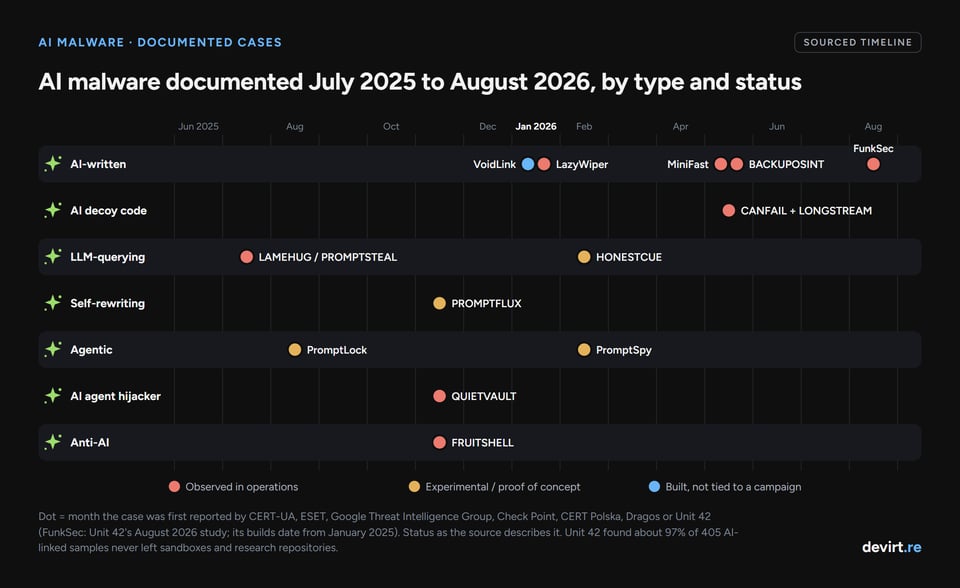
AI malware is real but still rare in production. In an August 2026 study, Unit 42 collected 405 malware samples that use AI in some way and found only 12 of them (3%) on protected endpoints between December 2024 and June 2025. About 97% existed only in sandboxes, research repositories and VirusTotal, and none needed a new detection method. In ATT&CK, as of 13 November 2026, only 5 of 747 enterprise malware entries mention AI or LLMs: four describe malware written or run with AI (LAMEHUG, LazyWiper, MiniFast and BACKUPOSINT), and the fifth, the Mini Shai-Hulud worm, steals credentials from AI configuration files.
These are the 7 AI-era types documented so far. The names and the grouping are ours, built from the cases; vendors use their own labels.
AI-written malware
AI-written malware is ordinary malware whose code was written largely with an AI coding assistant. It behaves like any other malware once it runs; what changes is how fast one person can build it.
- Documented cases: VoidLink, a cloud-focused Linux malware framework, is what Check Point called an early AI-generated malware framework on 20 January 2026: one developer likely built it with an agentic AI coding tool, and it was working within about a week. In the December 2025 attacks on Poland's energy sector, a wiper that CERT Polska named LazyWiper was likely generated largely by an LLM. In a May 2026 intelligence brief, Dragos described a December 2025 to February 2026 campaign against Mexican government institutions and a water utility in which a 17,000-line, 49-module post-compromise framework named BACKUPOSINT v9.0 APEX PREDATOR was written entirely by Anthropic's Claude. Check Point also linked the MiniFast backdoor, used by the Iran-linked group Nimbus Manticore in 2026, to AI-assisted development.
- What defenders look for: the same behavior as any malware. CERT Polska noted that LazyWiper's generic, LLM-style code had no distinctive features, which makes attribution harder.
AI-generated decoy code
AI-generated decoy code is malware padded with large amounts of harmless-looking, LLM-written code to bury the malicious part and make the file look benign.
- Documented cases: in May 2026 GTIG reported CANFAIL and LONGSTREAM, used in Russia-nexus attacks on Ukrainian organizations. CANFAIL carried LLM-written comments flagging its own unused code; LONGSTREAM queried the system's daylight saving status 32 times as filler.
- What defenders look for: large blocks of dead, repetitive code, and explanatory comments that no malware author would normally leave.
LLM-querying malware
LLM-querying malware is malware that sends requests to an AI model while it runs and acts on the answer, so its commands or code aren't stored in the file for scanners to find.
- Documented cases: CERT-UA reported LAMEHUG in July 2025, in phishing emails sent to Ukrainian government bodies, and attributed it to APT28 with moderate confidence. GTIG tracks it as PROMPTSTEAL and called it its "first observation of malware querying an LLM deployed in live operations": it asks a hosted model for commands to collect system information and documents. HONESTCUE, which GTIG first saw in September 2025 and described in February 2026, asks Gemini for code that runs its next stage.
- What defenders look for: connections to AI services from processes that have no business making them, embedded API keys, and command activity with no human session behind it.
Self-rewriting malware
Self-rewriting malware is malware that asks an AI model to rewrite its own code so each copy looks different, an AI-era version of polymorphism.
- Documented cases: GTIG identified PROMPTFLUX in early June 2025 and described it in November 2025 as an experimental dropper that asks Gemini to regenerate its own script to evade signatures. GTIG judged it still in development and unable to compromise a device, and Google disabled the assets linked to it.
- What defenders look for: files that change hash while behavior stays the same, plus AI API traffic from script hosts. Behavior-based detection handles this the same way it handles classic polymorphic code.
Agentic malware
Agentic malware is malware that puts an AI model in its decision loop: the model reads the situation (files on disk, or what is on a phone's screen) and decides the next action.
- Documented cases: PromptLock, which ESET found on 26 August 2025, uses a locally run AI model to generate scripts for reconnaissance, data theft and encryption. It turned out to be an academic proof of concept from NYU Tandon and was never seen in an attack. PromptSpy, which ESET described on 19 February 2026, is Android malware that asks Gemini how to keep itself pinned in the recent-apps list; ESET called it the first known Android malware to use generative AI in its execution flow, and GTIG later found a broader agent module in it.
- What defenders look for: apps or processes with screen or accessibility access that also call AI services, and unusual sequences of automated UI actions.
AI agent hijackers
AI agent hijackers are malware that use AI tools already installed on the victim's machine, such as AI coding assistants with command-line access, to do part of the malware's work.
- Documented cases: GTIG's November 2025 report describes QUIETVAULT, a credential stealer that targets GitHub and npm tokens and uses an AI prompt with on-host AI command-line tools to search the machine for other secrets.
- What defenders look for: AI command-line tools launched by unexpected parent processes, and new public repositories appearing on developer accounts.
Anti-AI malware
Anti-AI malware is malware that carries text aimed at AI-powered security tools, trying to talk an AI analyst into calling it harmless.
- Documented cases: GTIG's November 2025 report lists FRUITSHELL, a publicly available PowerShell reverse shell observed in operations, which carries hard-coded prompts meant to get past LLM-powered security analysis.
- What defenders look for: natural-language instructions embedded in a script or binary, which are themselves an indicator. AI triage tools should treat text inside a sample as data, never as instructions.
One more pattern is common but isn't an AI capability: AI-branded lures. Unit 42 found that the most widely seen sample in its dataset was conventional malware in an installer posing as an AI app, which reached more than 50 organizations. The AI there is the bait. The malware underneath is ordinary.
AI malware cases documented in 2025 and 2026
| Name | AI-era type | Status | Date reported | Source |
|---|---|---|---|---|
| LAMEHUG / PROMPTSTEAL | LLM-querying | Observed in operations (APT28, moderate confidence) | July 2025 | CERT-UA, GTIG |
| PromptLock | Agentic (proof of concept) | Academic prototype, never used in attacks | August 2025 | ESET, NYU |
| PROMPTFLUX | Self-rewriting | Experimental | November 2025 | GTIG |
| QUIETVAULT | AI agent hijacker | Observed in operations | November 2025 | GTIG |
| FRUITSHELL | Anti-AI | Observed in operations | November 2025 | GTIG |
| VoidLink | AI-written | Not tied to a campaign | January 2026 | Check Point |
| LazyWiper | AI-written | Used in attacks (Poland, December 2025) | January 2026 | CERT Polska |
| HONESTCUE | LLM-querying | Proof-of-concept stage | February 2026 | GTIG |
| PromptSpy | Agentic | Possible proof of concept | February 2026 | ESET, GTIG |
| CANFAIL, LONGSTREAM | AI-generated decoy code | Observed in operations | May 2026 | GTIG |
| MiniFast | AI-written (suspected) | Observed in operations | May 2026 | Check Point |
| BACKUPOSINT v9.0 APEX PREDATOR | AI-written | Used in attacks (Mexico, Dec 2025 to Feb 2026) | May 2026 | Dragos |
| FunkSec | AI-written (assessed) | Seen on endpoints, January 2025 builds | August 2026 | Unit 42 |
Two patterns stand out. First, most AI malware so far is either a proof of concept or ordinary malware written faster; the cases where a model makes decisions at runtime are few and mostly experimental. Second, the AI piece is often a weakness: malware that depends on a commercial AI service needs an API key and network access, and the provider can cut it off. Google disabled the assets linked to both PROMPTFLUX and PromptSpy.
Future malware types (speculation)
Everything in this section is speculation. None of these six is a documented malware family as of 13 November 2026. They are categories that defenders discuss because the building blocks already exist in research or in early cases. Each is described only by what it would do and what defenders would watch for.
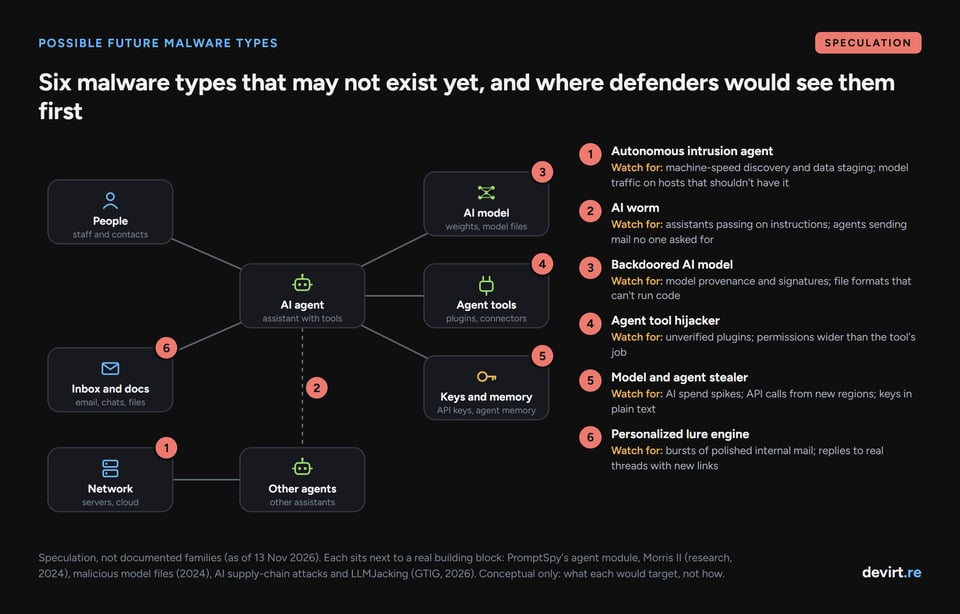
Autonomous intrusion agents
An autonomous intrusion agent would be malware that pursues a goal (find the finance server, take the data) with an AI model choosing each step, with no operator in the loop. The building blocks are visible: PromptSpy's agent module, and GTIG's May 2026 report of a criminal group that planned a mass exploitation campaign with a zero-day exploit GTIG believes was developed with AI.
- What defenders would watch for: machine-speed activity that moves through discovery, credential use and data staging faster than a human could; model traffic or local model files on endpoints that have no reason to hold them.
AI worms
An AI worm would spread between AI assistants instead of computers, through text or images that make one assistant pass the instruction on to the next. Researchers demonstrated the idea in a test environment with "Morris II" in a March 2024 paper on self-replicating prompts against AI email assistants; it has not been seen in the wild.
- What defenders would watch for: assistants producing outputs that contain instructions, AI agents emailing or posting without a user request, and the same odd text spreading across many mailboxes or documents.
Backdoored AI models
A backdoored model would carry malicious behavior inside the model itself, triggered by a hidden phrase or condition. Malicious model files already exist: in February 2024 JFrog reported about 100 models on Hugging Face whose files ran code when loaded. Research on "sleeper agent" models, published in January 2024, showed that trained-in hidden behavior can survive standard safety training.
- What defenders would watch for: model provenance (who trained and signed it), safe model file formats that can't run code, and behavioral testing of models before they get access to tools or data.
Agent tool hijackers
An agent tool hijacker would be a malicious plugin, connector or configuration file for an AI agent that quietly turns the agent's permissions (email, files, code repositories, payments) against its owner. GTIG's May 2026 report notes attackers already planting malicious logic in popular AI integration libraries and distributing trojanized configuration files to reach AI environments.
- What defenders would watch for: agent tools from unverified sources, tools asking for more permissions than their job needs, and agent actions that don't match what the user asked for.
Model and agent stealers
A model and agent stealer would be an infostealer aimed at the new valuables on a machine: AI API keys, cloud model access, agent memory and local model weights. Mandiant already responds to "LLMjacking", where attackers hijack companies' paid access to LLMs; GTIG described such incidents on 3 November 2026.
- What defenders would watch for: AI spend spikes, model API calls from unfamiliar regions or accounts, and AI keys stored in plain text on developer machines.
Personalized lure engines
A personalized lure engine would be malware that uses stolen emails and documents to write a convincing, unique phishing message for every contact of each victim, in the victim's own style. Microsoft reported in March 2026 that threat actors already use generative AI to draft phishing lures; the speculative step is automating it inside the malware.
- What defenders would watch for: sudden bursts of well-written internal email from one account, and messages that reply to real threads with unexpected links. Phishing-resistant MFA and out-of-band checks for payment requests matter more as lures get better.
Why protected malware still needs analysis
Whatever writes the code, a person or a model, much of the malware above ships packed or protected so analysts can't read it. Malware authors use the same commercial protectors as software developers. On 13 November 2026, 9 of the 105 procedure examples on MITRE ATT&CK's Software Packing page named Themida, as our post What Is Themida? explains, and our explainer on code obfuscation covers the wider family of techniques.
The hardest case is code virtualization. A protector such as VMProtect or Themida turns selected functions into bytecode for its own virtual machine, so a decompiler shows the interpreter instead of the malware's logic, and a sandbox only shows the paths one run happened to take. AI doesn't remove that layer; an AI-written backdoor wrapped in a virtual machine is as unreadable as a hand-written one. A malware analysis service that can devirtualize those functions, and say plainly which ones it couldn't settle, gives a team evidence it can check rather than a single verdict.
FAQ
What are the main types of malware?
The main types of malware are viruses, worms, trojans, ransomware, spyware, adware, rootkits, bootkits, keyloggers, botnets, fileless malware, wipers, RATs, cryptojackers, infostealers, backdoors and loaders. This guide covers 31 classic types and 7 AI-era types.
Which type of malware is hardest to detect?
Bootkits and kernel rootkits are the hardest to detect because they run below or inside the operating system that security tools rely on. Fileless malware is also hard to spot, because it leaves little on disk and hides inside legitimate system tools.
Which type of malware lives only in memory?
Fileless malware runs in memory (RAM) and uses built-in tools such as PowerShell and WMI, known as LOLBins. Restarting can clear the running code, but most fileless attacks set up a way to come back.
Is ransomware a type of malware?
Yes. Ransomware is malware that encrypts or steals data and demands payment, and in MITRE ATT&CK it is the fifth most common type, with 51 of 747 entries.
Is a smurf attack a type of malware?
No. A smurf attack is a type of DDoS technique that floods a target with network replies. A botnet (which is malware) can carry out DDoS attacks, but the smurf attack itself is a network method, not a program.
Can malware damage hardware?
Rarely, but it can make hardware unusable. Firmware-level malware such as UEFI bootkits can survive a reinstall, and AcidRain, malware built for modems and routers, is linked to the Viasat KA-SAT outage at the start of Russia's full-scale invasion of Ukraine in 2022.
Is AI malware a real threat?
AI malware is real but still rare. Unit 42 found only 3% of 405 AI-linked samples on protected endpoints, and existing defenses caught all of them. The near-term effect of AI is faster, cheaper ordinary malware.
What is malware in simple words?
Malware is any program built to do something bad to your device, your data or you, without your permission. It might steal passwords, lock your files for ransom, spy on you, or use your computer for someone else's purposes.
Who is at risk from malware?
Anyone with a connected device is at risk, but the types differ by target. Home users mostly meet adware, scareware, infostealers and mobile malware; businesses face ransomware, backdoors and supply chain attacks; and journalists, activists and officials are the usual targets of commercial spyware.
How do I know if I have malware?
Common signs are a slow or hot device, pop-ups and redirects, programs or browser extensions you didn't install, security tools turned off, accounts logging in from new places, and files that are renamed or encrypted. Many infections show no signs at all, which is why behavior-based protection and logging matter.
What should I do if my device has malware?
Disconnect it from the network, then run a full scan with up-to-date security software, or a scan from a trusted boot environment for rootkits. Change passwords from a different, clean device and sign out all sessions, because infostealers take session cookies. Restore from a clean backup if files were encrypted or the system can't be trusted, and at work, call your incident response team before touching anything.
Can I get malware from public Wi-Fi?
Rarely directly, on an up-to-date device. The bigger public Wi-Fi risks are fake hotspots that send you to phishing or fake download pages, and unpatched devices with open services. Keep the device updated, check the address before downloading anything, and use a VPN you trust on networks you don't control.
How many types of malware are there?
There is no official count; top-ranking lists give 9 to 17. In MITRE ATT&CK, 18 type words cover 583 of 747 malware entries (as of 13 November 2026), led by backdoors, loaders and RATs.
Method note: the ATT&CK counts come from a script run on 13 November 2026 against the official ATT&CK Enterprise v20.1 and Mobile v20.1 data. It records the first type word in each malware entry's first sentence. Examples were checked against the linked primary sources on the same date.
Written by Devirt, an automated devirtualization service for authorized analysis of protected software.


