
Ghidra: Download, Install, Decompiler and Plugins (2026)
Ghidra from download to decompiler: install on JDK 25, first project, scripts, extensions and MCP, with data from 57 releases so setup works first time.
Ghidra is a free, open-source software reverse engineering framework that the U.S. National Security Agency's Research Directorate built and still maintains. It disassembles and decompiles compiled programs, runs on Windows, Linux and macOS, and can be scripted in Java or Python. The current release, Ghidra 12.2, came out on 22 October 2026 and is the first to need JDK 25, and on 23 November 2026 GitHub's counter showed 7,289,347 downloads of Ghidra's release files across 57 releases. Below: how to download and install it without the usual Java error, what you see first, how the decompiler works, scripting, extensions and MCP, how Ghidra compares with IDA Pro and Binary Ninja, and where it stops.
When Ghidra's decompiler shows a dispatcher: a function protected by code virtualization, the technique VMProtect and Themida use, decompiles in Ghidra as the protector's interpreter rather than the logic you wanted. Devirt provides binary devirtualization for files you own or are authorized to analyze, and returns annotated pseudocode, a full report, LLVM IR and structured API JSON: plain files you can read alongside your own Ghidra project. A free assessment recommends the scope, outputs and price before any paid work starts.
What is Ghidra?
Ghidra is a software reverse engineering (SRE) suite: you give it a compiled program, and it shows you the machine code as assembly, rebuilds functions as C-like pseudocode, and lets you name, type and comment what you work out. Its README lists disassembly, assembly, decompilation, graphing and scripting among its capabilities, for many processor instruction sets and executable formats, in interactive or automated (headless) mode.
| Ghidra fact | Value (checked 23 Nov 2026) |
|---|---|
| Maker | NSA Research Directorate; pull requests also come from the public |
| Licence | Apache License 2.0 (a few standalone support programs ship under GPL) |
| Price | Free, no paid edition |
| Latest release | Ghidra 12.2, published 22 October 2026 |
| Needs | 64-bit JDK 25; Python 3.9 to 3.15 for PyGhidra |
| Runs on | Windows 10 (build 1809+), Linux, macOS 10.13+ (64-bit only) |
| Minimum hardware | 4 GB RAM, 1 GB of disk for the install |
| Download size | 570 MB zip for 12.2 (378 MB for 10.0 in 2021) |
| Processor modules in the source tree | 39 folders, from 6502 and Z80 to x86, ARM, AARCH64, RISC-V and Hexagon |
| GitHub | 101,013 stars, 11,481 forks |
Ghidra sits in the same category as IDA Pro and Binary Ninja: an interactive disassembler with a built-in decompiler. It's used for malware analysis, vulnerability research, firmware work, interoperability and teaching. A longer look at what Ghidra is and how its windows fit together is on Medium; this post is the practical companion.
Who makes Ghidra, and is it free?
Ghidra is made by the NSA's Research Directorate, which built it in-house for years before releasing it at the RSA Conference in March 2019. The GitHub repository was created on 1 March 2019 and the full source followed in April 2019. Since then, outside contributors have added pull requests alongside the NSA team.
Ghidra is free for personal and commercial use. It's licensed under Apache 2.0, there is no licence key, no subscription and no feature-limited edition, and the source code is public. That last point is the usual answer to the trust question: whether Ghidra is safe to install, given who built it, comes down to the open code and the security advisories the project publishes. The README itself warns that "certain versions" have known vulnerabilities and asks users to read the advisories, which is a good reason to stay on the current release.
Where do you download Ghidra?
Ghidra downloads from the Releases page of the official NationalSecurityAgency/ghidra repository on GitHub. The old ghidra-sre.org address now forwards there. Under each release, open Assets and take the zip named ghidra_<version>_PUBLIC_<date>.zip. For 12.2 that's ghidra_12.2_PUBLIC_20261016.zip, about 570 MB. The README warns that the two "Source code" archives are the wrong files for a normal install.
Each release note also lists a SHA-256 checksum for the zip. Checking it takes one command:
- Windows (PowerShell):
Get-FileHash .\ghidra_12.2_PUBLIC_20261016.zip -Algorithm SHA256 - Linux:
sha256sum ghidra_12.2_PUBLIC_20261016.zip - macOS:
shasum -a 256 ghidra_12.2_PUBLIC_20261016.zip
Compare the result with the value on the release page. Third-party packages exist (Chocolatey on Windows, Flathub and distribution repositories on Linux), but they can lag behind GitHub. If a tutorial tells you to download Ghidra anywhere else, check the version number against GitHub first.
How do you install Ghidra on Windows, Linux and macOS?
Ghidra has no installer. You install it by putting a supported JDK on the machine and extracting the zip; the Getting Started document for 12.2 says administrative rights aren't needed for personal use, and uninstalling is deleting the folder.
- Install a 64-bit JDK 25. Ghidra's docs point to Adoptium Temurin and Amazon Corretto, both free. Ghidra finds Java on the PATH or through
JAVA_HOME. - Download and verify the release zip (above).
- Extract it to a folder you own. Don't extract over an older Ghidra install, and avoid
C:\itself, which can need admin rights. - Launch it with
ghidraRun.baton Windows or./ghidraRunon Linux and macOS. For Python 3 scripting, launchsupport/pyghidraRuninstead.
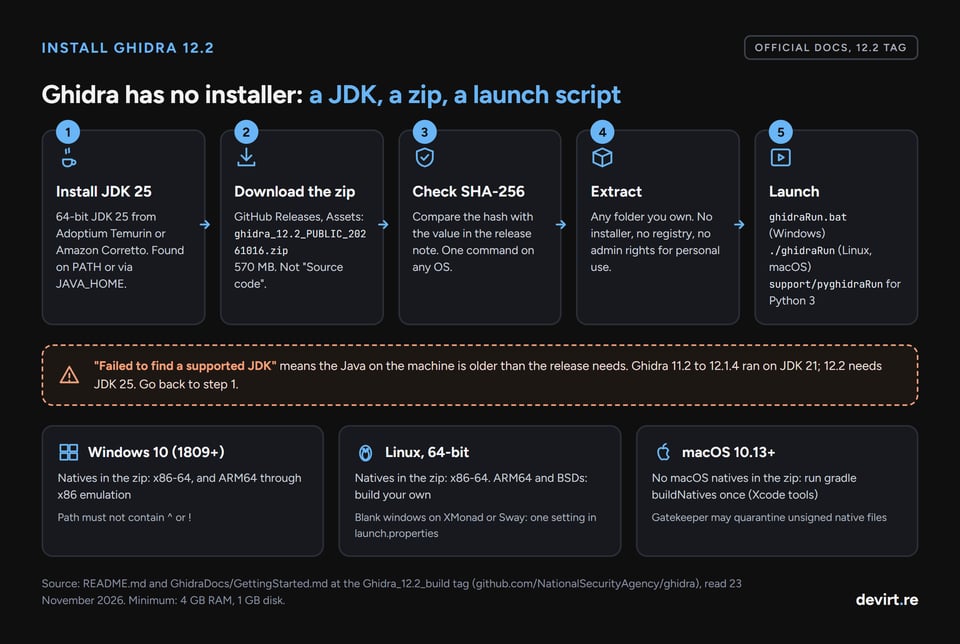
The platform differences are mostly about the native parts of Ghidra, such as the decompiler, which are compiled programs rather than Java:
| Windows | Linux | macOS | |
|---|---|---|---|
| Supported | Windows 10 build 1809 or later, 64-bit | 64-bit distributions | macOS 10.13 or later |
| Native binaries in the official zip | x86-64, and ARM64 through x86 emulation | x86-64 | None: build them once with gradle buildNatives (Xcode command line tools needed) |
| Launch | ghidraRun.bat |
./ghidraRun |
./ghidraRun |
| Known issues in the docs | Won't start from a path containing ^ or !; old 7-Zip versions fail on 0-byte files |
Blank windows on XMonad or Sway; display problems over 32-bit-colour remote desktop | Gatekeeper can quarantine the unsigned native files; Getting Started gives two fixes |
Linux on ARM64, FreeBSD and OpenBSD also run Ghidra with natives you build yourself. Python is optional for the core tool but needed for PyGhidra (3.9 to 3.15) and for the Debugger, which talks to native debuggers through Python.
Which Java version does Ghidra need?
Ghidra 12.2 needs a 64-bit JDK 25. Every earlier release asked for less, and that's why so many install guides are now wrong. Devirt read the README at every release tag on GitHub on 23 November 2026, and the requirement has moved three times since 10.0:
| Ghidra releases | First published | Last in the range | JDK required |
|---|---|---|---|
| 10.0 to 10.1.5 | 23 Jun 2021 | 26 Jul 2022 | JDK 11 |
| 10.2 to 11.1.2 | 3 Nov 2022 | 9 Jul 2024 | JDK 17 |
| 11.2 to 12.1.4 | 27 Sep 2024 | 21 Sep 2026 | JDK 21 |
| 12.2 | 22 Oct 2026 | current | JDK 25 |
The 9.x READMEs don't state a JDK in their install section, so they're left out. Since 10.2, the pattern has held: Ghidra moves to each new long-term-support Java about a year after that Java version is released (JDK 17 in September 2021, 21 in September 2023, 25 in September 2025). The 12.2 release notes say the move to JDK 25 lets script and extension authors use newer Java features, such as the Foreign Function and Memory API.
If you have an older JDK, Ghidra won't silently run on it. The launcher uses whatever Java it finds to look for a supported JDK and asks for the path if it can't find one. You can keep several JDKs installed side by side; JAVA_HOME_OVERRIDE in support/launch.properties pins the one Ghidra uses.
What do you see when you open Ghidra?
Ghidra opens on the Project Manager, not on a program. Everything lives in a project: you create one (File > New Project, non-shared for solo work), import a program into it (File > Import File), and Ghidra detects the format, such as PE, ELF or Mach-O, and the processor. Double-clicking the imported program opens it in the CodeBrowser, Ghidra's main tool, which offers to run auto-analysis. Say yes.
Auto-analysis disassembles the code, creates functions, applies known library signatures, finds strings and builds cross-references. After that, three windows do most of the work: the Symbol Tree (functions, labels and imports), the Listing (the assembly) and the Decompiler (the same function as pseudocode). Clicking a line in one highlights the matching line in the other. Renaming a function or variable (L) and retyping it (Ctrl+L) is how unreadable output becomes readable.
The full first session, on a small program you compile yourself in a debug and a stripped build, is its own walkthrough: how to use Ghidra, step by step, from import to finding where a string is used. Two habits from it are worth taking anywhere: begin at anything a person wrote (a message, a file name, an imported API) and walk the cross-references back to the code, and keep the original file untouched, since Ghidra stores all your work in the project.
How does the Ghidra decompiler work?
Ghidra's decompiler works in two stages: a processor description written in SLEIGH translates each machine instruction into p-code, a small register-transfer language, and a separate native decompiler program analyzes that p-code and prints C-like pseudocode. Because every processor is turned into the same p-code first, one decompiler covers every processor Ghidra has a SLEIGH description for. Commercial tools tend to sell decompilers per architecture or per edition; in Ghidra, decompiling a new processor costs nothing extra.
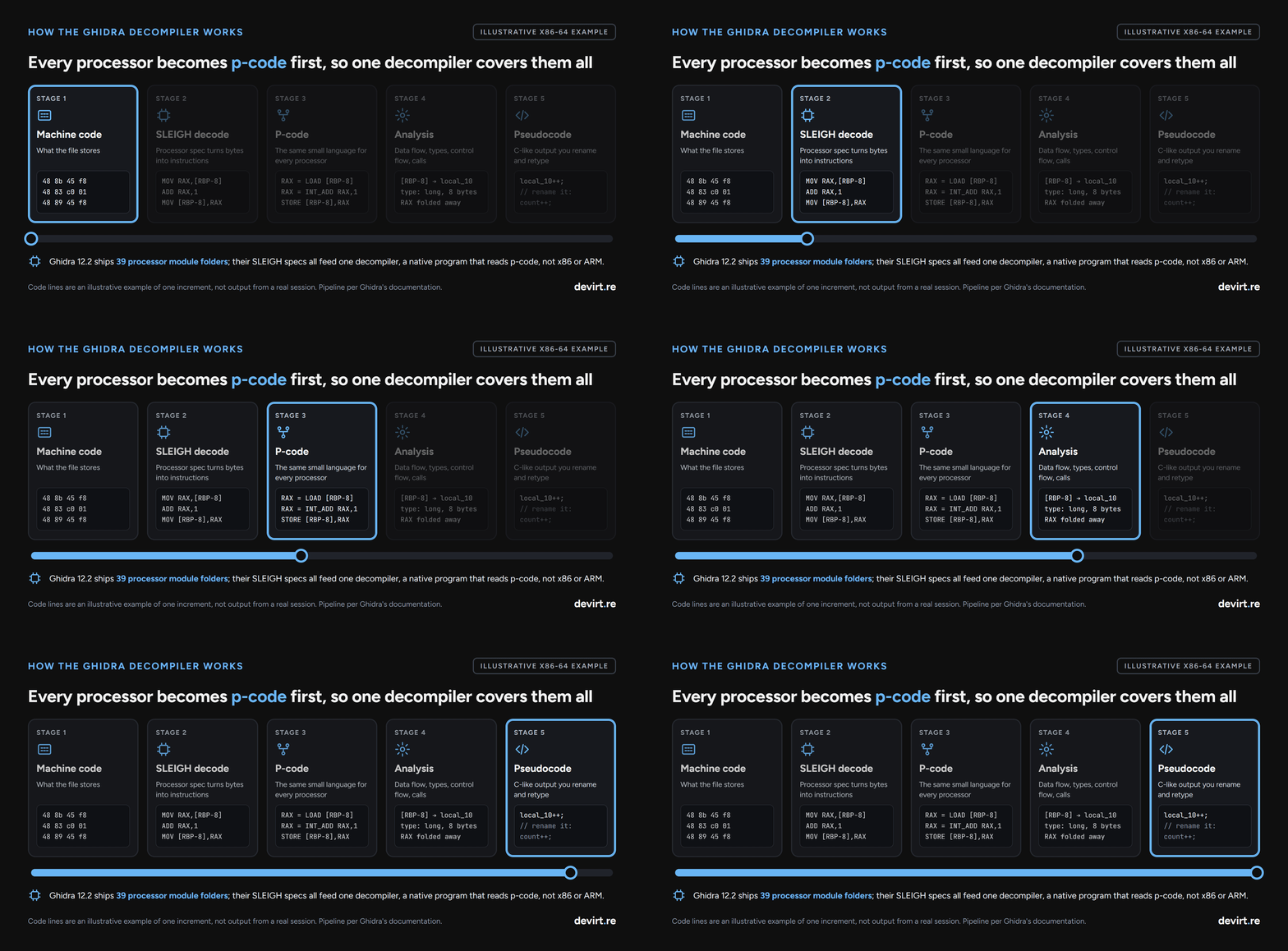
Between p-code and C, the decompiler does the hard part:
- Data flow. It traces which values reach which operations, so register shuffling collapses into variables.
- Types. It infers integer sizes, pointers and structures from how data is used, and takes your corrections from the Data Type Manager.
- Control flow. It rebuilds
if,while,forandswitchfrom jumps. - Calls. It matches calling conventions so parameters and return values appear as arguments.
The output depends on the input. On a debug build it's close to the source; on an optimized, stripped build you get placeholder names (FUN_00401230, param_1, local_18) and some reshaped logic, and your renaming does the rest. The decompiler doesn't invent what the binary no longer contains: comments, local variable names and much of the type information are gone after compilation. And when you change a type or a function signature, the pseudocode updates everywhere that function is used.
How do you script Ghidra in Java and Python?
Ghidra is scripted in Java or Python from the Script Manager (Window > Script Manager), and it ships with a large library of ready-made scripts. Devirt counted the script files in the 12.2 source tree on 23 November 2026: 347 scripts, 322 in Java and 25 in Python, spread across Ghidra's modules.
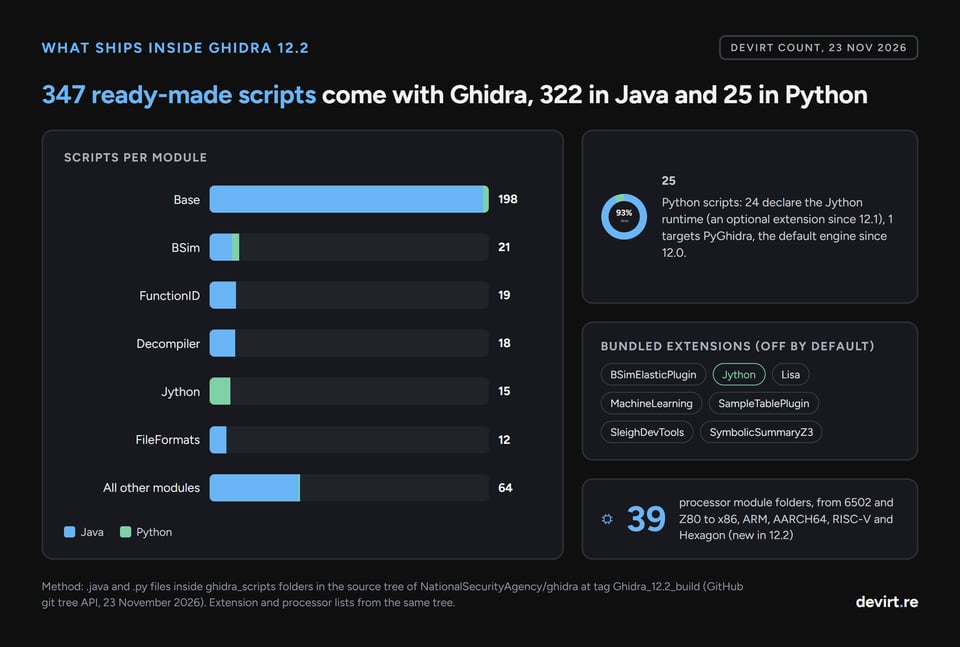
| Ghidra module | Java scripts | Python scripts |
|---|---|---|
| Base | 194 | 4 |
| BSim (function similarity) | 16 | 5 |
| FunctionID (library signatures) | 19 | 0 |
| Decompiler | 18 | 0 |
| Jython | 0 | 15 |
| FileFormats | 12 | 0 |
| Others (Debugger, emulation, version tracking and more) | 63 | 1 |
Python in Ghidra changed over two releases. In 12.0, PyGhidra, which runs real CPython 3 and grew out of the Pyhidra project, became the default engine for Python scripts; launch it with support/pyghidraRun, and the script offers to install the pyghidra package if it's missing. In 12.1, the older Jython engine (Python 2.7 syntax) became an optional extension: tick Jython in File > Install Extensions and restart, and give each Jython script a # @runtime Jython header. That second step matters more than it looks: of the 25 Python scripts in the 12.2 source tree, 24 declare @runtime Jython, including the BSim and Base ones, and only PyGhidraBasics.py targets PyGhidra. Install the Jython extension if you want the bundled Python examples to run. PyGhidra also works as a normal Python module, so you can drive Ghidra from your own scripts.
Three more ways to run code against Ghidra:
- Headless mode.
support/analyzeHeadlessimports and analyzes programs and runs scripts with no GUI, which is how teams batch-process large sample sets. - Your own editor. The Script Manager can open scripts in Visual Studio Code, and Tools > Create VSCode Module project in the CodeBrowser sets up a full project. The GhidraDev plugin does the same for Eclipse.
- The API docs. The scripting API's Javadoc ships with every release as
docs/GhidraAPI_javadoc.zip.
Which Ghidra extensions and plugins are worth knowing?
Ghidra extensions are add-ons you install from File > Install Extensions in the Project Manager: tick a bundled one, or click the green plus to add an extension zip, then restart Ghidra. A few come in the box, uninstalled by default: BSimElasticPlugin, Jython, Lisa, MachineLearning, SampleTablePlugin, SleighDevTools and SymbolicSummaryZ3, plus the GhidraDev and SLEIGH editor plugins for Eclipse and plugins for moving data between IDA Pro and Ghidra.
The rest come from GitHub. On 23 November 2026, GitHub listed 120 repositories tagged ghidra-plugin, 118 tagged ghidra-extension and 93 tagged ghidra-scripts, and 1,199 tagged plain ghidra. Sorting the tagged repositories by stars shows where attention has gone:
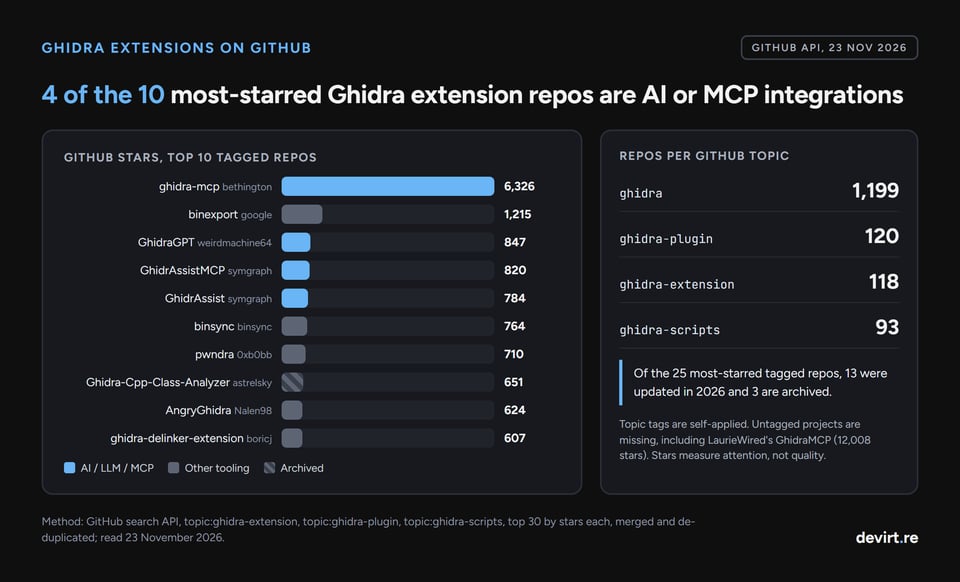
- AI and MCP: four of the ten most-starred tagged repositories are AI integrations. bethington/ghidra-mcp leads with 6,326 stars, followed by GhidraGPT (847), GhidrAssistMCP (820) and GhidrAssist (784).
- Diffing and collaboration: google/binexport (1,215 stars) exports Ghidra databases for BinDiff, BinDiffHelper brings BinDiff matches back in, and binsync (764) syncs work between decompilers through git.
- Analysis helpers: pwndra for CTF work, AngryGhidra (angr inside Ghidra), GhidraEmu (a p-code emulator), ghidra-findcrypt (crypto constants), efiSeek (UEFI firmware) and ghidra-nativeaot (.NET Native AOT binaries).
- Odd jobs: ghidra-delinker-extension exports relocatable object files from a program.
Two cautions. Stars measure attention, not quality, and of the 25 most-starred tagged repositories, 13 were pushed to in 2026 while 3 are archived. And extensions are built against a specific Ghidra version, so after an upgrade, check that each one has a build for your release before you rely on it.
Does Ghidra have an MCP server?
Ghidra has no official MCP server from the NSA; Model Context Protocol support comes from community extensions on GitHub. An MCP server exposes Ghidra functions, such as decompiling a function, listing cross-references or renaming a symbol, as tools that an AI agent like Claude Code or an IDE assistant can call while you work.
The best-known is LaurieWired's GhidraMCP, which pairs a Ghidra plugin with a Python bridge script, with 12,008 stars on 23 November 2026. It carries no GitHub topics, which is why it's missing from the tagged chart above. bethington/ghidra-mcp, the most-starred tagged one, describes itself as offering "200+ MCP tools" with both a GUI plugin and a headless server. A census Devirt ran on 13 November counted 138 public Ghidra MCP servers, most created in 2025 and 2026, with the stars concentrated in a handful. They differ most in how much they let an agent change, which decides which Ghidra MCP server fits your client and your target.
An agent sees what Ghidra sees, so the same limits apply: it reads the decompiler's output, and on a virtualized function that output describes the protector's virtual machine. Use MCP on programs you own or are authorized to analyze, and treat an agent's renames like a colleague's: useful, and worth checking.
How often is Ghidra updated, and what's new in 12.2?
Ghidra ships seven to nine releases a year, with a feature release about every five months. Since 10.0 in June 2021 there have been 46 releases, and the 13 feature releases (10.0, 10.1 … 12.2) arrived a median of 162 days apart. GitHub's download counter, read on 23 November 2026, shows how many times each release zip has been fetched:
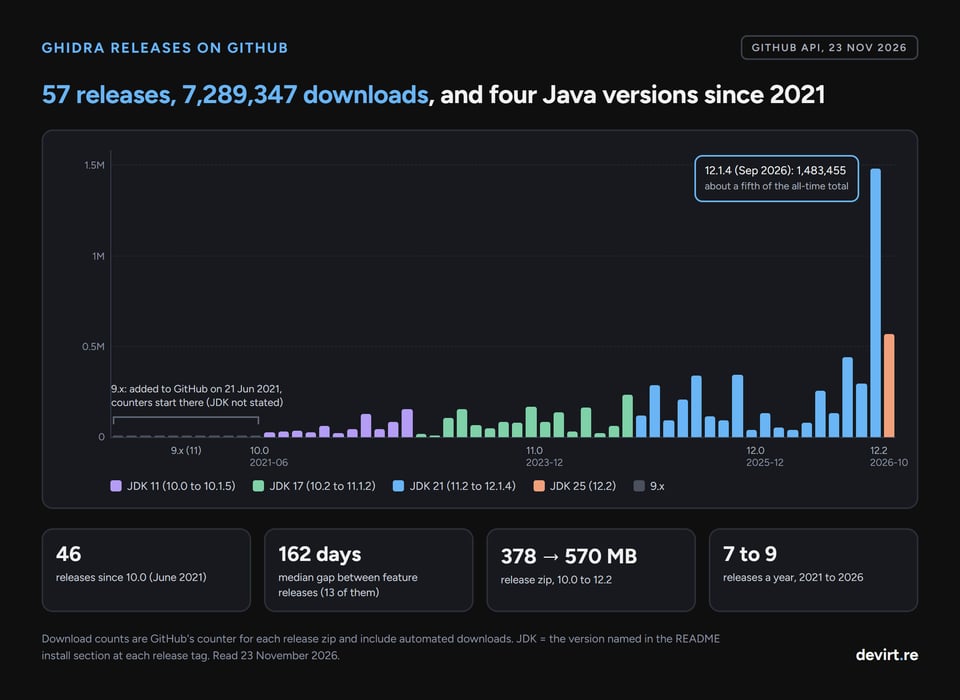
The counter counts every fetch of the file, automated ones included, so treat it as attention rather than users. One release stands out: 12.1.4, published on 21 September 2026, logged 1,483,455 downloads in two months, about a fifth of the all-time total. The 11 releases from the 9.x line show only 32,885 between them because they were added to GitHub Releases on 21 June 2021, two days before 10.0, and their counters start there.
What changed in Ghidra 12.2, from its release notes:
- JDK 25 is now required, and Ghidra runs Java with compact object headers to cut memory use.
- TLS is enforced for every Ghidra Server and BSim PostgreSQL connection, with new certificate requirements. If you run a shared server, this is the change to plan for.
- A Hexagon processor module arrived, plus CIP-51 support and fixes across x86, ARM, AARCH64, MIPS, RISC-V and others.
- "Timeless debugging" is in beta: execution traces captured with an Intel PIN tool can be imported and stepped through with a breakpoint timeline, a dynamic call tree and a variable viewer.
- C99 integer types (
int8_t,uint64_tand the rest) are built in, and a new merger combines two structures, unions or enums that turn out to be the same type.
Ghidra 12.0 (December 2025) made PyGhidra the default Python engine and added an experimental Z3-based concolic emulator. Older milestones: the debugger arrived in 10.0, BSim and Rust and Go binary support in 11.0.
Ghidra vs IDA Pro vs Binary Ninja: which should you use?
Ghidra is the free choice with no architecture or licence limit; IDA Pro is the long-standing commercial standard sold by annual licence; Binary Ninja sits between them with perpetual licences and a Python plugin API. Prices were checked on the vendors' pages on 23 November 2026:
| Ghidra | IDA Pro (Hex-Rays) | Binary Ninja (Vector 35) | |
|---|---|---|---|
| Free edition | Everything, any use | IDA Free: non-commercial, cloud decompiler for x86 and x86-64 | Free: evaluation and education, plugins don't run |
| Paid editions | None | IDA Home $365/year (non-commercial); IDA Pro from €1,099/year (Essential) to €8,599/year (Ultimate) | Personal $199 (non-commercial); Commercial $1,799; Ultimate $3,499 |
| Licence model | Apache 2.0 | Annual | Perpetual, with one year of updates |
| Decompiler coverage | Every processor with a SLEIGH spec | Depends on edition: 2 cloud decompilers up to all local ones | Grows by edition |
| Scripting | Java, Python (PyGhidra) | IDC, IDAPython | Python API |
| Headless | Included | Separate IDA Pro Headless offer | Commercial and Ultimate only |
| Debugger | Yes, since 10.0 | Yes | Yes |
Choose Ghidra when you need a decompiler for an architecture the others charge extra for, a shared project server without a licence bill (Ghidra Server), or a tool you can modify. Choose IDA Pro when your work or your clients expect IDA databases, or its decompiler handles your targets better. Choose Binary Ninja when you want a paid tool you own outright. Plenty of analysts keep two, because decompiler quality depends on the compiler, the architecture and the function, and a hard function is worth checking in both.
The decompiler gap is easy to put in numbers. On 13 November 2026, Hex-Rays listed decompilers for 15 processor architectures across all IDA editions, while Ghidra 12.2 has one decompiler for every one of its processor modules; the IDA Pro vs Ghidra comparison on devirt.re sets out those counts, the licensing and the disassembly coverage (where IDA lists more than 70 processor families) with a source for each row.
What can't Ghidra do?
Ghidra can't recover what the binary doesn't contain, and it can't read logic that never appears as native instructions. In practice that means four limits:
- Lost source detail. Comments, local names and most types don't survive compilation. Ghidra gives you structure; meaning is your job.
- Managed code it doesn't target. Ghidra has JVM and Dalvik processor modules, but no .NET module: for C# programs, a .NET decompiler such as ILSpy or dnSpyEx reads the metadata Ghidra ignores.
- Packed programs. Ghidra analyzes the file as stored, so a packed program shows the unpacking stub and a block of compressed or encrypted data, not the code that runs later.
- Virtualized functions. VMProtect, Themida and similar protectors can replace chosen functions with bytecode that only an interpreter embedded in the file understands. Ghidra decompiles the interpreter faithfully: a dispatcher loop that fetches the next bytecode and jumps to one of many small handler routines. The original function isn't there to decompile.
Analysts recognize the last case quickly in Ghidra: the target function shrinks to a few instructions that jump into a large region, and the decompiler shows the same loop-and-indirect-jump shape whatever input it's given. Renaming won't fix it. Reading the protected logic takes devirtualization, which rebuilds the virtual machine's instruction set and turns the recovered operations back into functions you can open alongside the rest of the program.
Why won't Ghidra start? Three launch errors and their fixes
Ghidra launch failures almost always come down to Java. The Getting Started document lists three messages:
- "The 'java' command could not be found in your PATH or with JAVA_HOME." No Java at all. Install JDK 25 and open a new terminal so the PATH change takes effect.
- "Failed to find a supported JDK." Java exists but it's too old for this release (an install guide written for JDK 17 or 21 does this). Install JDK 25; Ghidra will find it or ask for its folder.
- "Exited with error. Run in foreground (fg) mode for more details." Something else failed and the message was hidden. Run
support/ghidraDebug, or setLAUNCH_MODEtofgin the launch script, to see the real error.
Two other causes from the known-issues list: a ! anywhere in the install path (Java treats it as a jar separator) and, on Windows, a ^. Move the folder and try again.
Ghidra FAQ
Is Ghidra better than IDA Pro?
Ghidra is not strictly better or worse than IDA Pro. Ghidra is free and open and decompiles every processor it supports at no extra cost; IDA Pro is the long-established commercial tool, and many clients and teams exchange IDA databases. Which decompiler reads a given function better depends on the compiler, the architecture and the function, so the honest answer is to try both on your own targets.
Does Ghidra run on Apple Silicon Macs?
Ghidra runs on Apple Silicon (macOS ARM64), but the official zip has no macOS native binaries, so you build them once with gradle buildNatives after installing the Xcode command line tools. The Java parts run as they are.
Does Ghidra execute the file you open?
Ghidra doesn't run the program during normal analysis; import and auto-analysis read the file. Code only runs if you choose to: under the Debugger, which drives a native debugger such as GDB, LLDB or WinDbg, or in the emulator, which interprets p-code without executing the real binary.
Can Ghidra decompile Java or Android apps?
Ghidra has JVM and Dalvik processor modules, so it can disassemble and decompile class files and DEX bytecode. For Java and Android apps, dedicated decompilers that rebuild Java source from bytecode, such as jadx for APK files, are usually the first stop, with Ghidra kept for native libraries inside the app.
Can several people work on one Ghidra project?
Ghidra Server lets several analysts share a project: each works on a local copy and checks changes into a shared repository. It's included free with Ghidra, and from 12.2 every client-server connection uses TLS.
How much memory does Ghidra need?
Ghidra's documented minimum is 4 GB of RAM and 1 GB of disk for the install; large programs need more, and the project database grows with each program you import. The docs also strongly suggest dual monitors. Once you've had the Listing, the Decompiler and the Symbol Tree open at the same time, you'll see why.
How the numbers in this post were gathered
All Ghidra numbers come from GitHub's REST and search APIs, read on 23 November 2026 with an authenticated, read-only client; no release file was downloaded. Releases: every entry on the NationalSecurityAgency/ghidra Releases page (57) with the download counter of its zip. Java requirements: the JDK named in the README's install section at each release tag. Shipped scripts: .java and .py files in ghidra_scripts folders of the source tree at the Ghidra_12.2_build tag (the release zip packages these modules, but the count is of the source tree). Extensions: GitHub topic search for ghidra-extension, ghidra-plugin and ghidra-scripts, top 30 by stars per topic, merged. Limits: download counters include automated fetches, topic tags are self-applied (untagged projects such as GhidraMCP are missed), and stars measure attention. IDA Pro and Binary Ninja prices are from hex-rays.com/pricing and binary.ninja/purchase on the same day. Devirt is not affiliated with the NSA, Hex-Rays or Vector 35.



