
Java Decompiler Test: CFR vs Vineflower vs JD-GUI (2026)
Java decompiler test: CFR, Vineflower, Procyon, JD-GUI and JADX on one program built 7 ways, recompiled and re-run. See which of 35 outputs still worked.
A Java decompiler is a tool that turns compiled Java bytecode, the .class files inside a JAR, back into readable Java source code. On 23 November 2026 we wrote one small Java program, compiled it seven ways, and decompiled every build with five free decompilers: CFR, Vineflower, Procyon, JD-GUI and JADX. Then we fed all 35 outputs back to the Java compiler. One of the 35 compiled and printed exactly what the original printed. The rest came close, and the spots where each one fell short are a better guide to choosing a Java decompiler than any feature list.
When the bytecode isn't Java's: Java decompilers work so well because JVM bytecode is a public format that keeps class, method and field names. Code virtualization in native Windows programs is the opposite case: a protector such as VMProtect or Themida turns chosen functions into bytecode for a private virtual machine with no published spec, and a decompiler shows you the interpreter instead of the logic. Devirt's binary devirtualization recovers what those functions compute and returns IDA databases, annotated pseudocode and a coverage ledger. Devirt accepts only files you own or are authorized to analyze.
What is a Java decompiler?
A Java decompiler reads the bytecode the Java compiler (javac) produced and writes Java source that would compile to the same behavior. It works on single .class files and on whole JAR, WAR or EAR archives, which are ZIP files full of classes.
Java decompiles unusually well because a class file keeps a lot of the source's structure. Class names, method names, field names, method signatures and string literals are all stored in the file, since the Java virtual machine needs them to link code at run time. What javac throws away is everything the JVM doesn't need: comments, formatting, most local variable names (unless the class was compiled with debug information), and the exact syntax you used. A decompiler has to rebuild loops, conditions, lambdas and switch statements from jumps and method calls, and that rebuilding is where Java decompilers differ.
Compare that with native code. When we tried to decompile an EXE built from C#, 14 of 23 named source items survived; a C or C++ binary keeps far less. Devirt measured what a native decompiler gets back in its write-up on decompilation, and the short version is that Java is the easy case.
Which Java decompiler is best?
The best Java decompiler for most people in 2026 is Vineflower, with CFR as a second opinion. In our test, Vineflower 1.12.0 wrote the most modern Java syntax back (5 of 7 Java 21 features), but it gave up on one method in every build. CFR 0.152 produced code for every method, though one Java 21 method came out as unstructured gotos. JADX 1.5.7 produced the only output that recompiled and ran unchanged. JD-GUI 1.6.6 is the friendliest viewer, but its last release dates from December 2019, and its engine failed on 6 of the program's 10 class files whenever our JDK 21 compiler had built them.
| If you want to... | Use | Why, from our test |
|---|---|---|
| Read modern Java (records, sealed types, switch patterns) | Vineflower | Restored the most Java 21 syntax (5 of 7 features), but gave up on one method |
| Get every method back, even if it's ugly | CFR | Produced code for every method; marks risky spots with warnings |
| Compare a second reading of a hard method | Procyon | Only tool to restore the text block; weaker on generics |
| Decompile Android code too | JADX | Built for APK and DEX; the one output that ran unchanged (Java 8, debug build) |
| Click through an old JAR in a GUI | JD-GUI | Worked on JDK 8 compiler output; failed on JDK 21 compiler output |
| Stay in your IDE | IntelliJ IDEA (Fernflower), JD-Eclipse in Eclipse, or a decompiler extension in VS Code | IntelliJ's built-in decompiler is Fernflower, Vineflower's parent |
How we tested the decompilers
We tested five Java decompilers on one program we wrote, built seven ways, so every difference in the output comes from the decompiler or the build, not from the input.
The program. A 193-line ledger in Java 21 syntax, written to hit the constructs decompilers find hard: records, a sealed interface, pattern matching for switch with record patterns and a guard, a switch expression on strings, a text block, lambdas, method references, try-with-resources, an anonymous class, an inner class that writes a private field of its outer class, an enum with constant bodies, a switch that falls through on purpose, and a labeled continue inside a do-while loop. A second copy says the same thing in Java 8 syntax (227 lines). Both print the same 18 lines of output.
The seven builds.
1. Java 8 source, compiled by a real JDK 8 javac (Temurin 1.8.0_504).
2. Java 8 source, compiled by JDK 21's javac with --release 8, no debug information (javac's default keeps line numbers but drops local variable names).
3. The same with -g, which keeps local variable names.
4. Java 21 source, javac 21, default.
5. Java 21 source with -g.
6. and 7. Builds 2 and 4 run through ProGuard's name obfuscation, with shrinking and optimization switched off so only names change.
The decompilers. CFR 0.152, Procyon 0.6.0, Vineflower 1.12.0, JD-Core 1.1.3 (the engine inside JD-GUI 1.6.6, driven headless through its public API) and JADX 1.5.7. All five came from their official GitHub releases, run with default settings.
The check. Each decompiled program went back through javac 21. If it compiled, we ran it and compared its output byte for byte with the original's. We also counted which local variable names came back, whether any comment survived, and whether each modern Java feature appeared in the output. The scripts and raw outputs are kept with this post, so anyone can re-run the test.
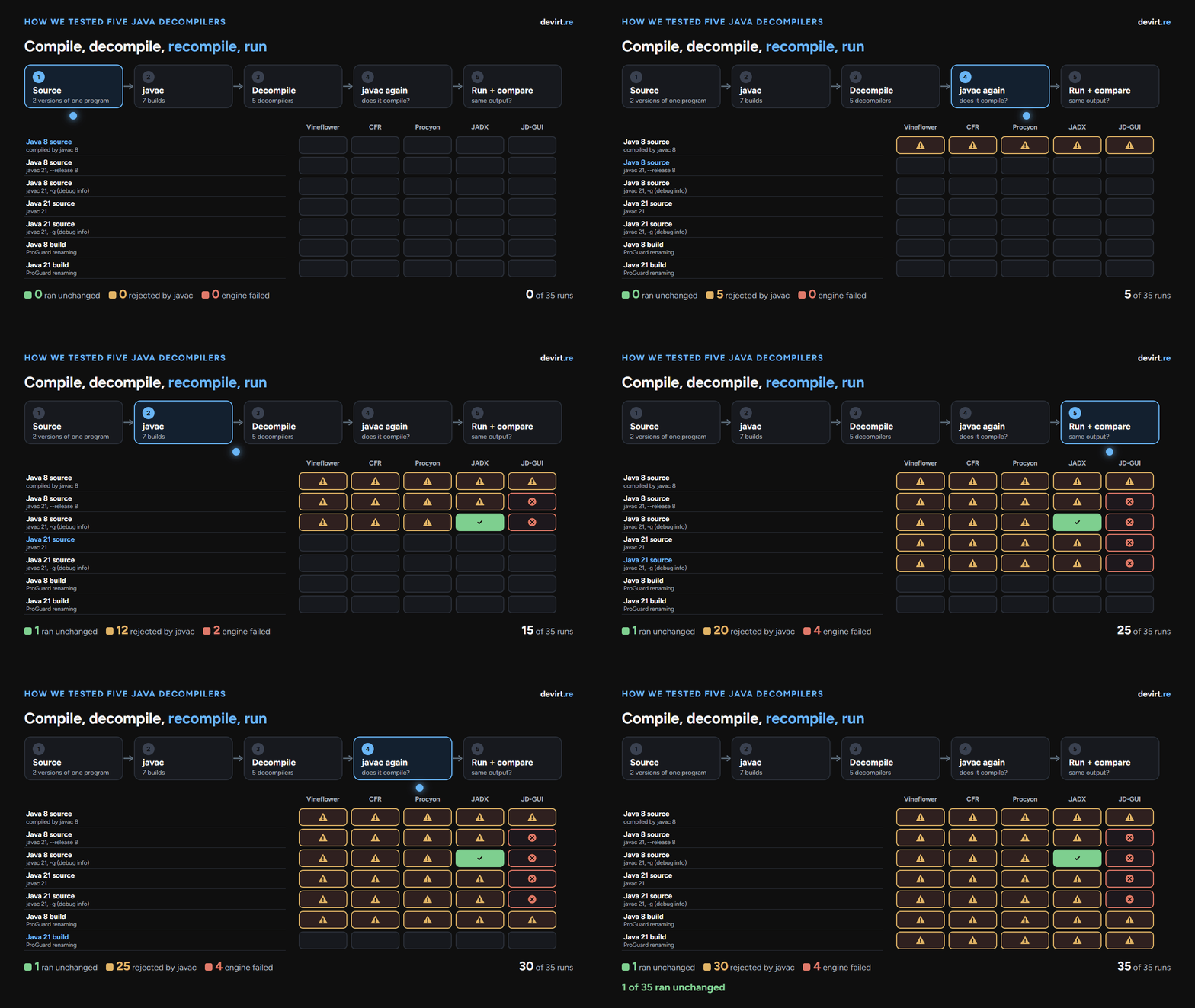
Two limits. This is one program, so it shows how five tools handle these constructs, not a ranking over all Java code. And javac's error counts are a floor: javac stops at syntax errors before it reports type errors in the same file, so "at least N lines" is the honest way to read them.
Results: what survived Java decompilation
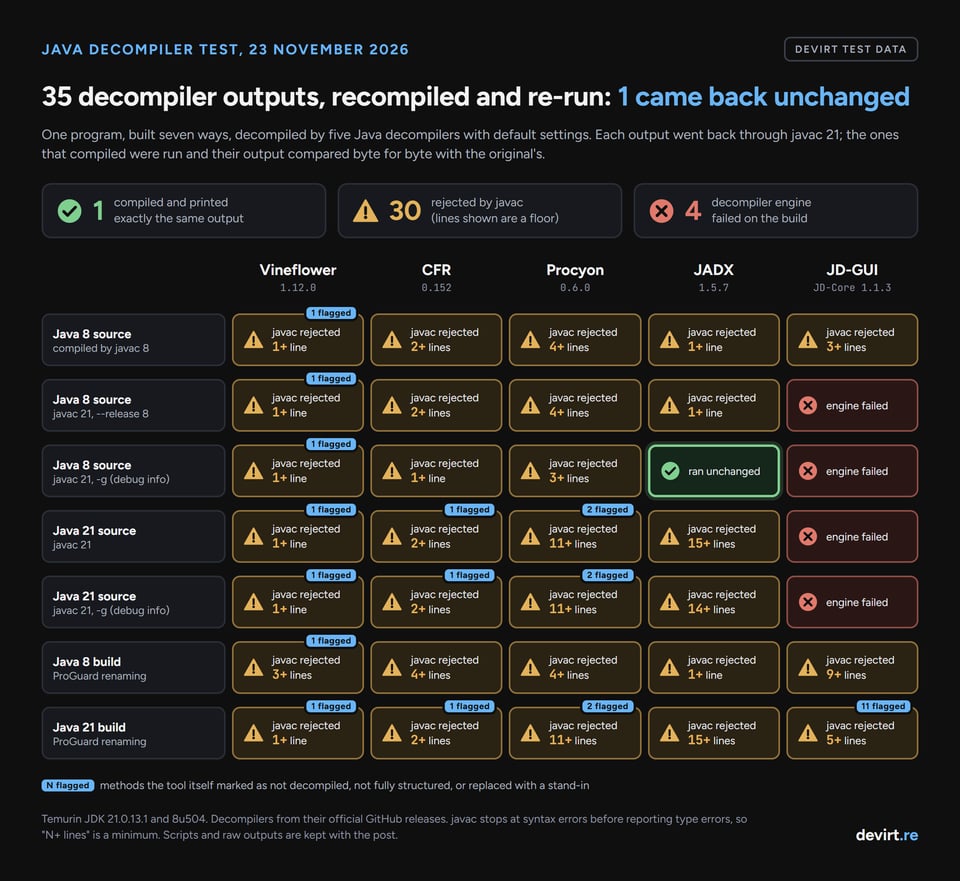
Every Java decompiler in the test got the program's structure back, and almost none produced code you could recompile without edits. One output out of 35 compiled and ran unchanged: JADX on the Java 8 build with debug information.
| Decompiler | Ran unchanged (of 7 builds) | Methods the tool flagged | Java 21 features written back (of 7) | Local names with -g (of 20) |
|---|---|---|---|---|
| Vineflower 1.12.0 | 0 | 1 in every build (gave up on checksum) |
5 | 17 |
| CFR 0.152 | 0 | 1 left unstructured on Java 21 builds, plus 2 warnings in every build | 3 | 20 |
| Procyon 0.6.0 | 0 | 2 stand-in helper classes on Java 21 builds | 4 | 20 |
| JADX 1.5.7 | 1 (Java 8, -g) |
none | 0 | 19 |
| JD-GUI 1.6.6 (JD-Core 1.1.3) | 0 | engine failed on 4 of 7 builds; 11 methods left as bytecode on the Java 21 ProGuard build | n/a (failed) | n/a (failed) |
On the Java 8 source compiled by JDK 8's javac, the build closest to an older JAR you might download, every tool came close. javac rejected at least 1 line from Vineflower and JADX, 2 from CFR, 3 from JD-GUI's engine and 4 from Procyon. Four of the five tripped on the same line, a lambda that compares string lengths. The generic type of the list it sorts (List<String>) isn't stored for local variables in a default build, so the decompilers declared a plain List (Procyon wrote List<? super Object>), and javac then couldn't find length() on an Object. That one-word fix is typical of what decompiled Java needs.
Vineflower's single rejected line hides a bigger gap: it gave up on the checksum method, whose labeled continue jumps out of a do-while loop, and printed the bytecode in a comment instead. CFR, Procyon and JADX all decompiled that method.
The other 34 outputs failed in ways worth knowing about:
- JD-GUI's engine failed outright on 4 builds: every build from the JDK 21 compiler except the two ProGuard builds.
- On the Java 21 builds, the pattern-matching switch broke every tool. None wrote the record pattern back. CFR, Procyon and Vineflower left calls to SwitchBootstraps.typeSwitch, an internal bootstrap method, in the source, which javac rejects.
- Procyon added generic casts such as (Collector<? super Object, ?, Map>) that don't type-check, which is why it had the most rejected lines on the plain Java 8 builds.
- On the JDK 8 build, JD-GUI's engine named both try-with-resources variables null, which javac can't parse.
Do variable names and comments survive decompilation?
Comments never survive Java decompilation, and local variable names survive only when the class was compiled with debug information. No comment from our source appeared in any of the 35 outputs. javac doesn't write comments into class files, so no decompiler can bring them back.
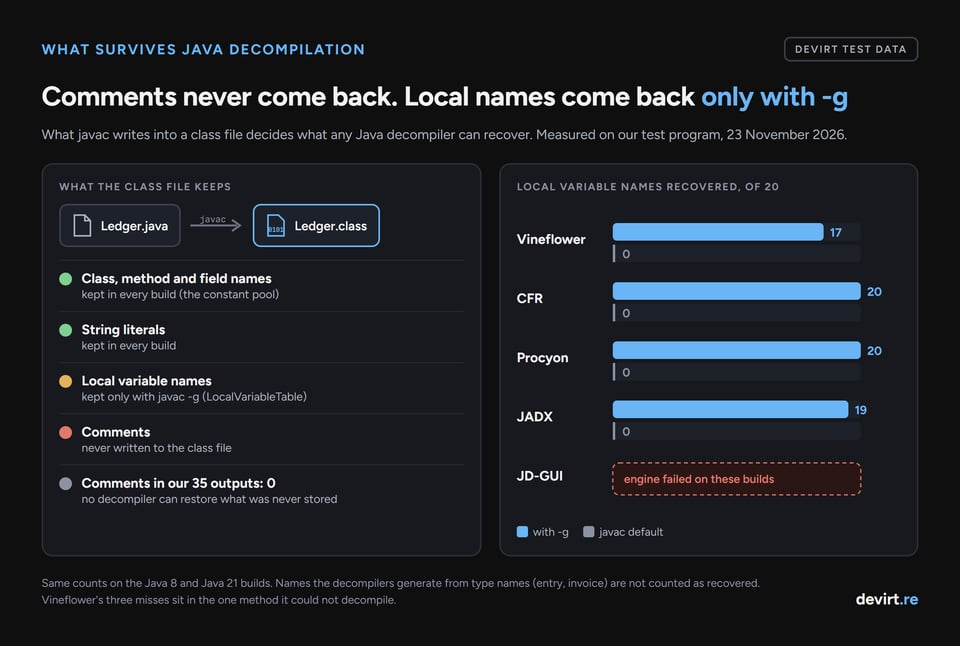
Local variable names depend on the -g flag. A default javac build keeps line numbers and the source file name, but not the LocalVariableTable that maps variables to names. On those builds no decompiler recovered any of the 20 local variable names we tracked; they wrote names derived from types (string, list, n) or numbered ones (var1, var2). With -g, CFR and Procyon recovered all 20, JADX 19 and Vineflower 17. Vineflower's three misses were the variables inside the checksum method it couldn't decompile.
Class, method and field names are a different matter. They live in the class file's constant pool whatever the flags, and all 26 class, method and field names we tracked appeared in every output from the plain builds. That's why decompiled Java reads so much better than decompiled C, and also why obfuscators go after exactly those names.
Java 8 versus Java 21: modern bytecode splits the tools
A Java decompiler has to recognize the bytecode patterns that each new language feature compiles to, and the tools that are still maintained recognize far more of Java 21 than the ones that aren't. We checked seven features in the Java 21 build.
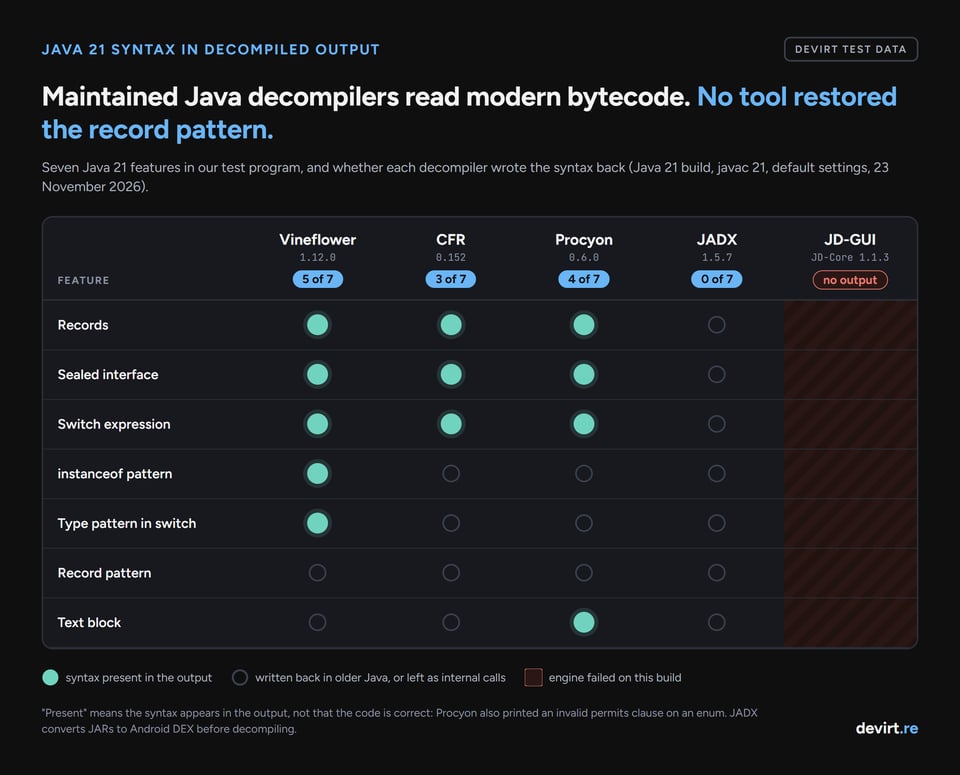
- Vineflower wrote back records, the sealed interface, the switch expression, the instanceof pattern and a type-pattern switch: 5 of 7. It missed the record pattern and the text block.
- Procyon wrote back records, the sealed interface, the switch expression and the text block: 4 of 7. It was the only tool to restore the text block, but it also printed
enum Region permits Ledger$Region$1, Ledger$Region$2, which isn't valid Java, and generated helper classes to stand in for the pattern switches. - CFR wrote back records, the sealed interface and the switch expression: 3 of 7. Its pattern-switch code fell back to labels and gotos, with an "Unable to fully structure code" note.
- JADX wrote back none of the 7. It showed records as classes that extend
java.lang.Record, which javac refuses to compile. JADX reads JARs by converting them to Android's DEX format first, a route built for APK files. - JD-GUI's engine produced no output for either Java 21 build.
The pattern held on Java 8 code too, but the gaps were smaller: on the plain Java 8 builds, the Java 8 constructs we checked (lambdas, try-with-resources, string switches, varargs and so on) appeared in 10 to 12 of 13 checks for every tool that produced output.
The Java decompilers, one by one
CFR
CFR is a Java decompiler written by Lee Benfield, released under the MIT license on GitHub. Its latest release, 0.152, dates from December 2021, though the source repository was still getting commits in June 2026. In our test CFR produced code for every method in every build (on the Java 21 builds one method came out as gotos, under an "Unable to fully structure code" note), and it flags the places it isn't sure about: two "possible behaviour change" warnings around exception handling showed up in every build. It's a single JAR you run from the command line.
Vineflower
Vineflower is a community fork of JetBrains' Fernflower, continuing the work of the earlier Quiltflower fork, under the Apache 2.0 license on GitHub. Version 1.12.0 came out in April 2026. It restored the most Java 21 syntax in our test (5 of 7 features), but it gave up on one method in every build, a method CFR, Procyon and JADX all decompiled. A Vineflower plugin can replace Fernflower inside IntelliJ IDEA.
Fernflower (IntelliJ IDEA)
Fernflower is the decompiler built into IntelliJ IDEA, maintained by JetBrains on GitHub. When you open a .class file in IntelliJ, Fernflower writes the source you see. Fernflower publishes its builds to JetBrains' own IntelliJ repository rather than to GitHub releases or Maven Central, where only old third-party forks appear. Our rule was GitHub releases or Maven Central only, so we tested Vineflower in its place and say so here.
Procyon
Procyon is a Java metaprogramming suite by Mike Strobel that includes a decompiler, under the Apache 2.0 license on GitHub. Its last release, 0.6.0, is from February 2022. It was the only tool to restore a text block, and the weakest at generic types.
JD-GUI and JD-Core
JD-GUI is the best-known Java decompiler GUI, from the Java Decompiler project, under GPLv3 on GitHub. Its engine is JD-Core, which the same project also ships inside Eclipse as the JD-Eclipse plugin; JD-GUI 1.6.6 (December 2019) bundles JD-Core 1.1.3.
On classes from JDK 8's javac, JD-Core decompiled all 10 class files of our program. On classes from the JDK 21 javac we used, even with --release 8, it failed on 6 of the 10, including the main class, which JD-Core decompiles together with its inner classes. The cause is a small class-file detail: that javac writes MethodParameters entries with no name for the parameters the compiler adds to inner-class, anonymous-class and enum constructors, and for the parameter of an enum's valueOf method. Section 4.7.24 of the JVM specification allows a parameter with no name, and JD-Core 1.1.3 crashes on it. ProGuard drops that attribute, which is why JD-Core worked on the ProGuard builds. So if JD-GUI throws an error on a recent JAR, check which compiler built it before blaming the JAR.
JADX
JADX is a decompiler built for Android's DEX format that also accepts .class and .jar files, under Apache 2.0 on GitHub, with release 1.5.7 out in November 2026. On the Java 8 build with debug information its output was the only one in the test to compile and run unchanged. On Java 21 code it wrote back none of the new syntax.
Recaf
Recaf is a bytecode editor rather than a decompiler engine. Its interface lets you switch between CFR, Procyon and Fernflower back ends and edit the decompiled code, so its output is as good as the engine you pick. We didn't test it separately.
Online Java decompilers
Sites such as javadecompilers.com put several of these engines behind an upload box. The output is the same as running the engine yourself; the difference is that your JAR goes to someone else's server (more on that below).
How to decompile a JAR file
To decompile a JAR file, download one decompiler from its releases page, make sure you have a Java runtime, and run one command. These are the invocations our test script used, with default settings (the script called JADX's command-line class directly, adding --no-res to skip Android resources):
java -jar cfr-0.152.jar app.jar --outputdir out/cfr
java -jar procyon-decompiler-0.6.0.jar -jar app.jar -o out/procyon
java -jar vineflower-1.12.0.jar classes/ out/vineflower/
jadx -d out/jadx app.jar
Vineflower takes a JAR, ZIP, folder or single class file, and writes to the folder, ZIP or JAR you name. For JD-GUI, open the JAR in the window and use File, then Save All Sources. In IntelliJ IDEA, open any .class file and the decompiled source appears in the editor.
Unzipping a JAR (jar xf app.jar) only gives you the .class files. To read them as Java you still need a decompiler, and if you only want to see the bytecode itself, the JDK's own javap -c -p disassembles it.
Are online Java decompilers safe to use?
Online Java decompilers are safe for code you're allowed to share, and a poor choice for anything else, because they upload your JAR to a server you don't control. Two of the top three Google results for "java decompiler" are upload sites, and neither homepage explained where an uploaded file goes; one linked a privacy policy. A proprietary JAR can contain credentials, internal endpoints and business logic. Running CFR, Vineflower or JADX locally takes one command and keeps the file on your machine, so for anything private, use a local decompiler.
What does obfuscation change?
Obfuscation doesn't stop a Java decompiler from producing code, but it removes the names that make the code readable. When we ran ProGuard's name obfuscation on the test program, none of the 26 renamed class, field and method names we tracked appeared in any decompiler's output, while all four string literals we checked were still there. The logic decompiled about as well as before: the same tools broke on the same constructs. ProGuard also gives many members the same one-letter name, and on the Java 8 build CFR and Vineflower each confused same-named members, which added two rejected lines apiece.
That matches how Java obfuscators work. Renaming is cheap and can't be undone by a decompiler, because the original names were never shipped; a Java deobfuscator can only guess at new names from context. Heavier options (string encryption, control-flow changes) make the output harder to follow, and Android builds get similar renaming from R8. For an obfuscated JAR, expect correct structure with meaningless names, and expect to rename things by hand as you work out what they do.
Java bytecode versus native code
Java decompilation is the easy case of decompilation because JVM bytecode is a documented, typed format that keeps names and a clear call structure. Native machine code keeps none of that, which is why decompiling C, C++ or Go gives you pseudocode with invented names instead of near-original source. The reverse engineering tools for native code (Ghidra, IDA Pro, Binary Ninja) do far more inference to get even that far.
The hardest case is native code that was virtualized on purpose. A protector replaces selected functions with bytecode for a virtual machine it invented, then embeds an interpreter to run it. Unlike JVM bytecode, that format has no public specification and no names, so a decompiler can only show the interpreter's loop. Recovering what the function does means rebuilding the virtual machine first, which is the problem devirtualization exists to solve.
Is it legal to decompile Java code?
Decompiling Java code is legal in many situations, but the answer depends on where you are, what the license says and why you're doing it. This is an overview, not legal advice.
- In the European Union, Article 6 of the Software Directive 2009/24/EC allows decompilation without the rightholder's permission when it's indispensable to achieve interoperability with an independently created program, limited to the parts needed and to information not already available.
- In the United States, courts have treated disassembly as fair use when it's the only way to reach a program's unprotected functional elements and there's a legitimate reason (Sega v. Accolade, 9th Cir. 1992). A license can still forbid reverse engineering as a contract term.
- Decompiling your own code, open-source code, or code you're authorized to analyze is the safe ground most developers work on.
FAQ
Can a Java decompiler recover the exact original source? No. A Java decompiler recovers equivalent source, not the original text. In our test no output matched the source line for line: comments were gone in all 35, local names were gone without -g, and syntax such as text blocks and record patterns often came back in an older form.
Which decompiler does IntelliJ IDEA use? IntelliJ IDEA uses Fernflower, JetBrains' open-source decompiler. Vineflower, a community fork of Fernflower, can replace it through a plugin.
Is JD-GUI still maintained? JD-GUI's last release, 1.6.6, came out on 25 December 2019. It still opens older JARs well, but in our test its engine failed on class files produced by a JDK 21 compiler.
What is the difference between a decompiler and a disassembler for Java? A Java disassembler such as javap prints the bytecode instructions one by one; a Java decompiler rebuilds Java source from them. Use the disassembler when the decompiler's output looks wrong and you want to see what the class file says.
Written by Devirt, an automated devirtualization service for authorized analysis of protected software. Test data: Devirt, 23 November 2026. Tools from their official GitHub releases (CFR 0.152, Procyon 0.6.0, Vineflower 1.12.0, JD-GUI 1.6.6 with JD-Core 1.1.3, JADX 1.5.7), Temurin JDK 21.0.13.1 and 8u504; scripts and raw outputs kept with this post.



