
Can You Decompile an EXE? What Comes Back, by Language
Can you decompile an EXE or DLL? What .NET, C++ and Go files give back, which decompilers to use, the legal frame, and what packing changes.
Decompiling an EXE turns a compiled Windows program back into code a person can read, but you never get the original source file back. How close you get depends on the language the program was written in. A .NET EXE comes back as near-complete C#, a C or C++ EXE comes back as pseudo-C with invented names, and a packed or VM-protected EXE shows you the protection before it shows you the program. On 13 November 2026 we compiled a small C# program of our own and read the EXE back: 14 of its 23 named items survived, and every comment and local-variable name was gone. Below: what an exe decompiler or dll decompiler gives back for each kind of file, which tools to use, where the legal lines sit, and what protection changes.
When the decompiler shows an interpreter instead of the program: some EXEs and DLLs are protected by VMProtect, Themida or Code Virtualizer, which turn selected functions into bytecode for a private virtual machine. Devirt's supported protectors page lists which protector families run on the automated path and which start with a free assessment. VMProtect results come with a coverage ledger that counts every protected function Devirt detected. Every upload requires you to confirm that you own the file or are authorized to analyze it.
Can you decompile an EXE back to its source code?
You can decompile an EXE, but not back to its source code. Compiling throws information away. Comments never reach the binary, and local-variable names survive only as debug information, which release builds often strip or ship as a separate file. Optimizers then reorder and merge code, so many different source files could produce the same EXE.
A decompiler works backwards from what is left. It reads the machine code or bytecode, rebuilds functions, loops and conditions, and invents names for whatever the compiler discarded. The result reads like source and sometimes compiles. It's still a reconstruction, not the file the developer wrote.
What does a decompiler give back for .NET, C/C++ and Go?
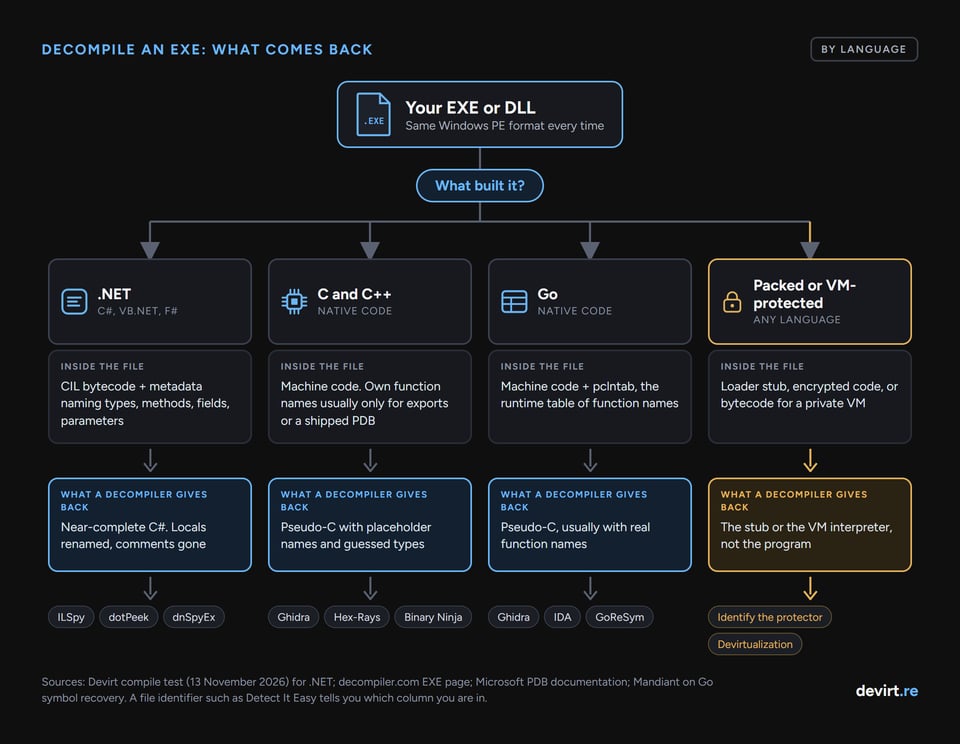
What a decompiler gives back depends on what the compiler kept. The EXE format is the same Windows PE file in every case, but the contents differ:
| Built with | What the EXE contains | What a decompiler gives back | Typical tools |
|---|---|---|---|
| .NET (C#, VB.NET, F#) | CIL bytecode plus metadata: type, method, field and parameter names | Near-complete C#; locals get generated names; no comments | ILSpy, dotPeek, dnSpyEx |
| C and C++ | Native machine code; the program's own function names usually only for exports or a shipped PDB | Pseudo-C with placeholder names and guessed types | Ghidra, IDA with Hex-Rays, Binary Ninja |
| Go | Native machine code plus a function table the Go runtime uses for stack traces | Pseudo-C, often with real function names | Ghidra, IDA, Mandiant's GoReSym for names |
| Packed or VM-protected (any language) | A loader stub, encrypted code, or bytecode for a protector's virtual machine | The stub or the protector's interpreter, not the program | Identify the protector first |
.NET. A .NET EXE holds Common Intermediate Language (CIL) and a metadata table that names every type, method, field and parameter. That's why .NET decompilers produce readable C#. The decompiler.com EXE page draws the same line: it decompiles .NET files to C#, but for a native EXE it only reports the structure, such as architecture, imports, exports and resources.
C and C++. A native EXE contains machine code for the processor. Ghidra or Hex-Rays can rebuild each function as pseudo-C, but variables get generated names (Ghidra uses names like local_10) and types are inferred. The program's own function names usually survive only when it exports them (common in DLLs) or when the developer shipped a PDB file; calls into Windows itself keep their names, because imports are listed by name. Microsoft describes a PDB as a mapping from source identifiers and statements to compiled code.
Go. A Go EXE keeps more than a C++ one. The Go runtime needs a table called pclntab to print stack traces, and it holds function names, addresses and source file names. Mandiant's write-up on Go symbol recovery notes that when a Go binary is stripped, the symbol table goes but the data it pointed to, including pclntab, stays in the file. The linker's -s flag omits the symbol table and debug information, not that runtime table.
If you don't know which case you have, a file identifier tells you before any decompiler does. Detect It Easy reports the compiler and any packer, and it's one of the maintained tools that replaced PEiD.
What survived when we compiled our own program?
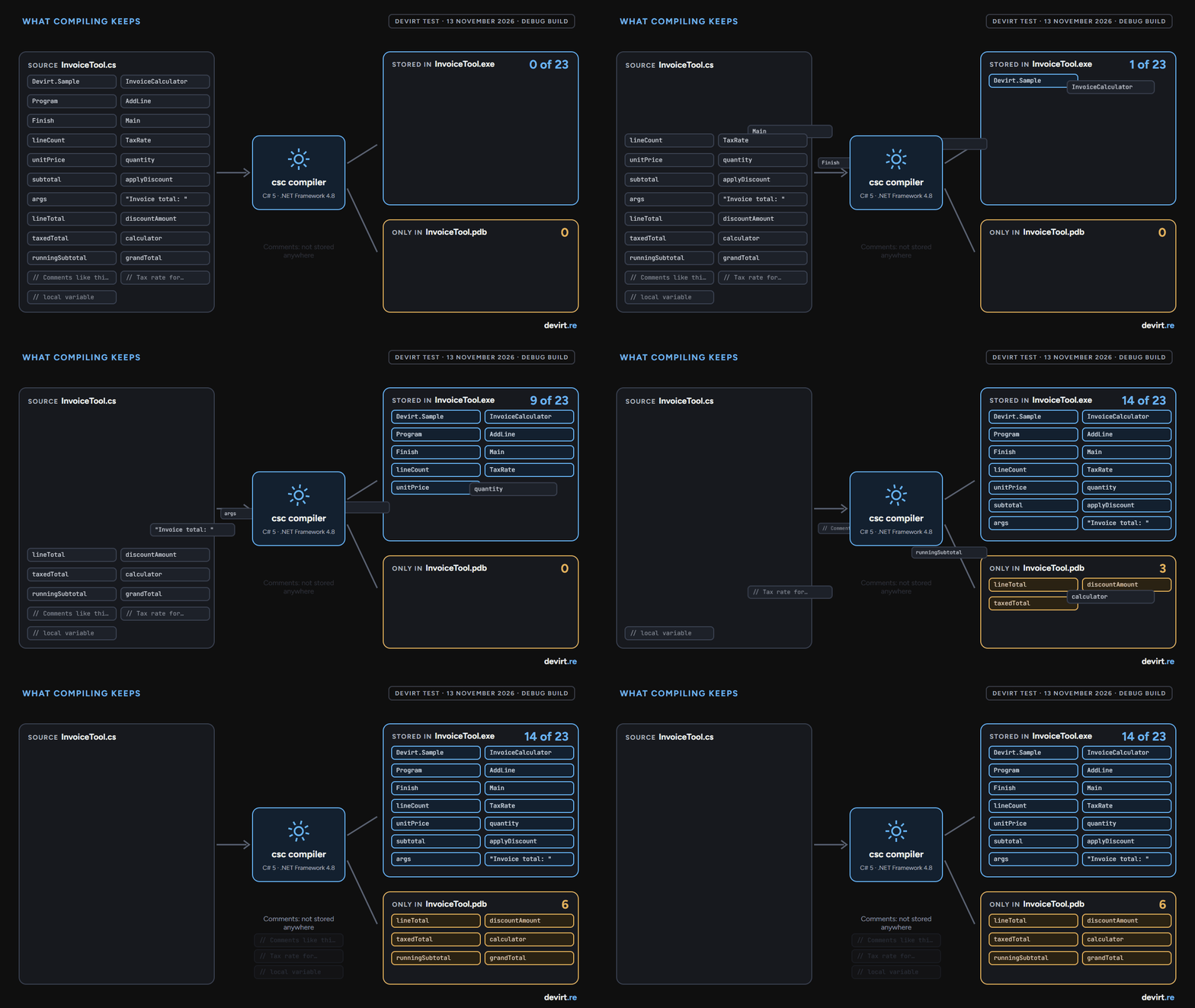
When we compiled our own program and read it back, 14 of 23 named source items survived and 9 did not. We wrote a 46-line C# program, an invoice calculator with one namespace, two classes, three methods, a field, a constant, five parameters, six local variables, one string literal and three comments. We compiled it with the C# compiler that ships with Windows (version 4.8.9221.0, C# 5) three ways: a release EXE, a release DLL, and a debug EXE with its PDB. Then we read each file back with .NET's own reflection API and a 157-line reader we wrote on top of it, and searched the raw bytes for every name.
| Source item | Count | Release EXE | Release DLL | Debug PDB file |
|---|---|---|---|---|
| Namespace, class and method names | 6 | 6 kept | 6 kept | not needed |
| Field and constant names | 2 | 2 kept | 2 kept | not needed |
| Parameter names | 5 | 5 kept | 5 kept | not needed |
| String literal | 1 | 1 kept | 1 kept | not needed |
| Local-variable names | 6 | 0 kept (types only) | 0 kept | 6 found |
| Comments | 3 | 0 kept | 0 kept | 0 found |
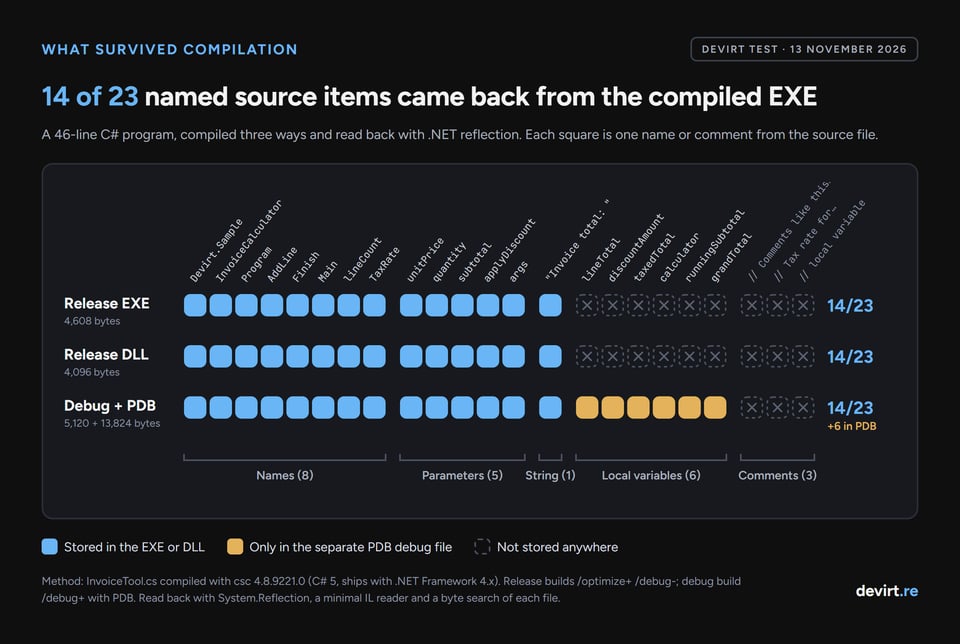
The DLL kept exactly what the EXE kept, so for .NET a DLL decompiler and an EXE decompiler are the same job. Local variables kept their types (Decimal, InvoiceCalculator) but lost their names, so a decompiler has to invent one where the source said runningSubtotal; our reader could only list them as V_0, V_1 and V_2. The local names were in the PDB, so a developer who ships PDB files ships more than they may expect. Comments were nowhere, in any file.
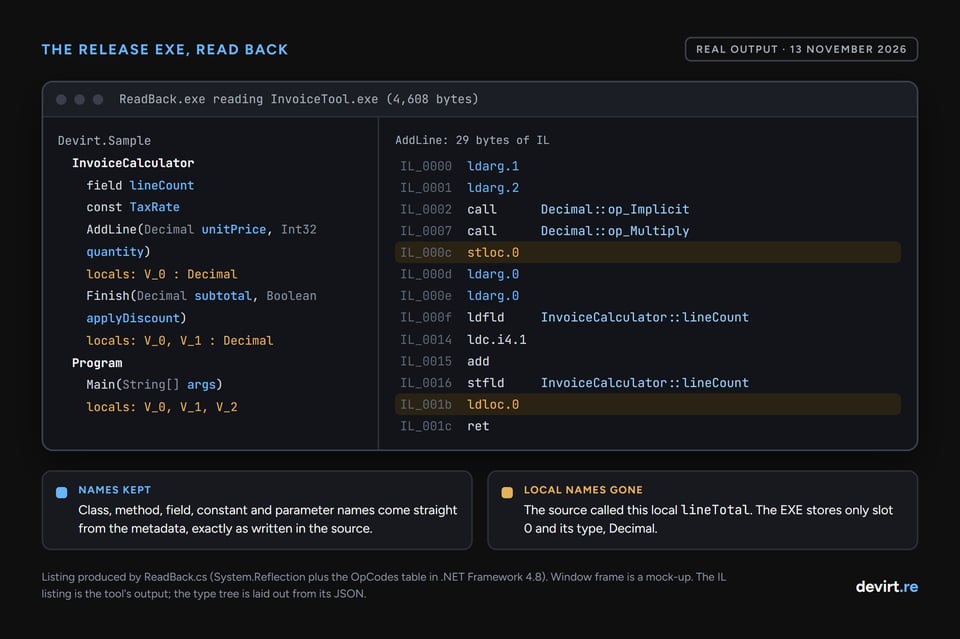
Two limits. First, this shows what .NET metadata and IL hold, read with Microsoft's own API. It isn't ILSpy or dotPeek output, although those tools read the same tables. Second, we couldn't repeat the test for C++ or Go, because no native compiler was installed on the test machine. The C/C++ and Go rows earlier come from the sources cited, not from our run. We kept the program, the build script and the reader, so the run can be repeated.
Which EXE and DLL decompilers should you use?
The right EXE decompiler or DLL decompiler is the one built for the language inside the file. A .NET tool shows nothing useful on a C++ binary, and a native decompiler opening a .NET file finds almost no machine code to work with, because the program is stored as bytecode.
- For .NET EXEs and DLLs: ILSpy is open source under the MIT License, decompiles to C#, can decompile a whole project, and its desktop app runs on Windows, Linux and macOS. JetBrains dotPeek is free. dnSpyEx, an unofficial continuation of dnSpy, adds a debugger.
- For native EXEs and DLLs (C, C++, Go, Rust): Ghidra is free and open source, released by the NSA, with a decompiler built in. IDA with the Hex-Rays decompiler is the long-standing commercial choice. Binary Ninja is a commercial alternative with a free edition.
- To compare decompilers on one file: Decompiler Explorer runs 13 decompilers, including Ghidra, Hex-Rays, Binary Ninja, angr and RetDec, on the same upload. Files must be under 2 MB, and the site states that uploaded binaries are retained, so don't upload anything confidential.
For a wider list covering debuggers, disassemblers and network tools, Devirt keeps a guide to reverse engineering tools. Newer AI-assisted tools rewrite decompiler output into friendlier code, and our comparison of AI decompiler vs Ghidra covers where that helps and where it guesses.
Can you recompile a decompiled EXE?
A decompiled .NET EXE can often be turned back into a project that builds, after some repair. ILSpy offers whole-project decompilation, and its command-line tool, ilspycmd, has an option to decompile an assembly "as compilable project". The same tool can borrow local-variable names from a PDB when one exists, which is the debug file our test found them in. Expect to fix errors before a large project builds.
Decompiled C or C++ almost never recompiles as it stands. Pseudo-C is a reading aid: it has placeholder types, compiler idioms written out longhand, and gaps where the decompiler wasn't sure. Turning it into buildable source is a manual rewrite, function by function.
Is it legal to decompile an EXE?
Decompiling an EXE is not illegal in itself, but whether it's allowed depends on your license, your jurisdiction and your purpose. This is a general outline, not legal advice:
- United States. 17 U.S.C. § 1201(f) lets a person who lawfully obtained the right to use a program circumvent a technical protection, solely to identify and analyze the parts needed for an independently created program to interoperate with others, when that information wasn't readily available. Separately, many license agreements forbid reverse engineering, and courts have enforced such clauses: in Bowers v. Baystate (Fed. Cir. 2003), a shrink-wrap license's ban on reverse engineering was upheld as a contract term, not preempted by copyright law.
- European Union. Article 6 of the Software Directive (2009/24/EC) allows decompilation without the rightholder's permission when it is indispensable for interoperability, done by someone with the right to use the copy, limited to the parts needed, and only when the information wasn't readily available. Article 5(3) separately allows observing, studying and testing how a program works. Article 8 makes contract terms contrary to Article 6 or Article 5(3) null and void.
- In both. Distributing decompiled code, or using it to build a program that copies the original, is where copyright trouble starts. Article 6(2) of the EU directive limits passing on information obtained by decompiling and bars using it for a program substantially similar in its expression.
The safe working rule is the one Devirt applies to every upload: decompile files you own or are authorized to analyze, for a purpose you can state.
What changes when the EXE is packed or VM-protected?
A packed EXE decompiles to the packer, not the program. Packers compress or encrypt the real code and add a small stub that restores it in memory at run time, so a decompiler reading the file on disk sees the stub and a block of data it can't interpret. The first move is to identify the packer or protector, because the name decides what kind of analysis comes next.
A VM-protected EXE goes further. Protectors such as VMProtect and Themida can translate selected functions into bytecode for their own virtual machine. A decompiler pointed at one of those functions shows the protector's interpreter instead: a dispatcher that fetches each virtual instruction and the handlers that carry it out, whichever function you open. The original logic is still in the file, but as data for that interpreter, which no general-purpose decompiler reads.
Recovering those functions is devirtualization: rebuilding the virtual machine's logic and turning the private bytecode back into functions a decompiler can follow. Without that step, decompiling a VM-protected EXE tells you which protector was used and where the protected functions are. It doesn't tell you what they do.
Written by Devirt, an automated devirtualization service for authorized analysis of protected software. Test run 13 November 2026 on Windows with the .NET Framework 4.8 C# compiler.


