
PEiD Is Old: What Replaced It, and What Packer Detection Misses
PEiD matched byte signatures at the entry point. What replaced it, why its hits can mislead, and what an empty packer-detector result really means.
PEiD is a Windows tool that identifies the packer, cryptor or compiler behind a PE file by matching byte signatures, most of them read at the program's entry point. Older malware-analysis tutorials often start with it. The aldeid wiki puts its database at more than 470 signatures and notes that PEiD's official site has been discontinued. Yet in November 2026 its rules still ship inside newer tools, and "peid" still draws about 600 US searches a month, according to Ahrefs. This post explains what PEiD actually checked, why that method ages badly against modern protectors, and what to make of a result that says nothing at all.
A note from Devirt: if your identifier points at VMProtect, Themida, Enigma Protector or Obsidium, the browser check on devirt.re looks at the file's format and protection signals in your browser, and the file stays on your device. Recovery itself is for files you own or are authorized to analyze.
What is PEiD, and how did it identify a packer?
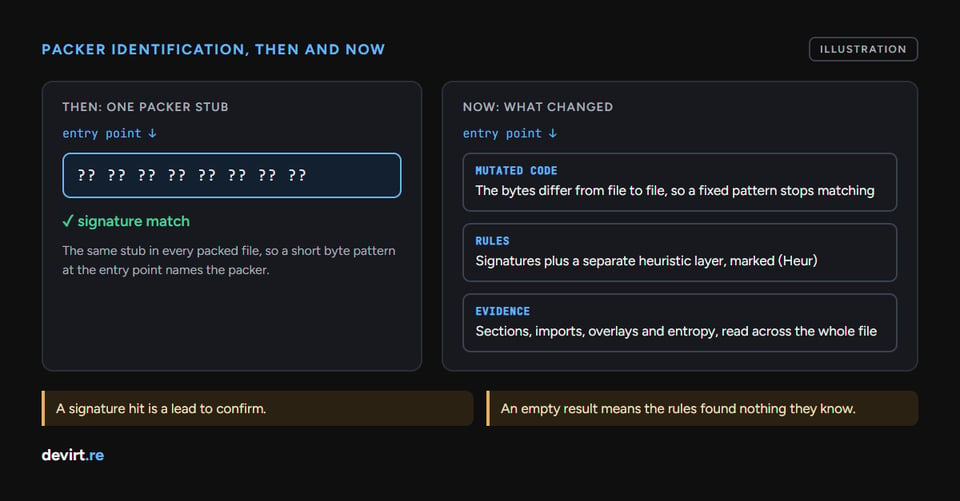
PEiD identified a packer by comparing short byte patterns against the code at a file's entry point, the first instruction Windows runs. Packers of PEiD's era wrote a small unpacking stub and pointed the entry point at it, and that stub looked much the same in every file the packer produced. A few dozen bytes were enough to name it.
The tool offered three depths of search. In the words of one mirrored PEiD README:
- Normal mode scans the file at its entry point.
- Deep mode scans the section that contains the entry point.
- Hardcore mode scans the entire file.
Users could also load an external userdb.txt file of extra signatures, and the Detect It Easy README still refers to PEiD's "userdb ecosystem". That's why PEiD keeps turning up in older tutorials and write-ups: the method worked well on packers that never changed their stub.
Why do entry-point signatures age badly?
Entry-point signatures age badly because they match bytes, not behavior. Three things broke the model:
- Protectors stopped writing a fixed stub. Commercial protectors apply mutation, rewriting code into equivalent but different instruction sequences, so two files protected by the same tool may no longer share the bytes a signature needs.
- Normal mode looks in one place. If the identifying code sits anywhere other than the entry point, Normal mode never sees it. Deep and Hardcore modes widen the search, and the wider the search, the more short patterns match by accident.
- Signatures piled up without pruning. Short patterns written for one packer start matching unrelated code, so the database produces confident-looking names for the wrong thing.
None of this makes PEiD dishonest. It reports what its rules matched, and the rules describe the packers of its time.
What replaced PEiD?
Detect It Easy and Exeinfo PE are two maintained identifiers that do PEiD's job today, alongside merged signature sets that keep the old rules usable:
- Detect It Easy runs on Windows, Linux and macOS. Its rules are DiE-JS modules, which range from compact signatures to multi-stage analyzers that look at a file's structure. It also runs a separate heuristic layer and marks those results "(Heur)", so you can tell a matched rule from an educated guess.
- Exeinfo PE is a Windows detector for packers, protectors, compilers and .NET obfuscators. Its external
userdb.txtlists 4,469 signatures, which keeps the PEiD-style ecosystem alive. - packing-box's Python PEiD reimplements the original tool and merges more than 5,500 signatures from several sources, which is useful when you want PEiD-style results in a script.
The broader shift is from "does this byte pattern appear?" to "what does the whole file look like?" Detect It Easy, for example, weighs signals such as overlays and high entropy alongside its rules. Knowing how to read a PEiD or Detect It Easy result matters as much as which tool you pick, because all three report a name with very different evidence behind it.
Is PEiD still accurate?
PEiD is still accurate for the older packers its signatures describe, but its results need checking. The Detect It Easy README makes the point itself: DiE bundles PEiD's rules for compatibility and calls them useful for reproducing legacy detections, while warning that many of those signatures are noisy by modern standards and can produce convincing-looking false positives. Treat a PEiD match as secondary evidence, and confirm it against the file's structure before you rely on it.
What does an empty result mean?
An empty packer-detector result means only that the enabled rules found nothing they recognize. It doesn't mean the file is unpacked or unprotected. The Detect It Easy README puts it this way: a clean report only means the enabled rules did not find the static evidence they know how to recognize.
So when an identifier comes back blank, keep looking:
- Entropy: compressed or encrypted sections score high, and DIE's README lists high entropy among the signals it weighs.
- Imports: a program that imports almost nothing often resolves its real imports at runtime.
- Sections: unusual names or a large section with little readable code are worth a second look.
None of these proves protection on its own. Together they tell you whether "nothing found" means "nothing there" or "nothing the rules know".
What if two identifiers disagree?
When PEiD and Detect It Easy disagree on a file, trust the result backed by more evidence, not the one with the more specific name. PEiD's signatures were written for older packers. Detect It Easy can reject a misleading match from its signature database and replace it with a more precise heuristic conclusion. If the two still conflict after that, the file's structure decides: the matching section layout, the entropy, and the protector's own markers.
This is also where antivirus results confuse people. A protector's name in a detection label describes how the file was wrapped, not what the program does. Legitimate software gets protected too, and protected files are sometimes reported as false positives.
What if the result names a VM protector?
When an identifier names VMProtect or Themida, the question changes. Those protectors can translate selected functions into bytecode for their own virtual machine. Unpacking alone never removes that virtualization, because the virtualized functions run as bytecode inside the protector's own interpreter. A disassembler or debugger from your usual reverse engineering tools will show the protector's interpreter instead of the program's logic. Recovering those functions is devirtualization, and the difference between unpacking and devirtualization decides which work comes next.
The name alone doesn't tell you how much of the file is affected. Background on how VMProtect splits a program into native and virtualized code helps there. For a broader view of the techniques packers and protectors layer on top of each other, code obfuscation covers the families one by one.
Identification is still the right first step, as long as it's treated as a first step. A signature hit, a heuristic guess and an empty report are all leads. The file's structure is the evidence.
Written by Devirt, an automated devirtualization service for authorized analysis of protected software.


