
What Is VMProtect? Who Uses It, and Why Antivirus Flags It
VMProtect explained: what the protector does, who uses it, why antivirus engines flag protected files, and what an analyst does with one.
VMProtect is a commercial software protector from VMProtect Software that rewrites selected functions of a program so they are hard to read, debug or modify. As of November 2026 its user manual lists three ways to protect a function, plus a set of file-wide options. It supports x86, x86-64 and ARM64 binaries and .NET assemblies, on Windows, Linux, macOS and Android. The same tool turns up in games, licensed business software and malware samples, which is why the name confuses people. This post explains what VMProtect does, who uses it, why antivirus engines react to it, and what an analyst sees inside a protected file.
Reading a VMProtect file you're allowed to analyze? Devirt recovers VMProtect-virtualized functions as an IDA database and annotated pseudocode, and marks every function proven, runtime-dependent, unresolved or permanently bounded. Start with a free assessment.
What is VMProtect?
VMProtect is a protector, which is a different thing from a compressor or an installer. A developer runs it on a finished program and picks the functions worth protecting, such as license checks or proprietary algorithms. VMProtect then rewrites those functions so the shipped file still runs normally but resists analysis. Its signature technique, virtualization, turns protected functions into bytecode for a virtual machine embedded in the protected file.
The VMProtect website describes the product as protection against cracking, analysis and reverse engineering. That is the whole job: VMProtect makes it slower and more expensive for someone else to understand the protected parts of a program.
How does VMProtect protect a program?
VMProtect protects a program at two levels. Per function, its user manual offers three modes:
- Mutation: the function's instructions are rewritten into equivalent but more complicated sequences. The code stays native machine code and reads worse.
- Virtualization: the function is converted into bytecode that only VMProtect's embedded virtual machine can execute. A disassembler no longer sees the original instructions at all.
- Ultra: mutation and virtualization combined. The manual says it gives high protection and runs slowly.
Per file, VMProtect adds options that work around those functions:
- import protection, which hides the list of system APIs the program calls
- resource and memory protection
- packing, which compresses the protected file
- debugger detection and detection of virtualization tools
- a licensing system that creates and checks serial numbers and can lock a program to a hardware identifier
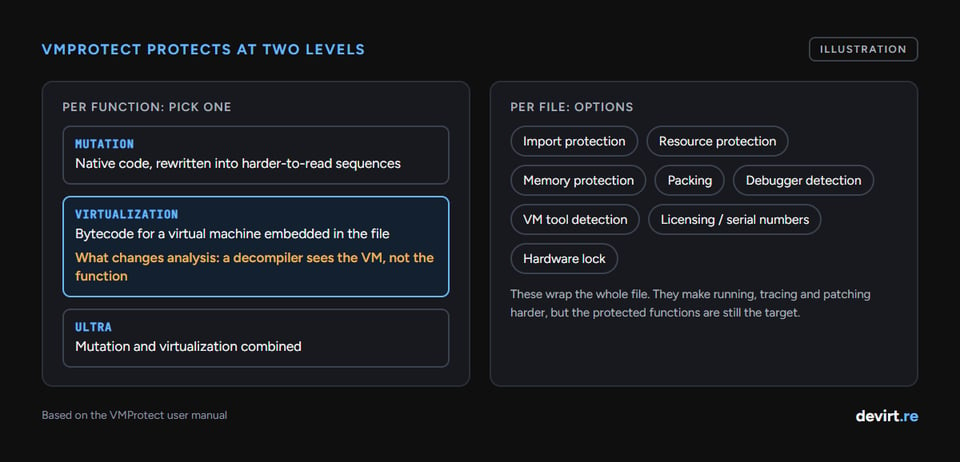
Virtualization is the option that changes an analyst's day. Mutated code is still ordinary code underneath. Virtualized code is a different instruction set designed by the protector, so a decompiler shows the virtual machine's machinery instead of the function you wanted to read.
Who uses VMProtect, and why?
VMProtect is used by individual developers and companies that ship desktop and mobile software and want to slow down cracking, tampering and reverse engineering. The vendor licenses it to private developers and to organizations, and its own site shows customer logos from games and technology companies.
The reasons are commercial. A license check that anyone can patch out is worth nothing, and an algorithm a competitor can read easily is not much of an advantage. VMProtect's licensing system, serial numbers and hardware locking also mean some developers use it for license enforcement as much as for protection. Against another widely used commercial protector, VMProtect and Themida differ in how their virtual machines are built.
Is VMProtect malware?
VMProtect is not malware. It is a commercial protector that legitimate developers use to shield their software from cracking and tampering. Malware authors use it too, so some antivirus engines detect VMProtect-protected files heuristically. F-Secure's threat description for VMProtect, for example, files it under a malware category and calls it a security envelope and file compressor that has been used to obfuscate malicious software.
A VMProtect detection tells you the file is protected. It does not tell you what the protected code does. False positives on legitimate software happen for exactly this reason: the protection layer looks the same whether it wraps a game launcher or a trojan. If your own signed software gets flagged, the detection is about the protector, and the antivirus vendor's false-positive process is where that conversation starts.
Why does VMProtect show up in malware?
Malware authors use VMProtect for the same reason software vendors do: it slows analysis. MITRE ATT&CK tracks this as sub-technique T1027.002, Software Packing, which covers both packers that compress or encrypt code and virtual machine software protection. Its procedure examples list VMProtect use by several tracked groups.
The interesting part is how often the strongest option goes unused. In an ANY.RUN study published on 18 June 2024, none of the VMProtect- and Themida-protected samples from five malware families used code virtualization. The protectors were used much like basic packers, so unpacking and ordinary dynamic analysis reached readable code. So a VMProtect detection on a malware sample does not mean its functions are virtualized.
What happens when an analyst opens a VMProtect file?
An analyst who opens a VMProtect file first confirms what it is, then works out whether the functions they need are only packed or virtualized. Identifiers such as Detect It Easy report the protector from signatures and heuristics. Devirt's free browser check does the same first look on your own file: it reads the format, sections and protection signals inside your browser, and the file never leaves your device.
The split that matters comes next:
- Packed only: the original instructions come back once the protected program has unpacked itself in memory, and normal static and dynamic analysis resumes.
- Virtualized: the disassembler shows a dispatcher loop and dozens of small handler routines instead of the function. Reading that means tracing the virtual machine by hand, tracing it dynamically and accepting gaps, or translating the bytecode back into readable code.
That last route is devirtualization. The longer walk-through of all three options, written for incident responders, is in our guide to malware reverse engineering on VM-protected samples. The deeper technical background on VMProtect's virtual machine lives on the VMProtect research page.
Where does VMProtect protection stop?
VMProtect protection slows analysis; it does not make analysis impossible. Every protected function still has to run on a real processor, so its behavior can be observed, and virtualized bytecode can be translated back into readable logic with enough work. What does not come back is the original source code: names, comments and project structure are gone at compile time, before VMProtect ever touches the file.
That is why honest recovery is reported function by function. VMProtect devirtualization at Devirt marks every recovered function as proven, runtime-dependent, unresolved or permanently bounded, so a reader knows which parts of the recovered code carry evidence and which still depend on conditions nobody has seen yet. Devirt only accepts files you own or are authorized to analyze.
Written by Devirt, an automated devirtualization service for authorized analysis of protected software.


