
Ghidra MCP Server Setup: 6 Servers and What They Can Change
Ghidra MCP servers compared with data: which of 672 tools can change your project, who labels them, and setup for Claude Code, Cursor, VS Code, Codex.
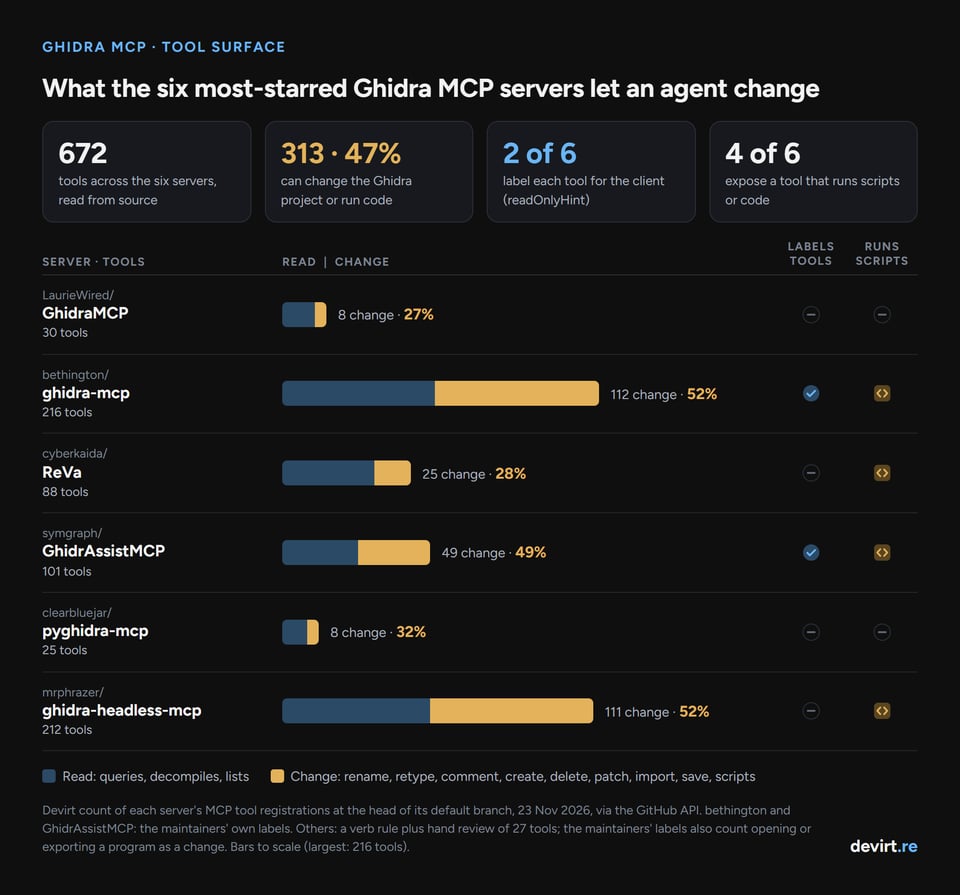
A Ghidra MCP server is a Model Context Protocol server that lets an AI agent, such as Claude Code, Cursor or GitHub Copilot in VS Code, call Ghidra's decompiler and program database as tools. On 23 November 2026 we read the source code of the six most-starred dedicated Ghidra MCP servers on GitHub and sorted every tool they expose. Of 672 tools, 313 (47%) can change your Ghidra project: rename, retype, comment, patch, delete or run a script. Only two of the six servers label which tools are which for the client. This post compares the six servers, shows how to connect each to your AI client, and explains how to keep an agent read-only.
The read-only end of the scale: the servers below differ mostly in how much an agent can change. Devirt's MCP connector sits at the far end: it's read-only, so your agent can read the assessments, jobs and results of protected-binary work you approved, including the coverage ledger, while upload, scope approval and payment stay in your account. It registers in the same MCP client as any server here, which is how AI reverse engineering continues past a virtualized function. Devirt accepts only files you own or are authorized to analyze.
What is a Ghidra MCP server, and is there an official one?
A Ghidra MCP server is a bridge between Ghidra and an MCP client: the client lists the server's tools, and the model calls them to decompile a function, follow cross-references or rename a variable. There's no official Ghidra MCP server. The NSA's Ghidra repository doesn't ship one in its current release (12.2, October 2026), and all seven issues and pull requests with "MCP" in the title that asked for one are closed.
Every Ghidra MCP server is a community project, and the field is crowded: our census of public Ghidra MCP servers counted 138 on GitHub on 13 November. This post takes the six most-starred dedicated servers from that census (standalone Ghidra MCP servers, not wider toolkits or tools built on top of one) and goes one level deeper, into what their tools do.
The six Ghidra MCP servers compared
The six leading Ghidra MCP servers split into two designs. Four ship a Ghidra extension that runs inside the Ghidra GUI, with a headless option. Two are headless first: they start Ghidra themselves through PyGhidra, with no window open.
| Server | Stars (23 Nov) | Latest release | Runs as | Tools | Can change the project | Labels tools for the client | Runs scripts |
|---|---|---|---|---|---|---|---|
| LaurieWired/GhidraMCP | 12,008 | 2.0 (10 Oct 2026) | Ghidra plugin + Python server; headless option | 30 | 8 (27%) | No | No |
| bethington/ghidra-mcp | 6,326 | v7.0.0 (21 Oct 2026) | Ghidra plugin + Python bridge; headless server; Docker | 216 | 112 (52%) | Yes | Yes |
| cyberkaida/reverse-engineering-assistant (ReVa) | 974 | v7.3.2 (13 Nov 2026) | Ghidra extension (HTTP); headless mcp-reva |
88 | 25 (28%) | No | Yes |
| symgraph/GhidrAssistMCP | 820 | 3.1.0 (18 Nov 2026) | Ghidra extension (SSE, HTTP); headless script | 101 | 49 (49%) | Yes | Yes, off by default |
| clearbluejar/pyghidra-mcp | 468 | v0.3.0 (2 Nov 2026) | Headless, or with a shared Ghidra GUI | 25 | 8 (32%) | No | No |
| mrphrazer/ghidra-headless-mcp | 200 | none (last commit 16 Sep 2026) | Headless (stdio or TCP) | 212 | 111 (52%) | No | Yes |
The tool counts are what each server registers in its source today, so they differ from older numbers you'll see quoted. bethington's README lists 219 tools in its catalog, 216 of them served by the GUI plugin, and GhidrAssistMCP now exposes 101 explicitly named operations, having renamed and split its older consolidated tools. Two of LaurieWired's 30 tools and five of pyghidra-mcp's 25 only work with the Ghidra GUI attached.
Requirements move with Ghidra releases, and every extension zip only loads in the Ghidra version it was built for. LaurieWired's current release targets Ghidra 12.1.4. bethington's targets Ghidra 12.2 with Java 25, ReVa supports Ghidra 12.0 and later, and GhidrAssistMCP supports 12.0 to 12.2 on Java 25. The two headless servers need a local Ghidra install and GHIDRA_INSTALL_DIR.
Which tools can change your Ghidra project?
A Ghidra MCP tool can change your project when it writes to the program database or project: renaming a function, setting a type, adding a comment, creating or deleting a structure, patching bytes, importing a file, saving, re-running analysis or running a script. Across the six servers, 313 of 672 tools do one of those things. The rest read.
The share follows each project's scope, and popularity has little to do with it. LaurieWired's GhidraMCP keeps to eight change tools, all renames, types and comments. ReVa's 25 add bookmarks, labels, structures parsed from C, Version Tracking markup, imports and its script tools. The two biggest servers, bethington's ghidra-mcp and mrphrazer's ghidra-headless-mcp, are roughly half change tools: bethington's include Ghidra Server version control and a live debugger, and the headless server can patch instructions, rebase the image and edit references directly.
Four of the six can also run arbitrary code inside Ghidra:
- bethington/ghidra-mcp:
run_script_inlineandrun_ghidra_script - ReVa:
run-script, alongside tools that write and edit scripts - GhidrAssistMCP:
run_script, switched off by default - ghidra-headless-mcp:
ghidra.eval,ghidra.callandghidra.script
A script tool can do anything the Ghidra process can do. mrphrazer's README says so directly: its read-only guard "does not sandbox Python, Java, filesystem, or process access". ReVa's README warns that its scripting tools are on by default, and asks you to enable API-key authentication or disable them if ReVa listens on anything other than localhost.
How we counted: the tool names come from each server's registration code at the head of its default branch on 23 November 2026, read through the GitHub API. Nothing was installed or run. bethington's ghidra-mcp and GhidrAssistMCP label every tool themselves (read-only, write or destructive), and we used their labels. For the other four, a rule on the tool's leading verb decided (get, list, decompile read; rename, set, create, delete, patch change), and we read the description of 27 tools where the name was ambiguous. The two definitions aren't identical: bethington and GhidrAssistMCP also count session and project operations, such as opening, switching or exporting a program, as changes. Our verb rule applied to those two servers gives 85 (39%) and 39 (39%) instead of 112 and 49, so read their shares as the upper end. Counts are from each default branch; for bethington that's dev, which its README calls experimental, so it can run ahead of the v7.0.0 release. The scripts, the full tool list and every hand decision are kept with this post.
How do you keep a Ghidra MCP agent read-only?
You keep a Ghidra MCP agent read-only by combining what the server offers with what your client enforces, because most servers offer little. MCP has a field for this: a server can mark each tool with readOnlyHint and destructiveHint annotations. The MCP specification sets readOnlyHint to false when it's missing, so a client should treat an unlabelled tool as one that may modify its environment. The specification also calls the annotations hints, not guarantees.
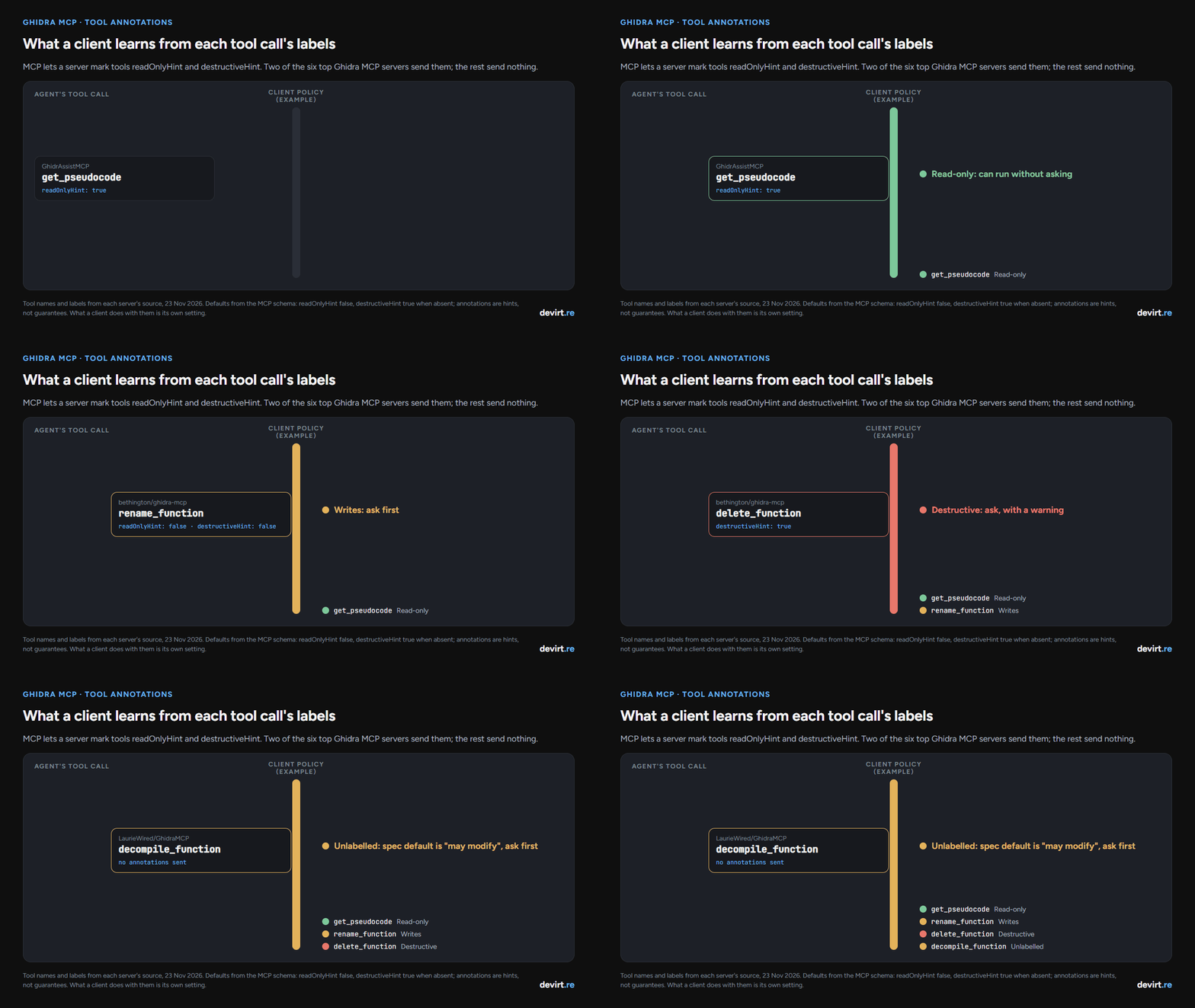
Only bethington's ghidra-mcp and GhidrAssistMCP send these labels. bethington labels 104 of its 216 tools read-only and 25 destructive. GhidrAssistMCP labels 52 of 101 read-only and 24 destructive. The other four servers send nothing, so the client has no labels to go on: depending on its settings, it asks before every call or before none.
What each server gives you beyond labels:
- ghidra-headless-mcp opens programs read-only by default. An agent must call
program.mode.setto switch a session to read-write, and raw scripting refuses a read-only session unless it's told to write. - GhidrAssistMCP has a checkbox per tool in its Configuration tab, and ships seven tools switched off:
import_file,export_programand its five script tools. - bethington/ghidra-mcp documents a "minimal read-only allowlist" of four tools for clients that gate by name, and warns that an allowlist cut too far makes the agent work around it through the plugin's HTTP API.
- LaurieWired's GhidraMCP, ReVa and pyghidra-mcp document no read-only mode. ReVa's README goes the other way for convenience: it suggests a Claude Code permission rule that lets every ReVa tool run without a prompt, which includes
run-script.
Whatever the server, two habits hold. Keep a copy of the Ghidra project before an agent session, and review the agent's renames the way you'd review a colleague's: a confident wrong name is harder to spot than a missing one.
How do you connect Ghidra MCP to Claude, Cursor or VS Code?
You connect a Ghidra MCP server to an AI client in one of two ways, and the server's transport decides which. A stdio server is started by the client from a command. An HTTP server runs on its own, and the client is given its URL.
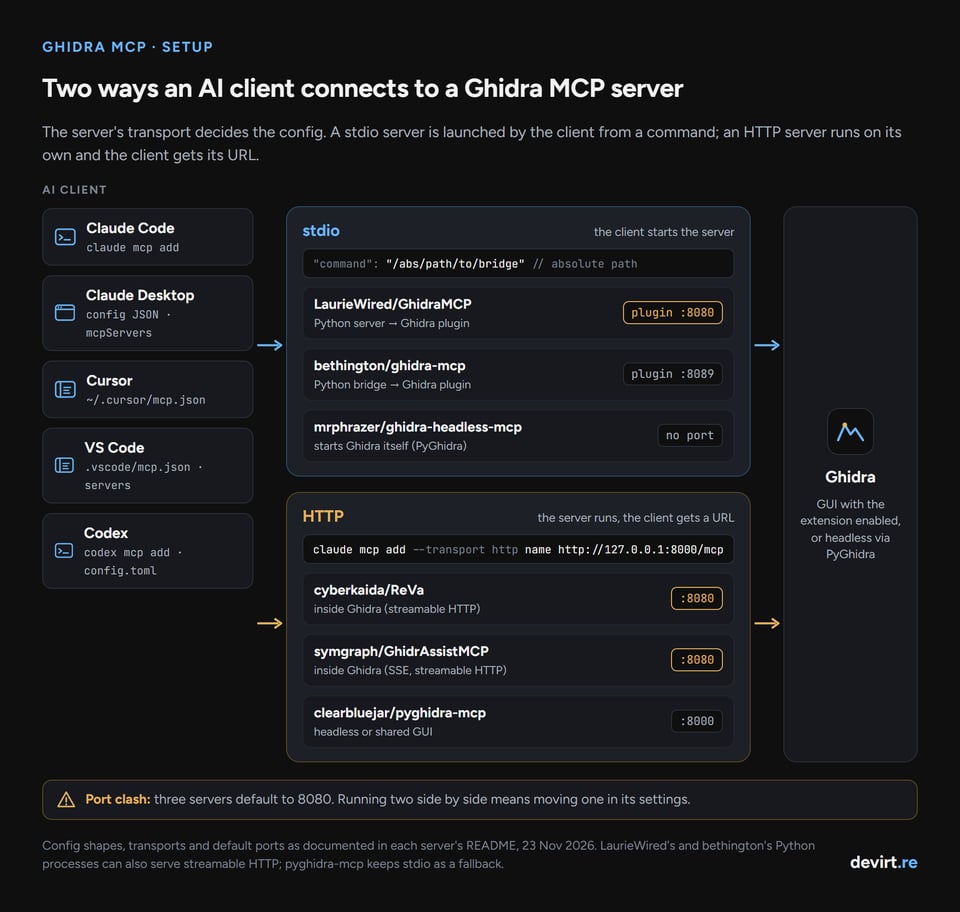
LaurieWired's GhidraMCP and bethington's ghidra-mcp both run a small HTTP server inside the Ghidra plugin and a Python bridge that speaks MCP over stdio, so the client launches the bridge. ReVa and GhidrAssistMCP serve MCP over HTTP directly from inside Ghidra. pyghidra-mcp recommends streamable HTTP and keeps stdio as a fallback, and ghidra-headless-mcp uses stdio.
Claude Code
Claude Code takes one command. For LaurieWired's GhidraMCP, from its README:
claude mcp add ghidra -- uvx --from git+https://github.com/LaurieWired/GhidraMCP ghidra-mcp --ghidra-server http://127.0.0.1:8080/
For an HTTP server, such as pyghidra-mcp started with --transport streamable-http:
claude mcp add --transport http pyghidra-mcp http://127.0.0.1:8000/mcp
pyghidra-mcp's README adds a trap for project .mcp.json files: give an HTTP entry "type": "http", because Claude Code treats an entry with only a url as a stdio server.
Claude Desktop and Cursor
Claude Desktop and Cursor read the same mcpServers JSON shape, in the Claude Desktop config file and in ~/.cursor/mcp.json. bethington's quickstart uses its installed bridge:
{
  "mcpServers": {
    "ghidra-mcp": { "command": "/home/<you>/.local/bin/bridge-mcp-ghidra" }
  }
}
Use the absolute path. bethington's README explains why: a client started from a desktop launcher doesn't see your shell's PATH, so a bare command fails with spawn ENOENT before the bridge runs.
VS Code and Codex
VS Code uses a servers key with a type on each entry. LaurieWired's README puts a "type": "stdio" entry for its command in .vscode/mcp.json, and ReVa's README adds a "type": "http" entry for its URL to VS Code's user settings. For Codex, pyghidra-mcp's README adds an HTTP server to ~/.codex/config.toml:
[mcp_servers.pyghidra-mcp]
url = "http://127.0.0.1:8000/mcp"
ghidra-headless-mcp registers with codex mcp add and the same command you'd give Claude Code.
One clash to plan for: LaurieWired's plugin, ReVa and GhidrAssistMCP all default to port 8080. Run two of them side by side and you have to move one. bethington's plugin uses 8089, and pyghidra-mcp's HTTP server uses 8000.
Which Ghidra MCP server should you use?
The best Ghidra MCP server is the one whose tool surface matches the job, and the data gives a short list:
- A first session in the Ghidra GUI: LaurieWired's GhidraMCP. With 30 tools and eight that change anything, it's the easiest to review.
- Long annotation sessions with scripting, emulation and debugging: bethington's ghidra-mcp. It has the widest toolset, labels on every tool (GhidrAssistMCP is the only other server that labels) and the only documented allowlist.
- Control over each tool: GhidrAssistMCP, for the per-tool switches, the labels and risky tools off by default.
- Headless runs over many binaries: pyghidra-mcp for a lean, project-wide set of 25 tools, or ghidra-headless-mcp when you want depth and read-only sessions by default.
- Claude Code users who want ready-made skills: ReVa, whose repository also ships a Claude Code plugin marketplace with triage and deep-analysis skills.
Whatever you pick, check the release against your Ghidra version first. Extension zips are built per Ghidra version, and a mismatch is one reason a plugin doesn't show up after installing.
Where every Ghidra MCP server stalls
Every Ghidra MCP server reads what Ghidra's decompiler reads, so the six differ in what an agent can change and share the same view of the code. On a function protected by code virtualization, which VMProtect and Themida apply to the functions a developer most wants to protect, the decompiler shows the protector's interpreter: a dispatcher, virtual registers and handlers. An agent can describe that loop accurately and still not know what the function does. Adding tools doesn't change it, because the protected logic exists only as bytecode until it's devirtualized.
That's the point where an agent should hand off rather than guess. The devirt.re guide to ghidra mcp and other reverse engineering MCP servers shows where that happens in an agent workflow. After recovery, the agent needs evidence back: which functions were proven, which depend on runtime data and which stay open. Devirt reports those proof states per function, through the same read-only connector, for binaries you own or are authorized to analyze.
These servers change fast. Three of the six shipped a release in the last month, so treat the counts here as a dated snapshot and recheck the README before you install.
Written by Devirt, an automated devirtualization service for authorized analysis of protected software. Data: GitHub REST API, 23 November 2026; tool lists read from each server's source, scripts and raw output kept with this post.



