
Putting it all on the table.
Reproof now supports tables, complete with Markdown import and export.
Hi!
Have you tried adding paragraph versions while writing in Reproof yet? We've made the experience a bit better this week, thanks to feedback. You'll now see which version you're currently viewing (something like (2/3), if you're on version two out of three). That, and the versions slide in and out of view a bit more smoothly.
We cooked up something new, too: Table support.
New to Reproof: Tables
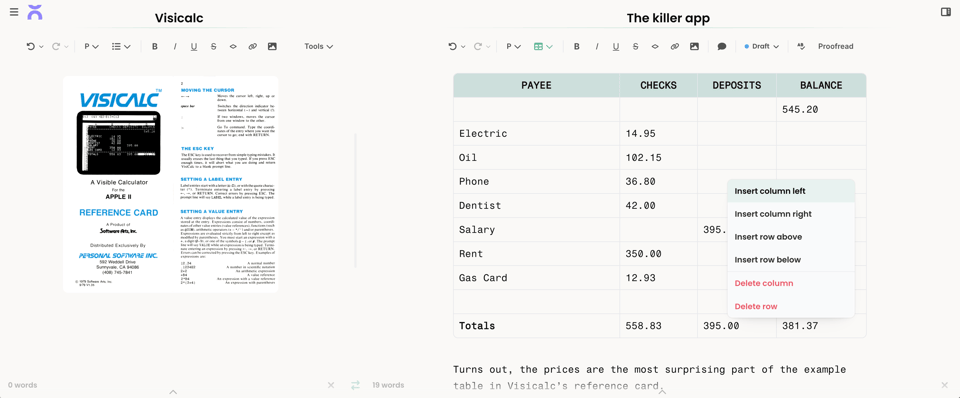
Words come first, in Reproof. But words don't only come in paragraphs. Sometimes they come in bullet points, in blockquotes, and code blocks. And sometimes they need to be tabulated, sorted into columns and rows, organized by category and quantity.
For those times, you need tables. And you can now make those tables in Reproof, or copy and paste them in from any other app.
To add a table in Reproof, click the lists button in the top toolbar, hover over the Table item, then add the number of rows and columns you need. Or, you can start out with Markdown, typing out your first row with pipes like | this | and this | then Reproof will turn it into a table when you press return. Or you could copy a table from Excel, Google Sheets, or any other spreadsheet or table editor, and paste it into Reproof (as long as it has no more than 6 columns; any more gets hard to read in a document).
Then, edit to your heart's content, using Reproof's rich text and markdown formatting to tweak things as needed. Drag and drop columns and rows, mark the top row as a heading, copy and paste everything out into any other app with full Markdown and HTML table support.
It's the easiest way to add tables alongside everything else you're writing. And I'm biased, but it's the fastest way I've ever used to jump between Markdown and formatted tables.
Ok, back to writing! Hope you have a great weekend, and if you have any feedback about writing in Reproof, let us know.
~ Matthew, co-founder, Reproof


Add a comment: