
Write without leaving your keyboard
Hi!
Reproof is built for writing, focused writing where you get in the zone and ignore everything else other than the words you're putting down on the page. Any interruption, anything that makes you need to move your mouse, or that makes your cursor act slightly differently than you'd expect, is enough to break that concentration.
This week, we tweaked a bunch of little things in Reproof to make it easier to keep writing without losing focus. When you switch paragraph versions, for instance, your cursor now immediately moves to the new version—and remembers your previous location if you switch back. That makes it easier to jump back and forth, especially with the Ctrl+Alt+, or . keyboard shortcuts to go to previous and next versions, respectively.
That, and one new feature that lets you do even more in Reproof directly from your keyboard:
Quick Actions
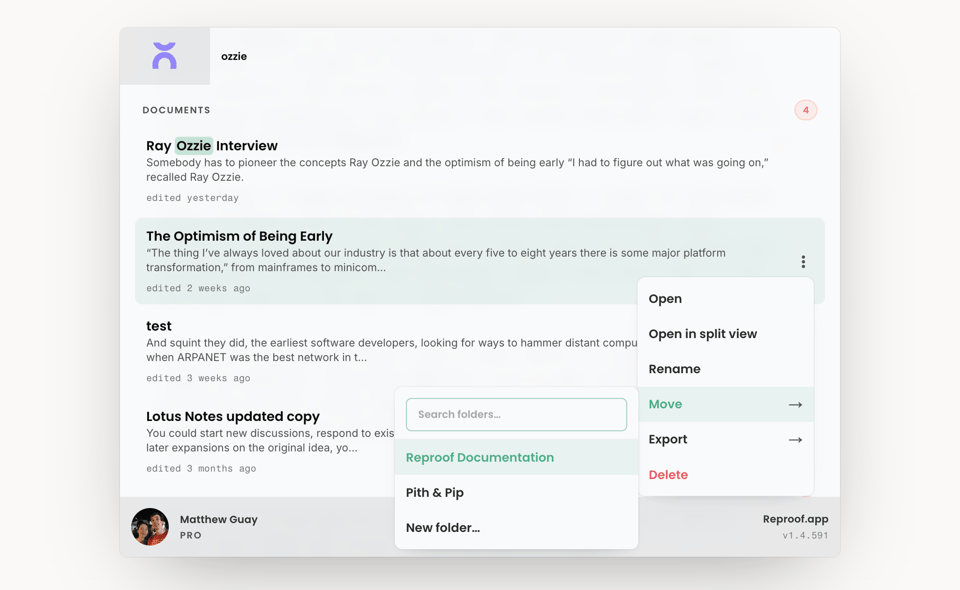
My favorite way to switch documents in Reproof is the Command Palette; you press Cmd+K (or Ctrl+k on a PC), type in some text from the doc, then press enter to open it. No mouse needed.
But then I'd want to open my notes document in side-by-side view, and have to open the document sidebar, click on the document's menu, and select Open in split view. Not that hard, but just enough to take me away from writing.
Quick Actions solves that, with a keyboard-navigable menu inside the Command Palette. Search for a document, arrow down to find the right document if there are multiple results, then press the → arrow key and use your up and down arrows to find the option you want before pressing enter to select it.
You can open documents in split view (my favorite use-case), rename or move them, export them in your favorite format, or delete (after confirmation), all from your keyboard.
How are you using Reproof?
Got a unique way you've used Reproof so far? Or have you written something you're proud of in Reproof? Or ... do you have anything you wish it did differently or that has been bugging you as you're using it?
Reply, and let us know. We'd love to hear how you're finding Reproof so far.
Thanks, and happy writing!
~ Matthew Guay, co-founder, Reproof


Add a comment: