Reproof, the writing app for perfectionists, is here!
Hey!
A while back, you signed up to get notified when Reproof, the new writing app we were building, finally launched.
It ... took a little longer than expected. A lot longer, in fact, years longer, as we rebuilt the editor time and again until we built the app we’d dreamed of all along.
But it’s finally here, and you can try it today at reproof.app. I’m pretty excited to tell you all about it.
But first: If you signed up years ago but don’t want to be on the Reproof list now, you can unsubscribe here. No hard feelings, really.
If you would like to see what makes Reproof different, though, let’s dig in.
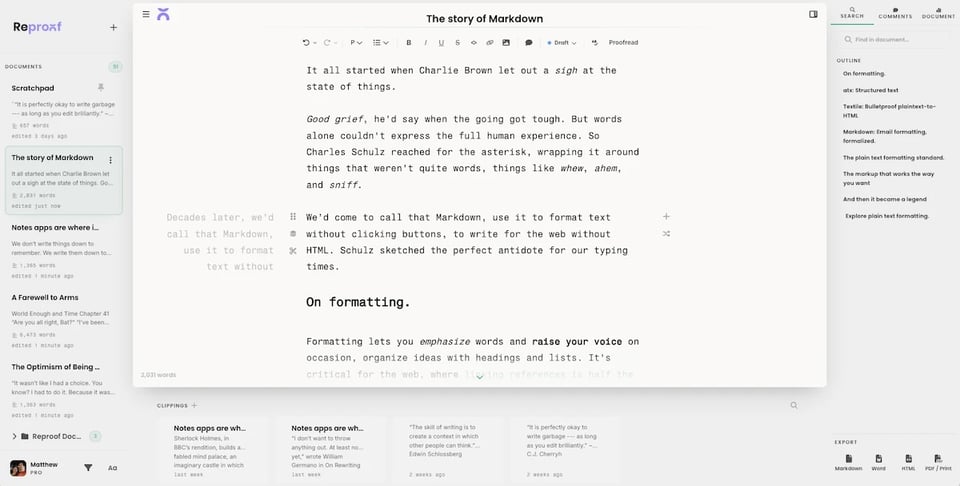
Almost every other writing app treats documents like single sheets of paper, with one paragraph after another, and nowhere to play with ideas or save things for later. In Reproof, writing isn’t linear, and you can write and rewrite until your words sing.
Introductions, say, are hard to nail. I’ll rewrite them three or four times before settling on what sounds best. That’s why Reproof is built around paragraph versions. Write a paragraph, then click the + button beside a paragraph to create a new version and write another take on that intro. Still not quite there? Do it again. Then click the previews of the paragraph on the right or left to switch back and forth between versions, or drag and drop the paragraph to another spot if it’d fit better there. It’s like a children’s "choose your own adventure" story, for real-world writing.
Then when you write something that’s good but ... doesn’t quite belong, click the scissors icon beside that paragraph to save it as a clipping, stored at the bottom of your document. It’s a softer way to save your darlings for later, to drag back into another spot in this document or resurrect in a whole other piece later.
It’s the writing workflow I’ve used for years, piecemeal, with cut bits pasted into the bottom of Google Docs. With Reproof, I can stay focused on my writing and keep away the clutter while not losing the original ideas along the way.
Along with that, Reproof includes a bunch of writing-focused niceties I’ve come to rely on over the past few months:
Versions, with a daily backup of edited documents, to step back in time.
Markdown and rich text editing, and you can copy and paste in Markdown or rich text anytime for easy publishing.
Side-by-side documents, for notes on one side and a doc on the other, or for working on a press release and blog post about the same topic together, or any other similar-but-different work.
Selective find and replace that works across both documents if you have them open side-by-side.
A Command Palette, to search through documents and settings and jump to them without leaving your keyboard.
Proofreading, to catch duplicate words and stray TKs and tense changes and more.
Writing stats, to see how much you’ve written over time.
Reproof is what I’ve taken to calling the writing app for perfectionists, where you can write and rewrite until you get it right. It’s the app I’ve written in daily for the past months, and I can’t wait for you to try it.
It’s ready for you to write in, today, at reproof.app.
If you have 15 minutes, though, I’d love to give you a personal walkthrough. You can book a time on my calendar, or just reply to this email if another time works better.
Thanks for sticking around, and I cannot wait to see what you write with Reproof!
~ Matt Guay, co-founder, Reproof
-
Grep. Grep. Grep. Grep. Greppy grep. Grep.
21st century writing is copy-centered coding. I’ve authored or co-authored a dozen books, written columns for major newspapers and features for national magazines, invented food blogging, pioneered an early web site, and wrote as much on the Internet as anyone. I’ve written all the writing, so I know whereof I speak.
No Grep? I’ll stay in BBEdit.
-

Hey Jim, thanks for following along and checking Reproof out! Our focus right now is on simplifying the writing and experimentation process, with power user tools simplified to be as approachable as possible (best example there, I think, is selective find and replace).
Got a lot of next things we're excited to build out first, from collaboration to API-powered publishing. I completely understand why Grep is a dealbreaker for you today, and we'll keep listening to feedback for what to build out next.
-
Grep is simple if you offer canned plain-language options (from, say, a scroll), and the heavier stuff is easily hidden out of view. Tons of WYSIWYG word processors and markdown editors have offered it as a hidden search/replace option. Easy implementation, easy hiding, huge power unlocked.
There are a jillion "we're so simple, we're so sleek, we're so approachable" writing apps, even if yours is a little better. They all feel like kiddy toys. It seems like your goal is to make a more grown-up, more powerful version of one of those. If so, Grep is baseline IMO.
I'll stop lobbying now.


Reply: