Software Updates — Week of August 25, 2026
Here's what's new this week in GovPossible:
Grants:
- 9/1: Palmetto Pride (-> $15k) - Keep SC Beautiful Programs Grants learn more
- 9/2: SC Dept of Archives Historic Preservation Grants ($40k-$200k) - preservation projects that benefit local communities and the public through the physical repair and rehabilitation of South Carolina’s historic buildings learn more
- 9/4: Foundation for Rural Service ($250-$5K) - aid to communities served by NTCA members learn more
- 9/9: DOT – Bollards Installation Grant (~$500k) - installation of bollards in high pedestrian areas learn more
- 9/10: (monthly) Park and Recreation Development (PARD) (~$5k-$60k, 80/20 match, balance available by county) - Build of new or renovation of existing recreation facilities. Learn More
- 9/14: SC Rural Infrastructure Authority (up to $1m, up to 25% match) - Assistance is available for a variety of water, waste water and storm water drainage construction activities. Learn more
- 10/6: Cities for Financial Empowerment Fund ($20k plus technical assistance and follow-on funding) - Grant to setup Financial Empowerment Center training for residents on good financial practices. Learn more
Introducing the Facility Reservations Module:
Hello everyone! We're excited to announce the launch of our new Facility Reservations module - a complete system for managing your town's bookable spaces, from picnic shelters and meeting rooms to food truck spots and farmers market stalls!
What's New?
If your reservations currently live in a paper calendar, a binder, or a spreadsheet only one person understands, this module is for you. Facility Reservations gives your staff one place to take applications, check availability, prevent double-bookings, collect payment, and publish the schedule to your website - all connected to your general ledger like everything else in GovPossible.
Facilities, Your Way
You define facility types - categories like "Picnic Shelters," "Meeting Rooms," or "Farmers Market Stalls" - and then add the individual facilities beneath them, each with its own name, location, capacity, and dimensions.
Each facility type picks the schedule style that matches how you actually rent it:
Two-Block Days Every day splits into a Morning/Afternoon block and an Evening block - perfect for shelters and community rooms where you rent by the half-day.
Hour Ranges You set the windows when a facility is available each day of the week (even split windows, like 8-11am and 1-3pm), and bookings pick any start and end time within them in 15-minute increments. You can even require a cleanup buffer between back-to-back bookings.
Weekly Slots A recurring day of the week with a set time window - built for things like Sunday farmers markets, where a vendor books their stall for the day.
You can also set blackout dates - for a whole facility type or a single facility - so nothing gets booked while the shelter roof is being replaced.
Taking Applications
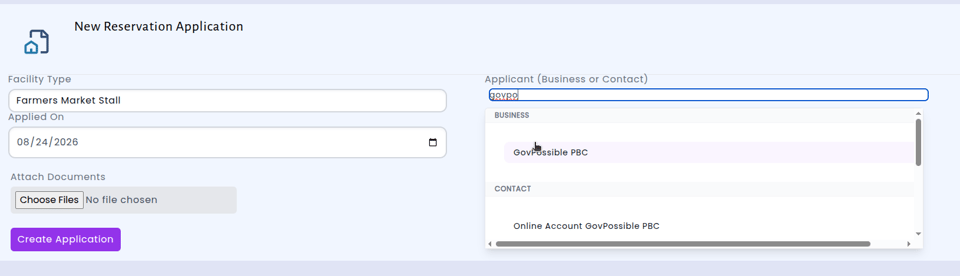
Each reservation starts as an application from a business or an individual, holding one or more bookings. As your staff pick a facility, date, and time, the system checks availability live - and if the slot is taken, it tells you who has it and suggests other facilities of the same type that are free that day.
Behind the scenes, double-bookings are blocked at the database level, so two clerks can't reserve the same shelter for the same afternoon no matter how fast they both click.
Applications move through a simple lifecycle - submitted, under review, then approved, held, or voided - and approving an application confirms all of its bookings in one step. You can also define a requirements checklist per facility type (rental agreement, certificate of insurance, fire marshal inspection...) and check items off as applicants turn them in, so you can see at a glance what's still outstanding.
Like everything else in GovPossible, applications support custom fields, fees, document attachments, notes, tasks, and a full activity log.
Payments That Land in Your Ledger
Each booking carries its own charge with a clear Paid / Partial / Unpaid status. When it's time to collect, staff add bookings to the cart and check out through the same receipting flow you already use at the counter - and every payment posts to the revenue and cash accounts you've configured for that facility type.
Prepaid Credits for Your Regulars
Have food truck vendors or market regulars who book every week? You can sell them prepaid credits - including at bulk pricing, like 10 reservations for the price of 8 - and apply credits to bookings with one click. The module keeps a full ledger of purchases, redemptions, refunds, and adjustments per business, with optional expiration dates. You can even issue complimentary credits when the situation calls for it.
Staying on Top of It All
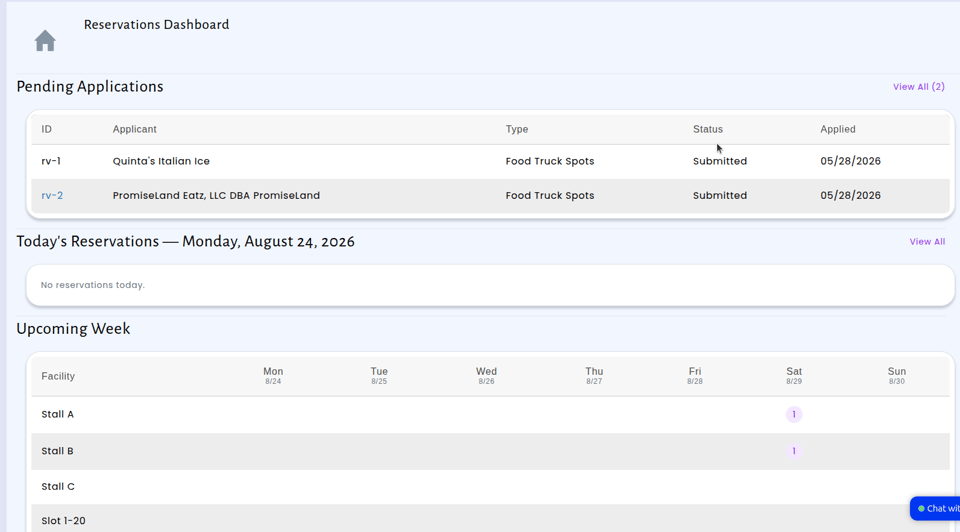
Dashboard - pending applications, today's reservations by facility, and a 7-day booking grid the moment you open the module.
Calendar - month, week, and day views, filterable by facility type and status, with a printer-friendly version one click away.
Attendance - a daily check-in screen lists everything booked today by facility, so whoever is making the rounds can mark each reservation attended or a no-show, with notes.
Email digests - a nightly summary of the next day's bookings and a Sunday-evening look at the week ahead, delivered automatically to the staff you choose. No activity, no email.
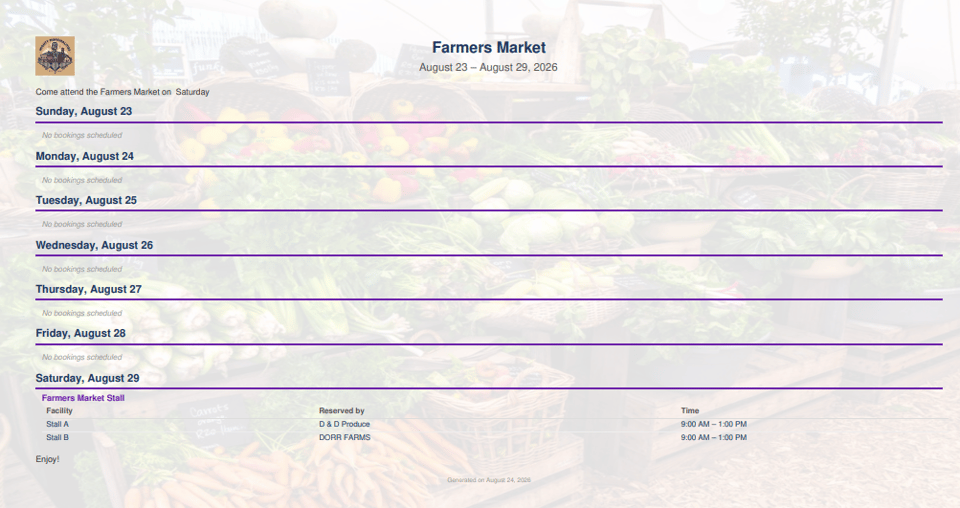
Weekly brochure - generate a branded, printable PDF of the week's reservations, with your logo, a background image, and your own intro text - great for posting at the park or handing to your grounds crew.
Calendar feeds - subscribe Outlook, Google, or Apple Calendar to a live feed of your reservations, filtered by facility type if you like, with revocable links you control.
Show the Schedule on Your Website
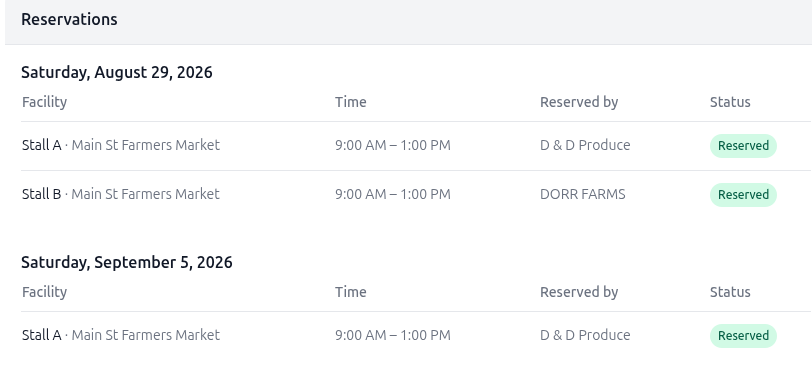
Residents shouldn't have to call town hall to find out if the shelter is taken Saturday.
If you use the GovPossible website, drop a Reservation Listing block onto any page and it shows upcoming reservations - filtered to the facility types you choose, looking as many days ahead as you like, grouped by date or by facility.
If your town has its own website, we generate an embeddable widget - a copy-paste snippet your webmaster adds once, and the schedule stays current automatically.
Either way, you control privacy: applicant names only appear for facility types where you've allowed it - otherwise visitors simply see the slot is reserved.
Getting Started
If you'd like to start managing your shelters, rooms, fields, or market stalls in GovPossible, reach out to us and we'll help you get your facilities and schedules set up!
Meetings: Faster Onboarding for Board Members
Staff can now set up an existing member entirely from the back office: add their legislative profile, seat them on the board, and you're finished. When that member later creates a portal account and signs in with the same email address, the portal recognizes them, connects their account to the profile your office already created, and opens up the meetings their seat entitles them to. There's no form to fill out and nothing for the member to claim — the Legislative menu is simply there the first time they log in, showing upcoming and past meetings for the bodies they serve on.
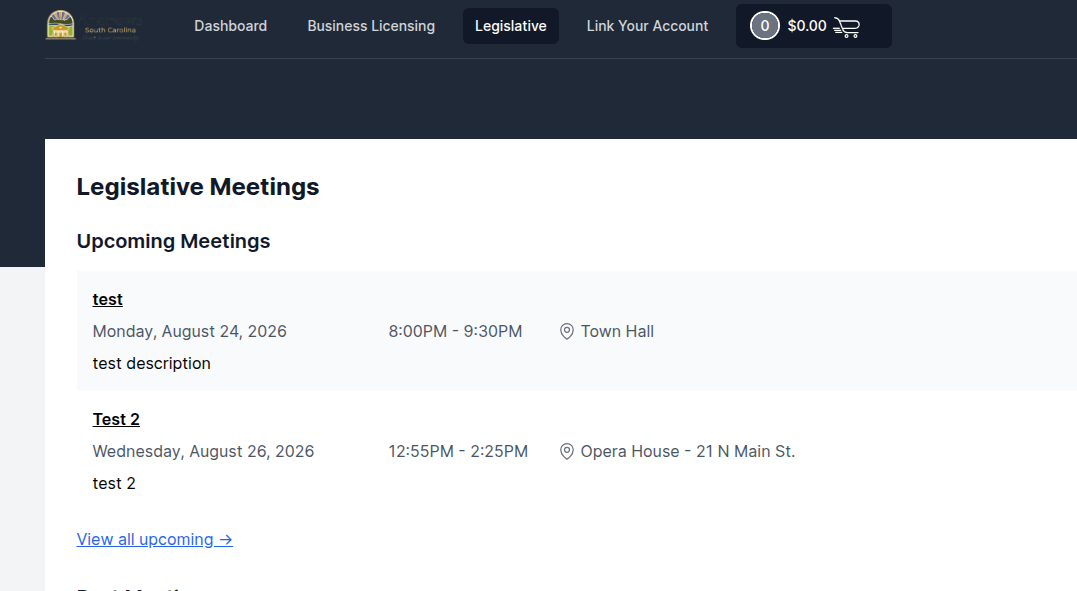
Members who have never served before still follow the already established path of creating a profile and applying; nothing about that experience changes.
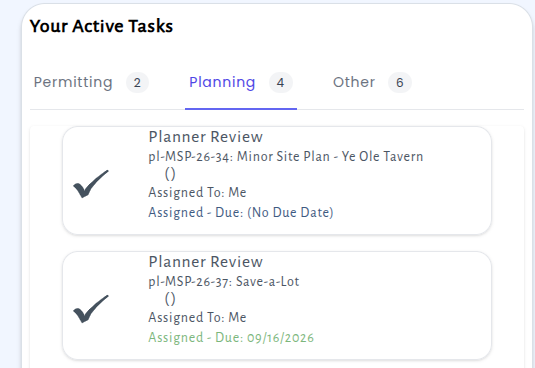
Shared: Your Welcome Screen task list now groups tasks by hat
Many of you wear more than one hat at your organization — you might approve purchase requests as a department head in the morning, review timesheets as a supervisor in the afternoon, and handle a permit application as a clerk in between. Until now, every task waiting on you showed up in a single, undifferentiated list on your Welcome Screen. If you had a busy week, that list could get long, and it wasn't always obvious which role a given item belonged to.
We've updated the Welcome Screen so that when you have tasks from more than one hat, they're now sorted into clearly labeled groups — one for each hat you wear. Everything you need to do is still on one screen, but now it's organized the way you actually think about your work.
Checkout: Reprint a Receipt in One Click
Receipts now have a Print button right on the receipt page. Whenever you need a paper copy for a customer at the counter, for your daily reconciliation packet, or for a file that still lives in a drawer, it's one click away — no more hunting through browser menus or fiddling with page settings to get a clean copy.
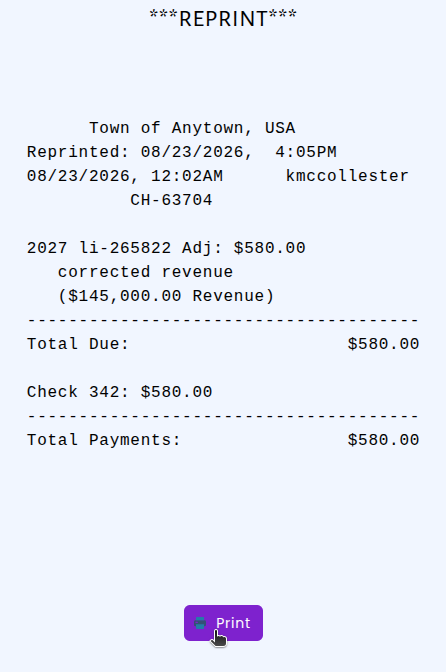
The button is smart about where the receipt should go. If your office has a receipt printer set up, pressing Print sends the receipt straight to that printer. If no receipt printer is configured, the button hands off to your browser's normal print preview, so you can still print to any printer on your network or save the receipt as a PDF.