GovPossible Updates — Week of March 17, 2026
I have a Confession...
Over the last six month I've been working on a lot of new features. Some of them I have indeed announced to y'all
- Applying for New Licenses Online
- Applying for New Permits Online
- Finance Module
But there have been a lot of smaller items that have gotten caught up in the wash.
The good news is that I've now automated the process for when an item is ready to go out to y'all, it automatically gets added to this newsletter! That's why today's is a lot longer, and it hopefully that become a regular occurrence. :-)
Grants
As part of the research on our (Mark Partin's and my) podcast Mighty Municipalities, I kept coming across grant opportunities. We're now sharing them as a regular part of the podcast and I thought I'd start including them here as well:
- 3/31: Tmobile Hometown Grants ($50k), 25 towns per quarter: T-Mobile
- 3/31: Americorp Staff Augmentation (Listen to the end of the podcast for more details: Grants.gov
- 5/7: The FY2026 Federal Historic Preservation Grants are now open, with applications due May 7, 2026 by 5 PM: SC Dept of Archives
Feature Updates:
Licensing Mail Reports - Show Online activity
Your weekly and monthly licensing reports now include a new Online Activity section that gives you a clear picture of what's happening through the community portal. At a glance, you can see how many license applications were submitted online, how many are still outstanding and awaiting staff action, and how many online payments were processed during the reporting period.
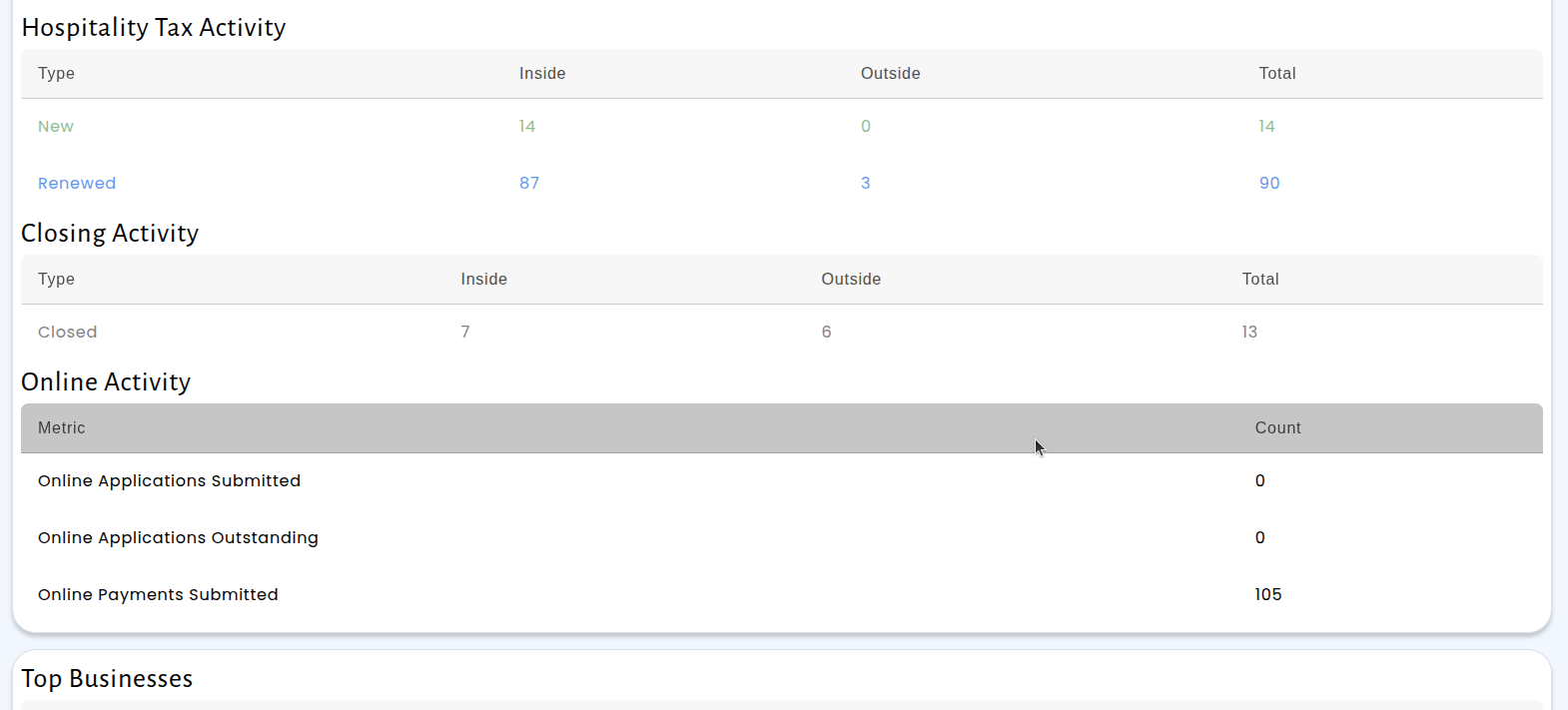
This means you no longer need to check multiple places to understand your online licensing workload. Whether you're reviewing the week's activity or looking at monthly trends, the information is right there in the same report you already receive. Outstanding applications are highlighted so you can quickly identify items that need attention, and the payments summary helps you keep track of revenue coming in through the portal.
Permitting Monthly Report: Now Shows Fees by Type
The permitting monthly report now includes a new section that breaks down collected fees by type, giving you a clearer picture of where your permit revenue is coming from. Previously, the report only showed collections grouped by general ledger account. Now you can also see totals for each fee type — such as application fees, inspection fees, plan review fees, and more — all in one place.
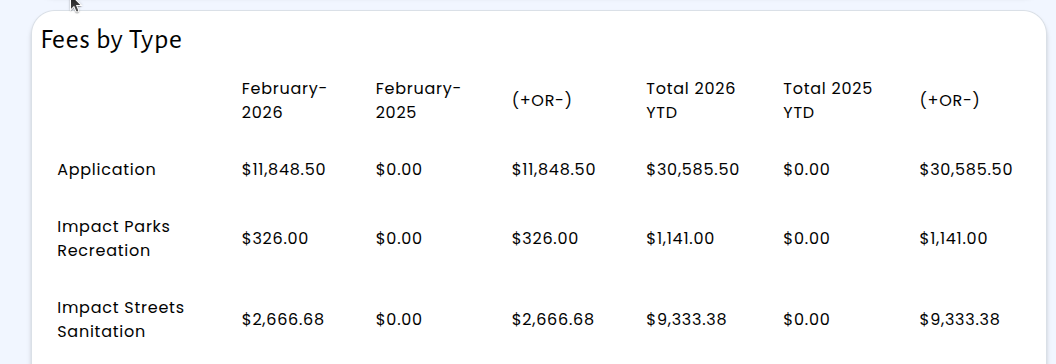
In addition to the new fee breakdown, the monthly report is now available as an interactive page within the system. You can select the month, year, and jurisdiction directly from dropdown menus, making it faster to pull up the exact data you need without waiting for an email. The report link has been added to the permitting reports navigation menu for easy access.
This update helps finance and permitting staff quickly identify fee collection trends and verify that the right amounts are being collected for each fee category. Whether you're preparing for a council meeting or reconciling monthly revenue, the fees-by-type view puts the information you need right at your fingertips.
Wesbites: Image Resizing Now Available in the Content Editor
Managing images on your website pages just got easier. Previously, when you added an image to a content block in the CMS, it would always display at its full original size — which often meant images were too large or didn't fit the layout you had in mind. Now, you can resize any image directly within the text editor. Simply click on an image you've inserted, and a resize dialog will appear where you can set your preferred width and height. An aspect ratio lock keeps your images looking proportional, so you don't have to worry about stretching or distortion.
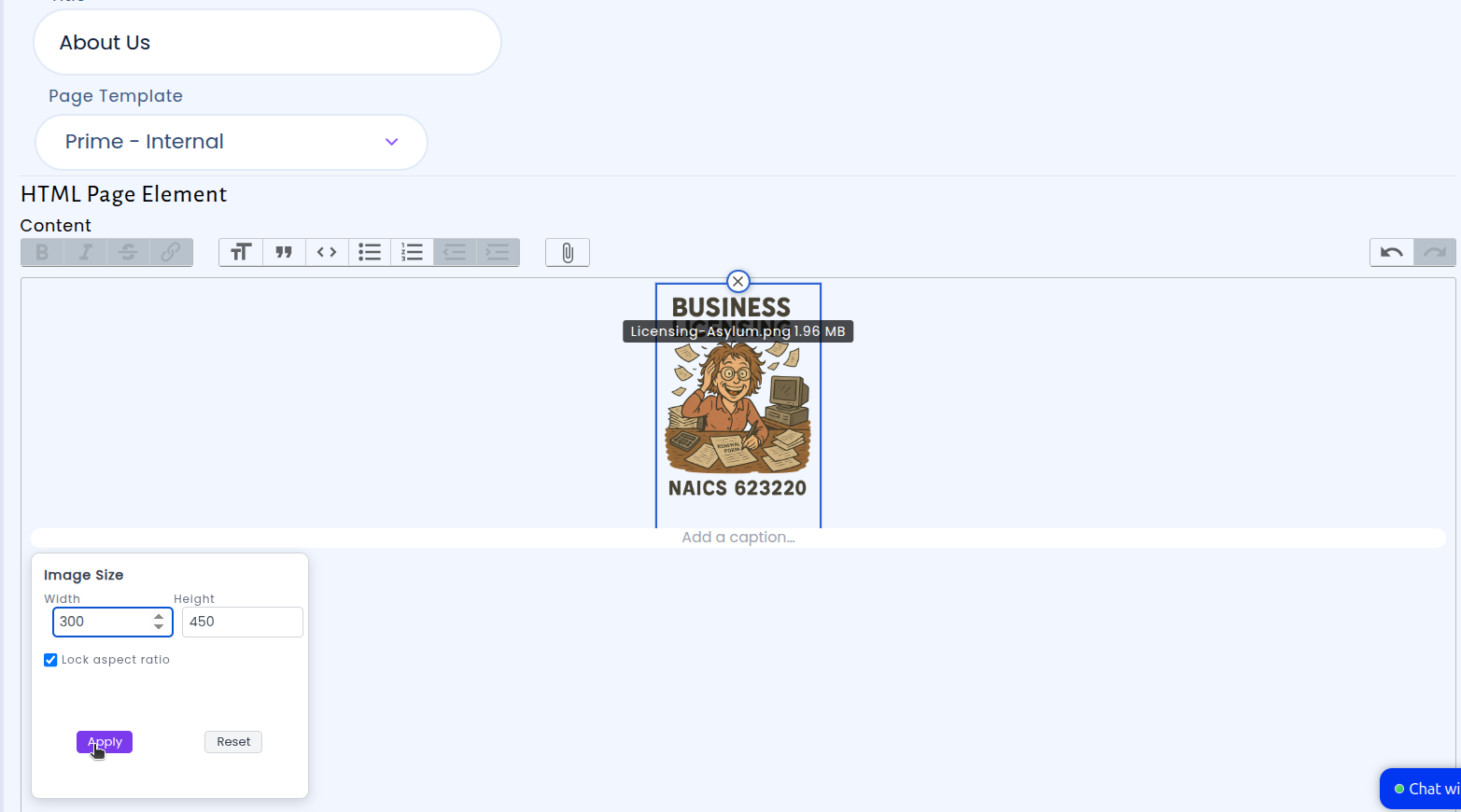
Once you apply your chosen dimensions, the image is automatically served at the correct size — both in the editor preview and on your live website. There's no need to resize images in a separate program before uploading them. You can also reset an image back to its original size at any time. This update gives you more control over how your web pages look, helping you create polished, professional content without any extra steps.
System-Wide: Date Clearing on Mobile Use
Date fields throughout the system now include a convenient "Clear" option that appears next to any selected date. Previously, clearing a date from a field required using the keyboard's backspace or delete key — something that works fine on a desktop computer but isn't available when using an iPad or other tablet. This made it difficult for staff working in the field or at a counter with a tablet to correct or remove a date entry.
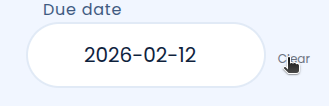
With this update, a small "Clear" label appears to the right of any date field that has a value. Simply tap it to remove the date — no keyboard needed. This works on iPads, tablets, and desktop computers alike, so your workflow stays the same regardless of which device you're using. The improvement applies to all date pickers across the system, including permit applications, cemetery contracts, and any other forms that use date fields.
Finance: Bank Reconciliation: Balancing Suggestions
When reconciling bank statements, the system suggests which GL account to use for each transaction based on how you've categorized similar transactions in the past. Previously, these suggestions only appeared when the description on a new transaction matched a past transaction exactly — character for character. That meant recurring payments like IRS tax deposits or payroll transfers, which include a different reference number each time, wouldn't receive a suggestion even though you'd categorized the same type of payment dozens of times before.
We've updated the bank reconciliation tool to recognize transactions that are similar, not just identical. Now when you're working through your bank statement, the system looks at the meaningful parts of each description and finds past transactions that are close matches. For example, if you previously reconciled "IRS USATAXPYMT 270568894771210" to a specific expense account, a new transaction for "IRS USATAXPYMT 999888777666555" will automatically suggest that same account — even though the reference numbers differ. This works across all kinds of recurring transactions where only a portion of the description changes from month to month.
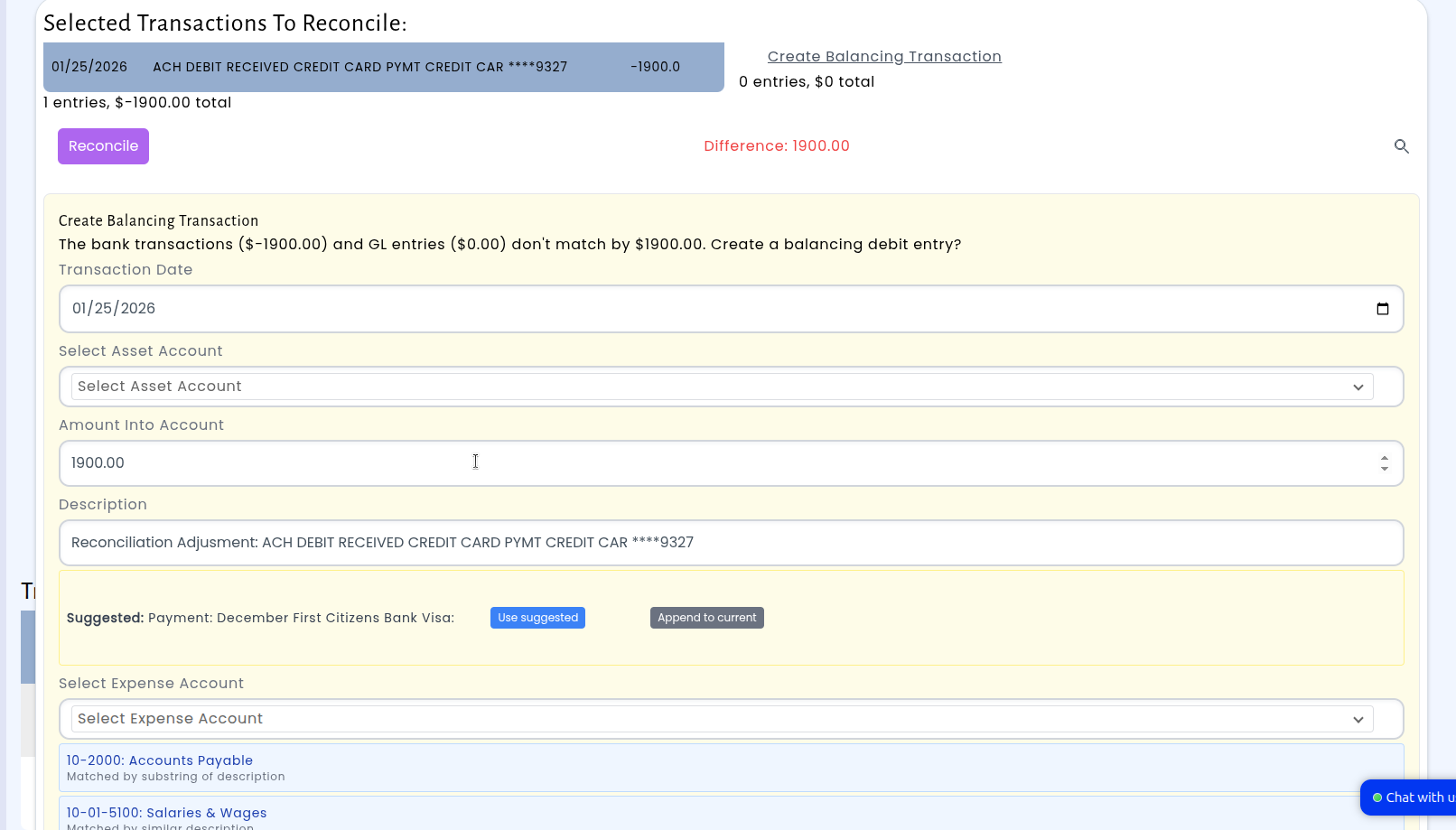
The suggestions are ranked so the closest matches appear first, and the system is careful not to suggest accounts when descriptions are too different. This means less time looking up the right GL account during your monthly reconciliation and fewer opportunities for misposting — the system learns from your past work and applies that knowledge even when transaction details vary slightly.
Codes Enforcement Email Reports
Keeping up with codes enforcement activity just got a lot easier. GovPossible ERP now sends automated email reports for your codes enforcement department on a daily, weekly, and monthly schedule. Each report delivers a clear summary of new cases, closed cases, active cases, violations, and requests — so your team always has a current snapshot of what's happening without having to log in and pull numbers manually.
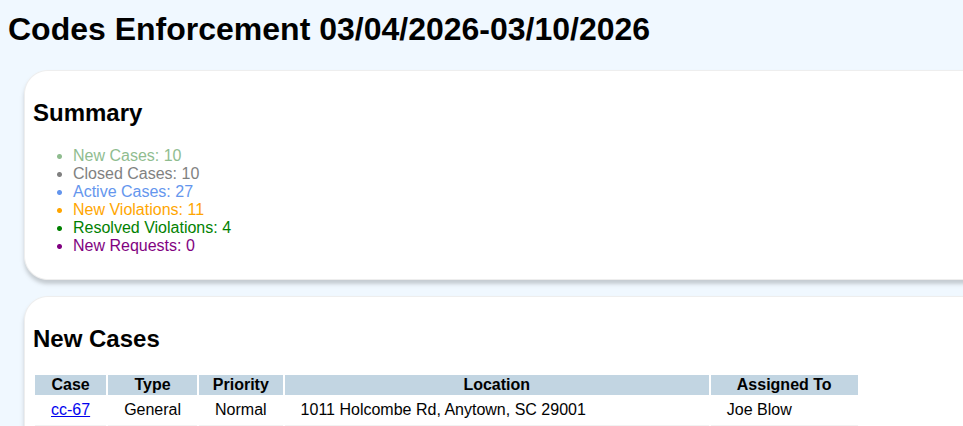
The daily and weekly reports highlight recent activity over the past day or week, including which cases were opened, who they were assigned to, and where they're located. This makes it simple for supervisors and staff to stay on top of workload distribution and ensure nothing falls through the cracks.
The monthly report goes a step further with year-over-year comparisons, breaking down cases by type so you can easily spot trends and measure performance against prior years. Whether you need to report to council or simply track your department's progress, these reports give you the data at a glance.
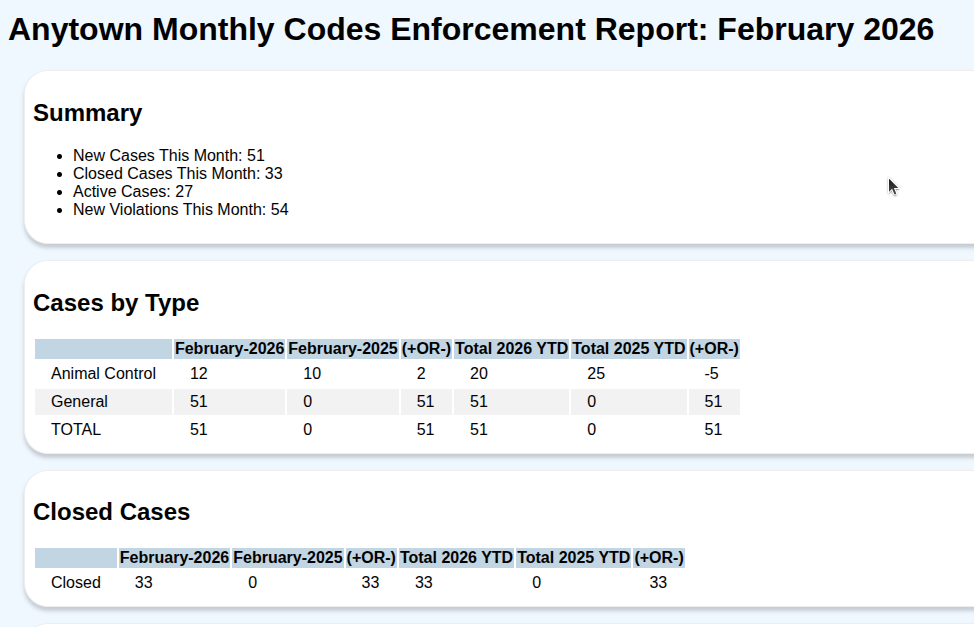
Report recipients are configured per customer, so each jurisdiction controls exactly who receives these updates. If your organization uses our codes enforcement module, these reports are ready to go — just let us know which email addresses should receive them and we'll get you set up.
Cash Receipting: Customize number of receipt
Cash receipt printing just got more flexible. Previously, the system always printed exactly two copies of each receipt — no more, no less. Now, we can configure the number of receipt copies for your organization to match your specific workflow. Whether you need one copy for the customer and one for your records, or additional copies for other departments.
This update keeps things simple: you will continue to receive two copies just as before, so there is nothing you need to change right away. When you are ready to adjust the number of copies, just let us know and we will update your configuration. It is a small change that can save paper, reduce waste, and better fit the way your office actually operates.
Parcel Management: Set Primary Address
Authorized staff can now set the primary address on a parcel directly from the parcel detail page. A new "Parcel Admin" permission group has been added alongside the existing Support group, giving administrators fine-grained control over who can manage parcel address assignments.
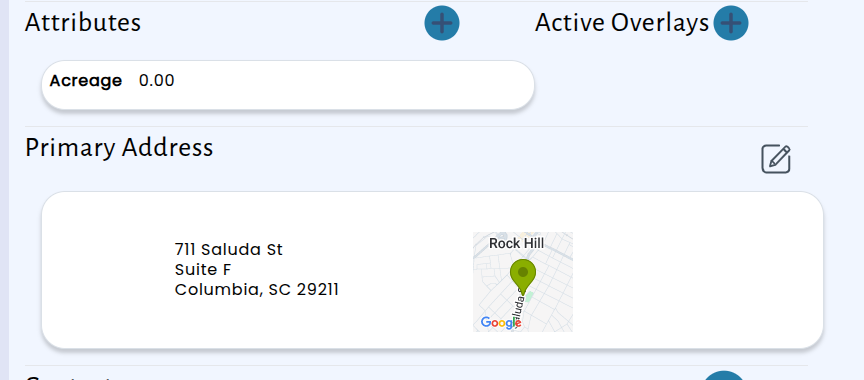
When a user with the right permissions views a parcel, they will see an option to search for and select an address to assign as the primary address. The search popup makes it easy to find the correct address and apply it in just a few clicks. Users who are not members of the Parcel Admin or Support groups will continue to see the parcel page as before, with no changes to their experience.
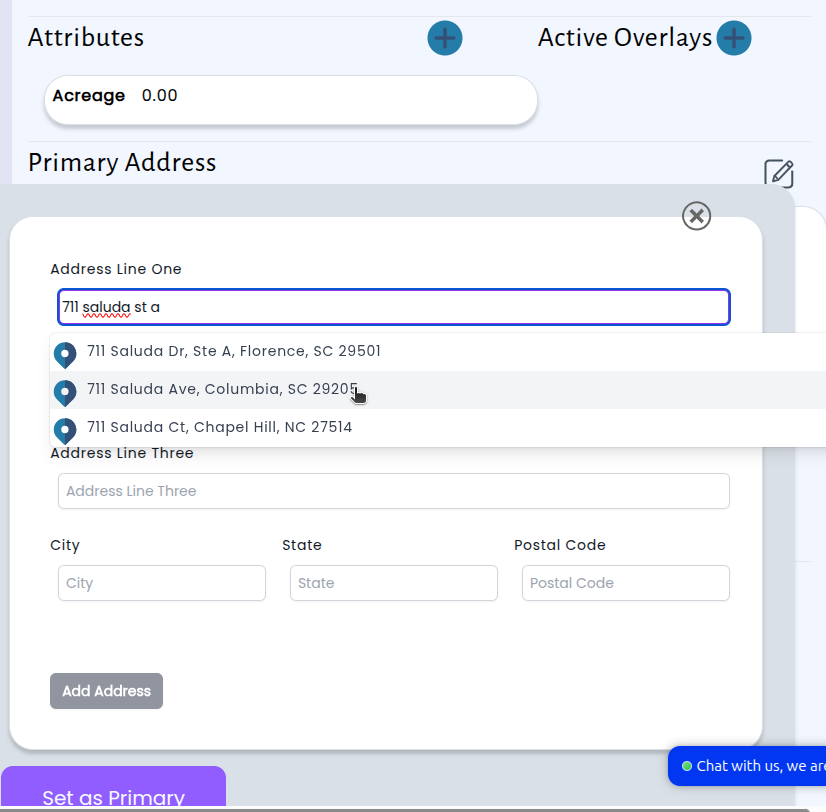
This update reduces the need for back-and-forth requests when a parcel's primary address needs to be corrected or reassigned. Staff with the appropriate permissions can now handle it themselves, saving time and keeping parcel records accurate.