GovPossible Software Updates — Week of April 7, 2026
Hello everyone! Spring has sprung and, since I was travelling Monday, I held back a day on releasing this update. :-)
As I know you're feeling, this is a really busy time for y'all in licensing. In general (with one promised exception for one customer) I'm going to leave licensing and cashiering alone as much as possible for the rest of April and the first part of May so we can keep you humming along!
Here's what's new this week in GovPossible:
Permitting Portal: Faster Permit Pages for High-Volume Contractors
We've made improvements to how the permitting page loads and displays customer permits. Previously, contractors with a large number of permit applications (40+) could experience slow load times when opening the permitting page. We made some changes so that should be resolved.
Along with the speed improvement, we've reorganized the permitting page to make it easier for 'active' contractors to find what they need.
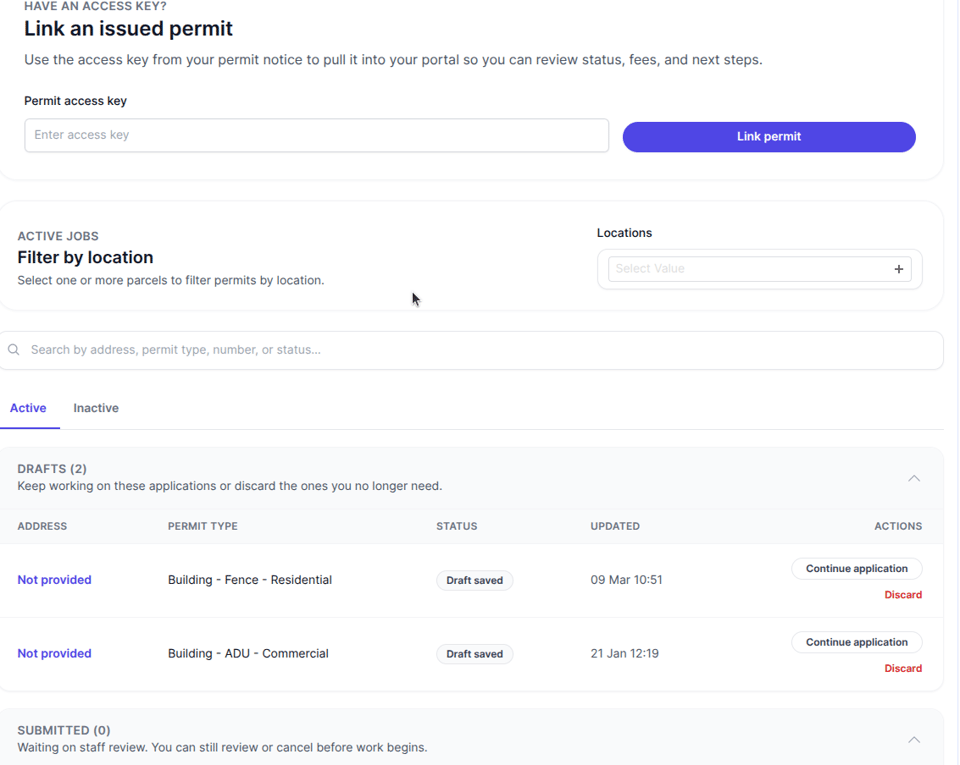
Permits are now separated into Active and Inactive tabs, so completed permits stay out of the way until you need them. Within each tab, permits are grouped by status — such as Drafts, Submitted, In-Process, and Active — with collapsible sections and counts so you can see at a glance how many permits are in each stage. If a section has more than ten permits, you'll see a "Show more" button to keep the page tidy. We've also added a search bar that lets them filter permits by address, permit type, number, or status.
Licensing: Business Documents Now Visible on Licenses
Managing business license applications just got easier. We've updated the license application and license screens to display business documents right alongside the application docs:
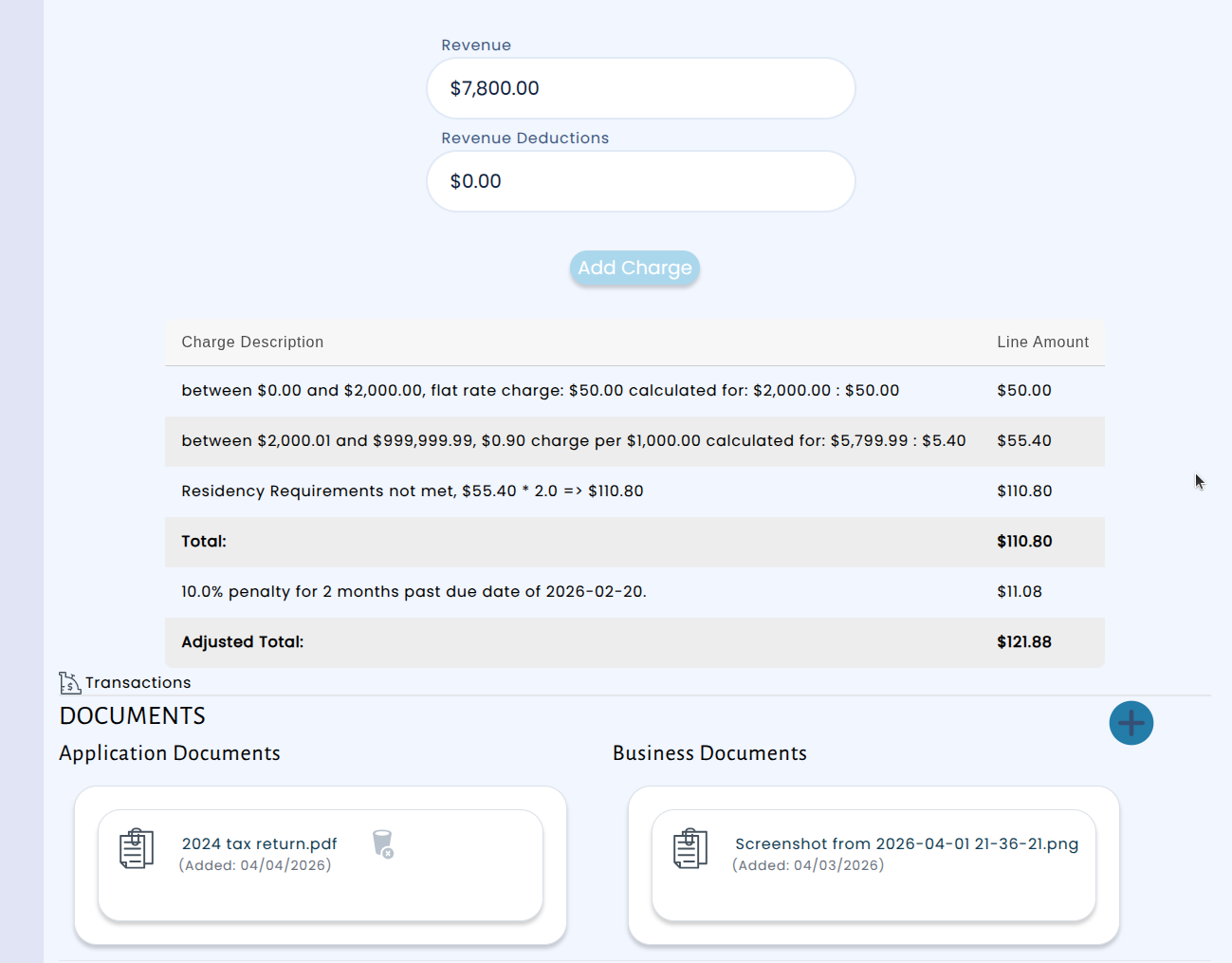
This improvement hopefully helps you process license applications a little more quickly by keeping all the relevant information — application details and supporting business documents — without hopping between screens!
Cash Receipting: Empty Cart Checkout Protection
We've added a safeguard to the cash receipting system that prevents payments from being processed when there are no items in the cart. A customer ran into a situation where it was possible to add a charge to the cart, remove it, and still proceed with a credit card payment — resulting in a payment with no associated charge. This is now prevented at several steps of the checkout process.
In addition, we improved the experience when removing items from the cart. The remove button now works more reliably across all browsers, and the checkout area clearly communicates when the cart is empty, guiding staff to add items before proceeding. These changes help ensure accurate record-keeping and reduce the chance of processing errors during busy counter transactions.
Permitting: Duplicate Parcel Prevention
We've updated the permitting application process to prevent the same parcel from being accidentally added to an application more than once. Previously, it was possible to link a parcel twice. Now, the system catches duplicates right away and lets you know before they become a problem.
For parcels with a single address, the system will simply block the duplicate and display a clear message explaining that the parcel has already been added. For parcels that have multiple alternate addresses, the system shows a warning that the parcel is already linked and gives you the option to cancel or proceed, since you may need to add the same parcel under a different address.
This update helps keep your permit applications clean and accurate, saving time for both applicants and reviewers by eliminating duplicate entries before they can cause issues downstream.
(BETA) Job Postings: Managing Position Descriptions Just Got Easier
Keeping position descriptions organized and up to date is essential for any HR department, and now GovPossible makes that process simpler than ever. You can now create, edit, and manage position descriptions directly within each position type in the HR module. Each description supports rich text editing, time frames for tracking when descriptions are effective, and the ability to upload Word documents that are automatically imported into the system.
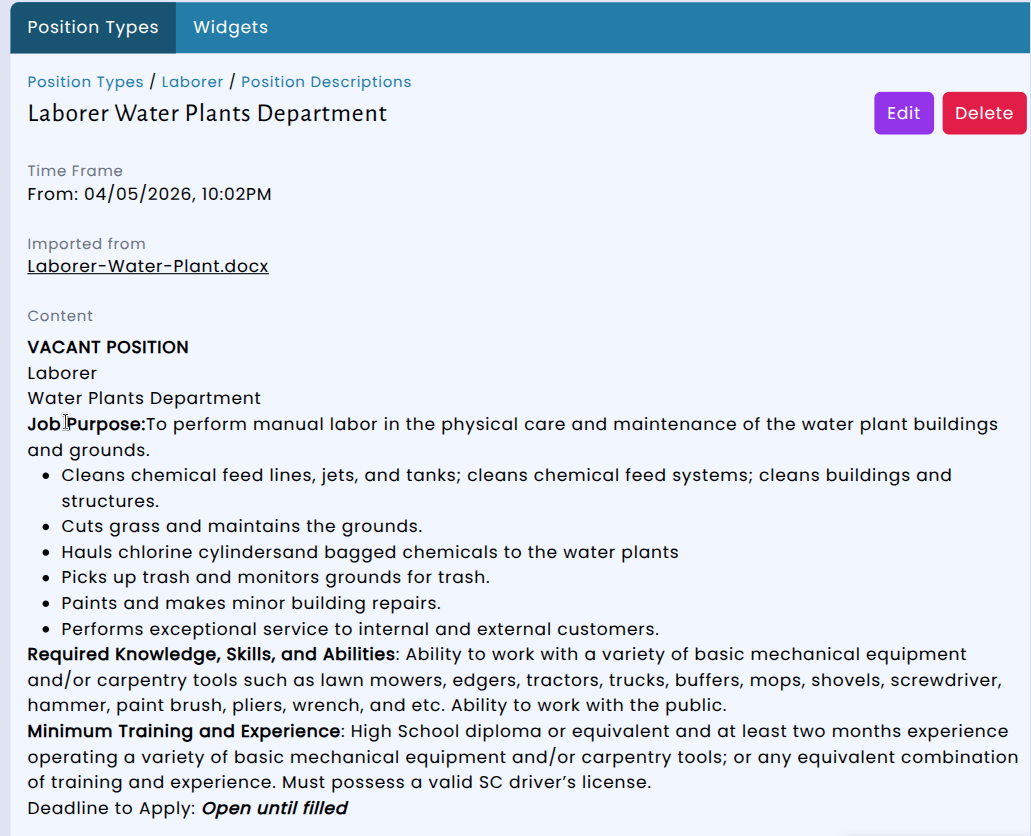
If your department already has position descriptions saved as Word files, you can upload them directly and the system will pull in the content automatically — no need to copy and paste. The original file stays attached so you can always download it later. This means your team can transition existing documents into the system quickly while keeping everything in one place.