Systeme.io Tutorial: Step-by-Step Guide for Beginners
If you have been hunting for a Systeme.io tutorial that does not assume you already know what a funnel, an automation rule or a DNS record is, you are in the right place. This guide takes you from zero to a live, working online business setup, one clear step at a time.
By the end, you will know how to create your account, build your first sales funnel, collect email subscribers, automate your follow-up, sell a product or course, and pick the right plan so you never overpay.
Quick answer: how do you use Systeme.io?
- Create a free account on Systeme.io, no credit card needed.
- Tour the dashboard and set your business basics.
- Connect your own domain and set up your sender email.
- Build a funnel from a template, usually an opt-in page plus a thank-you page.
- Write your welcome email and attach it with an automation rule.
- Add a product, connect Stripe or PayPal, and start selling.
- Upgrade only when your contact list or feature needs outgrow the free plan.
Ready to follow along while you read? Open your free Systeme.io account here in a second tab, and build as you go. That is the fastest way to learn any software.
What Is Systeme.io?
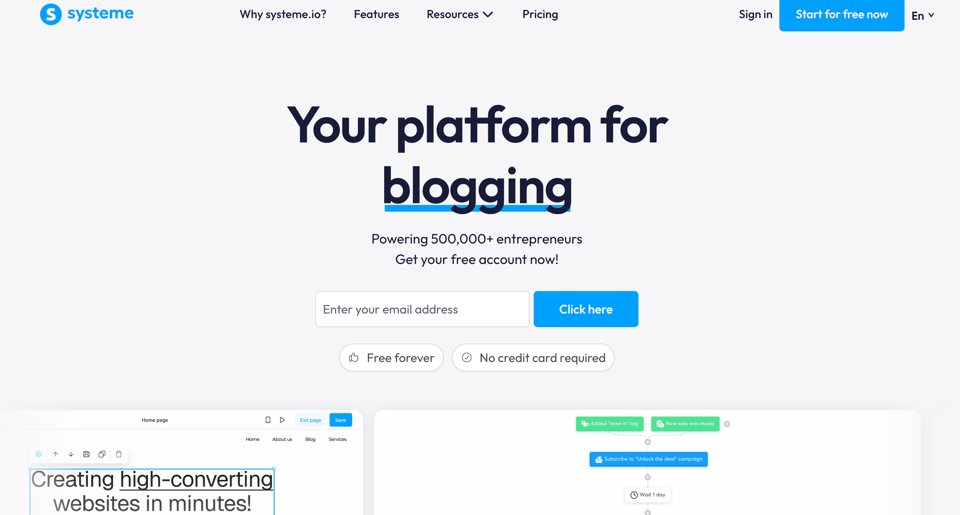 Systeme.io is an all-in-one platform for building and running an online business. Instead of paying for one tool for funnels, another for email, another for courses and another for affiliates, you get all of it inside one account.
It was founded by Aurélien Amacker, and it is reported to serve more than 500,000 businesses. It is especially popular with beginners, course creators, coaches, bloggers, affiliate marketers and small digital product sellers, because the free plan is real and the paid plans are cheap.
Here is what lives inside one Systeme.io account:
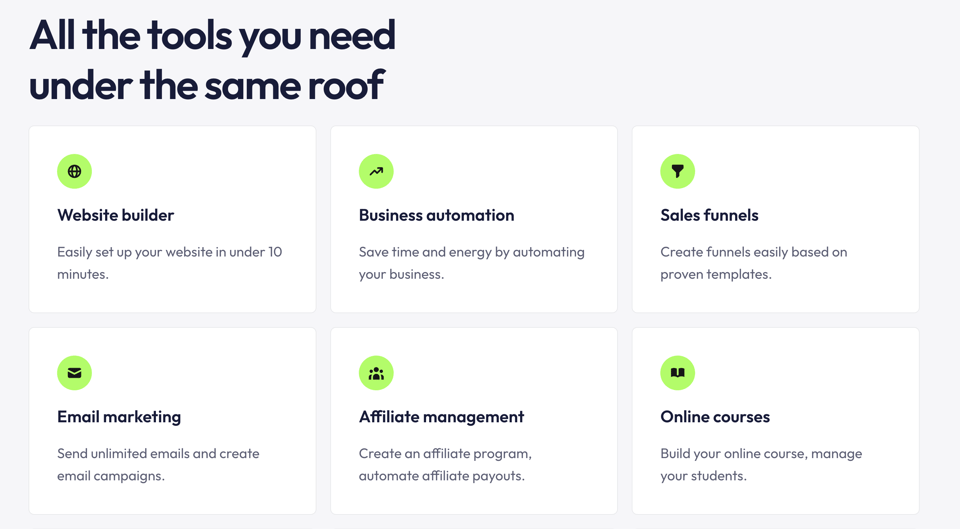
- Sales funnels with drag-and-drop pages, order bumps, one-click upsells and A/B tests
- Email marketing with unlimited email sends on every plan
- Marketing automation through automation rules and visual workflows
- Online courses with students, lessons and access control
- A website builder and a blog
- An affiliate program manager so other people can promote your products
- Communities, a booking calendar, CRM pipelines, SMS marketing and a link-in-bio page
- Physical product selling with inventory and shipping management
- Unlimited sub-accounts, useful if you manage more than one brand or serve clients
In plain words: it is the tool that lets one person run what used to need five subscriptions and a stressful afternoon of connecting them together.
Who Is Systeme.io For?
Systeme.io works best for people who want to launch fast without a huge budget. It is a strong fit if you are:
- A complete beginner who wants one platform instead of a tangle of tools
- A coach, consultant or course creator who wants to sell knowledge online
- An affiliate marketer who needs landing pages and an email list
- A blogger who wants to turn readers into subscribers and buyers
- A small business owner who wants a simple website, funnel and email system
- An agency or freelancer who wants to build funnels for clients using sub-accounts
If you are brand new, do not worry about the long feature list. You only need a handful of tools to get your first results, and this tutorial walks you through exactly those.
How Much Does Systeme.io Cost?
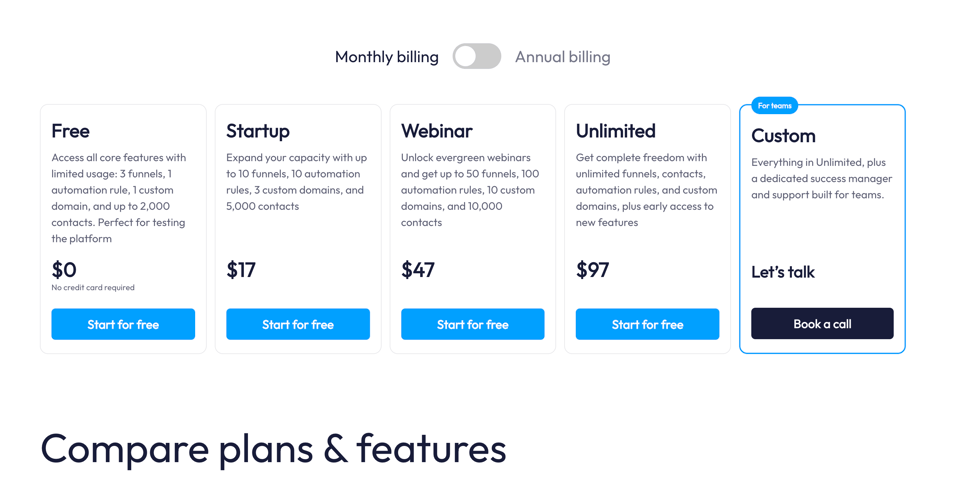 Before the tutorial itself, let us clear up the money question, because it decides what you can build on day one. These are the plans listed on the official Systeme.io pricing page at the time of writing, with monthly billing.
Free Plan: $0, Forever
- Up to 2,000 contacts
- 3 sales funnels
- 1 course
- 1 blog
- 1 custom domain
- 1 affiliate program
- Unlimited email sends
- Limited to 1 automation rule and 1 email campaign
- No credit card required, and it does not expire
Startup Plan: $17 per Month
- Up to 5,000 contacts
- 10 sales funnels
- 5 courses
- Unlimited email sends
- Higher limits on automation rules, email campaigns and more
Webinar Plan: $47 per Month
- Up to 10,000 contacts
- 50 sales funnels
- 20 courses
- Evergreen (automated) webinars
Unlimited Plan: $97 per Month
- Unlimited contacts
- Unlimited funnels
- Unlimited courses
- Unlimited automation rules
- Free migration support and a one-on-one kickstart coaching session
What every plan includes: unlimited email sends, unlimited file storage, unlimited sub-accounts, an affiliate program, 0% transaction fees from Systeme.io (Stripe and PayPal still charge their own normal processing fees), and customer support with an average response time of under two hours, seven days a week.
Pay yearly and save. Annual billing gives you two months free, so Startup works out to $170 a year, Webinar to $470 and Unlimited to $970. That is roughly $14, $39 and $81 per month.
The rule of thumb for choosing a plan: Systeme.io prices mostly by contact count. Under 2,000 contacts, start on Free. From 2,000 to 5,000, Startup. From 5,000 to 10,000, Webinar. Over 10,000, Unlimited.
For comparison, Systeme.io points out that a typical stack of separate tools, such as ClickFunnels for funnels, Mailchimp for email, Teachable for courses and Tapfiliate for affiliates, adds up to around $245 a month before you connect them. Systeme.io covers all of it on the free plan or from $17.
Prices and limits can change, so glance at the pricing page when you sign up. You can see the current plans and start free through this link.
Is Systeme.io Really Free?
Yes. Systeme.io has a permanent free plan with no credit card required and no expiry date. You can build funnels, collect leads, send emails and host a course without paying anything.
The free plan is thin in a few places, and it is better to know that now than to be surprised later:
- Only 1 automation rule and 1 email campaign, so you will want to plan your automation carefully
- 3 funnels and 1 course in total
- Your list is capped at 2,000 contacts
- The free plan has a ceiling on how much you can process in sales before you need to upgrade, so check the pricing page and help center for the current threshold
Think of the free plan as a no-risk test drive. Learn the tool, launch your first funnel, get your first subscribers, then upgrade when growth demands it. If you cancel a paid plan later, you keep it until your next billing date and then your account simply reverts to Free.
Systeme.io Tutorial: Step-by-Step Guide
 Now for the hands-on part. Follow these steps in order. Menu names can shift slightly when Systeme.io updates its interface, but the logic stays the same.
Step 1: Create Your Free Systeme.io Account
- Open Systeme.io through this link.
- Click the button to start for free.
- Enter your name, email address and a password.
- Confirm your email if you are asked to.
- Answer the short onboarding questions about your business.
That is it. You land inside your dashboard on the free plan. No card, no trial countdown, no pressure.
Beginner tip: use an email address you check every day. Your confirmation emails, order notifications and system messages will go there.
Step 2: Take a Tour of the Dashboard
Spend ten minutes just looking around. The main areas you will use as a beginner are:
- Dashboard: your home screen with a quick view of contacts, sales and activity
- Contacts: every subscriber and customer lives here, with their tags and history
- Funnels: where you build opt-in pages, sales pages, checkout pages and thank-you pages
- Emails: your campaigns, newsletters and email templates
- Automations: the rules and workflows that run your follow-up on autopilot
- Products and Courses: what you sell, and where students get access
- Blog and Website: your content and public pages
- Affiliates: your own affiliate program, if you want one
- Settings: business details, domains, payment gateways and email settings
You do not have to master all of them today. Funnels, Emails and Automations are the big three for beginners. Everything else can wait.
Step 3: Fill In Your Settings and Connect Your Domain
Before you build, take care of the boring but important setup.
Business details. Add your business name, address and contact information. Email laws require a valid address in your emails, and it also makes your messages look more trustworthy.
Your sender name and email. Set the name your subscribers will see, ideally your own name or brand, so your emails feel personal and get opened.
A custom domain. The free plan includes one custom domain. Using your own domain, such as yourbrand.com, instead of a default Systeme.io address makes your pages look professional and builds trust. In the settings, add your domain, then copy the DNS records Systeme.io gives you into your domain registrar, such as Namecheap or GoDaddy. Wait for the changes to propagate, which can take anywhere from a few minutes to a few hours. If you get stuck, Systeme.io offers a free DNS setup service, and its support team answers quickly.
Email authentication. In the same area, follow the prompts to authenticate your sending domain. This helps your emails land in the inbox instead of spam. It is a one-time job, and it is worth doing before your first big send.
Step 4: Build Your First Funnel
A sales funnel is simply a series of pages that guides a visitor toward one action. For beginners, the best first funnel is a lead magnet funnel, because it builds your email list, and your list is your most valuable asset.
A lead magnet funnel has two pages:
- Opt-in page (squeeze page): offers something free, such as a checklist, guide, template or mini course, in exchange for an email address
- Thank-you page: confirms the signup and tells the person what happens next
Here is how to build it:
- Go to Funnels and click to create a new funnel.
- Choose a funnel goal such as collecting leads, and give your funnel a name.
- Pick a template. Systeme.io has a library of ready-made funnel and page templates, so you never start with a blank screen.
- Open the opt-in page in the editor and replace the placeholder text with your own headline, subheading, bullet points and button text.
- Add your free offer. You can upload a PDF or file and deliver it on the thank-you page, or deliver it by email.
- Check the form. Make sure the button connects to the next step in your funnel.
Good headline formula for beginners: promise a specific result in a specific timeframe. For example, "Get my 5-day checklist for launching your first online course" beats "Join my newsletter" every time.
Step 5: Customize Your Pages With the Drag-and-Drop Editor
The page editor is where beginners often relax, because it is genuinely simple. You click on any element to edit it, and you add new elements from a menu.
You can add or change:
- Headlines, paragraphs and bullet lists
- Images and videos
- Buttons and forms
- Countdown timers
- Testimonials and icons
- Sections with backgrounds and colors
A few conversion-focused tips as you design:
- Keep one goal per page. One page, one action.
- Make the button text specific, such as "Send me the checklist" instead of "Submit".
- Use short paragraphs and bullet points, because people scan on their phones.
- Put your promise above the fold, which means visible without scrolling.
- Always preview your page on mobile before publishing, since most visitors will arrive on a phone.
When you are happy, publish the funnel. You now have a live page that can collect leads, built in under an hour without writing a single line of code.
Step 6: Set Up Email Marketing
Email is where Systeme.io really earns its place. You can send unlimited emails on every plan, including free, which is rare. There are two main types you should know.
Email campaigns (sequences). A campaign is a series of automatic emails sent over time after someone joins. This is your welcome sequence. A simple and effective starter sequence looks like this:
- Email 1, immediately: welcome the subscriber, deliver the freebie and set expectations
- Email 2, day 2: share your story or your best quick tip
- Email 3, day 4: teach something valuable related to your offer
- Email 4, day 6: present your product, course or affiliate recommendation with a clear link
- Email 5, day 8: answer common objections and remind them of the benefits
Newsletters (broadcasts). A newsletter is a one-time email to your list or a segment of it. Use these for announcements, new content, promotions and updates.
To create a campaign, open Emails, create a new campaign, add your emails one by one and set the delay between them. Use the personalization option to include the subscriber's first name. Keep subject lines short and curious, and write the way you talk.
Beginner tip on the free plan: the free plan allows one email campaign, so make it count. Build a flexible welcome sequence that you can reuse for every new subscriber.
Step 7: Automate Everything With Automation Rules
Automation is the part that turns your setup into a business that works while you sleep. In Systeme.io, an automation rule follows a simple pattern: when something happens (trigger), do something (action).
Common triggers:
- A contact subscribes through a funnel step
- A tag is added
- A form is submitted
- A product is purchased
- A course is completed
Common actions:
- Send an email
- Add or remove a tag
- Subscribe the contact to an email campaign
- Enroll the contact in a course
- Move the contact to a workflow
Your first automation, step by step:
- Open your funnel and select the opt-in page.
- Go to its automation rules tab and click to add a rule.
- Set the trigger to "contact subscribed through this funnel step".
- Set the action to "subscribe to email campaign" and choose your welcome sequence.
- Save the rule and make sure it is active.
- Test it with your own email address and watch the welcome email arrive.
Free plan trick: since you only get one automation rule, subscribe contacts directly to your campaign inside that single rule, instead of spending it on tags.
Rules versus workflows. Rules are simple, one trigger and one action. Workflows are visual flowcharts with branching logic, multiple steps and conditions, ideal for full customer journeys like a webinar reminder flow or course onboarding. Start with rules. Move to workflows when your funnel gets more advanced.
Step 8: Add a Product and Start Selling
Once your list is growing, you can start selling. Systeme.io handles digital products, courses, subscriptions and physical products.
Connect a payment processor. In the settings, connect Stripe or PayPal. Systeme.io also supports options such as Apple Pay, Razorpay, Flutterwave, Mercado Pago and Xendit, which matters if you sell outside the US. Remember that Systeme.io charges 0% transaction fees on every plan, while your payment processor still takes its own standard fee.
Create your product. Go to the products section, add a new product, then set the name, price and type, such as one-time payment, subscription or payment plan. Upload your digital file or link it to a course.
Build a sales funnel. Create a new funnel with a goal of selling a product. A typical high-converting structure looks like this:
- Sales page: explains the offer, benefits, proof and guarantee
- Order form (checkout): where the buyer pays
- Order bump: a small add-on offered on the checkout page, such as a template pack
- One-click upsell: an extra offer shown right after purchase, which the buyer can accept with one click
- Thank-you page: confirms the order and gives access instructions
Boost your income with order bumps and upsells. These two features are among the easiest ways to raise your average order value without finding any new customers. A buyer who has just decided to purchase is the most likely person to say yes to a relevant extra.
Add coupon codes. If you want to run your own promotions, you can create coupon codes for your products and share them with your audience.
Step 9: Create and Sell an Online Course
Systeme.io includes a complete course platform with a members area, so you do not need a separate tool like Teachable or Thinkific.
- Go to the courses section and create a new course.
- Add a title and a short description.
- Create sections and lessons.
- Add your content: video, text, images and downloadable files.
- Connect the course to a product, so buyers get access automatically after purchase.
- Use automation rules to enroll students and send them welcome emails.
The free plan includes one course, Startup includes five, Webinar twenty, and Unlimited has no cap. For most beginners, one well-built course is plenty to start.
Course creator tip: begin with a small, specific outcome. A three-lesson mini course that helps someone get one clear result will sell better than a huge course that tries to cover everything.
Step 10: Launch a Blog and Website
Systeme.io also lets you build a website and a blog with the same drag-and-drop editor. A blog is a long-term way to bring free traffic from Google to your funnels.
- Create your blog and choose a layout
- Write helpful posts that answer questions your audience types into search engines
- Add a signup form or a link to your funnel inside each post
- Use clear headings and short paragraphs so your posts are easy to scan
Every post is a chance to turn a reader into a subscriber, and a subscriber into a customer.
Step 11: Set Up Your Own Affiliate Program
Every Systeme.io plan, including Free, lets you run your own affiliate program. That means other people can promote your products and earn a commission, while you only pay when a sale actually happens.
To use it, create an affiliate program for a product, set the commission percentage, and share your affiliate signup page. Systeme.io tracks the sales and manages the payouts for you. It is a smart way to get traffic without paying for ads upfront.
Step 12: Manage Contacts, Tags and Pipelines
As your list grows, you will want to keep it organized.
- Tags: labels such as "bought course" or "downloaded checklist" that help you segment your audience
- Contacts: a searchable list with each person's details and activity
- Pipelines: a simple visual board to track leads and deals, helpful if you sell high-ticket offers or coaching
Segmenting means you can send the right message to the right person, which lifts opens, clicks and sales.
7-Day Plan to Launch With Systeme.io
Here is a simple schedule if you want to go from nothing to live in a week.
- Day 1: Create your free Systeme.io account, explore the dashboard and fill in your settings.
- Day 2: Connect your domain and authenticate your sender email.
- Day 3: Decide on your lead magnet and write the headline and bullet points.
- Day 4: Build your opt-in page and thank-you page from a template.
- Day 5: Write your five-email welcome sequence.
- Day 6: Create your automation rule and test the full flow with your own email.
- Day 7: Publish, then send traffic from social media, your blog or your existing audience.
After week one, add a paid product, an order bump and an upsell.
Common Beginner Mistakes to Avoid
- Building too much too soon. One funnel that works beats five that do not.
- Skipping the test. Always subscribe to your own funnel and check every email and page.
- Forgetting mobile. Preview every page on a phone.
- Ignoring email authentication. It protects your deliverability.
- Vague offers. A clear promise gets more signups than a generic one.
- Not tracking the numbers. Look at your funnel stats and improve the page with the weakest conversion.
- Upgrading too early or too late. Stay on Free while you learn, then upgrade when you hit a limit that is blocking your growth.
Which Systeme.io Plan Should You Choose?
Here is an honest breakdown by situation.
- Just starting out, under 2,000 contacts, testing one idea: the Free plan is the perfect place to begin.
- Serious about launching, need more than one email campaign or automation: Startup at $17 a month is the sweet spot, and the yearly option at $170 is the best value for most solo creators.
- Running launches or selling with automated webinars, list up to 10,000: the Webinar plan at $47 a month, or $470 a year.
- Large list, agency or many clients: Unlimited at $97 a month, or $970 a year, with no contact cap and free migration support.
The smart move: if you already know you are committed, choose a yearly plan. You get two months free, and you remove the friction of thinking about renewal. Starting on Free and upgrading the moment you outgrow it is also perfectly fine, because your funnels, contacts and courses carry over.
Pick your plan and get started with Systeme.io here.
Systeme.io Pros and Cons
Pros
- A genuine free plan that does not expire
- Funnels, email, courses, blog, affiliates and automation in one place
- Unlimited email sends and 0% transaction fees on every plan
- Paid plans start at $17 a month, far below most competitors
- Beginner-friendly templates and a simple drag-and-drop editor
- Fast customer support, with an average response under two hours
- Unlimited sub-accounts on every plan
- Free migration help on annual and Unlimited plans
Cons
- The free plan is limited to 1 automation rule and 1 email campaign
- Pricing climbs with contact count, so a growing list pushes you up a tier
- Design flexibility is simpler than dedicated website builders
- Some advanced features have a small learning curve
- Native integrations are fewer than the biggest platforms, though you can connect many tools through webhooks and the API
Systeme.io vs Other Platforms
How does it stack up when you compare it to the usual names?
- Versus ClickFunnels: ClickFunnels starts at $97 a month with no free plan, while Systeme.io gives you funnels, email and courses on a free plan, and its top plan costs the same as ClickFunnels' entry price.
- Versus Kajabi: Kajabi is polished but starts far higher in price and has no free plan. Systeme.io covers most of the same ground for a fraction of the cost.
- Versus Teachable or Thinkific: those are course platforms. Systeme.io includes courses plus funnels, email and affiliates in the same account.
- Versus Mailchimp or ConvertKit: those focus on email. Systeme.io includes email plus everything else you need to sell.
For beginners and small businesses, the all-in-one approach and the price are the real advantages. You learn one tool, pay for one tool and manage one dashboard.
Systeme.io Discount Code and Black Friday Deals
Many people search for a Systeme.io discount code, so here is the honest picture.
There is no coupon code box you have to hunt for. The simplest way to make sure you get any current offer is to sign up through this article's link: click here to open Systeme.io, and any available discount will be applied through the link.
Black Friday: if you are reading this around Black Friday, go ahead and check. Use the link, look at the plans, and any available discount will apply automatically. You do not need to copy or paste a code.
Two guaranteed ways to pay less, with or without a promotion:
- Start on the free plan. It costs $0, forever.
- Choose yearly billing. You get two months free on any paid plan, which cuts the price by roughly 17%.
Because offers can change at any time, the best moment to lock in your plan is when you are ready to build. Check today's Systeme.io offers through this link.
Frequently Asked Questions About the Systeme.io Tutorial
What is Systeme.io used for?
Systeme.io is used to build sales funnels, send email marketing, create online courses, run a blog or website, manage an affiliate program and automate follow-up, all from one account.
Is Systeme.io good for beginners?
Yes. It offers ready-made templates, a drag-and-drop editor, a free plan and quick support. You can launch your first funnel in a day without technical skills.
How do I start with Systeme.io?
Create a free account, set up your business details and domain, build a funnel from a template, write a welcome email, connect them with an automation rule, and publish. This tutorial walks through each step.
Is Systeme.io free forever?
Yes. The free plan never expires and needs no credit card. It includes up to 2,000 contacts, 3 funnels, 1 course, 1 blog and unlimited email sends, with some lower limits such as one automation rule and one email campaign.
How much does Systeme.io cost per month?
Free is $0, Startup is $17, Webinar is $47 and Unlimited is $97 per month with monthly billing. Paying yearly gives two months free, which makes the annual prices $170, $470 and $970.
Does Systeme.io charge transaction fees?
No. Systeme.io charges 0% transaction fees on every plan. Your payment processor, such as Stripe or PayPal, still charges its own normal fees.
Can I send unlimited emails on Systeme.io?
Yes. Unlimited email sends are included on every plan, including the free plan. Your plan limit applies to contacts, not to how often you email.
Can I use my own domain with Systeme.io?
Yes. Even the free plan includes one custom domain. You add the domain in your settings and update your DNS records at your registrar. Systeme.io also offers a free DNS setup service.
Can I sell courses on Systeme.io?
Yes. You can create courses with sections, lessons, videos and downloads, connect them to a product and deliver access automatically after purchase. The free plan includes one course.
What payment methods does Systeme.io support?
Systeme.io integrates with Stripe and PayPal, plus Apple Pay and regional options such as Razorpay, Flutterwave, Mercado Pago and Xendit.
Is there a Systeme.io discount code?
There is no code to type. The easiest way to get any available discount is to sign up through this link, and yearly billing already saves two months.
Does Systeme.io have a Black Friday deal?
Offers vary, so the best approach is to check through this link, where any available discount will be applied. Yearly billing is a dependable saving all year.
Can I upgrade or cancel at any time?
Yes. You can upgrade or cancel from your account settings. If you cancel, you keep your plan until the next billing date, then your account reverts to the free plan.
Does Systeme.io offer free migration?
Yes, Systeme.io offers free migration help, which is available on annual plans and the Unlimited plan. Check the free migration page for the current terms.
Is Systeme.io better than ClickFunnels?
For most beginners and small businesses, yes. Systeme.io costs far less, has a free plan and includes email, courses and affiliates in the same account. ClickFunnels is a funnel-focused tool with a higher entry price.
How long does it take to learn Systeme.io?
Most beginners can build their first funnel and welcome email in a single day. Mastering workflows, upsells and courses takes a few weeks of regular use.
Where can I find official Systeme.io tutorials?
Systeme.io has an official help center and a video tutorial playlist on YouTube. This guide gives you the full roadmap in one place, so you always know the next step.
Final Thoughts: Your Next Step
You now have the complete roadmap. You know what Systeme.io is, what it costs, and how to set up your account, build a funnel, automate your emails, sell products and courses, and choose the right plan.
The people who succeed with this tool are not the ones who read the most tutorials. They are the ones who start. A free account costs you nothing, the first funnel takes an afternoon, and every day you wait is a day your list is not growing.
Here is exactly what to do right now:
- Create your free Systeme.io account, no credit card needed.
- Build your first lead magnet funnel using the steps above.
- Set up your welcome email and automation rule.
- When you are ready to scale, pick a yearly plan and save two months.
If you already know you are serious, skip the waiting and start on a paid plan. Startup at $17 a month is the sweet spot for most creators, and Webinar or Unlimited are there when your audience grows.
Start with Systeme.io now and build your online business today
