Helium 10 Promo Code: FLEXOBA10
What is the Helium 10 promo code?
The Helium 10 promo code is FLEXOBA10. It takes 10% off your Helium 10 subscription every month for as long as you stay subscribed, and it works on new sign-ups, including the Diamond plan.
Disclosure: I am a Helium 10 affiliate. If you sign up through my links I earn a commission at no extra cost to you. Helium 10 only pays affiliates for new sign-ups, which is exactly why I only recommend it to people who plan to use it.
That is the short answer, and if it is all you came for, start here with my Helium 10 link, enter FLEXOBA10 at checkout and confirm the discount shows on your order before you pay.
If you want the longer answer, keep reading, because there is a decision hiding inside this one code that most coupon pages never mention. My Helium 10 link also applies 30% off for your first 6 months automatically. The two offers do not stack. You pick one. The code is the better pick if you plan to stay past 18 months, and the link is the better pick if you are not sure you will. I will show you the exact math in a minute.
I also wrote this for people searching Helium 10 Black Friday, because it is the same question in a different coat. You want to know whether to start now or wait for the sale. I will give you what I know about last year's sale, what has and has not been announced this year, and a simple way to compare any deal that appears.
Here is what you will get from this guide:
- The code, how to use it, and what to do if it does not show at checkout
- The code versus the 30% link offer, with real numbers for Platinum and Diamond
- What Black Friday has looked like for Helium 10 and whether waiting is smart
- Current plan prices, what each tool does, and why I push new sellers toward Diamond
- The honest downsides, because a promo code article that only says nice things is not worth your time
- A seven day plan to test Helium 10 properly, so you can walk away if it does not pay off
I have used Helium 10 for product research and I was impressed by how easy the site is to move around and how complete the data is. That first impression is the reason I put my name on this page. User ratings I have seen sit around 4.7 out of 5, though ratings move, so check the live review pages yourself.
Want to see the plans before reading on? Open Helium 10 through my link and keep this page open in another tab.
How do you use the Helium 10 promo code?
Create your account through the tracked link, choose Platinum or Diamond, type FLEXOBA10 in the promo or coupon box at checkout, and check that the discounted price appears before you pay.
Here are the steps in order:
- Open Helium 10 through my link. Opening it in a fresh tab matters, because the link is what tells Helium 10 you are a new sign-up.
- Create your free account first. The free plan gives you a look at the dashboard and a few tools with no card needed, so you can see the layout before you spend anything.
- Go to the pricing page and choose your plan. Pick monthly or yearly billing. Yearly shows the lower per-month figure, monthly gives you flexibility.
- At checkout, find the box for a promo or coupon code and enter FLEXOBA10.
- Read the order summary. You should see 10% off the plan price. If you see nothing, stop and do not pay yet.
- Complete the purchase only when the summary shows the discount you expect.
There are a few things worth knowing before you click.
- New users only. Helium 10 pays affiliates for new sign-ups, and offers tied to a link are normally meant for new accounts. If you already have a paid account, the code may not apply.
- Use one offer, not two. The link applies its own 30% off for 6 months automatically. The code gives 10% off recurring. They do not add together, so if you enter the code and the link discount disappears, that is normal. Read the next section to decide which one you want.
- Check the screen, not my article. Prices and promotions change. The checkout summary is the final word. If it shows something different from what I describe here, trust the summary and use the pricing page as your reference.
- Do not rush past the free plan. I like paying only after I have clicked around. Poke at the free tools for ten minutes, then upgrade when you are ready.
Ready to go? Claim Helium 10 through my link here.
Promo code or 30% link: which saves more?
 The 30% link offer saves more if you stay under 18 months. FLEXOBA10 saves more if you stay longer than 18 months. They are equal at exactly 18 months, and you cannot stack them.
The reason is simple arithmetic. The link gives 30% off for 6 months, which is 180 percentage-months of discount (30 times 6). FLEXOBA10 gives 10% off every month with no end date. It takes 18 months for 10% to catch up to 180 (10 times 18). After month 18 the code keeps saving and the link has stopped.
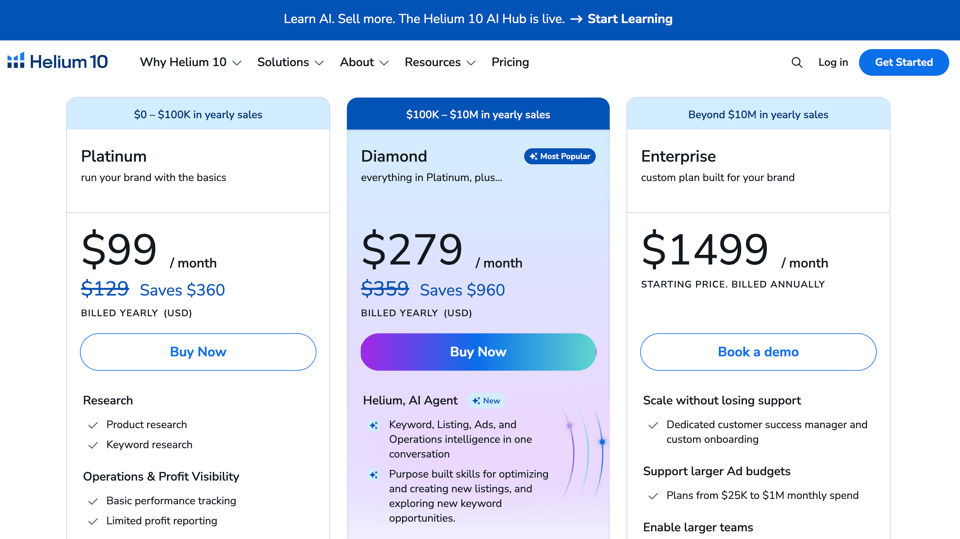
Here are the numbers on the yearly-billing prices I found on Helium 10's pricing information and independent price trackers: Platinum at $99 a month and Diamond at $279 a month. Prices move, so confirm yours at checkout.
Diamond at $279 a month
- With the 30% link offer: $195.30 a month for 6 months, which saves $502.20 in total
- With FLEXOBA10: $251.10 a month, which saves $27.90 every month
- After 12 months: link saves $502.20, code saves $334.80
- After 18 months: both have saved $502.20
- After 24 months: link saves $502.20, code saves $669.60
Platinum at $99 a month
- With the 30% link offer: $69.30 a month for 6 months, which saves $178.20 in total
- With FLEXOBA10: $89.10 a month, which saves $9.90 every month
- After 12 months: link saves $178.20, code saves $118.80
- After 18 months: both have saved $178.20
- After 24 months: link saves $178.20, code saves $237.60
There is also FLEXOBA20, which takes 20% off for 6 months. On Diamond that is $55.80 a month saved, or $334.80 over the 6 months. It is a middle option, but the link's 30% beats it for the same 6-month window, so I do not push it.
So which one should you choose?
- Pick the link's 30% if you are brand new, you want the biggest saving while you are still learning the tool, or you are not sure you will keep paying after the first half year. Most people searching for a promo code fall here.
- Pick FLEXOBA10 if you already know you will run a store for more than a year and a half. Every month after month 18 is extra money saved, and the discount does not drop off.
This is the honest part that many coupon pages skip. A recurring 10% sounds smaller than 30%, and for the first year and a half it is. It only wins if you stay. That is not a trick, it is just how the numbers fall.
My own rule: if you cannot say where your store will be in 18 months, take the 30% and revisit. If you can say it, use the code.
Either way, you start in the same place. Open Helium 10 through my link and make the choice at checkout, where you can see the final price.
Is there a Helium 10 Black Friday deal?
Helium 10 usually runs a Black Friday and Cyber Monday sale, but I could not find an official announcement for this season as I write this. The 30% link offer and the FLEXOBA10 code are both available now, so you do not have to wait to save.
Here is what I know. Independent deal trackers report that last year's Helium 10 Black Friday sale offered 40% off the Platinum plan for 12 months. They say it began around November 19 and was extended into early December to cover Cyber Monday. On a $99 Platinum plan, 40% off works out to $59.40 a month. Those are third-party reports, not an official promise for this year, so treat them as a pattern and not a guarantee.
Three things stand out about that pattern, and they matter for your decision.
- It was a Platinum deal. Reports describe the 40% as applying to Platinum, not Diamond. If the same shape repeats, anyone who wants Diamond may not get a Black Friday discount on it at all.
- It started in the second half of November. Sale windows can shift, and nothing says this year will match last year.
- It was for new subscribers. If you are already a member, the sale may not help you.
So is it smart to wait? Here is how I think about it.
The percentage-months method. To compare any deal, multiply the discount by the number of months it lasts. Last year's reported 40% for 12 months is 480 percentage-months. My link's 30% for 6 months is 180. FLEXOBA10 is 10 per month, forever, so it reaches 480 at month 48. On Platinum, a repeat of last year's deal would be the biggest saving of the three over the first year. That is true, and I am telling you because you would find out anyway.
Now the other side of waiting. Every week you wait is a week you are not finding products, not tracking keywords, not learning the tool. And if the official sale ends up Platinum only, Diamond buyers gain nothing from waiting. If you are serious about Diamond, the cost of waiting is real and the possible reward might never arrive for your plan.
Here is my practical advice, split by what you want.
- You want Diamond: start now. The link's 30% and the code both work on it today, and there is no confirmed Diamond sale to wait for.
- You want Platinum and can wait: watch the official pricing page from mid-November. If a bigger Platinum deal appears, compare it using the percentage-months method above.
- You are unsure: open the free plan today, look around, and decide when you have seen the data.
One more reason to start before the sale: Q4 is when sellers are most active, so the learning you do in November pays off in the busy weeks. Waiting for a sale to save a few dollars can cost you a seller's most valuable month.
See what is live on Helium 10 right now through my link, and compare it against anything the official page announces later.
How much does Helium 10 cost with the promo code?
With FLEXOBA10, Platinum comes to about $89.10 a month and Diamond to about $251.10 a month on yearly-billing prices. On monthly billing, the code brings Platinum to about $116.10 and Diamond to about $323.10.
Helium 10 raised its prices earlier this year and dropped the old Starter plan, so older coupon pages that mention a $29 or $39 entry plan are out of date. The standard paid plans now are Platinum and Diamond, plus a free plan and an Enterprise option for large teams. Here is how the prices look.
Platinum
- List price: $99 a month on yearly billing, or $129 a month billed monthly
- With FLEXOBA10: $89.10 yearly-billing, $116.10 monthly-billing
- With the 30% link offer for 6 months: $69.30 yearly-billing, $90.30 monthly-billing
Diamond
- List price: $279 a month on yearly billing, or $359 a month billed monthly
- With FLEXOBA10: $251.10 yearly-billing, $323.10 monthly-billing
- With the 30% link offer for 6 months: $195.30 yearly-billing, $251.30 monthly-billing
Earlier, the price chart you may have seen online said Platinum was $79 and Diamond was $229. That was before the increase. If a page shows those numbers, it has not been updated. Always confirm on the live Helium 10 pricing page before you pay.
What changes between the plans? Based on what reviewers and Helium 10's own plan descriptions list, these are the main differences:
- Platinum has monthly usage limits on tools like the Listing Analyzer, with reports of around 50 uses a month, while Diamond is reported at around 150
- Diamond includes the AI agent called Helium, the MCP connector for linking your data to an AI assistant, and the AI Listing Builder
- Diamond has higher limits across product and keyword work and more room for teams and multiple accounts
- Both plans include the Freedom Ticket course, which sells for $997 on its own according to reviewers
- Reviewers also report that Diamond accounts pay a small fee, around 2% of managed ad spend, when using Helium 10 Ads, and that the Managed Refund Service keeps a share of recovered funds. Check these details on the pricing page before you rely on them
One more honest note. Some of these specifics, like the exact limits and which plan includes Helium 10 Ads, are described differently by different reviewers. The pricing page is the single source you can fully trust, so open it with the promo code in hand and compare.
Here is a simple way to think about the monthly price gap. Diamond on yearly billing costs $180 more a month than Platinum. That sounds like a lot until you set it against one bad inventory order, which is where the next sections go.
Check the live Helium 10 prices through my link and see the discount applied before you commit.
Should new users start on Diamond or Platinum?
If you are serious about building an Amazon business, start on Diamond. Platinum looks cheaper, but it has lower limits and none of the AI tools, and the gap shows up exactly when you start doing real work.
I know that is not what a cautious person wants to hear. Most guides tell beginners to start small. I understand the instinct, and for some people it is right, which I cover in the next section. But for a seller who has decided to commit, I think starting on Platinum is the more expensive path in the long run.
Here is the reasoning, and you can check it against your own situation.
1. Research is where new sellers lose money, and Diamond gives you more of it. The biggest early mistake is ordering inventory for a product that does not sell. Product research is the cheapest insurance you will ever buy. Higher limits mean you can check more products, more keywords and more listings before you commit cash. Platinum's monthly caps are fine until you are in the middle of a research push, and then they get in your way.
2. The AI tools are a real working advantage. Diamond includes Helium, the built-in AI agent, the MCP connector and the AI Listing Builder. MCP lets you connect your Helium 10 data to an AI assistant and ask questions in plain language, such as which keywords are worth targeting or how a listing compares to its competitors. MCP access is Diamond only, and there is no way to unlock it on Platinum. If you want these tools, you need Diamond.
3. Switching plans mid-work is annoying. You can upgrade later, but you do it at the moment you are busiest and most frustrated, often right after hitting a limit. Starting on Diamond removes that moment.
4. You can walk away. This is the point I want you to hear. Subscribing is not marrying. Use Helium 10 for a month with the code or the link, do the seven day plan later in this article, and if it does not help you, do not subscribe again. Check the cancellation and refund terms at checkout so you know your options before paying.
5. Your decision is about the cost of a mistake, not the monthly fee. Diamond costs about $180 more a month than Platinum at list price. A single wrong inventory order for a new product can cost many times that. If better research stops even one bad order, the plan has paid for itself.
A word on the code and the link. If you choose Diamond, the 30% link offer drops it to $195.30 a month for the first 6 months on yearly-billing prices. FLEXOBA10 brings it to $251.10 a month for as long as you stay. I showed the break-even earlier. For a new Diamond subscriber, I lean to the link first, then reassess at month six, because that gives you the biggest saving while you are learning.
I will say this plainly: I am an affiliate, so weigh my advice accordingly. That is exactly why I keep the reasoning above open to inspection. If Diamond does not fit your budget or your stage, the next section gives you my honest alternative.
Start with Diamond through my Helium 10 link, or read on if you are leaning Platinum.
When is Platinum the better choice?
Platinum is the better choice if you are testing the waters on a tight budget, you will research a small number of products, and you do not need the AI tools yet. It still includes the core Helium 10 toolkit.
I do not want to oversell Diamond. Some people really should start on Platinum, and an honest guide has to say so.
Platinum fits you if most of these are true:
- You are on a tight budget and every dollar matters this month
- You plan to research a handful of products, not dozens
- You are launching one or two listings, not managing a catalog
- You work alone and do not need team or multi-account access
- You are happy to use a separate AI assistant of your own and do not need the MCP connector
- You want a low-risk way to learn the tools before upgrading
Several reviewers suggest Platinum is a solid fit for solo sellers with modest monthly revenue and that Diamond starts to pay off when ad spend or the number of products grows. I think that is fair. If you are not at that stage yet, Platinum is not a mistake.
The best way to use Platinum is as a testing ground. Start there with the 30% link offer, which brings it to $69.30 a month for 6 months on yearly-billing prices. Do real work, hit the limits if you hit them, and treat that as information. If you never feel the caps, you are in the right plan. If you hit them within the first month, you are telling yourself you need Diamond, and you will already have the habit of using the tools.
The price of choosing Platinum. You trade a lower monthly bill for lower limits and no AI agent, no MCP and no AI Listing Builder. You may spend time on tasks that Diamond could speed up. You may upgrade in the middle of a launch. None of that is a disaster, but it is a cost, and I would rather you see it before paying than after.
Which code on Platinum? The numbers are the same shape as Diamond, just smaller. The link saves $178.20 over the first 6 months. FLEXOBA10 saves $9.90 a month, which catches up at month 18 and wins after that. If you are unsure you will stay, use the link.
If you cannot decide, there is a neutral move: open the free plan first. It costs nothing and shows you the dashboard. Then come back and choose with the data in front of you.
Try Helium 10 on Platinum or Diamond through my link and choose the one that fits your stage.
What do you get with Helium 10?
Helium 10 is an all-in-one toolkit for Amazon sellers, with tools for product research, keyword research, listing creation, advertising, operations and analytics. Plan limits decide how much of each tool you can use.
Here is what the main tools do, in the order a new seller usually meets them. Each one has a plain job, and you do not need all of them on day one.
- Black Box. This is the product database search. You set filters such as price, estimated sales, competition and reviews, and it returns products that match. It is where many sellers find their first product idea, and the quality of the filters is the main reason I like it. Try Black Box through my link.
- Xray. A Chrome extension that sits on an Amazon search page and shows estimated revenue, sales, price and review data next to each product. It turns browsing into research, and it is the tool I reach for when I see a product and want to know in ten seconds whether the market looks real. Open Xray with my link.
- Cerebro. Reverse ASIN keyword research. You enter a competitor's product and see the keywords it ranks for. It is the fastest way I know to learn what shoppers type when they buy something. Use Cerebro through my link.
- Magnet. Seed keyword research. You enter a phrase and get a list of related terms with search volume. It is the right tool when you are starting from an idea, not a competitor. Start with Magnet here.
- Keyword Tracker. Tracks where your product ranks for chosen keywords over time. Once you launch, this is how you see whether your work is moving the needle. See Keyword Tracker on my link.
- Scribbles and the Listing Analyzer. Scribbles helps you place keywords in your listing without losing track, and the Listing Analyzer scores and checks your listing. Platinum and Diamond differ in how many analyses you get each month. Try the listing tools here.
- Profits and Alerts. Tools for watching your numbers and getting notified when something changes on your listings, such as hijackers or suppressed listings. Boring, and very valuable the day something goes wrong. Explore the operations tools.
- Managed Refund Service. Helium 10 files claims for Amazon fees you may be owed and keeps a share of what it recovers. Reviewers say the share depends on your plan, so read the terms. See how it works.
- Freedom Ticket. A training course that is included with Platinum and Diamond. Reviewers say it sells for $997 on its own, so if you are new, it is a real part of the value. Look at the plans that include it.
I have used Helium 10 to search for products and what struck me was how easy the site is and how complete the data is. Product research is the part that helped me the most, and the data felt very up to date, which matters because a market that was good six months ago may be crowded now. Customer care was also good when I needed it.
A note on keyword data. All keyword tools estimate. Helium 10's numbers are very useful for direction, but I recommend cross-checking a few critical keywords with Amazon's own search suggestions and the Brand Analytics report if you have brand registry. Treat the tool as a strong guide, not a court ruling.
If you are new, here is a sane order: Black Box for ideas, Xray to sanity check, Cerebro to see what the competitor ranks for, Magnet to widen your keyword list, Scribbles to write your listing. That one chain covers most of what you need for a first product.
Open Helium 10 and start with Black Box, using FLEXOBA10 or the link discount at checkout.
What are the Helium 10 AI features?
Helium 10's AI features are Helium, a built-in AI agent, the MCP connector that links your Helium 10 data to an AI assistant, and an AI Listing Builder. All three are part of the Diamond plan.
This is the part of Helium 10 that has changed the most recently, and it is why I think the platform is worth a second look even if you tried it years ago. Helium 10 has been improving quickly, and the AI tools are the clearest sign.
Helium, the AI agent. Instead of clicking through five tools, you ask a question in plain language and the agent does the legwork with your data. For example, you might ask it to compare two product ideas, or to explain why a listing is not ranking. It saves clicks, and it is a friendly way for a beginner to learn what to ask.
The MCP connector. MCP is a standard way to connect an AI assistant to a data source. With the Helium 10 MCP connector, you can use an assistant such as Claude and ask questions about your Helium 10 data in plain language. Two facts matter here, and I want to get them right because some pages have them wrong.
- MCP access is a Diamond feature. Platinum has no path to it.
- Diamond includes a monthly allowance of calls, reported at 1,000, and the $50 fee that some pages mention is a top-up for Diamond accounts that use up that allowance. It is not a way for Platinum accounts to unlock MCP.
If you are searching for the Helium 10 MCP price, that is the honest picture: it comes with Diamond, with a top-up if you run past the included calls. Check the live page for current terms.
The AI Listing Builder. It helps you draft a listing from your product details and keyword research. I would use it as a strong first draft and then edit the result by hand. A listing that reads like it was written by a machine does not convert well, and Amazon's Rufus and search algorithms reward clear, accurate, keyword-aware copy. Writing a listing that is honest about the product matters more than any tool.
Why this matters for the decision. If you only want the classic tools, Platinum has most of them. If you want to work with AI, Diamond is the plan. There is no side door. That is the clearest dividing line between the two plans, and it is a big reason I push serious new sellers toward Diamond.
See the Helium 10 AI features on Diamond. With the link you get 30% off for 6 months, or you can use FLEXOBA10 at checkout.
Is Helium 10 worth it with the promo code?
Helium 10 is worth it if you will use it to avoid one bad product decision or to find one good one. If you will not open it after the first week, no promo code makes it worth paying for.
That is the honest answer, and here is how to test it for yourself without hype.
Think about what a first product costs you. Take a hypothetical seller who orders 500 units at $8 each, which is $4,000 before shipping and fees. Suppose the product sells poorly and the seller is stuck with half the stock. That is a loss of thousands of dollars, many times the monthly price of any Helium 10 plan. This is an illustration, not a prediction, and your numbers will differ. The point is the ratio between a subscription fee and an inventory mistake.
Now compare it to the plan price. Diamond with the 30% link offer is $195.30 a month for the first 6 months on yearly-billing prices. Platinum with the link is $69.30. If better research steers you away from one bad order, either plan has paid for itself many times over. If it helps you find a product that sells, the benefit outweighs the price. That has been my experience, and it is why I keep recommending it.
Here is a simple worth-it test.
- Time test. Will you spend at least a few hours a week on research and listing work? If yes, the tool will save you time.
- Money test. Are you about to spend real money on inventory? If yes, research is cheap insurance.
- Stage test. Do you already have a product idea? If not, Black Box and Xray are built for exactly that stage.
- Commitment test. Will you stay long enough for the discount to matter? If yes, FLEXOBA10 starts to win after month 18.
If you pass three of the four, I think it is worth it. If you pass one or none, use the free plan and wait.
So is Helium 10 worth it with FLEXOBA10 or the link? For a committed new seller, I say yes. For a casual browser, start free.
Test the value yourself through my Helium 10 link. Start free, then upgrade when the data convinces you.
What are the downsides of Helium 10?
The main downsides are higher prices since this year's increase, a learning curve for beginners, keyword estimates that need cross-checking, and a promo code that does not stack with the link offer.
A promo code article that only praises the product is not worth your time, so here are the real drawbacks, along with how I think about each one.
- The price went up. Helium 10 raised its plan prices earlier this year and removed the cheaper Starter plan. Reviewers describe the increase as roughly 20 to 30% across core plans. That makes the entry point higher than it used to be. This is exactly why the discount matters, and why the free plan is a useful first step.
- There is a learning curve. The dashboard holds a lot of tools. A beginner can feel lost in the first hour. My fix is the simple chain from earlier: Black Box, Xray, Cerebro, Magnet, Scribbles. Learn those five and ignore the rest until you need them.
- Estimates are estimates. Sales numbers and keyword volumes are modeled, not read from Amazon's books. They are good for direction. I cross-check the keywords that drive big decisions.
- Plan limits can bite. Platinum has monthly caps on certain tools. Heavy researchers will notice them. Diamond raises them, which is part of its case.
- Extra fees exist. Reviewers report a small management fee on Helium 10 Ads for Diamond accounts and a revenue share on the Managed Refund Service. Read the terms for any add-on before you use it.
- The code and the link do not stack. If you were hoping to combine 30% and 10%, you cannot. You pick the better fit for how long you will stay.
- It does not guarantee results. Helium 10 gives you better information. It does not choose the product, negotiate with the supplier or handle shipping. Those parts are still your job.
- Not every plan includes every feature. Some of the best new features, like MCP, are Diamond only. If you want them, Platinum will not do.
How do I weigh these? For a committed seller, the price and the learning curve are the real costs. Both are manageable. The price is managed with the code or the link. The learning curve is managed by starting with a small set of tools and a plan.
If these downsides do not scare you, try Helium 10 through my link. If they do, start on the free plan and keep your card in your pocket.
How do you test Helium 10 in seven days?
Spend seven days using Helium 10 on one real product idea, then decide if it earned its price. If it did not, do not subscribe again.
This plan is built so you get a clear yes or no and do not drift. Block out thirty to sixty minutes a day.
- Day 1: Set up and look around. Create your account through my Helium 10 link, install the Chrome extension, and explore the dashboard. Write down one product category you are curious about and one budget limit for your first order.
- Day 2: Find ideas with Black Box. Set filters for a price range you can afford, healthy estimated sales, and modest competition. Save five products that look interesting. Do not fall in love with any of them yet.
- Day 3: Check the market with Xray. Visit the Amazon search pages for your five products. Use Xray to see revenue, reviews and price spread. Cross off anything that looks crowded, price-warred or dominated by one huge brand. Keep two.
- Day 4: Study the keywords with Cerebro. Run the top competitor on each remaining product through Cerebro. Look at which keywords bring them traffic. Note any that are surprising to you.
- Day 5: Widen the list with Magnet. Enter your main phrase and collect related terms. Group them into themes. Notice which ones have high volume but low competition.
- Day 6: Sketch a listing. Use Scribbles, and if you are on Diamond, the AI Listing Builder, to draft a title and bullets. Edit by hand until it sounds like a person wrote it and is honest about the product.
- Day 7: Decide. Review what you found. Ask three questions. Did I find a product I would actually consider ordering? Did the tool save me time? Would I have made a worse decision without the data?
How to read the result.
- Yes to two or more: keep the subscription and consider the code if you plan to stay past 18 months.
- Yes to one: stay on the free plan or Platinum, and try again with a second product.
- Yes to none: do not subscribe again. You have lost a week and learned what does not suit you.
That last line is the point of this plan. A fair test beats a long commitment. Helium 10 earns its place if it helps you decide better, and the seven days will show it.
If you want a stronger start, begin on Diamond for the first month with the 30% link offer, which gives you the AI tools and higher limits while you learn. You can always step down later.
Start your seven day test through my Helium 10 link.
Helium 10 promo code FAQs
What is the best Helium 10 promo code?
FLEXOBA10 is the code I recommend if you plan to stay subscribed for more than 18 months, because it takes 10% off every month with no end date. If you are not sure you will stay, the 30% off for 6 months that comes with my Helium 10 link saves more at the start.
Does the Helium 10 promo code work on Diamond?
Yes. FLEXOBA10 is meant for new sign-ups on paid plans, including Diamond. Confirm that the discount appears in your order summary at checkout before paying, because prices and rules can change.
Can I use the promo code and the 30% link offer together?
No. They do not stack. The link applies 30% off for 6 months on its own, and the code gives 10% off recurring. Choose the one that matches how long you will stay.
How much is Helium 10 with the code?
On yearly-billing prices, Platinum is about $89.10 a month and Diamond about $251.10 a month with FLEXOBA10. On monthly billing, they are about $116.10 and $323.10. The live pricing page is the final word.
Is there a Helium 10 Black Friday deal?
Helium 10 usually runs one. Deal trackers report last year's sale was 40% off Platinum for 12 months, starting around November 19. I could not find an official announcement for this season yet. The 30% link offer and the code are available now, and I explain how to compare any sale in the Black Friday section above.
Is there a Helium 10 free trial?
Helium 10 offers a free plan that lets you explore the platform with a limited set of tools and no payment needed. I could not confirm a time-limited free trial of the paid plans, so I treat the free plan as the real way to try it. Open the free plan through my link.
Is Helium 10 legit?
Yes. It is a long-running, widely used software platform for Amazon sellers, with well-known tools such as Black Box, Xray and Cerebro. User ratings I have seen are around 4.7 out of 5, though they vary by site and over time. As with any software, read recent reviews and the terms before you pay.
Is Helium 10 worth it?
It is worth it if you will use it to research products and listings before spending on inventory. It does not guarantee profit. My own experience is that the product research helps a lot, the data feels very up to date, customer care has been good, and the benefit outweighs the price.
What is the difference between Helium 10 Platinum and Diamond?
Diamond has higher usage limits and includes the AI agent, the MCP connector and the AI Listing Builder. Platinum has the core toolkit with lower limits. Diamond is about $180 a month more than Platinum at yearly-billing list prices.
Can I cancel Helium 10 anytime?
You can cancel through your account, but the exact terms depend on how you billed, monthly or yearly. Read the cancellation and refund terms at checkout. If you want the most flexibility, monthly billing lets you stop sooner, at a higher monthly price.
What if the promo code does not work?
Open the link in a fresh tab in the same browser, restart checkout, type FLEXOBA10 in capitals, and check the order summary. If it still fails, use the 30% link offer, which applies automatically.
Final verdict: should you use the Helium 10 promo code?
Yes, if you are a new user who wants to research Amazon products with real data. Use the 30% link offer if you are still learning, and FLEXOBA10 if you know you will stay past 18 months.
Here is the whole decision in one place.
- You have not tried Helium 10 yet: open my link and start with the free plan.
- You want the full toolkit and the AI features: choose Diamond and take the 30% link offer first.
- You are watching the budget: choose Platinum, test it properly, and upgrade only if you hit the limits.
- You are playing a long game: use FLEXOBA10 and let the 10% keep working past month 18.
- You are waiting for Black Friday: compare any official deal with the percentage-months method, and remember last year's reported sale was Platinum only.
What I would not do is stay stuck researching the research tool. Data beats guessing. A week with Helium 10 will tell you more than another month of reading reviews, including this one.
The code, one last time: FLEXOBA10, for 10% off every month. The link: i.helium10.com/xLd3K3, for 30% off your first 6 months. Pick one, check the order summary, and start your seven day test.
Get started with Helium 10 through my link
Sources and notes
- Helium 10 pricing and membership plans, Helium 10's own page, for plan names and tiers
- Helium 10 pricing and plans, RevenueGeeks, for the price increase, the end of the Starter plan and current list prices
- Helium 10 Black Friday, RevenueGeeks, for the reported timing and terms of last year's sale
Prices, limits and promotions change often. Figures here come from those pages and from independent reviewers, and I looked them up shortly before publishing. Confirm everything on the live Helium 10 pricing page and at checkout before you pay.
