Melio payment Reviews: Is It Worth It? Pricing and Features
Disclosure: this article contains my affiliate link. If you sign up through it, I may earn a commission at no extra cost to you.
Paying vendors should not eat half your Friday. If you are still logging into three bank portals, writing checks and chasing receipts, Melio is built to fix exactly that. I went through the official Melio website and the reviews on G2, Capterra and Trustpilot to put together the most complete, honest breakdown you will find. By the end you will know the real pricing, what you actually get at each tier, where Melio shines and where users complain, and whether it fits your business.
Good news first: Melio is free to start, and right now new accounts can try everything free for 90 days. Start your free Melio account here and see it for yourself before you spend a cent.
What Is Melio?
 Melio is a US-based B2B payments platform that helps small and mid-sized businesses pay their vendors and get paid by their customers from one dashboard. You upload or forward a bill, pick how you want to pay (bank transfer, credit card, debit card or check), and Melio sends the money in the form your vendor prefers.
Here is the part that makes people love it:
- Your vendor does not need a Melio account to get paid.
- You can pay by credit card even if the vendor only accepts ACH or checks.
- It syncs with QuickBooks and Xero so your books stay clean.
- There is a free plan, so you can start without a subscription.
Melio was founded in 2018, is headquartered in New York and has an office in Tel Aviv. It is also used by accountants and bookkeepers to manage payments for multiple clients. Melio itself says it is trusted by over 100,000 business owners.
Create your free Melio account and send your first payment
How Does Melio Work?
Melio is simple on purpose. The whole flow takes a few minutes once you are set up.
- Step 1: Sign up and connect your bank account (Melio supports instant bank connection or micro-deposits).
- Step 2: Add a bill by uploading it, snapping a photo, forwarding it to your Melio email or syncing it from QuickBooks or Xero.
- Step 3: Choose your payment method: free ACH bank transfer, credit or debit card, or mailed check.
- Step 4: Pick the delivery date and schedule it, or set up recurring payments on autopilot.
- Step 5: Your vendor gets paid by ACH deposit or paper check, and the payment syncs back to your accounting software.
The magic is in step 3. You decide how you pay, and your vendor decides how they receive. Nobody has to change anything on their side.
How Does Melio Pay Vendors Who Don't Accept Credit Cards?
You pay Melio with your credit card, and Melio sends your vendor an ACH deposit or a check. The vendor never sees a card payment, and you still earn your card rewards and extend your cash flow. The trade-off is a 2.9% card fee, which I explain in the pricing section.
How Long Do Melio Payments Take?
Standard ACH payments take up to about three business days according to Melio's own comparison page. Paper checks take longer because they travel by mail. If you are in a rush, Melio offers faster options for an extra fee, covered below.
Who Owns Melio?
Melio is owned by Xero, the cloud accounting giant. Xero completed its acquisition of Melio on October 15, 2025, in a deal worth about US$2.5 billion upfront. Melio co-founder and CEO Matan Bar leads Xero's US business.
What does that mean for you?
- Melio is backed by a large, publicly listed accounting company, not a tiny startup.
- Xero planned to roll Melio's bill pay into its own US plans, and Xero says standard ACH bill payments inside its software are included on certain US plans without a separate Melio subscription.
- Melio continues to be available as its own product, including the free plan.
If you already use Xero or QuickBooks, this ownership makes Melio a natural fit for your workflow.
Melio Features
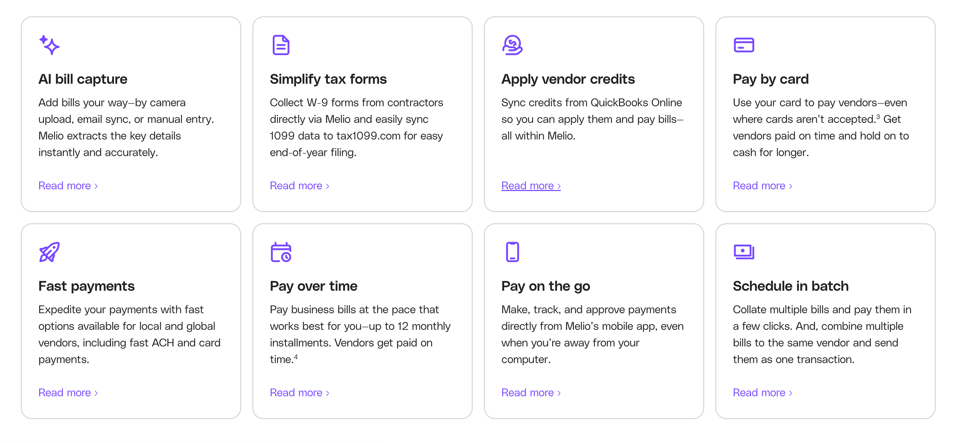
Here is what you actually get, explained without the jargon.
Pay Bills by ACH, Card, Check or Wire
This is the core of Melio. Pay by free bank transfer (ACH), by credit or debit card, or by mailed check. You can also use faster delivery options and international payments when you need them.
- ACH bank transfers are free up to your plan's monthly limit.
- Card payments cost 2.9%.
- Standard checks cost $1.50 each.
- Pay any vendor, even ones that do not accept cards.
Pay Any Bill With a Credit Card
Melio's headline feature. Put rent, supplies, contractor invoices or inventory on your card even when the vendor does not take cards. Use it to earn rewards, hit a credit card welcome bonus spend requirement or simply stretch your cash flow until the statement is due.
Bill Capture and Easy Bill Entry
You do not have to type bills in by hand.
- Upload a PDF or photo of a bill.
- Forward bills to your dedicated Melio email.
- Import bills from QuickBooks or Xero.
- Core and higher plans add automatic line-item capture.
QuickBooks and Xero Sync
Every payment you make flows back into your accounting software, so reconciliation is not a monthly headache.
- Go plan: up to 10 syncs with QuickBooks Online or Xero.
- Core plan: unlimited two-way sync with QuickBooks Online and Xero.
- Boost plan: adds QuickBooks Desktop sync.
- Unlimited plan: adds NetSuite integration access.
Approval Workflows and User Roles
Running a team? Add approval steps so no payment goes out without sign-off.
- Core and Boost add roles, permissions and approval workflows.
- Boost adds advanced multi-user workflows and custom bill attributes like classes and locations.
- Unlimited gives you unlimited users with advanced roles.
Batch Payments and Recurring Payments
Pay several bills at once, combine payments to the same vendor and set recurring payments for rent, subscriptions or retainers. Set it once and stop thinking about it.
W-9 Collection and 1099 Support
At tax time this one is a lifesaver. Core and higher plans let you collect W-9 forms from vendors and sync the data for 1099 filing.
Get Paid: Invoices and Payment Links
Melio is not just for paying. You can create invoices and send payment links so customers pay you by ACH or card, and you choose who covers the card fee.
- Receive payments directly to your bank account.
- Send custom payment links.
- Decide whether you or your customer pays the card processing fee.
Fast and Instant Payments
Need money to land sooner? Faster ACH options are available for a fee, so you are not stuck waiting when a vendor is chasing you.
Phone Support and Dedicated Help on Higher Tiers
Unlimited adds a dedicated account manager and white-glove onboarding, and higher plans come with priority or premium support.
Try every Melio feature free for 90 days
Melio Pricing
Pricing is where Melio really wins small businesses. You can start at $0 and only upgrade when your volume justifies it. Here are the plans as published on Melio's pricing page.
Melio Go (Free)
- Price: $0 forever.
- 1 user.
- 5 free ACH payments per month.
- Card payments, check payments, invoice creation and payment links.
- Up to 10 QuickBooks Online or Xero syncs.
Best for freelancers and very small businesses with low payment volume.
Melio Core
- Price: $25 per month, or $20 per month billed annually.
- 20 free ACH payments per month.
- Unlimited QuickBooks Online and Xero sync.
- Approval workflows, batch payments, roles, W-9 and 1099 tools.
- Extra users cost $10 per month each ($8 on annual billing).
Best for small teams with moderate volume.
Melio Boost
- Price: $55 per month, or $44 per month billed annually.
- 50 free ACH payments per month.
- Everything in Core plus 2-day ACH delivery eligibility.
- QuickBooks Desktop sync, advanced workflows and bill attributes.
- Extra users cost $10 per month each ($8 on annual billing).
Best for growing businesses with more complex approvals.
Melio Unlimited
- Price: $80 per month, or $64 per month billed annually.
- Unlimited free ACH payments.
- Unlimited users.
- NetSuite integration access, dedicated account manager and white-glove onboarding.
Best for high-volume payers and larger teams.
Melio Platinum
- Invite-only tier for businesses with very high card volume (reported at $300K or more per month).
- Custom transaction pricing and discounted card fees.
Melio Transaction Fees
Beyond the subscription, these are the per-payment costs to know:
- Extra ACH payments over your plan limit: $0.50 each.
- Credit or debit card payments: 2.9% of the payment.
- Standard mailed check: $1.50 each.
- Faster same-day ACH: 1% fee.
- International USD payments: $20 flat fee.
Receiving payments by ACH through Melio is generally free, while card payments you accept carry a card fee that you can pass on to your customer.
Is There a Melio Free Trial or Special Offer?
Yes. Melio currently advertises that new customers get access to everything it offers, including unlimited free ACH payments and advanced automations, free for the first 90 days with no credit card needed. After that you can stay on a paid plan or drop back to the free Go plan. Offers can change, so check the details when you sign up.
Claim your free 90 days of Melio
How Much Does Melio Really Cost Per Month?
It depends entirely on how you pay.
- Paying everything by ACH under your plan's limit: you pay only the subscription, which can be $0.
- Paying by card: 2.9% on every payment. On a $5,000 invoice that is $145, so use cards deliberately when the rewards or cash flow benefit is worth it.
- Going over your ACH limit: $0.50 each, which is tiny compared with a wire fee.
Which Melio Plan Should You Choose?
- Under 5 vendor payments a month and one user: Go.
- Around 20 payments a month or a small team: Core.
- Around 50 payments a month or QuickBooks Desktop: Boost.
- 50 to 100 or more payments a month, or a bigger team: Unlimited, since extra users on Core and Boost add up.
Is Melio Legit?
Yes, Melio is legit. It is a real US payments company, founded in 2018 and owned by Xero after a roughly $2.5 billion acquisition completed in October 2025. It is used by well over 100,000 businesses and integrates with QuickBooks and Xero.
Being legit does not mean being perfect, though, and I want to be straight with you. Reviews on Trustpilot and accounting forums include complaints about payment holds, delayed or failed payments and slow customer support. Most of the happy reviews come from people whose payments went through smoothly, and most of the angry ones come from people whose payments hit a snag and who then struggled to get help. The sensible way to use Melio is to start with small payments, confirm your vendors are paid and scale up from there.
Is Melio Safe to Use?
Melio connects to your bank through established bank-linking methods and lets you pay vendors without sharing your bank details with them. As with any payments platform, sensible habits help: use a strong password, turn on any available extra security, double-check vendor details before sending, and avoid scheduling critical payments at the last minute.
Is Melio a Scam?
No. Melio is a legitimate payments business owned by a major listed accounting company. The word "scam" shows up in a handful of angry reviews, almost always tied to account holds or delayed payments rather than anything fraudulent. If you want to be careful, test with a small payment first.
Is Melio Worth It?
For most small businesses, yes. Here is why.
- The free plan costs nothing, so the downside of trying it is close to zero.
- Free ACH payments beat the cost of checks, stamps and wire fees.
- Paying by card on a vendor that only takes checks is genuinely useful for cash flow.
- Syncing with QuickBooks or Xero saves real bookkeeping time every month.
- It is cheaper per seat than many alternatives such as BILL, whose plans start higher per user per month.
It is less of a fit if you need guaranteed phone support, ultra-fast payments every time or a complex enterprise AP setup.
Start free and decide for yourself
Is Melio Good?
Yes, Melio is good for what it is designed to do: simple, flexible vendor payments for small businesses. Here is how real users rate it.
- G2: around 4.4 out of 5 from roughly 250 reviews, with users praising ease of use, easy setup and the QuickBooks integration.
- Capterra: roughly 4.2 out of 5 from several hundred reviews, praised for simplicity and value.
- Trustpilot: around 3.8 out of 5 from well over a thousand reviews, with the lower scores tied to support response times and payment holds.
The pattern is clear. People love the interface, the free entry point and the card-to-ACH flexibility. People who run into payment problems wish support was faster.
What Do Melio Users Like Most?
- How easy it is to set up and use.
- Paying vendors without needing their bank details.
- The QuickBooks and Xero integration.
- Being able to schedule payments and forget about them.
What Do Melio Users Complain About?
- Slow responses from customer support when something goes wrong.
- Payment holds, delays or failed payments on some accounts.
- The 2.9% card fee.
- No phone support on lower tiers.
Melio Pros
- Free plan with 5 free ACH payments a month.
- 90 days free access to everything for new customers.
- Pay any vendor by card, even if they only take ACH or checks.
- Vendors do not need a Melio account.
- Unlimited free ACH on the Unlimited plan.
- Syncs with QuickBooks Online, QuickBooks Desktop (Boost), Xero and NetSuite (Unlimited).
- Approval workflows, batch pay and recurring payments.
- W-9 and 1099 tools on paid plans.
- Invoices and payment links so you can get paid too.
- Cheaper per user than many competitors.
- Backed by Xero.
Melio Cons
- 2.9% fee on card payments.
- $0.50 per ACH over your plan allowance.
- Customer support complaints and payment-hold complaints are common in negative reviews.
- Free plan is single-user with limited syncs.
- Extra users cost $10 a month on Core and Boost.
- Standard checks cost $1.50 each.
- Not for personal bills; it is for business payments only.
Melio Alternatives and Comparisons
Melio vs BILL
Melio has a free plan and its paid plans start at $25 per month, while BILL has no free plan and charges roughly $45 to $79 or more per user per month, depending on the tier. Melio also offers vendor-friendly payments with no signup required. BILL leans toward larger finance teams with deeper AP automation.
Melio vs QuickBooks Bill Pay
If you live in QuickBooks, Melio plugs in directly and gives you more payment flexibility, including paying by card. Many users report the integration saves time, though QuickBooks users have also posted about support issues, so test with small payments.
Melio vs Xero Bill Pay
Since Xero owns Melio, the experience is increasingly connected for Xero users. If you are on Xero, check whether your plan already includes standard ACH bill payments before paying for a separate subscription.
Who Should Not Use Melio?
- Businesses that need real-time phone support on every issue.
- Large enterprises with complex multi-entity AP needs.
- People looking to pay personal bills.
Melio for Small Business, Freelancers and Accountants
Is Melio Good for Small Business?
Yes. Small businesses get free ACH, flexible card payments and accounting sync without paying for an expensive AP system. The Go plan alone covers many micro businesses.
Is Melio Good for Freelancers?
Yes. Freelancers can pay contractors and suppliers, send invoices with payment links and keep everything synced, all on the free plan.
Is Melio Good for Accountants and Bookkeepers?
Yes. Accountants use Melio to manage payments across multiple clients, and Melio runs programs that pay accountants for adding clients. Check Melio's accountant program page for current terms.
Can You Pay Rent With Melio?
Yes, as long as your landlord or property manager is a business that can receive payment by ACH or check. You can pay by bank or by card and schedule recurring payments.
Can You Pay Taxes With Melio?
Melio is built for vendor and business bills. For tax payments, use the official government payment channels or check Melio's help pages for supported payment types.
Melio Frequently Asked Questions
What is Melio used for?
Melio is used to pay business bills and get paid. You can pay vendors by ACH, card or check, send invoices, and sync everything with QuickBooks or Xero.
Is Melio free?
Yes, the Go plan is free forever for one user and includes 5 free ACH payments a month. Card payments cost 2.9% and extra ACH payments cost $0.50 each.
How much does Melio cost?
Plans are Go at $0, Core at $25 per month, Boost at $55 per month and Unlimited at $80 per month, with lower annual rates of $20, $44 and $64 per month. Card payments are 2.9%.
Is Melio really free?
Yes, the plan is free. You only pay when you use paid payment methods such as cards at 2.9%, mailed checks at $1.50, extra ACH payments over your limit at $0.50, faster delivery or international payments.
Does Melio charge a fee for ACH?
ACH is free up to your plan's monthly limit: 5 on Go, 20 on Core, 50 on Boost and unlimited on Unlimited. After that it is $0.50 each.
How much does Melio charge for credit card payments?
Melio charges 2.9% on credit and debit card payments.
Does Melio charge for checks?
Yes, standard mailed checks cost $1.50 each.
Does the person I pay need a Melio account?
No. Vendors receive an ACH deposit or a paper check without creating an account.
Can I pay a vendor by credit card if they only accept checks?
Yes. You pay Melio by card and Melio sends your vendor an ACH deposit or check.
How long does a Melio payment take?
Standard ACH takes up to around three business days, and checks take longer because they are mailed. Faster options are available for a fee.
Does Melio integrate with QuickBooks?
Yes. Melio syncs with QuickBooks Online on the free plan (up to 10 syncs) and with unlimited sync on Core and higher. QuickBooks Desktop sync starts on Boost.
Does Melio work with Xero?
Yes. Melio syncs with Xero, and Melio is now owned by Xero.
Does Melio work with NetSuite?
Yes, NetSuite integration access is available on the Unlimited plan.
Who owns Melio?
Xero owns Melio. The acquisition was completed on October 15, 2025.
Is Melio legit?
Yes, Melio is a legitimate US payments company owned by Xero. Like any payments platform, it has some negative reviews tied to holds and support delays, so start with small payments.
Is Melio safe?
Melio is a mainstream payments platform that connects to your bank through standard methods and lets you pay without exposing your bank details to vendors. Use strong passwords and verify vendor details.
Is Melio worth it for small business?
Yes, for most small businesses. The free plan, free ACH and card flexibility make it a low-risk way to simplify bill pay.
What are the downsides of Melio?
The main ones are the 2.9% card fee, per-user fees on Core and Boost, and complaints about support speed and payment holds from some users.
Does Melio have customer support?
Yes, Melio offers support, but reviewers often mention slower responses when issues arise. Higher plans add priority support and Unlimited adds a dedicated account manager.
Does Melio have phone support?
Lower-tier users commonly report there is no phone support. Higher tiers advertise premium and dedicated support, so check the current details for your plan.
Can I use Melio for personal bills?
No. Melio is for business payments only.
Can I get paid through Melio?
Yes. You can send invoices and payment links and receive ACH or card payments, and you can choose who pays the card fee.
Does Melio offer international payments?
Yes. International USD payments carry a flat fee, reported at $20, and other fees vary by currency and method.
Does Melio have a free trial?
Yes. New customers can access everything free for the first 90 days with no credit card needed, based on Melio's current pricing page.
What happens after the Melio free trial ends?
You can stay on a paid plan or move to the free Go plan.
Can I cancel Melio anytime?
Melio's plans are offered month to month, with discounted annual billing available. Check the terms at signup for your exact plan.
Which Melio plan is best?
Go for very low volume, Core for small teams, Boost if you use QuickBooks Desktop or need 50 ACH payments, and Unlimited for high volume or bigger teams.
Is Melio better than BILL?
Melio is cheaper and has a free plan, while BILL targets larger finance teams. For most small businesses, Melio is the better value.
Does Xero include Melio?
Xero says standard ACH bill payments inside its software are included for US customers on certain plans, without a separate Melio subscription. Check your Xero plan for current details.
Open your free Melio account and send your first payment
Melio Review Conclusion
Melio is one of the easiest, cheapest ways for a US small business to pay vendors, get paid and keep the books in sync. The free plan removes the risk, the 90-day offer lets you test everything, and paying by card when a vendor does not accept cards is a genuine cash flow tool. The honest caveat is that some users report payment holds and slow support, so start small, confirm vendors are paid and then scale.
If you are tired of checks, bank portals and manual data entry, give it a real try. Start your free 90 days with Melio now and put your bill pay on autopilot.
Melio Discount Code
Is there a Melio discount code? I could not find a verified, working Melio promo code for new customers, and I will not make one up. What Melio does offer right now is better than most codes: free access to everything for your first 90 days, plus a free Go plan that costs nothing forever.
- No code needed: the offer applies when you sign up for a new account.
- Annual billing saves roughly 20% compared with monthly on Core, Boost and Unlimited.
- Offers can change at any time, so grab it while it is live.
Use my link to start your free Melio account today: Claim the Melio free 90-day offer
