Helium 10 vs Keepa: Why Diamond Wins
Disclosure: I'm an official Helium 10 affiliate. If you sign up through my link I may earn a commission, at no extra cost to you. I've kept the Keepa comparison fair, including the places where Keepa is the better pick.
If you're reading this, you're probably in the same spot most new Amazon sellers land in. You have two tabs open, one for Helium 10 and one for Keepa. You've read three comparison posts that all say "it depends." And you're still no closer to a decision.
I'll save you the fourth "it depends."
Keepa is a price history tool. Helium 10 is a full Amazon seller toolkit. They're not really the same kind of product, which is why comparing them feels so confusing. One tells you what happened to a product's price and rank. The other helps you find a product, pick keywords, write the listing, run the ads and watch your account once you're live.
If you want to try the fuller toolkit with a discount that doesn't expire, here's the short version before we get into the detail:
- Use code FLEXOBA10 for 10% off Helium 10 for life.
- Or use my Helium 10 link, which applies 30% off to start. The link offer and the code don't stack, so you pick one. I'll show you the math on which one fits you further down.
- If you're going to try one plan, I'd look hard at Diamond first. I'll explain why.
Now let's actually compare these two properly.
The 30-second answer: Helium 10 vs Keepa
- Keepa is best at showing price history, sales rank history, Buy Box history and stock changes for any product, with alerts when something moves. It has a free version, and the paid data access is cheap.
- Helium 10 is best at everything that comes before and after that chart: finding products, mining keywords, building listings, running PPC, protecting inventory and tracking profit.
- If you only want to watch a price chart, Keepa is enough.
- If you want to build and run an Amazon business, Keepa alone leaves a lot of work on your plate, and Helium 10 covers most of it in one login.
That's the whole decision for most people. The rest of this article is the proof, and the part where I show you why trying Helium 10 sooner beats trying it later.
What Keepa actually is
Keepa has been around since 2011. It started as a price tracker for shoppers and became popular with sellers because it stores years of data on Amazon products. You install the browser extension, open any Amazon product page, and a chart appears under the listing.
On that chart you can see:
- Amazon's own price over time
- Third-party new and used prices
- Sales rank history
- Buy Box price history
- Stock status and offer counts
You can also set alerts so you get an email when a product drops below a price you care about, and there's a Product Finder for filtering the catalogue, plus an API for developers.
The basics are free. The deeper data access sits behind a paid subscription that most sources put at around twenty dollars a month. Check Keepa's own page for the current figure before you buy, because that's the kind of number that moves.
I want to be fair here. Keepa is very good at the one thing it does. When I look at a Keepa chart, the history is clear and the extension is fast. Sellers who use it aren't wrong to like it.
The honest downside, and reviewers say this too, is that the interface can feel busy when you're new, and the useful stuff is locked behind the subscription. More importantly, it stops at the data. It shows you the chart. What you do with the chart is your problem.
What Helium 10 actually is
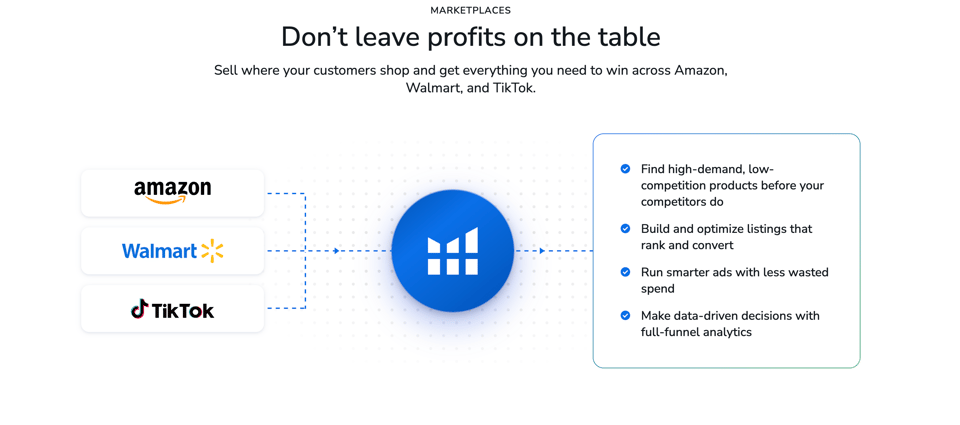
Helium 10 is a suite of tools built for Amazon sellers. It's a lot more than one chart. The pieces most sellers touch first are:
- Black Box for product research, where you filter the catalogue by revenue, competition, price range and more
- Xray, the Chrome extension that shows estimated sales and revenue right on Amazon search results
- Cerebro for reverse ASIN lookup, so you can see what keywords a competitor ranks for
- Magnet for keyword research from a seed term
- Listing Builder and Scribbles for writing and optimizing your listing
- Frankenstein for cleaning up keyword lists
- Alerts and Inventory Protector for keeping an eye on your live listings and stock
- Profits and analytics so you know what you're really making
- Helium 10 Ads for PPC management
- Freedom Ticket, an Amazon FBA training course included on the paid plans
Add the newer stuff, an AI agent called Helium and an MCP connector that lets outside AI tools query your own Helium 10 data, and you can see why people describe it as a toolbox instead of a tool.
Here's my own experience, kept plain. When I first used it to search for products, what stood out was how easy the site was to move around and how complete the data felt. I wasn't hunting through ten screens to find one number. Product research helped me a lot, the data felt very up to date, and when I needed help, the customer care was good. After using it, I felt the benefit was bigger than the price. That's my opinion, and your results will depend on how you work.
Product research: where the gap is the biggest
This is the first place Helium 10 and Keepa split apart.
With Keepa, you usually need to already have a product in mind. You find an ASIN, open the chart and study its history. That's useful once you have a candidate. It doesn't hand you candidates.
With Helium 10, product research is the starting line. Black Box lets you set filters, say a price band, a minimum monthly revenue, a limit on review counts, and see what products match. Xray sits on top of an Amazon search page and shows estimated monthly sales and revenue for every result, so you can scan a whole niche in a minute or two.
One thing I'd say for credibility: every sales estimate from every tool, including Helium 10, is an estimate. Independent reviewers treat all of them as approximations, and you should too. Use them to compare products against each other and to rule out bad niches. Don't treat them as accounting.
The practical difference is this. Keepa helps you judge a product you've already found. Helium 10 helps you find it in the first place and then judge it. If you're new, the finding part is the thing that actually stops you.
Keyword research and listings: Keepa has nothing here
This section is short because Keepa isn't in it.
Keepa doesn't do keyword research. It doesn't tell you what shoppers type, what your competitor ranks for, or which phrases belong in your title and bullets. Helium 10 does.
Here's how that plays out for a new seller:
- You find a product with Black Box or Xray.
- You drop a competitor ASIN into Cerebro and see the keywords driving their traffic.
- You use Magnet to expand from a seed term and find phrases you wouldn't have thought of.
- You clean the list, then write your title, bullets and backend terms with Listing Builder or Scribbles.
A good listing is how a product gets seen at all. Without keyword data, you're guessing. I've seen new sellers write a listing around the words they like instead of the words buyers use, and then wonder why nobody finds it.
If you went the Keepa-only route, you'd need a second tool for this. Then maybe a third for ads. That's how people end up paying for four subscriptions and still switching between four tabs.
Advertising and operations
Once a product is live, the work changes. You're watching ad spend, stock levels, hijackers, reviews and profit.
Keepa can show you that something happened, like a competitor undercutting you or a Buy Box swap. That's real value. It can't run your ads or protect your inventory.
Helium 10 has tools for that side too: Ads for PPC management, Alerts for listing changes, Inventory Protector for stock-related problems, and profit tracking so the numbers match reality. You don't need all of it on day one. But the day you launch, you'll be glad it's already there.
Worth knowing: ad tools are not the same on every plan, and Helium 10 has changed which plan gets what over the past year. On Diamond, the ad management fee is 2% of the PPC spend the tool manages. Read the current plan page before you decide, so nothing about the setup surprises you.
The AI side: where Helium 10 is moving fast
This is a part of the comparison most Keepa articles skip, and it matters.
Helium 10 has been pushing hard on AI. The Helium agent lets you ask questions about your own account and research in plain language. The MCP connector goes further: it lets outside AI tools query your Helium 10 data directly, and on Diamond it's included free for up to 1,000 calls a month, according to current plan breakdowns.
I'm not going to oversell this. Some of these features are new, and new features have rough edges. But the direction is clear. The company is putting its energy into making the data usable, not just viewable. Keepa is still, at heart, a chart. A great chart, but a chart.
If you've ever stared at a research screen thinking "okay, but what do I do now?", that gap is exactly what the AI work is trying to close.
Where Keepa wins (yes, really)
I said I'd keep this honest, so here it is.
- Price history depth. If your whole job is watching a product's price and rank over years, Keepa's charts are hard to beat, and they're well loved for it.
- Cost. A free tier and a cheap paid tier are easier to say yes to than a platform.
- Shopping use. If you're a buyer who wants to know whether a deal is real, Keepa is made for you.
If that describes you, skip Helium 10 and enjoy Keepa. Genuinely.
But if you're a seller, or about to become one, the question isn't "which tool has the nicest chart." It's "which tool gets me from zero to a live, profitable listing with the fewest gaps."
Can you use both?
Yes, and plenty of sellers do. Keepa is a good second opinion on price and rank history. But here's the order I'd go in, if you're deciding where the first dollar goes:
- Start with the tool that finds the product, picks the keywords and builds the listing. That's Helium 10.
- Add Keepa later if you decide you want deeper price history for a specific category.
Putting it the other way round means you'd have beautiful charts and no product to point them at.
Pricing: what you'd actually pay
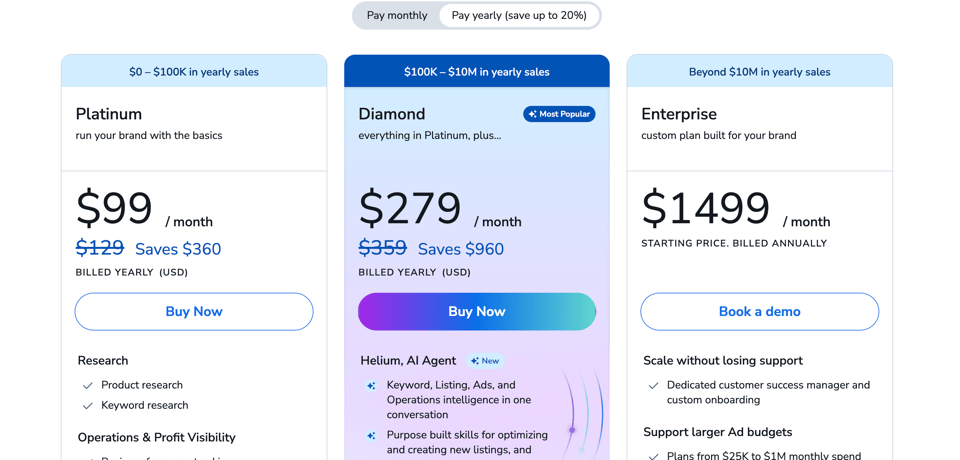
Pricing is where people get stuck, so here it is in plain words.
Keepa: free to start, with paid data access at a small monthly fee. Confirm the current price on their site.
Helium 10: after a pricing update earlier this year, the old Starter plan is gone. The paid plans now are:
- Platinum: about $99 a month when billed annually, or $129 a month billed monthly
- Diamond: about $279 a month when billed annually, or $359 a month billed monthly
- Enterprise: custom pricing for large operations
- A limited free plan is still there for testing the water
Yes, that's more than Keepa. It should be. You're paying for a platform instead of a chart. The right question is what a month of the platform is worth to you if it helps you avoid one bad product order.
Think about it this way. A single bad inventory purchase can cost more than a year of the subscription. Not every seller makes that mistake, but plenty do, and it's usually because they skipped research they couldn't afford the time for.
Check the pricing page before you buy, because figures and plan contents can change.
Why I'd look at Diamond first
Most people default to the cheaper plan. That's normal. It also isn't always smart, so let me make the case for Diamond, and then I'll give you the fair case for Platinum.
Diamond is the plan built for sellers who want the whole system. Here's what pushes me toward it:
- The AI and MCP access. The MCP connector is a Diamond feature, with 1,000 calls a month included. If you want your own AI assistant working off your real Helium 10 data, this is where you get it.
- More room to grow. Diamond is designed for people running more products and doing more research, with higher limits and deeper tools.
- Advanced ad tools. The ad management side is stronger on Diamond, and Helium 10 has recently trimmed some ad access from Platinum. If PPC is part of your plan, Diamond avoids the problem of outgrowing your plan in month three.
- You research faster. More capacity means fewer "I hit my limit" moments in the middle of a product search.
- You only pay once for the thing you'll end up needing. Sellers who start on the lower tier and move up often lose weeks in the middle.
The fair case for Platinum: if you're brand new, researching one or two products and want to keep the monthly bill smaller, Platinum is a perfectly reasonable place to begin. No shame in that. You can move up when you hit a ceiling.
My own view, and it's just a view: if you're serious about building something on Amazon, you're better off seeing the full toolkit first and then deciding what you can drop, instead of starting small and always wondering what you were missing.
Where FLEXOBA10 comes in
Now to the code. FLEXOBA10 gives you 10% off Helium 10 for life.
"For life" is the part that matters. Plenty of promo codes give a big number for a short window, then your bill jumps. This one keeps working for as long as you keep the account.
Here's the math, on Diamond, in plain numbers:
- Billed annually (about $279 a month), 10% off saves roughly $27.90 a month, around $335 a year.
- Billed monthly (about $359 a month), 10% off saves roughly $35.90 a month, around $430 a year.
- Over two years on annual billing, that's about $670 you didn't pay.
Small today, bigger every month you stay.
Now the honest part, because I'd rather you trust me than feel tricked. My Helium 10 link applies 30% off to get you started, and it doesn't stack with the code. Compare them:
- The 30% link offer is the bigger discount up front, but it's for a limited stretch, around the first six months in my setup.
- FLEXOBA10 is smaller per month, but it never switches off.
Run the numbers and the two come out roughly even at around eighteen months. Before that, the link saves more. After that, the code does.
So here's how I'd choose:
- If you're testing the water and want the lowest first-six-months bill, take the link offer.
- If you've already decided Helium 10 is your long-term base, and especially if you're going for Diamond, FLEXOBA10 is the one that keeps paying you back.
Whichever you pick, glance at your order summary at checkout and make sure the discount is showing before you pay. Offers change, and I'd rather you check than assume.
Why now beats later
You've seen how this goes. You tell yourself you'll decide after one more comparison, one more video, one more week. It feels like being careful. Most of the time it's just delay with a nicer name.
Here's what delay costs, in practical terms:
- Black Friday searches are climbing. Everyone's looking at tools right now, and that includes the sellers you'll compete against. A seller who is already inside the data in November gets a head start on one who starts in January.
- Q4 rewards early movers. Product research, keyword work and listing prep take time. The sooner you're in the tool, the sooner your pipeline moves.
- Waiting doesn't give you certainty. I've read the Black Friday pages. Helium 10 has run big seasonal deals in past years, but nothing official for this year is confirmed as I write this, so anyone telling you to wait for a guaranteed bigger deal is guessing. A discount you can use today beats a rumor.
- The tool only pays off when you use it. The longer it sits in your bookmarks, the longer you stay at zero.
I'm not going to invent a countdown clock. There isn't one. Offers can change, and that's the real reason not to sit on this. The honest version of urgency is just that the most valuable thing you can spend right now is time, and the cost of trying is small.
How to try it without taking a big risk
This is the part that should make the decision easier.
You don't have to marry it. Try it, use it properly for a stretch, and then decide. If it's not for you, don't keep paying for it. That's the whole deal.
A few things worth knowing so you pick the right way in:
- Monthly billing is the lower-risk way to test. It costs more per month, but you can leave. Annual billing is cheaper per month but, according to current plan details, isn't refundable after the first month. If you're unsure, start monthly.
- There's a free plan. It's limited, but it's a fair way to see the interface before you spend anything.
- Use your first week with a plan. Don't just look around. Pick one product idea, run it through Black Box and Xray, pull competitor keywords with Cerebro, and draft a listing. By the end of the week you'll know whether the tool earns its place.
The honest downsides of Helium 10
I don't trust articles that only say good things, and you shouldn't either.
- It's pricier than it used to be. Prices went up and the Starter plan disappeared. Entry costs more than it did a year ago.
- There's a learning curve. More than thirty tools means more to learn. You don't need all of them, and the included training helps, but expect to spend a few evenings getting comfortable.
- Estimates are estimates. Sales numbers are approximations in every tool. Cross-check anything you're about to put real money behind.
- Plan details shift. Features have moved between plans, and Diamond carries a small ad management fee. Read the plan page first.
- Not every review is glowing. Some sellers are unhappy about pricing and plan changes. Read a mix of opinions before you decide.
Here's how I weigh that. Most of those complaints are about price and complexity, and the company has been shipping fast, especially on AI and automation. The tool has been getting better. For me, the benefit outweighs the cost. For you, it depends on how seriously you're building.
FAQs
Is Helium 10 better than Keepa? For selling on Amazon, yes, because it covers product research, keywords, listings, ads and operations. For pure price history, Keepa is excellent and cheaper.
Do I need both? Most new sellers don't. Start with Helium 10. Add Keepa later if you want deeper price history in a specific category.
Does Helium 10 have a free plan? Yes, with limited access. It's a decent way to look around before you pay.
What is the Helium 10 coupon code for life? FLEXOBA10 gives 10% off for as long as you keep your account. It doesn't stack with the 30% link offer, so choose whichever suits you.
Which Helium 10 plan should I start with? Platinum if you're researching one or two products on a tight budget. Diamond if you want the full toolkit, the AI and MCP access, and the strongest ad tools.
Can I cancel Helium 10? Yes. Check the current refund terms first. Monthly plans give you the most flexibility.
Is Helium 10 worth it for beginners? If you're serious about launching a product, I think so. Product research alone can save you from a costly mistake. If you're only curious, start with the free plan.
Will there be a bigger Black Friday deal later? Helium 10 has run seasonal deals before, but nothing official for this year is confirmed as I write this. A discount you can use now is a sure thing.
The bottom line
Keepa is a good chart. Helium 10 is a toolkit. Those are different jobs, and if you're trying to build a real Amazon business, you need the one that does more of the jobs.
You've done the reading. More comparison tabs won't make the decision for you. A week inside the tool will.
So here's what I'd do if I were standing where you are right now:
- Click through to Helium 10.
- Look at Diamond first and see what the full system includes.
- Use code FLEXOBA10 if you want 10% off for life, or the 30% link offer if you want the lowest first-six-months bill.
- Spend your first week doing real research on one product.
- If it's not for you, don't keep paying. If it is, you just saved yourself months of piecing tools together.
Try Helium 10 now and check out Diamond, and put FLEXOBA10 in at checkout if you want the lifetime discount.
Stop collecting tabs. Open the tool.
