
PowerShell Potluck June 2026
In this issue:
- Secrets Management
- PSReadline Copy Screen
- PowerShell+DevOps Global Summit 2026
- PowerShell Summit 2027 CFP
- PSConfEU 2026 Videos
- SpiceWorld 2026
- The Microsoft DSC Book
- The Lonely Administrator
- Scripting Challenge
- Summary
Thanks for sticking around another month. I hope you learned a few things that you can apply to your work. The best way to learn is to do, but I think you can learn a lot from reading code and seeing how things work. There's plenty more of that lined up for the rest of year.
In the meantime, let's get to our monthly roundup of PowerShell news and tidbits.
Secrets Management
I have been using the Microsoft Secrets Management (Microsoft.PowerShell.SecretManagement) module for a long time. It is a safe and convenient way to store and access secure items. Not only passwords, but things like API keys and tokens. As of a few days ago, the project has been marked as archived and the module is considered feature complete. This means there will be no additional work. The final version 1.1.2 can still be installed from the PowerShell Gallery.
Even though the module is no longer being developed, doesn't mean you should stop using it. What you may encounter, and the reason Microsoft is discontinuing development, is that the security landscape has changed the last few years and the module was never designed for features like federated security systems. You may encounter limitations, but there's still plenty of value in securely storing secrets locally. Maybe you won't be able to use the module to store Entra ID credentials, but it can still store keys, local passwords, and anything else you need to protect.
You can read the announcement in the module's GitHub repository.
PSReadline Copy Screen
This month I showed you how to take advantage of PSReadline key handlers. A PSReadline function I think you will want to take advantage of is CopyScreen.
PS C:\> Get-PSReadLineKeyHandler -Unbound | where function -match capture

Miscellaneous functions
=======================

Key     Function      Description
---     --------      -----------
Unbound CaptureScreen Allows you to select multiple lines from the console
                      using Shift+UpArrow/DownArrow and copy the selected lines
                      to clipboard by pressing Enter.
If you don't see it as unbound, then you already have a key handler for it. If not, define a key handler with an available chord.
Set-PSReadLineKeyHandler -key Ctrl+Alt+s -Function CaptureScreen
When you invoke the key handler, PowerShell will insert a selection bar.
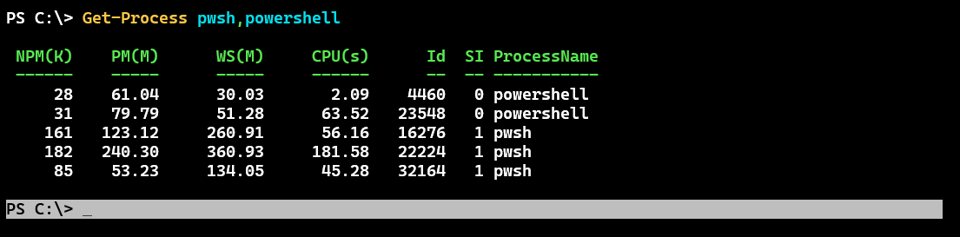
Hold the shift key and press the Up arrow to select what you want. Press Enter to copy it to the clipboard. Paste where ever you need the content.
PS C:\> Get-Process pwsh,powershell

 NPM(K)    PM(M)      WS(M)     CPU(s)      Id  SI ProcessName
 ------    -----      -----     ------      --  -- -----------
     28    61.04      30.03       2.09    4460   0 powershell
     31    79.79      51.28      63.52   23548   0 powershell
    161   123.12     260.91      56.16   16276   1 pwsh
    182   240.30     360.93     181.58   22224   1 pwsh
     85    53.23     134.05      45.28   32164   1 pwsh
You can also use the arrow keys to move the selection bar up or down and then begin selecting the lines. I think you'll have fun with this.
PowerShell+DevOps Global Summit 2026
If you didn't make it to Bellevue this year for the PowerShell Summit, then set aside some time to catch up on what you missed. Most, if not all, of the session videos are now available online.
You can find a complete playlist at https://www.youtube.com/watch?v=60k9-AEpF8o&list=PLfeA8kIs7CodKtMv-JeTF7wO9ZIzS2bc8. Or you can jump to my session on the history of PowerShell or Mastering PowerShell Parameters
PowerShell Summit 2027 CFP
Speaking of the PowerShell Summit, the call for papers (CFP) opens July 1. The event next year will be held in Orlando, FL April 5-8, 2027 at the Sheraton Lake Buena Vista. I encourage you to think about presenting. All you need is an idea. The first round of session evaluations are blind, meaning nobody knows who submitted it. The review is based on the merit of the topic and proposal alone.
If this is all new to year, I recommend taking a few minutes to read this guide on the process of speaking at the PowerShell Summit.
When you are ready to submit head to https://www.powershellsummit.org/speakers/.
PSConfEU 2026 Videos
And if that isn't enough PowerShell content for you, the session videos for PSConfEU 2026 are beginning to be published as well. You can find the watch list on YouTube. Session material from speakers can be found on GitHub
SpiceWorld 2026
In other conference news, I will be returning to Austin, TX this fall for SpiceWorld. This is fun event with a ton of content that you can begin using immediately. Naturally, I will be talking PowerShell. The event runs Nov 12-13 and is extremely affordable. Learn more at https://www.spiceworks.com/spiceworld/.
The Microsoft DSC Book
The other day I came across a mention of a book on Microsoft DSC v3.0 on Leanpub. I'm glad I found this because it means I don't have to write the book. The Microsoft DSC Handbook is a practical, how-to guide on using Microsoft's Desired State Configuration (DSC v3). This version runs cross-platform and is a major overhaul of v2. Leanpub is an ebook platform, but the benefit to you is that when the author updates the book, you can download the latest version. Once you buy the book, and this one is extremely well priced, you own it forever.
You can checkout the table of contents here.
The Lonely Administrator
I have maintained a WordPress blog for years. The last few years I have devoted my energy to this newsletter and the blog has not gotten the attention it deserves. I don't expect that to change. I have marked The Lonely Administrator as deprecated. At some point later this year I will take it off line permanently.
In the meantime, if there is content you want, now is the time to grab it online while you still can.
Scripting Challenge
I think this month's challenge will push some of you outside of your comfort zone. Not only do you need to figure out the PowerShell piece, there is a storage angle as well. I'd like to assume that IT Pros know the basics of managing and working with storage, but I know better.
Your challenge is to create a PowerShell solution that will create a VHD file that contains the contents of one or more folders. In other words, we're using the VHD file is a backup device. How you create the VHD is up to you. There are cmdlets you can use. Or you might turn to command-line tools and wrap them in PowerShell. To accomplish this in Linux will most likely require third-party tools. You are welcome to try, but this is really a Windows platform challenge.
Here are some other elements you might tackle:
- By default, backup your documents folder.
- Sized the VHD to match the size requirements.
- Format as NTFS.
- Allow the option to specify a partition drive letter.
- Create a dynamic VHD file.
- Add an option to move the VHD file to a ZIP or other archive format.
It isn't part of the scripting challenge, but test your solution by opening the VHD file and verifying the files. If possible, copy the VHD file to a different computer and then verify.
Summary
And with that, it is time to enjoy the weekend. Next week is a holiday weekend in the US so look for a single newsletter on 1 July.


Add a comment: