
Solving The PowerShell Mail Challenge
In this issue:
We're almost at the end of the month which means it is time to review last month's PowerShell scripting challenge. I have been giving you about three weeks to work on the solution, but I am wondering if I should give you the entire month and save the solution for the first newsletter of the following month. Of course, I'm assuming that at least a few of you are at a minimum poking at the challenge.
The true value is in the process, not necessarily the final result, and that is especially true for this challenge. Microsoft doesn't recommend using the .NET classes in production any more, but they still function and for our limited lab work, should be fine.
As a reminder, here is what I charged you with at the end of last month:
>I want you to build a set of PowerShell tools using the [System.Net.Mail.SmtpClient] class. You can use this class to send an SMTP mail message directly from PowerShell. Part of your challenge is discovering how to use the class. You should be able to write a PowerShell function that will send a simple text message to someone.
>
>For more advanced work, you will need to incorporate the [System.Net.Mail.MailMessage] class Extend your function allow the user to:
>
>- send an HTML formatted message
>- attach a file
>- add a CC
>
>You will need to discover how to configure your SMTP server, port, and SSL if required.
>
>I recommend separating the SMTP server configuration from your function. That is sensitive information that shouldn't be part of a script. You might store the information as variables, or maybe use configuration data. I leave that design decision to you. You most likely will also need to take credentials or authentication into account.
If you want to see what you can do, stop reading. You can read this later to see how I approached the challenge.
System.Net.Mail.SmtpClient
I told you that you can use the SmtpClient .NET class to send SMTP email. To learn how to use it I recommend exploring the class. I think the act of discovery is an effective learning tool. Later, you can search online for more information and examples. Whenever I have a new .NET class to explore, I use the Get-TypeMember command from the PSScriptTools module. I've shown you this command many times in the past.
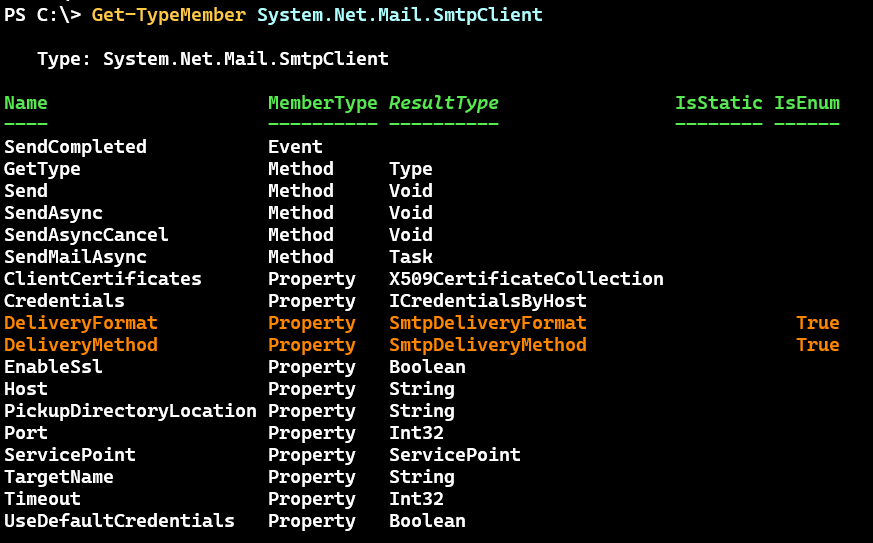
I need to know how to create an instance of the class. I can use Get-TypeConstructor also from the PSScriptTools module.
PS C:\> Get-TypeConstructor System.Net.Mail.SmtpClient

[System.Net.Mail.SmtpClient]::new()

[System.Net.Mail.SmtpClient]::new([System.String]$Host)

[System.Net.Mail.SmtpClient]::new([System.String]$Host,[System.Int32]$Port)
> Your output might look slightly different. I see that I have a bug in the output I have to fix.
As an alternative, you can always check the overload definitions for the New() method.
PS C:\> [System.Net.Mail.SmtpClient]::new.OverloadDefinitions
System.Net.Mail.SmtpClient new()
System.Net.Mail.SmtpClient new(string host)
System.Net.Mail.SmtpClient new(string host, int port)
I know from my normal mail configuration the name of the SMTP server and the required port so I can use that information to create an SmtpClient instance.
$port = 587
$mailHost = 'smtp.xxxxx.com'
$mc = [System.Net.Mail.SmtpClient]::new($mailHost, $port)
This should be an object that I fine tune.
PS C:\> $mc

Host                    : smtp.xxxxx.com
Port                    : 587
UseDefaultCredentials   : False
Credentials             :
Timeout                 : 100000
ServicePoint            : System.Net.ServicePoint
DeliveryMethod          : Network
DeliveryFormat          : SevenBit
PickupDirectoryLocation :
EnableSsl               : False
ClientCertificates      : {}
TargetName              : SMTPSVC/smtp.xxxxx.com
Enable SSL
For example, I know that I need to enable an SSL connection. I can see that the property accepts a boolean value.
PS C:\> $mc | Get-Member EnableSsl

   TypeName: System.Net.Mail.SmtpClient

Name      MemberType Definition
----      ---------- ----------
EnableSsl Property   bool EnableSsl {get;set;}
This is easy to set.
PS C:\> $mc.EnableSsl = $True
Adding Credentials
I also know I need to supply credentials.
PS C:\> $mc | Get-Member Credentials

   TypeName: System.Net.Mail.SmtpClient

Name        MemberType Definition
----        ---------- ----------
Credentials Property   System.Net.ICredentialsByHost Credentials {get;set;}
When I try exploring the System.Net.ICredentialsByHost class I get no properties or constructor. But because this is a credential, I'll try with a PSCredential. I can tell that PowerShell will try to convert whatever value I specify into to the proper type.
PS C:\> $mc.Credentials = "foo"
SetValueInvocationException: Exception setting "Credentials": "Cannot convert the "foo" value of type "System.String" to type "System.Net.ICredentialsByHost"."
PS C:\> $mc.Credentials = Get-Credential jhicks@jdhitsolutions.com

PowerShell credential request
Enter your credentials.
Password for user jhicks@jdhitsolutions.com: **********

PS C:\>
There is no error so I have to assume this will work. There's only one way to find out.
Send()
When using Get-TypeMember I saw a Send() method. I can discover the parameters like this:
PS C:\> Get-TypeMember System.Net.Mail.SmtpClient -Name Send | Select Syntax | Format-list

Syntax : {$obj.Send([String]from,[String]recipients,[String]subject,[String]body),
         $obj.Send([MailMessage]message)}
Or by looking at the overload definitions.


