Read this before ditching Google Workspace
My year with Proton
All of my blog posts, newsletters, and 1-1 emails are written by me — em dashes and all! If you wanna know how I use AI in my business, click here.
Last March, I left Google Workspace and signed up for Proton for Business.
Instead of slowly migrating platforms, I decided to immediately cancel my Workspace account, forcing myself to go all-in on Proton.
And for the first six months or so, I felt like Jax Taylor drowning in Big Bear.

Now, a year later, I feel like jumping feet-first was the best strategy for me.
I kept putting off “the move” because leaving felt impossibly overwhelming. So I gave myself no other option but to figure it out.
If you’ve been contemplating switching to Proton, or have been Proton-curious, I’d love to share a little bit about my experience over the last year.
The TL;DR version is this: Leaving Google Workspace is difficult, and there are tradeoffs. Proton makes a lot of things clunkier, which can be uncomfortable and sometimes super frustrating. I would only recommend making the switch if it’s truly values-aligned for you—to divest from Google and/or prioritize privacy.

I still haven’t deleted my personal/free Gmail account, and that’s okay (for now).
Unfortunately, I can’t completely escape. Google Docs is used by SO many people, including many of my clients, and I can’t access Docs with my Proton email address alone. Also, there are some integrations/functions I need that require a Google account.
I imagine a day where I can be completely rid of it. But for now, here’s how I sleep better at night: I forward all of my personal emails from Gmail to Proton (using a free alias) so I don’t have to go into Gmail at all anymore. And I’m not outright paying Google for their services.
P.S. This is the signature I use for personal emails:
I'm in the process of migrating over to Proton Mail from Gmail. While your original email was sent to [personal Gmail address], you're receiving a response from [Proton alias address]. You can email either address and your email will go to the same place.

Data migration was the easiest part of this transition, tbh.
You can transfer all of your events, labels, emails, etc. from Gmail/Gcal to Proton with a click of a button.
Drive was a bit trickier, but I basically just downloaded everything from Google Drive into a zip folder and uploaded it to Proton Drive, or transferred ownership of certain Docs/Sheets to my personal Google account.
I did lose some things, but it was honestly fine. Nothing that was worth saving, or that I still miss today. I think I’ve only opened the zip file from Drive once or twice over the last year.

Integrations are possible, they just take a little creativity and technical know-how.
The biggest perk and headache of using Proton is its privacy features. Generally speaking, privacy is fabulous. But when it comes to integrating with other platforms, it’s a nightmare.
The toughest challenge for me was making sure my Proton Calendar events were blocked off in my meeting booking platform, Tidycal.
Proton Calendar can be shared with other calendar software like iCal (which is now my main calendar after leaving GCal), but it’s read-only. For a while, I was manually having to block that time off in iCal so my availability in Tidycal was correct.
Until now!!!
It took LITERALLY an entire year for me to figure this out, so hopefully it helps someone lol.
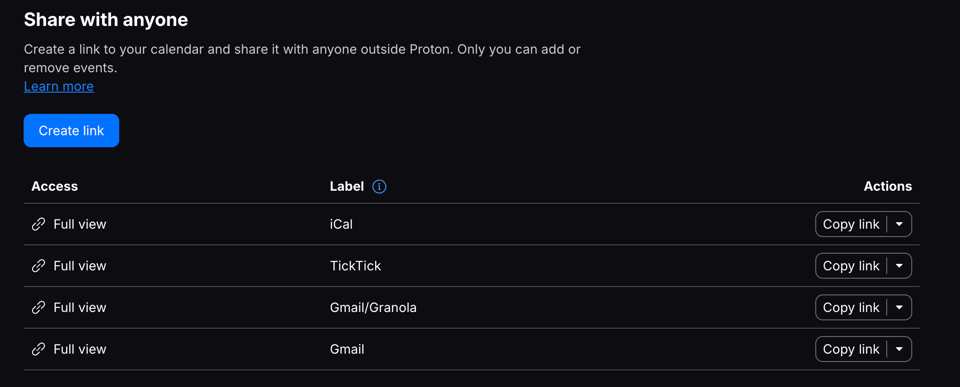
First, you’ll need to create a share link to your Proton Calendar:
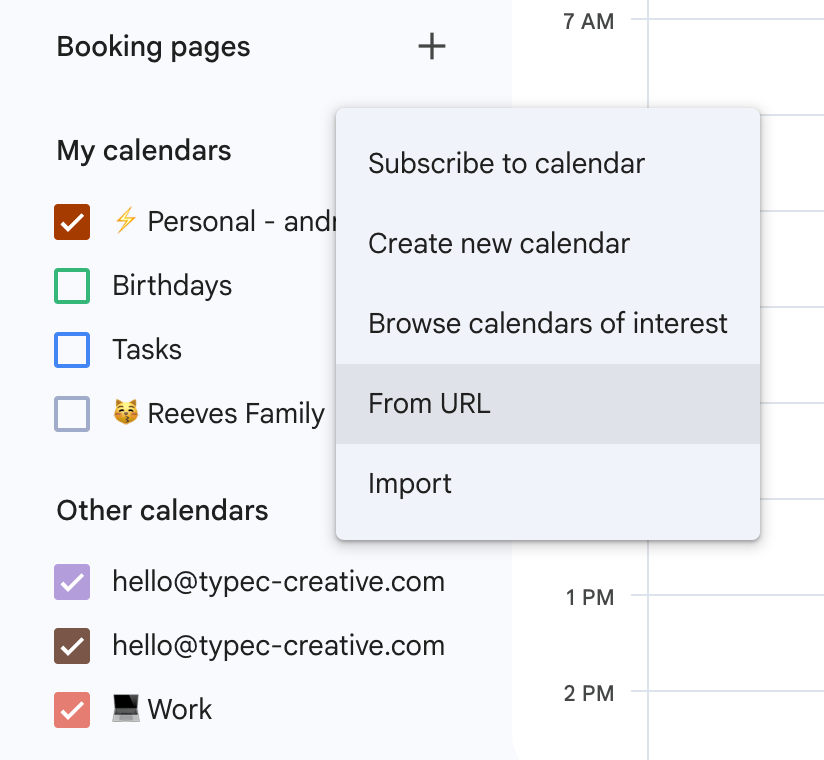
Then, add that calendar to your personal GCal by going to Other calendars + > From URL
Name it something obvious, like Proton Calendar, or your business email address.
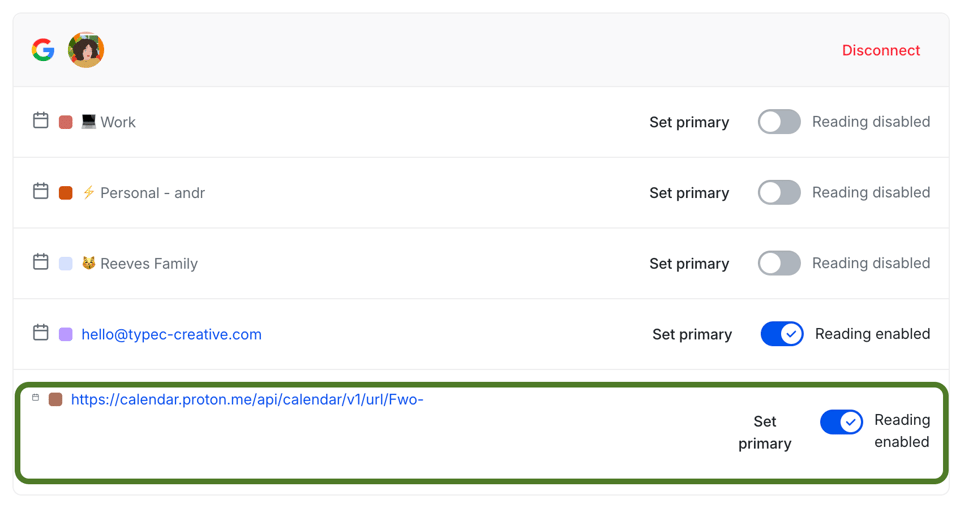
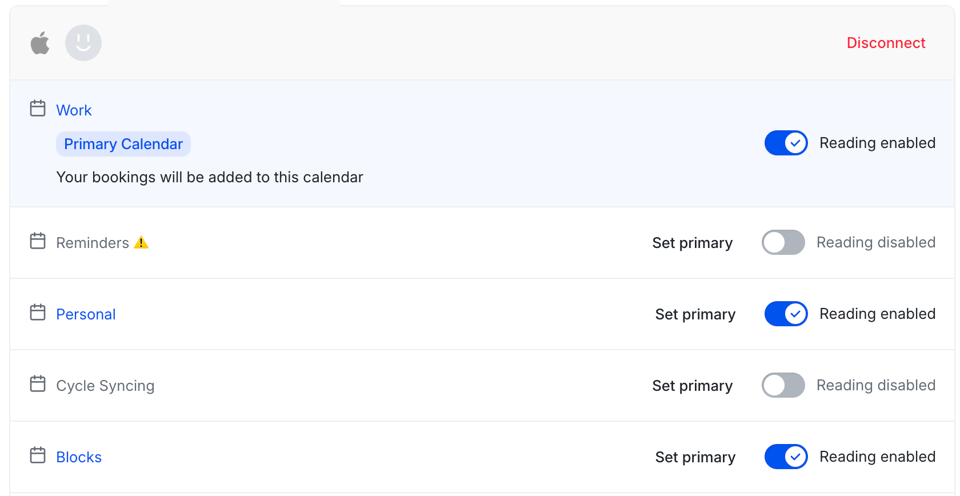
In your booking software, add your GCal account (if it’s already connected, you may need to disconnect/reconnect for the new calendar to show up) and toggle on reading access to the added Proton Calendar.
I personally have all my other calendar holds going through iCal (that calendar is my single source of truth for my personal and work schedule).
Luckily, Tidycal allows for multiple calendar connections—including iCal:
If you’re already on Proton and need some help with calendar integration stuff, consider booking a 60-minute strategy session with me—we can do it together!

Proton for Business now has Google Docs, Sheets, and Meet dupes.
They aren’t total dog shit, but definitely aren’t as good as the Google versions. I have gotten used to them over time, though!
Like I said in the TL;DR, there are definitely trade offs to making the switch.
Note: Proton Meet does not include live captions (yet)—it was literally released a few days ago. So some of my meetings will still have to take place elsewhere, for now.
Also, something Proton has that Google Workspace doesn't: A built-in password manager, Proton Pass. It’s solid, and included in your subscription. For me, it’s second only to 1Password.

Being less tidy has been a good thing.
I’ve mentioned this in posts past, but I don’t remember the last time I had inbox zero.
Some of my inbox habits have transferred over from Gmail to Proton Mail; but because Proton doesn’t have as many features as Gmail (I miss you dearly, Priority Inbox), I’ve had to really let go of some of my hangups around aesthetics and tidiness.
And you know what, I’ve still managed to make shit happen regardless! It sounds so silly but switching to Proton has taught me to embrace imperfection.
And in the age of AI optimization, I think getting comfortable with a little bit of technological friction will go a long way in the battle against Big Tech.
Peace, love and workflows,
Andrea

Enjoy this post?
Consider buying me a cup of tea, which I’ll sip while creating more rebellious content for you 🤘☕️
My name is Andrea (On-Dray-Uh) Reeves (she/her), I’m the founder and systems strategist behind Type C Creative.
I’m a biracial, Black, aroace woman with ADHD and OCD. I’m an unapologetically atypical human who runs my own business on vibes, values, and good systems that meet me where I am.
I work with fellow neurodivergent, queer, and creative solopreneurs who are ready to find simpler, more compassionate and intuitive ways of running their businesses.