
Scheduling a Mastra agent: the model writes the report, code posts it
Beacon now sends my weekly traffic report to Slack on its own. This week: the scheduled workflow behind it, what a scheduled run should and shouldn't remember, plus Greg Wilson on owning the check and Anthony Costanzo on quieter agents in Slack.
This week's post
Beacon is the analytics agent I built with Mastra. It reads Google Analytics, PostHog, and YouTube Studio, and I talk to it in Slack. A few weeks ago I asked it how traffic looked week over week and it came back with the numbers, plus something I hadn't asked for: /services/ had gone from 45 pageviews to 302, probably tied to a paid campaign. It was right. I had been testing Google Ads, and the follow-up showed 174 sessions and zero conversions, which is how I found out my conversion tracking was broken.
Good catch. The problem is that I had to ask. If I don't open Slack on Monday, none of that surfaces. So I put Beacon on a schedule, and the post walks through the decisions that came with it: a declarative cron on a workflow, date ranges computed in code instead of in the prompt, an evidence check between generation and delivery, and a Slack post that the model never gets to make.
Read: Scheduling Mastra Agents: A Weekly Report That Delivers Itself to Slack →
Mastra gives you two ways to do this. An agent schedule attaches a cron to the agent and lets the model run the whole job. A scheduled workflow attaches the cron to a workflow, so the model only owns one step. I went with the workflow because of one tool.
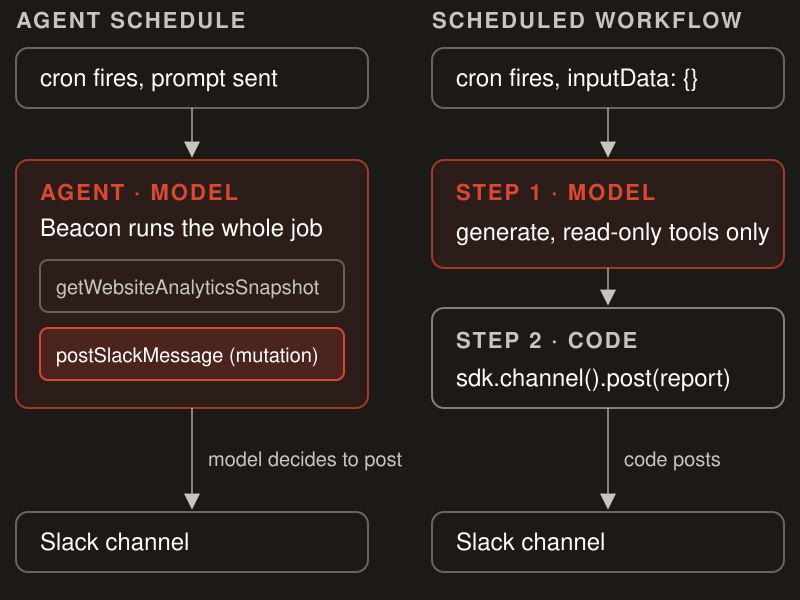
Posting to Slack is a mutation. Beacon is read-only by design, and I didn't want a posting tool sitting in its toolset during ordinary conversations just so a Monday job could deliver itself. In the workflow, the model generates and code delivers.
This week's video
The video version covers the same system with the code on screen: both scheduling APIs, the threaded versus threadless schedule options, the workflow steps, and what the schedule looks like in Mastra Studio (trigger history, pause, resume). This one is sponsored by Mastra.

Resources mentioned:
What a scheduled run should remember
The video walks through threaded versus threadless schedules. Threadless means every run starts from nothing. Threaded means the run accumulates history across weeks. My first instinct was threadless, because a clean slate is easy to reason about.
The clean slate throws away the one thing I'd want a Monday report to know: what I'm working on. If I've been running an ads test all week, the report should lead with the campaign, not bury it under the same five headline numbers. So the scheduled run does use Beacon's website memory, but narrowly. It gets the curated working memory (goals, experiments, caveats) in read-only mode. Recent messages, semantic recall, and observational memory are all off, and the run never writes its report back.
What makes this safe is that the working-memory template refuses to hold numbers. No dates, metric values, percentages, deltas, ranks, or counts. Memory can shape what the report emphasizes. It cannot be where a number came from. If you give a recurring job memory, decide up front what it's allowed to remember, and put that in the template rather than hoping the prompt holds.
The schedule I wrote is the easy case. The harder one is a schedule the agent proposes and I approve, and that's the dynamic workflows video I'm working on now.
Contributor Spotlight
You do not have to trust the agent to use it — Greg Wilson's line this week: "You do not have to trust the generator. You have to own the check." He draws the parallel to Uncle Bob reading his C compiler's assembly output until the compiler earned it, and then lays out the Ruby version of owning the check: RubyCritic with a floor of 95, Flay for structural duplication, RuboCop metrics cops, a CRAP ceiling of 6, and custom cops that enforce dependency direction. Those are numbers on purpose. "An agent can grind against 6. It cannot grind against 'keep your method small.'" Prompt rules fade as context fills. A deterministic gate returns the same answer every run. It's the same reasoning behind Railbed, the Rails template I covered a few issues back: RuboCop, Sorbet, and RubyCritic wired into one bin/ci so there is a single definition of ready that the agent and the reviewer share. Greg's post is the case for why that gate has to be numeric, and the evidence contract in this week's post is the same idea applied to an agent's output instead of its code.
Curated Links & Tools
Less Noise, Better Signals — Anthony Costanzo (you might remember Claudit from a few issues back) moved his assistant Alfred to Slack and got the same thing I got with Beacon: five "I'm looking into this" messages before every answer. He changed the transport instead of the prompt. Commentary-phase messages are dropped by type before they reach Slack, and Slack's native assistant.threads.setStatus shows "is working..." on the thread. The indicator is treated as state, cleared on finish, question, approval, interrupt, or failure, and persisted so a bridge restart doesn't leave a ghost spinner. If you're wiring an agent into Slack, read this before you write another progress message.
/show-me — One of my new favorite skills. Dex Horthy's show-me prompts the agent to explain with component trees, call stacks, shallow file trees, diffs, pseudocode, or a Mermaid diagram instead of paragraphs. The call-stack shape in particular has changed how I read plans: types, signatures, and the call tree before any code gets written. It works with Claude Code, Codex, and Pi.
npx skills add humanlayer/skills --skill show-me
Quick Hits
- claude-code-workflows 2026.08.23 — agent-ready v1.4.0 now detects your stack (React, Svelte, Angular, Mastra, FastAPI, Laravel, Supabase, Stripe, Cloudflare Workers, Terraform) and recommends the matching first-party skills, installing confirmed ones in project scope with
npx skills add. Nothing goes in globally or without a prompt. Release notes →
What's the first recurring job you'd hand an agent if the delivery step were guaranteed to stay in code? Reply and tell me.
If you're working out where the model should stop and code should take over in a recurring agent job, that's the boundary I help Mastra teams design. Here's how I help →
Damian


Add a comment: