Use YouTube (without being used by Youtube) and why I left Mastodon
Hello, friends! This week I have a practical everyday guide you can use to free up more time every week. Then I’m going to talk about obscure tech stuff most people don’t understand. Let’s get started.
How to turn YouTube into a tool (instead of a giant time sink)
This would all be so much simpler if the apps that wasted our time weren’t also incredibly useful. Take YouTube.
A friend recently described feeling vaguely gross after losing a few hours to random YouTube videos, which is something we’ve all felt. This is a website that uses every trick in the book to make itself addictive, and because of that it’s easy to lose hours to it while feeling vaguely numb.
But YouTube isn’t just a rabbit-hole—it’s also a useful tool. You can learn to do anything by searching, and there are countless video essays and even full courses that are valuable. In an ideal world a website like YouTube would optimize itself to be as useful as possible, ditching the addictive qualities altogether—humanity would certainly be better off if that was the case. But we don’t live in an ideal world.
I could launch into a rant here about the reasons for this (late stage capitalism, the ideology of infinite growth, the total lack of moral reasoning in Silicon Valley, etc.). But what you want is a way to lose less of your precious time to YouTube spirals without losing the good parts of the site.
I can’t fix society (today), but I can help you fix your YouTube situation. Here’s how to turn YouTube into a tool.
Turn off the algorithm
YouTube watches what you watch, and everything else you do on the site, in order to recommend videos to you. These recommendations are powerful, and no small part of how YouTube rabbit holes begin. So I recommend disabling the YouTube algorithm entirely. Here’s how my YouTube homepage looks:
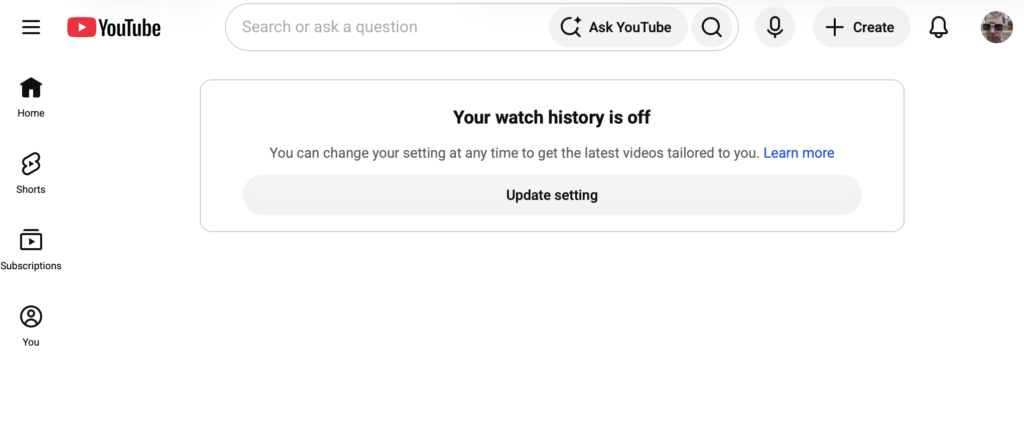
Peaceful, right? This turns YouTube into a website I can use to find and watch specific videos. I can still open YouTube and search for things, or browse my subscriptions, but the site isn’t going to try to trick me into watching something I didn’t intend to (at least, not right away—more on that later).
As I’ve written about for PopSci, this is pretty easy to do—you don’t even need to install anything. Just head to myactivity.google.com, then click “YouTube History”. Turn off your YouTube history. You can also delete your old history, if you want. From now on the YouTube homepage—and the YouTube app—won’t recommend any videos when you first open it. It’s glorious.
Curate what you watch
Now that there’s no homepage full of videos, what are you supposed to watch? Well, searching still works, so you can still use YouTube when you want to learn a specific skill (“how to fix a leaky faucet”) or watch a specific music video (“The Avalanches Frontier Psychiatrist”). But what about finding new, interesting, entertaining tidbits when you don’t have a specific subject in mind?
The best tool here is the Subscriptions tab, which you’ll find on the left-hand side of the homepage. You know how YouTube channels are always asking you to subscribe? This tab is why. Visit it and you’ll see all the videos from all the channels you subscribed to, in reverse chronological order. This is a great way to see a few videos from people whose work you enjoy, especially if you get into the habit of following channels you find worth watching. But even better: there’s a limited number of videos, meaning at some point you will run out of things to watch and you can do something else.
And you’ll discover videos in other ways. Sometimes your friend will send you something. Sometimes you’ll read about a video and look it up. Or maybe you’ll find a link on other social media. You don’t need another way to find things to watch—the internet is full of them. YouTube doesn’t need to be yet another bottomless time sink.
Customize the user interface
Now, the changes you’ve made so far result in a clean homepage, and you’ve got a few well-chosen channels to watch when you consciously choose to. But there’s still a few potential distractions. Every YouTube video still has a list of recommended videos, for example, meaning you might end up clicking something. And then there’s the comments, which can become addictive all on their own.
Well, you can tweak that too. I wrote for Lifehacker about UnTrap, a free browser extension that lets you customize YouTube. Install this and you can hide the YouTube recommendations that show up alongside videos, hide the comments, and generally disable anything else that tends to pull you away from what you planned on doing.
Or, if you want to go all out, I recommend FreeTube. This is an application I wrote about for PopSci that lets you take full control of YouTube. It’s completely private, doesn’t show ads, and even lets you skip over promotional content inside the videos themselves. Dig around in the settings—there’s a lot to love here.
Decide how to use your tools
Like I said before: it would be better for society if tools like YouTube were designed to enrich the culture instead of shareholders. I think we should all be working toward that better world. For now, though, we should all do what we can to liberate our time from the commercial interests that would steal it from us.
These tweaks help you get the good out of YouTube and less of the bad. They’re not perfect, granted—nothing is. But they’re a reminder that we can act to control more of what shows up on our screens and, ultimately, how we spend our time.
🔗 https://justinpot.com/how-to-turn-youtube-into-a-tool-instead-of-a-giant-time-sink/
Why I left Mastodon
I left Mastodon last month. You can still follow me there.
Is that confusing? A friend of mine, also a tech journalist, recently told me it is, so I thought I’d try to explain.
One of the nice things about Mastodon, and social networks like it, is that your followers can still follow you after you switch platforms. So a couple of weeks ago I did just that—I redirected my 6000 or so followers from Mastodon over to my website.
I joined Mastodon in 2018, but didn’t really start using it until 2022. That’s when I abandoned Twitter and wrote a WIRED article that served as an introduction to the then-growing ecosystem. I’m still proud of that piece, which incidentally is probably the main reason I have a healthy following on Mastodon today.
Or, at least, why I used to have a healthy following on Mastodon. A while ago I turned my website into a private social media network, meaning anyone with a Bluesky or Mastodon account can follow this site directly. For a while I was boosting these posts from my Mastodon account, but I got sick of doing that.
So I migrated my followers. It’s been glitchy, but I expected that. I’m guessing there aren’t many people who have attempted to forward thousands of followers from Mastodon over to a self-hosted WordPress site. Around 4000 followers have made the transition, leaving 2000 or so stuck on my old Mastodon account. I intend to try re-starting the migration in a couple weeks—the rest should make it over then.
For the most part, though, I’ve been posting the way I used to. I write longform posts like this one, I link to my articles on other sites, and I make the occasional joke. People using Mastodon can keep interacting the way they always have, but so can people on any other service using the Activitypub protocol.
This is how the entire internet could work, by the way. Imagine if anyone tired of Twitter could move to Bluesky without their followers even noticing a difference; if anyone sick of posting videos on Instagram could move over to YouTube and their followers would still see them all. The only reason the internet doesn’t work this way is companies don’t want to lose control of their platforms and governments aren’t forcing them to compete.
For now, though, I’m enjoying the fact that my website—which I control—is my biggest platform. I’m glad you’re here for the ride.
🔗 https://justinpot.com/why-i-left-mastodon/
That’s it for this week! As always, join the conversation by clicking the links below either of the articles, which also make it easy to share the articles directly.