Detecting overlap in CSS, $30 off The Layout Maestro (ends Wednesday)
Detecting overlap with CSS, plus a few links and $30 off The Layout Maestro.
Hey everyone,
In this issue, I will share my recent CSS article and a few links I liked from around the web.
Detect when elements overlap with CSS
CSS has no native way to detect whether two elements overlap. I found a way to detect horizontal overlap using scroll-driven animations and anchor positioning.
In my case, I had a decorative element on the edge of the page. When the viewport is resized, I don't want the decorative element to be on top of the content.
Take a look at the problem. Here is how the decorative element (the cookie plate on the left) is supposed to look.

When there is not enough space for it, it overlaps with the content. I don't want that.
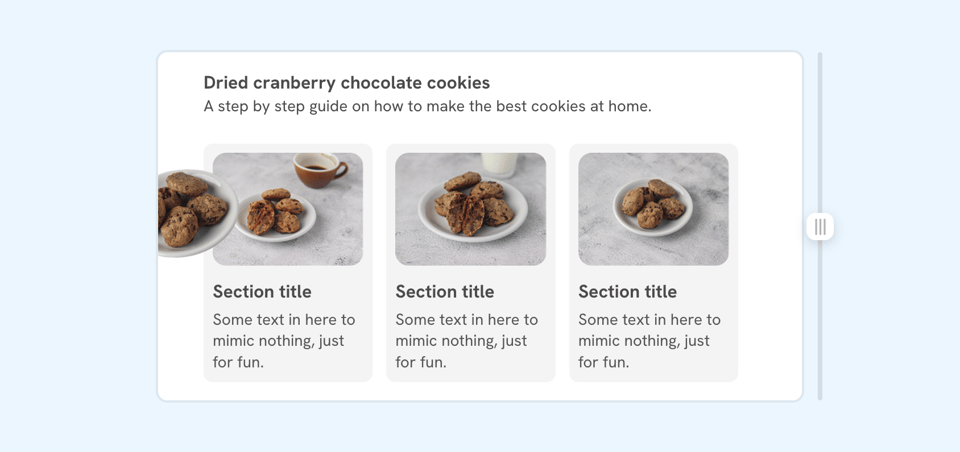
I added an element called "Measure" that spans between the decorative element and the section's left edge. If the space between them is less than a pre-defined amount (e.g., 20px), the decorative element is hidden.
Have you run into overlap problems like this? Hit reply, I'd love to hear about them.
Randomly Place an Element Along Edge of Another Element
This is a great walkthrough of a fun use-case for offset-path and the CSS random() function. It's supported in Safari and Chrome (behind the Experimental Web Platform Features flag).
A deep dive into StyleX
I'm not a big fan of writing utility classes, but I wouldn't say no to writing CSS and getting atomic or Tailwind-like CSS output. StyleX is a framework made by Meta and is used for all of their CSS. If you're into this, I recommend reading it.
The Layout Maestro September sale, $30 off
You might like The Layout Maestro, my interactive CSS layout course, which I built to help you understand layouts and know which layout method to use when.
Check out The Layout Maestro and enroll for just $169 until this Wednesday, September 30. No discount code needed.
Thank you for reading.
Ahmad


Add a comment: