
AI impressions are not a Key Performance Indicator
What Google's own report can and can't tell you
Google Search Console, the free dashboard for website owners, now has a report on how often your pages appear in Google's AI answers. Google says it reached every website on 31 August 2026, though you may not see it until your pages have appeared in AI answers often enough. It covers AI Overviews, the AI-written summary Google shows in its results, and AI Mode, a chat-style version of Google Search.
It's Google's own data, and it's the first time Google has given its AI answers a report of their own. So I'd expect it to turn up in a lot of monthly reports this autumn. And sooner or later, someone will want to make it a KPI (key performance indicator), one of the handful of numbers a business sets its targets against.
I wouldn't. Not yet. This report can't tell you whether anybody came to your website.
What it counts
It counts impressions. An impression is a link to one of your pages being shown to someone, whether or not they click. That's the only measure on Google's help page for the report, and you can split it by page, country, device and date.
What it can't tell you
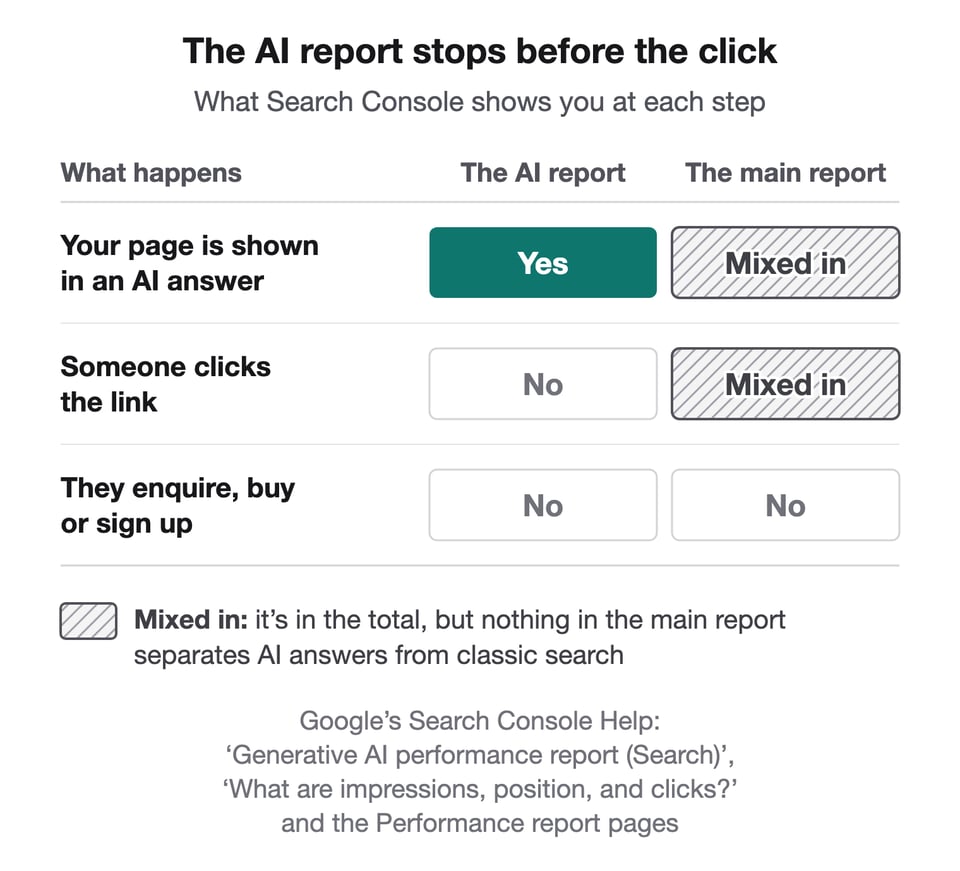
There are no clicks in the report.
There are no searches, either. You can see which page was shown, but not what the person had asked.
And there's no position. You can't tell whether yours was the first link in the answer or the last. Search Console also has a main report, where it counts your clicks and impressions from Google Search. For AI Overviews, that won't tell you either. In Google's words: 'An AI Overview occupies a single position in search results, and all links in the AI Overview are assigned that same position.'
It can move when you haven't
Google decides which searches get an AI answer, and how many links go into each one. If it shows AI answers on more searches, or puts more links in them, your pages get more chances to be shown, so your impressions can rise when nothing on your website has changed. The same goes for everyone else's.
Google also changes how it counts. Its documentation for Search Console's performance reports says the rules behind them, including how positions are numbered, 'are subject to change'. In mid-September, John Mueller, who answers website owners' questions for Google, said he expects the way Google counts positions in its AI answers to 'evolve over time'. He added: 'there will be some work required on your end when it comes to interpreting, understanding, comparing these metrics.'
And the report has already had one fault. A logging error reduced the impressions it showed for 13 to 17 August, and Google restored the missing data on 21 August 2026. I wrote about it in a blog post on August's Search Console numbers.
It's already in your search numbers
The AI report's impressions aren't extra. They're also counted in Search Console's main report, alongside your listings in classic search, Google's ordinary list of unpaid results. Add the AI figure to the main one and you've counted the same impressions twice.
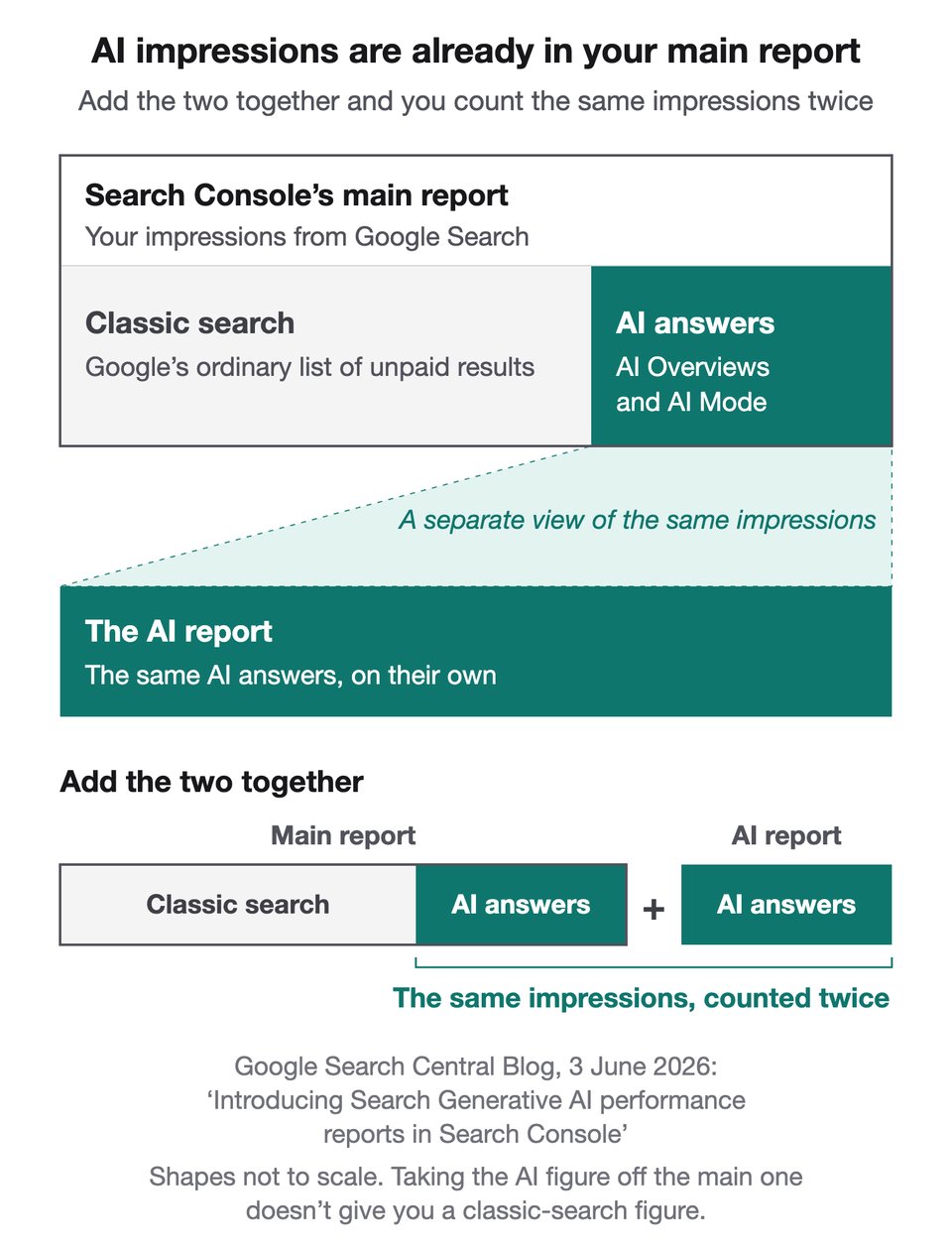
Clicks are mixed in the same way. A click on a link in an AI Overview counts as a click in the main report, and nothing there separates it from a click on your classic listing. So, as far as I can see, Search Console can't tell you how many visits Google's AI answers sent you. As standard, Google Analytics doesn't separate them either. Its help page says visits from AI Overviews and AI Mode go in the same group as all your other unpaid visits from Google search, not in its group for AI tools such as ChatGPT.
What I'd do instead
- Read it as a list of pages, not a score. Which of your pages do Google's AI answers link to, and which of your important ones never turn up? That's about your site. A rising total may only be telling you about Google.
- Judge AI search by what happens next. Look at clicks from Google in the main report, and at what those visitors did on your site: enquiries, sales, sign-ups. If those haven't moved, a rising AI line hasn't done anything for you yet.
- Keep it in the report, but not as a target. Watch the trend. Before you compare one month with the last, check Google's data anomalies page, where it records faults in Search Console's numbers.
What I'd take away
Before a number becomes a target, ask whether it can tell you that someone came to your website.
Thanks for reading
David
If you want to talk about what AI search is actually doing for your website, please contact me at [email protected].
Every passage quoted in this issue was on the page it's credited to on 19 October 2026.
