
Updates from May
Automations: even nicer now!
We rebuilt Buttondown's automation tool this month to make it easier and faster. There’s a lot of new (and nice) stuff, but the headline feature is that we finally did what you asked: one trigger can fire multiple actions, so you can rig together an entire drip sequence and view each step in concert.
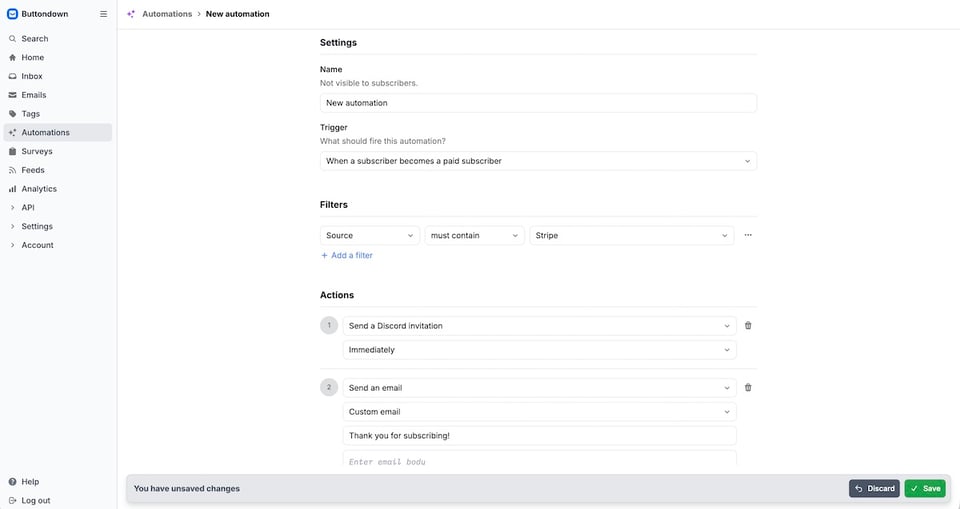
Automations include redesigned analytics, too, with the same filters you can use on emails inside Buttondown's dashboard. You can preview those automations against past events, to see what would have happened if that automation had been live, and ensure it'll run the way you expect once you turn it on. And we've whipped up templates for cross-posting and onboarding, to help you hit the ground running.
Here's everything about our newly rebuilt automations, why we made the changes, and how you can build anything (just short of a Turing Machine, but that’s slated for Q3) right in your Buttondown account.
In with the signal, out with the noise
You could just email everyone the same thing, but where's the fun in that? You want to tell the folks who signed up from your friend's newsletter something a little bit different than the people who signed up from your corporate website, and might like to avoid sending emails if they're not getting delivered anyhow. Buttondown's filters now support that and more.
You can now filter subscribers by bounce date and reason. Perhaps they marked you as spam; you never want to email them again. Perhaps they finally maxed out Gmail's once-generous 15Gb of storage; you might want to pause for a bit, before sending again once they've cleared out their email backlog. It's a way to catch trouble early, re-engage subscribers, or proactively clean your list to avoid dinging your sender reputation.
Filtering by source holds even more potential. Perhaps you have onboarding sequences; now you can split the subscribers that came from purchases into one automated list that includes a thank you for their support, while splitting those that came from your blog into another that includes a few of your favorite posts. Or, perhaps best for your subscribers' happiness, you could skip welcome altogether when the source is from an imported list with existing subscribers.
From the blog
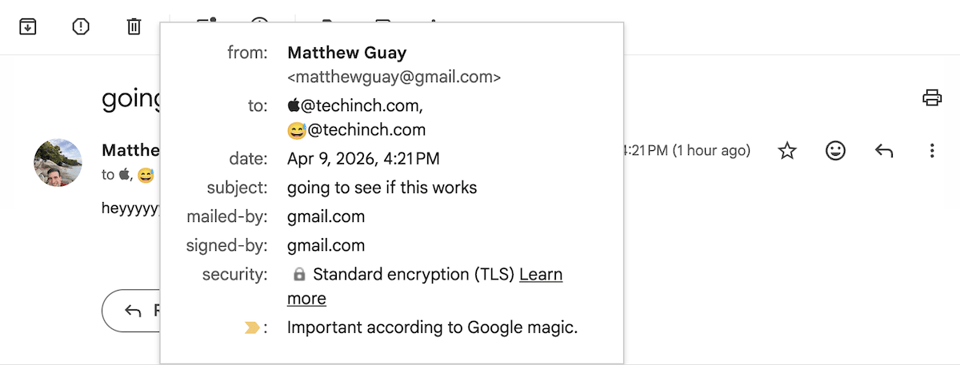
Did you know you can technically have an emoji in your email address? No, you can't sign up for a new 😉@gmail.com address today, but if you do have an emoji in your email address, it will deliver successfully to most email apps today. That, along with better filtering and JSON-formatted messages, are some of the features coming to email in the near future.
Remember micropayments, the idea that we might all pay a nickel or dime for every article we read online? Micropayments are a recurring idea as the future of payments, yet they've never taken off the way they were expected to. Instead, we got a subscription-powered world, one where newsletters are the most popular ways to support your favorite writers. Turns out we like macropayments, once, more than micropayments every time we read.
And how to keep your newsletter interesting? Compulsive curiosity. It's how columnists and creators alike keep their idea machine running for years and decades, and this month, we tracked down the best ways to keep the ideas flowing for your newsletter, even when you can't think of what to write next. (Dr. Seuss' best idea? Trying to win his publisher's bet that he couldn't write a book with only 50 unique words. I do so like that, Sam I am).
Other stuff
Your newsletter subscribers can update their email, view their subscription details, and more on the Portal. Now it’s easier to get to, with a new Portal link in your newsletter’s archive nav bar.
We’ve also added gift subscription details to the Portal, so subscribes can see their gift note and when their subscription ends at a glance.


Add a comment: