
May 2026 PowerShell Potluck
In this issue:
- Script to Exe
- PSReleaseTools Deprecated
- PSClock
- PowerShell After Dark
- TechMentor Orlando
- Scripting Challenge
- Summary
I hope you learned a few things this month. If you need to manage your subscription, including upgrading to a premium plan, use the links in the email footer. Let's wrap up the month with a potluck of PowerShell tidbits.
Script to Exe
I recently came across an article that showcased a tool you can use to create an executable from a PowerShell script file. This might be an attractive alternative for PowerShell scripts you've written for end-users or non-PowerShell users. You could give them a desktop shortcut to click and even a graphical window to display results.
In my limited testing I think you might need to re-factor your script to better suit the experience. There are a few potential obstacles. First, the tooling only supports Windows PowerShell scripts. The output of the compiled executable is text. You do not have traditional object output. This is why I think you might need to refactor your script to write a simple string result.
And just because you are compiling code, you should still not include plain text passwords or credentials. The compiled code should not be considered secure.
I like that all you need to do is install the PS2Exe module from the PowerShell Gallery and run Invoke-PS2EXE. You might also want to check out the project's GitHub repository.
PSReleaseTools Deprecated
When PowerShell 7 was first released, installation options were limited. That's why I wrote the PSReleaseTools module. I wanted a quick and easy way to install the latest PowerShell release with minimal effort. I also wrote commands to discover and download installation assets so you could run your own installation process.
By now we've reached PowerShell 7.6 and Microsoft offers a variety of mechanisms for installing PowerShell 7. You can use winget, the Microsoft Store, as well as third-party package managers like Chocolatey. At this point I don't see a reason to continue maintaining the module. I've since archived the GitHub repository and documented it as deprecated. You can still install the module from the PowerShell Gallery and the commands will still work. I just don't plan on adding new features or improvements.
Visit https://learn.microsoft.com/powershell/scripting/install/install-powershell?view=powershell-7.6 to read more about downloading and installing PowerShell on Windows, Linux, and Mac.
PSClock
I've long published a module to display a clock using a WPF form.

I recently updated the PSClock module with a few additional commands. You can now create a clock to be displayed in the upper right corner of your PowerShell session.
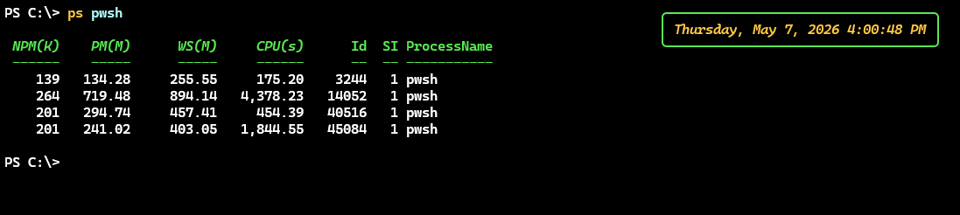
You can customize the appearance and format of the displayed date and time using Start-ConsoleClock
Or, you can show a clock in the title bar of your PowerShell session. If you are using Windows Terminal, this will be displayed in the tab.
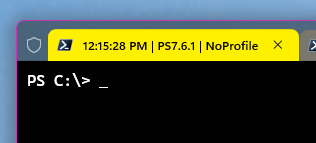
Again, you can customize the datetime format. You can also add arbitrary text or a variable value. Read the help for Start-TitleClock to learn more.
The module is supported in Windows PowerShell 5.1 and PowerShell 7, although it requires a Windows platform.
PowerShell After Dark
I've written about the PowerShell Podcast before. This month I am encouraging you to listen to episode 230, PowerShell After Dark: OnRamp, IoT, and Finding Your People. This episode was recorded during the recent PowerShell Summit during one of the typical end-of-the-day gathering. This social interaction is frankly one of the best benefits of attending the conference in person.
In this episode, Andrew chats with several attendees about their experience attending the event, the value of PowerShell and the value of the PowerShell community. I thought it was a terrific depiction of why we use PowerShell and why the community is so important, and different. The PowerShell community is one big supportive family. I hope that listening to the episode will make you feel a part of it. Or maybe you'll realize you need to take steps to get more connected or involved.
And if you want a way to keep up with the podcast, take a look at the PSPodcast module.
TechMentor Orlando
I probably have a no more than a handful of conferences in my future. One of them will be TechMentor/Live360 in Orlando, FL this November. TechMentor was the first conference I ever attended back in 1998, I think. It was also where I premiered as a public speaker. This event is geared towards working IT Pros who need information they can use immediately to solve problems at work.
I will be doing two sessions on November 18. The event runs November 15-20. My sessions are "The Human Side of PowerShell Scripting" and "Scripting with pwshSpectreConsole". If you happen to attend one of my sessions, I hope you'll come up and introduce yourself.
Learn more about the event at https://live360events.com/events/orlando-2026/home.aspx.
Scripting Challenge
Before I let you enjoy your weekend, let me leave you with this month's scripting challenge. This month's project is definitely about the process and not the final result as there are plenty of production-ready solutions.
I want you to build a set of PowerShell tools using the [System.Net.Mail.SmtpClient] class. You can use this class to send an SMTP mail message directly from PowerShell. Part of your challenge is discovering how to use the class. You should be able to write a PowerShell function that will send a simple text message to someone.
For more advanced work, you will need to incorporate the [System.Net.Mail.MailMessage] class. Extend your function allow the user to:
- send an HTML formatted message
- attach a file
- add a CC
You will need to discover how to configure your SMTP server, port, and SSL if required.
I recommend separating the SMTP server configuration from your function. That is sensitive information that shouldn't be part of a script. You might store the information as variables, or maybe use configuration data. I leave that design decision to you. You most likely will also need to take credentials or authentication into account.
I realize that this challenge may not be possible in locked down corporate networks, but I hope this doesn't prevent too many of you from trying your hand at a solution.
I think you'll find the process informative and educational.
Summary
That wraps up this month. As you read this I am on my way to Germany for PSConfEU where I am presenting two sessions. Hopefully, I'll have something to report later next month.


Add a comment: