
How to Write a Resume: Your 2026 Resume Guide
Revamping resumes for your next job hunt: streamlining processes, ATS handling, and a comprehensive guide


Hi there! We’re halfway through the year and if you’re gearing up for a job hunt, this resumé guide might come in handy.
Scenario 1: You’re tired of free pizza and itching to look for a job that pays better. You found a promising job advertisement that’s giving you life; you just might thrive in that new environment.
Scenario 2: You’re a fresh graduate and you finally realize it’s harder to get a job IRL.
So much has changed in the job application scene – ATS, streamlined application processes, etc.
Your resumé from years ago should be revamped to meet the new demands of the current application systems. We made it easier for you to learn how to write your resumé using this comprehensive guide.
If you are a fresh graduate, we hope this will help you revamp your resumé.
What is a resumé?
A resumé is a document that that describes your qualifications and the jobs that you have done, which you send to an employer that you want to work for.
resumé vs CV
Many companies require for an applicant to submit a resumé; some require a CV. Although they have similarities, these two documents are different.
A curriculum vitae or CV, in Latin, literally means 'course of one’s life.'
A CV is mostly used in teaching jobs in the academe, while a resumé is used for other jobs. A CV includes a detailed list of a person’s coursework and educational achievements, professional history, etc. It could be two to three pages long.
A resumé, on the other hand, is more straightforward, has a summary and most important qualifications and professional history of an applicant. It is usually two pages long, at most.
Make sure to submit the correct document that the company is expecting when sending your application.
🎉Download your free infographic here!🎉
How to write a resumé
1. Identify your important skills
When identifying your important skills on a resumé, take into consideration the job advertisement you’re looking at. It is professional and necessary to tailor your resumé according to the job ad you’re applying for. You may also have a better chance of passing through applicant tracking systems (ATS) and getting shortlisted with a tailored resumé.
Match your important skills with the keywords on the job ad and use them on your own resumé.
2. Format it professionally
Follow the Harvard format, which is a bullet point resumé. Get the template here.
It includes sections like education, experience, leadership and activities, and skills. You may include optional fields for additional information.
With this format, your resumé will look professional, clear, and tailored to what the recruiters are looking for. ATS can also parse/read this format properly.
Here’s another template you can use.
3. Write each section
Header and Contact Information
At the top of your resumé, start by listing your contact information. Include your first name and last name, address (city, state or province), phone number, email address and any professional social media links.
It has also become a standard for technology people to include their website or link to a portfolio. Just ensure that your personal information is correct and updated so potential employers can easily contact you.
Example:

Professional Summary or Objective
For your professional summary, write 2-3 sentences that include your years of professional experience, accomplishments, top skills and strengths as they relate to the position and what you’re looking for in your next role.
Example:
“Detail-oriented Software Engineer with over 3 years of experience in developing scalable web applications and optimizing code performance. Proven track record of enhancing user satisfaction by 20% through effective collaboration with cross-functional teams.”
"To obtain a challenging position in software development where I can utilize my programming skills and contribute to innovative projects while continuing to grow professionally."
Work Experience
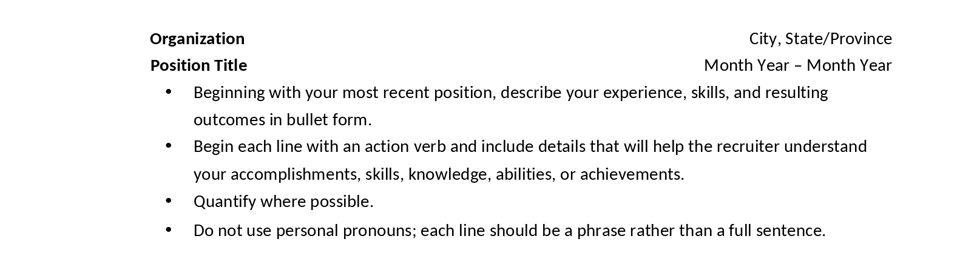
This is one of the most important sections of your resumé. List your work experience in reverse chronological order, starting with the most recent. Instead of listing your duties, use numbers and statistics to quantify and highlight your achievements.
If you are are applying for an entry-level position or have not yet acquired much work experience, list your internships, part-time and volunteer work, as well as relevant extra-curricular activities. In this way, you can still demonstrate your valuable skills.
Example:

Education
For the education section, list your degrees and diplomas, beginning with the highest achievement. Write the institution, your degree and date of graduation.
You can add information such as your major, honors you received (if any), or your grade point average (GPA). If you are completing a degree, mention your expected date of graduation.
Example:
BSc in Computing Studies, National University, 2023
GPA: 3.8
Skills
The skills section is where you will show your core competencies. It should include five to 10 of your core abilities and strengths that are necessary for the role you’re applying for.
This is where you list your computer programs and languages, research and problem solving skills, and foreign languages. If the job description requires leadership skills, you may add it here.
Example:

List your strongest skills first. You may also list your skills into several parts, such as computer, technical, management, etc. This is specially common with technology roles that require specific skills, such as software and computer engineering. You could have a subsection of technical skills and another for other skills.
Certifications & Licenses
This section is where you will list the certifications and licenses that you earned. If you don’t have any professional certifications or licenses yet, you can leave out this section.
Example:
Microsoft Certified Azure Developer Associate, 2020
AWS Certified Developer Associate, 2022
Meta Database Engineer Professional Certificate, 2023
Outside Projects, Conferences and Trainings, Hobbies & Interests
These are a few of optional sections that you may add if they are relevant to the job you’re applying for. Likewise, for hobbies and interests, you may add them if they are part of the company culture.
4. Review and edit
Congratulations on getting this far! It’s time to proofread and refine your resumé.
✅ Make sure that your resumé language is:
specific rather than general
easy to read by people and ATS
factual (quantified and qualified)
direct and informative, free from “fluff”
written in the active voice (Use this list to enhance your action words).
👀 Double check for these common mistakes:
Missing contact details
Not demonstrating results
Spelling and grammar errors
Usage of slang or colloquialism
Passive language vs action words
💡 Top tips:
Make it easy-to-read with enough white space
Be consistent with the format and content
List headings in order of importance
Use consistent spacing, underlining, italics, bold, and capitalization for emphasis
Try to save as PDF to see if your doc file will be saved properly when converted to .pdf
Conclusion
In writing your resumé, you don’t need to write a fresh one from scratch for each job application. However, it is necessary to tailor it according to each job application.
Power-pack your professional summary with a trio of key skills. You may pull this directly from the job description (think ATS matching).
Highlight your professional achievements and cut anything out that does not add value.
Always quantify and qualify your achievements in bullet points to show their relevance and how they are aligned to the job description.
Optimize the layout for ATS scanning and parsing with clear heading, bullet points, and standard text alignment.
Avoid complex layouts and tables, spelling errors, and slang or colloquialism.
Next step - Write a cover letter that enhances your resumé
Cover letter segments and paragraph structure
[Date: DD MM YYYY]
[Your Name]
[Your Contact Info]
To:
[Hiring Manager’s Name/Team]
[Department Info]
[Company Address]
[Formal Greeting]
[Opening Paragraph]
[Body Paragraph 1]
[Body Paragraph 2]
[Optional Body Paragraph 3]
[Closing Paragraph]
[Salutation],
[Your Signature]
Did you like this post? Let us know by sending a message!
Also read:
How to write SMART Goals in 6 easy steps
Subscribe today to get smarter in your Tech career and gain competitive advantage in the AI era.
