Sensei Notes #02 — Affordable TTS, 3D Foliage, and Learning Tips 🌳
Hey!
Welcome to the second Sensei Notes.
This week, we’re going "under the hood." I’m sharing a tool for instant 3D foliage, a strategy to slash your AI chatbot costs with affordable Text-to-Speech, and a mindset shift on how to learn Three.js and R3F faster by looking where others don't.
Let’s dive in. 🌳 🗣️ 📚
🔥 Asset Resources
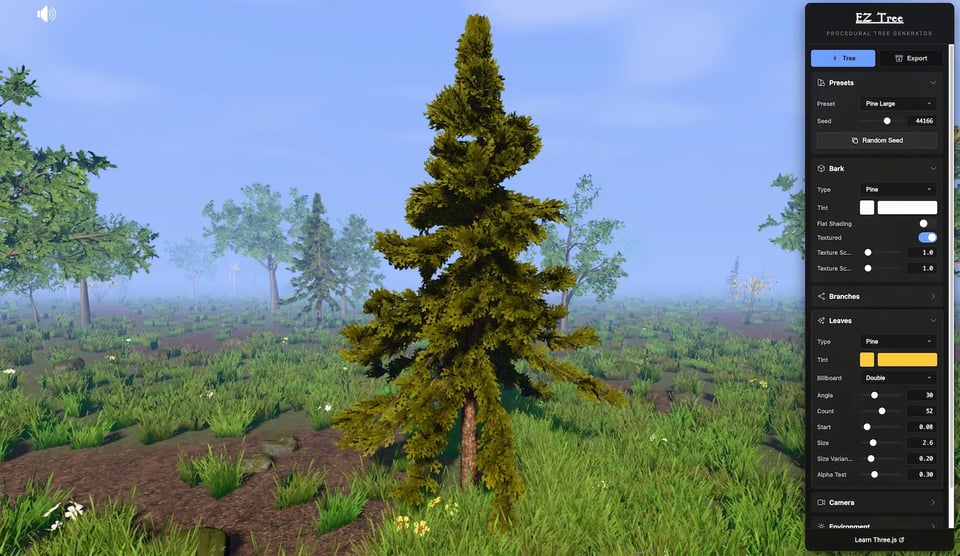
Grass and trees transform simple projects into living worlds. Thanks to Dan Greenheck and his EZ-Tree generator, generating customized royalty-free trees doesn’t require you to open Blender or buy another asset pack!
🤖 AI Corner
When building AI chatbots, the biggest money pit is often the Text-to-Speech (TTS) cost. Here’s the current landscape:
ElevenLabs: Clearly the gold standard for quality, but also the most expensive.
OpenAI Audio Models: Great quality and more affordable than ElevenLabs.
The "Unbeatable" Alternative: I’ve found a high-quality contender called Inworld TTS with pricing that’s hard to beat: $5 per 1M characters.
The Strategy: You can use Inworld as your primary endpoint, or implement a "split-strategy" to optimize costs. Offer the premium ElevenLabs voices to your paid or high-tier users, and use Inworld as the high-quality fallback for free or low-usage tiers.
🪄 Tips & Tricks
When learning Three.js and React Three Fiber, most people start with documentation, YouTube tutorials, or paid courses. While that’s a great foundation, it has one major downside: you are always lagging behind. You have to wait for a creator to discover a feature, master it, and finally publish content about it.
"Learning by doing" is my go-to recommendation—finding solutions as you hit roadblocks. But there is another level: The Open-Source Goldmine.
Because these libraries are open-source, you can see what the team is building before it’s even officially released or documented. Diving into the source code reveals techniques and components you didn’t know existed, sparking new ideas for your projects.
Where to dig:
Three.js Examples: The official examples often showcase working code for undocumented features.
Drei (R3F): Browse the component list in the documentation. Many come with working examples.
Did you know the <Bounds /> component in Drei allows you to fit a 3D model to the screen automatically, ensuring it’s perfectly framed regardless of the user's screen size?
That's it for this one — let me know what topics you'd like me to cover next. Join the conversation on Discord!
Happy coding,
Wawa


