
“Before I knew it, I had four damaged sockets and three bad cables.”
Welcome to this week’s digest of Unsung, a microblog about software craft and quality. Here’s what was posted in the last week:
“The archive itself is not new”
Thursday, January 22
I love how this Byte magazine archive by Hector Dearman tries to do something different. It inspired me, and reminded me of the excitement of what Internet was supposed to be. I think we all wanted the web to feel more like this – fast, with infinite information right at your fingertips, the biggest library you could imagine at the comfort of your home.
I hope seeing everything in single, searchable place offers a unique perspective.
(The details of the zoomable UI are a bit wonky in practice, but one can imagine fixing all that.)
“8–10 hours per symbol”
Thursday, January 22
A great post duet from Craig Hockenberry that flew by on Mastodon and clarified something for me:
[For] the extra work to create a custom SF Symbol, our experience is 8-10 hours per symbol. This is also an expert level task: lots of knowledge on how SVG control points work and how to maintain compatibility across different sizes and weights.
If you’re paying a designer to do this, the cost will be somewhere in the $1000-2000 range. For Apple this is an easy cost to absorb, for smaller developers it’s a big “nope”.
And, of course in the Mac menubar (and now iPadOS) you need a lot of them.
Another subtle example of how out of touch Apple Design is with day-to-day development.
So not only is the overiconification of menus in macOS and iPadOS a bad idea, but it’s also expensive. You could make an argument that it would push people into reusing SF Symbols – ergo “consistency” – but that would land better if we haven’t already seen even Apple is struggling with that on their own (previously, previously).
Favourite well-made apps and sites
Thursday, January 22
A week ago I asked on Mastodon and Bluesky:
What are you favourite well-made apps or sites? Phones and computers alike.
Doesn’t have to be “pretty,” but well-made according to whatever definition works for you.
I specifically made it kind of vague, and these are the answers I got. I grouped them into categories and added links. I am excited to dig into these and study them, but wanted to share a raw list as well in case this inspires some of you, too.
Thank you to everyone who participated! (Numbers in circles like ② or ③ mean more than one person nominated a given site or app.)
Info sites:
- Ian’s Shoelace Site ② “A «does one thing well» site. Great breadth and depth. Information architecture designed to help you discover/find information, not sell you something. Loads fast. Still maintained after decades.”
- SCELBI Computer Museum. “Useful, tightly curated, organized, loads fast, no BS. A basic bootstrap thing, but there’s something magical about it. Small enough to be digestible in an hour, well set up for either research or just cool vibes . Partly bc subject itself is «small» but seems not only that.”
- Hyperion Records. “All the liner notes and song texts!”
- www.gov.uk
- plaintextsports.com
Interactive explainers:
- Bartosz Ciechanowski ③
- It’s Nicky Case!
- Neal.fun
- Making Software by Dan Hollick
- Alex Harri
Personal sites:
- “I’m in love with Maggie Appleton’s site. The general design and the illustrations, the content (from quick notes to polished essays), the way it creates a visual and conceptual taxonomy with the #digitalgarden concept.”
- Kottke
- Robin Sloan
- Robin Rendle
- Rasmus Andersson
- Ariel Salminen
Work and tasks:
- Mimestream ③ “It basically stays out of my way? Which is about as good as it gets these days. Also, it has just enough customization options to handle my sometimes complex number of gmail accounts (personal/work, for various clients, etc.)”
- Things ② “The fanciest, most attention-to-detail software I know of.”
- Sup “Pretty niche. I’m thinking specialist interfaces for specialists here. Tools that become an extension of their users’ bodies and disappear in te use”
- CalendarBridge “<3 <3 <3”
- MyLifeOrganized
- Voice memos (iPhone)
Art/Games:
- “rekall for a simple, occasional, cyberpunk-ish retro mood board injection.”
- Good Sudoku
- Floor796
- Threes
Creative:
- Monodraw ② “for ASCII art”
- “Zerocam is the perfect no-fuzz-just-snap camera app”
- “I like Keynote. But am not completely objective about that.”
- Vectoraster “for halftones”
- Spectrolite “for colour separations”
- Darkroom
- Rayon (desktop)
- MagicaVoxel
- Fusion 360
Podcasts:
- Pocket Casts
- “Castro is still my favourite podcasting app…
- …although visually I like Queue more”
Social:
- “Telegram is the best messaging app in terms of UI design”
- “Locket is my fav «novel UX» app and its widget is always on my home screen”
- Phanpy (the Mastodon client)
- Reeder
- BarnOwl
Commerce:
- McMaster-Carr ④ “The best online catalog.” “Impossibly fast. Still in awe after all these years.” “It supports your cognition, including with contextual material, to find the thing you are looking for (or the thing you didn’t know you were looking for until you started looking). It helps you find the right part because of what they show, the right filters, and especially the contextual information (I think about the little scale they had to explain the different hardnesses of rubber, for example).”
- Cars&Bids. “Fast, functional, and easy to use. Not stunning, just utilitarian.”
- DigiKey
Writing and note-taking:
- iA Writer ② “Simple and effective, using it I always wish to write more but I forget it again.” “Has been consistently great for years.”
- “I’ve been using Bear ② by Shinyfrog for my notes for well over a decade now. Dependable, works great, no junk ware, and a reasonable price. Pretty to boot. The fact that in the 10+ years I’ve been using it, there’s only been a single major overhaul update is a feature, not a bug to me.”
- “Notability! Haven’t found anything else that matches the flexibility for handling imported files & photographs, typed notes, hand-drawn diagrams and mark-ups completely seamlessly within a single document. Unbeatable for handling both notes in class (uni) and on site (trade).”
- “Been using OmniOutliner daily for decades. Simple, focussed and matches the way I think. Lots of ways to make lists and outlines but this one works for me.”
- WriterDuet
Music:
- “The radio station WFMU streams online, and also has a website where you can log in to chat with other listeners and interact with the playlist. The degree to which it does what you want it to do is stunning. It doesn’t get in your way or make you learn a new paradigm; it just makes it easy to do what you want to do. It’s a lesson in design for any UI/UX people.”
- Ishkur’s Guide To Electronic Music. “This website maps out all the sub-sub-sub-genres of electronic music, with descriptions and samples. I think that the fine-grained classifications are comical, but they do an excellent job of what they’re doing.”
- “Easy Metronome is a simple elegant loud phone metronome that is super easy to use even for weird time signatures.”
- “Pro Metronome is also excellent. I’ve used it for over 10 years and it stubbornly refuses to abandon its skeuomorphic leather and big clicky scroll wheel”
- “I really appreciate the Apple Music Classical app (even though it exists in this odd liminal space beside Apple Music) having spent many years frustrated about how traditional music streaming services handle classical recordings.”
Travel:
- Flighty ②
- “I‘m travelling with Deutsche Bahn quite frequently, and while their own App (DB-Navigator) is quite good compared internationally, I prefer to track trains on Bahn Experte for its bare, technical and valid information and performance.”
- “The Man in Seat 61 is a goldmine for train travellers. At least in Europe, the information is really up to date and if you want to find pictures of the sleeper cars of the Romanian railway or the seat map of Prague - Berlin trains, it’s all there.”
- Transit
- Waymo’s app
Food and health:
- “The kiosks in Costco’s food court aren’t the prettiest to look at but they are S tier for responsiveness. You literally just press a button and immediately the item is added to your cart. You can order a hot dog and soda in under 5 seconds.”
- Paprika. “Love my recipe management.”
- Fitness Stats. “Simple, effective, and good looking.”
- Mela
- MacroFactor
- HealthFit
- The Way
Text editors:
- “I use Panic’s Nova an awful lot and it just has a really nice feel so I keep paying for it.”
- Sublime Text
- vim
Data transfer:
- “WebWormhole for functionality, encrypted data transfer between your devices or to your friends without installing anything. (There’s also a similar magic wormhole CLI tool.)”
- PairDrop. “Drop-dead easy file sharing on the local network.”
- “LocalSend is well made, because until sofar it aleay works, even when AirDrop doesn’t. And it also works on non-Apple environments.”
Other nerdy tools:
- RegExr. “A web-based tool to create or explain regular expressions.”
- “The Sway compositor. A keyboard-driven tiling window manager with dynamic tiling layout. I can’t even imagine trying to use a computer with floating, overlapping windows anymore; everything lines up perfectly and adjusting layout is a matter of a few extremely quick keyboard shortcuts. They take a concept—laying out multiple windows on a display without gaps or overlaps—and build a fast, coherent interface around that concept, and it works fantastically.”
- “The original HP 42S calculator packed a lot of power into a convenient and ergonomic enclosure, and Free42 is a very tasteful recreation and expansion of that device for modern platforms.”
- Beyond Compare (Linux version)
- Alfred
- Genius Scan
I didn’t know where to put these:
- “The Kanji Study dictionary on Android has a wild amount of polish, I’m consistently impressed by how much effort has been put into it, especially because it’s sold for a (admittedly high) one-time fee.”
- Sim Daltonism
- Homey
Meta:
- “I happen to maintain a list of my favourite apps. (And being well-made is sort of a pre-req.)”
- Web app directory and Mac app directory
Out of sight
Thursday, January 22
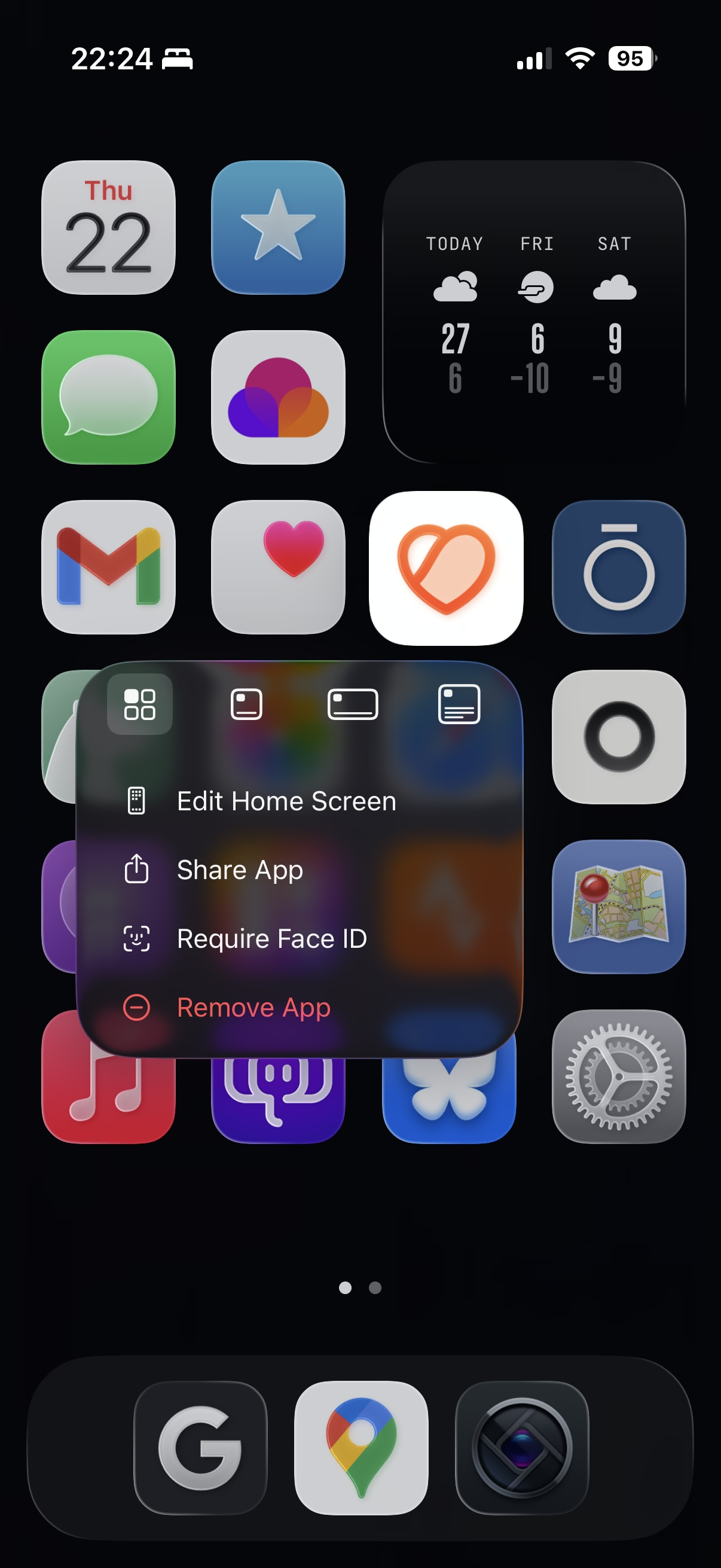
If you choose to remove the app names from the springboard, a small thing Apple could do would be to show the app name in the long-press menu here. Otherwise, I found it feels really easy to forget the name over time! (It would be a small riff on this disambiguation detail.)
“A hand-wave toward something ineffable”
Thursday, January 22
I’m strangely conflicted about sharing this post about taste from Roger Wong:
Sensitivity is how finely you perceive—noticing friction, asking why a screen exists, catching the moment something feels wrong. Standards are your internal reference system for what “good” actually looks like. Both can be trained.
The post is great and I nodded all the way through. But I found the linked Medium post very hard to parse – like it was written by AI for LinkedIn – and I haven’t yet opened Rick Rubin’s relatively famous book quoted inside because I am worrying it might be too pretentious.
So, perhaps I can offer a rare caveated endorsement: click on Roger Wong’s post, but not sure it’s worth clicking further.
“Fourth reason: Map makers are lazy”
Wednesday, January 21
A wildly fascinating 12-minute video from the always-hilarious YouTube channel Map Men about the reason for a surprising black spot that could be seen on Google Earth until 2012.

Reading the Wikipedia entry after watching the video adds extra color to the mystery, turning it more squarely into a “software quality” story:
Some scientists were initially skeptical that such an error could exist, since a signature was present in various global terrain data sets, such as the bathymetric data from the General Bathymetric Chart of the Oceans, which reported an elevation of 1 metre (3 feet) over the location of Sandy Island. Some data sets derived from satellite imagery indicated that sea surface temperatures were absent in the location, suggesting the presence of land.
“Because you haven’t used them recently”
Wednesday, January 21
I was surprised at this little thing that appeared in my Chrome Canary this morning.

It is rare to see an interface clean up after itself this way. This flew by quickly and wasn’t communicated very well, but I believe this changed my new tab page from this…
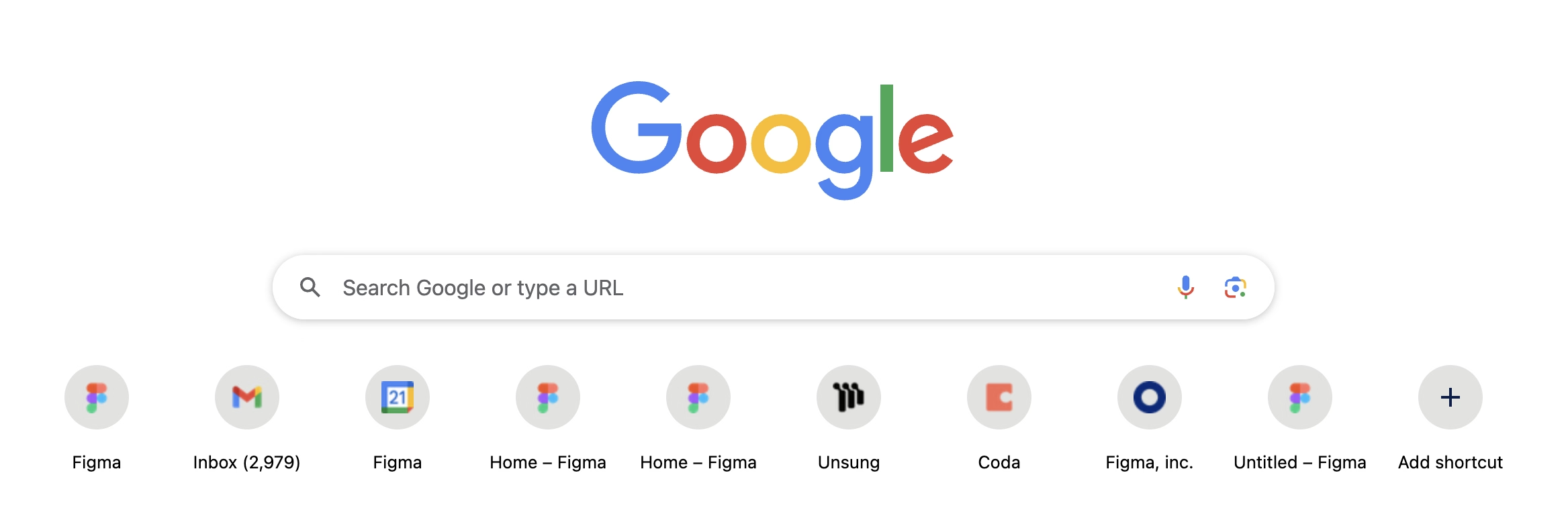
…to this:

Now, I said “surprised” and not “delighted” not just because the implementation felt a bit rough. I am also suspicious of the motivations, as Google’s sister iOS app played very fast and loose with this surface, literally moving the search bar from under my thumb in order to create room for features I would never use and could never remove. I suspect this is a preparation for something else that would take the place.
But until that day comes, this was an interesting gesture, and it’s really welcome to see a new tab harking back to the simplicity of Google from days past.
A Japanese word for “cat”
Wednesday, January 21
When I was in Hong Kong a few months ago, I noticed that a lot of intercoms have this particular animation of a cat sleeping and chasing a fly, on a loop:
It was actually kind of fun to see it all over Hong Kong on LCDs of varying quality.



Turns out this was Neko! A “screenmate” application from the late 1980s that made its way to various software platforms and apps since.
I liked the idea that somewhere in the intercom factory someone wanted to add a little delight to a very pedestrian (no pun intended) surface, and that’s why now we have Neko all over Hong Kong.
(I liked it so much I recreated it and added to the bottom of my site.)
“I’m still grumpy that Apple discontinued it back in 2015”
Tuesday, January 20
Daniel Kennett in A Lament For Aperture, The App We'll Never Get Over Losing (also note an alt title in the URL):
Start spending time in the online photography sphere and you’ll start to notice a small but undeniable undercurrent of lament of its loss to this day. Find an article about Adobe hiking their subscription prices because they added AI for some reason, and amongst the complaining in the comments you’ll invariably find it: “I miss Aperture.”
Kennett goes deep into two specific details: the HUD-like UI that travels to the photo, and the technically impressive loupe. It’s worth checking it out just to reflect on the importance of execution; ostensibly those features exist in Adobe’s Lightroom (Aperture’s main competitor), Photos, etc. But Aperture designed them in particularly memorable and impressive ways.
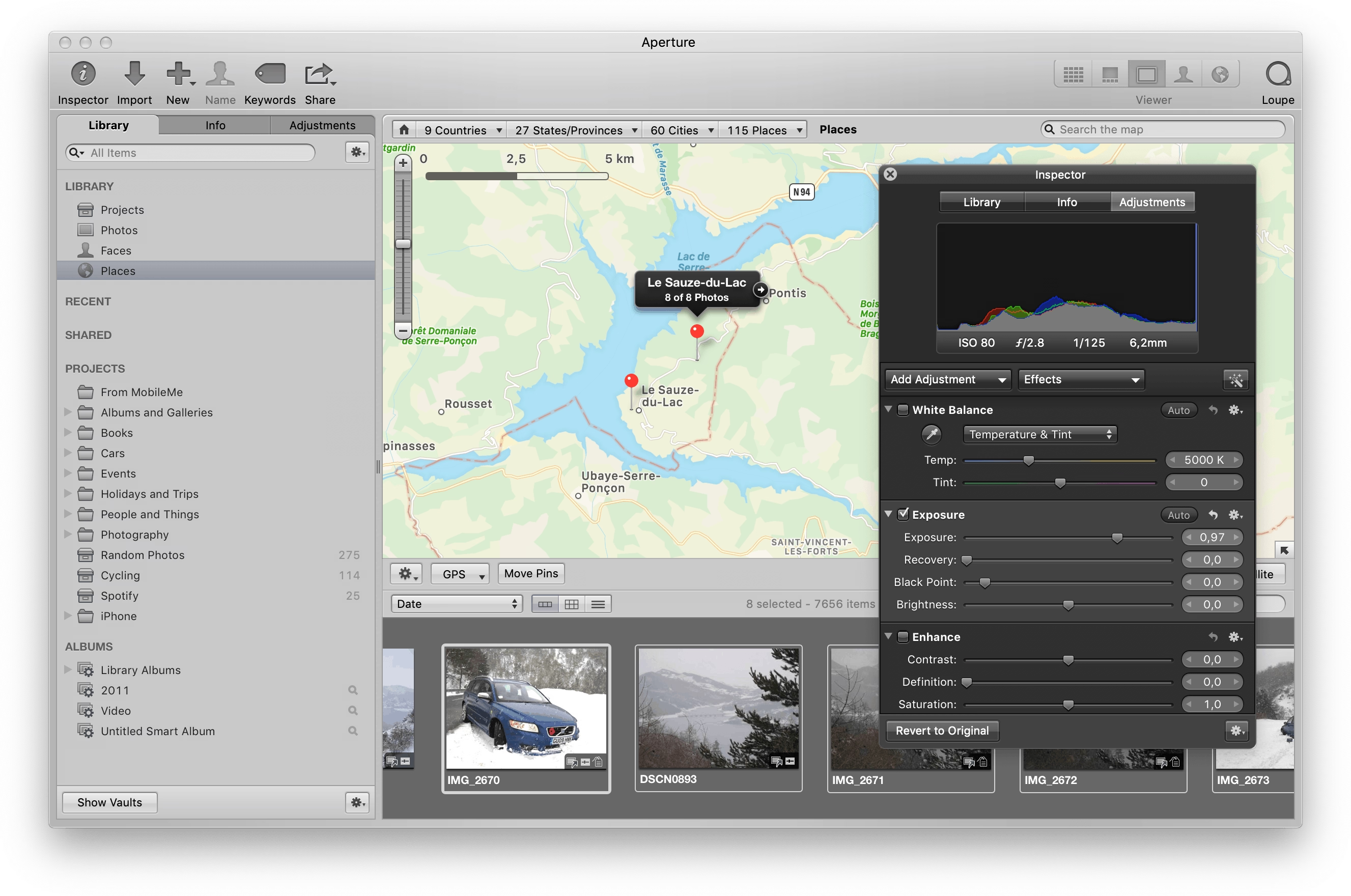
Back in the early 2010s I used Aperture, too. I was rooting for it. I felt like it was designed, and Lightroom merely existed.
It reminded me of the 1990s when I felt the same about Netscape 4 over Internet Explorer 4. There was something about Netscape’s feel that appealed to me more. The way buttons were designed. The way they responded to clicks. The way pages loaded. All these little nuances. This was perhaps the first time I appreciated one app over another for things I didn’t know how to measure, or perhaps even describe.
Aperture vs. Lightroom feels like a similar story, because for all my appreciation for Aperture, I remember it being slower than Lightroom, and the noise reduction (much more important 10+ years ago) was worse, too. In a small way, it was a relief that Aperture was discontinued, because it saved me from a tricky choice: better designed vs. technically superior.
But: I miss Aperture, also. Maybe it would’ve caught up technically today and it would’ve been the best of both worlds. To this day, I use Lightroom (now Lightroom Classic). If it’s filled with UI quirks, it’s mostly bad ones. If there is beauty in it, I no longer know how to see it. It’s a tool in the most reductive sense of the word. My photos deserve more.
Also something I learned from Kennett:
“Shoebox” apps are apps that contain the content you use with them, as opposed to document-based apps which work with content you manage as a user. It’s an extremely common design nowadays, but less so back then — early pioneers of the shoebox app were iPhoto, iMovie, etc.
“Dwarf children die from embarrassment at not being dressed at age 2”
Tuesday, January 20
I saw this screenshot the other day (link):

I never particularly liked those “cute” app updates that were all the rage some… 10 years ago? Or app updates that are too generic. I always felt the updates should be informative, and I occasionally like seeing what’s actually being fixed, and sometimes learning from it.
The post above is about a game called Dwarf Fortress that I have never heard of, despite it going on since 2006. In that game, actual descriptions of bug fixes often feel better than those creative app updates. Some examples:
- Zombies start conversation with necromancer adventurer who tries to sleep in their house
- Cats dying for no reason - alcohol poisoning?
- Giraffe is trainable for war
- Added mouths
PC Gamer some fun ones in 2016, or you can just go to Dwarf Fortress Wiki and explore on your own.
The game seems fascinating, by the way.
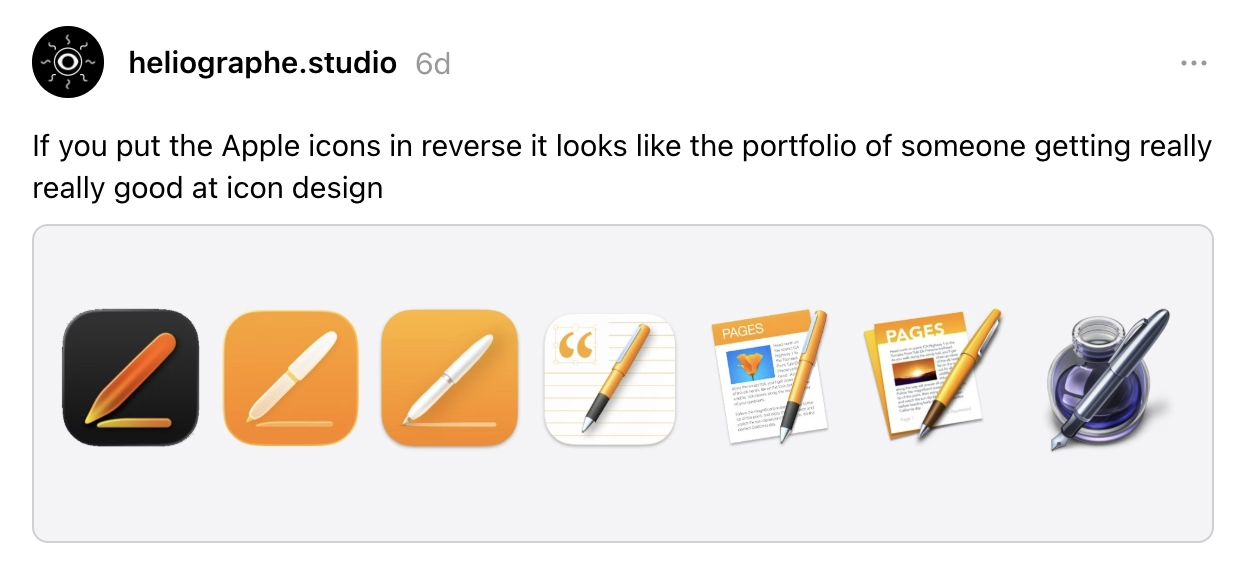
“If you put the Apple icons in reverse”
Monday, January 19
Savage from heliographe.studio on Threads (via Daring Fireball):
A nice transit detail
Monday, January 19
Even though this blog is about software, I might occasionally post some inspiration from real life. I saw this today outside of an RTA transit station in Cleveland. I have not seen it light up, but I imagine it would blink when the train is near the station, which would mean: hurry up if you want to catch the next train.
It reminded me of this disambiguation detail in Finder in a way: a tiny but thoughtful detail at the right moment can go a long way.

In Kraków last year, I saw a great variant of this: A tram waiting at the terminus would show exactly when it departs, so you can choose to rush when it’s close, or to run a quick errand if it’s not.

(I know a lot of countries have extremely user-friendly transit systems where those details were hot news 30 years ago, but I do not take them for granted.)
“Before I knew it, I had four damaged sockets and three bad cables”
Monday, January 19
Speaking of hardware: Always loved this 1998 Australian story (magazine scan or an easier-to-read transcription) of a very particular computer virus that did not require any software to spread “like a Sydney bush fire”:
Now it all became clear. One of the female sockets must have deformed when I first reconnected the CD-ROM burner. This forced the two pins into the same hole and shorted them out. Later when this cable was plugged into the JAZ drive, the pins, now bent to go into one hole, deformed the female connector on the JAZ drive. Again pushing the separating plastic over the hole. Plugging another good cable into this newly damaged socket caused the pins of the new cable to be forced together and short, and when this new cable was inserted into the good SCSI socket on the new JAZ drive it did more damage to it. Before I knew it I had four damaged sockets and three bad cables.
I believe the cables and sockets looked something like this:
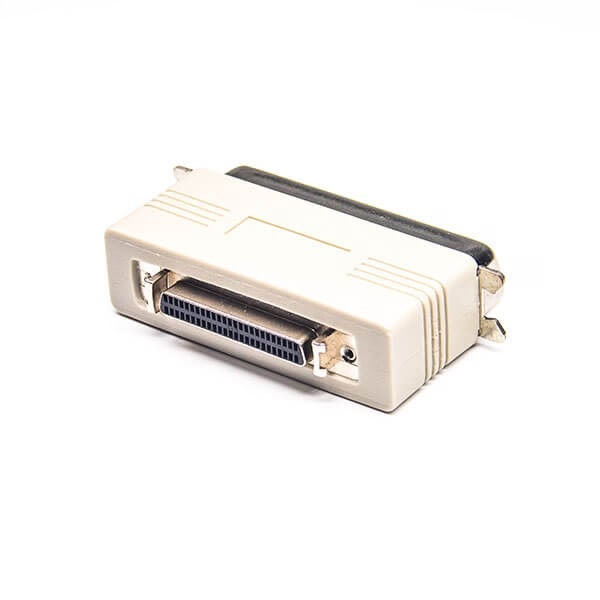
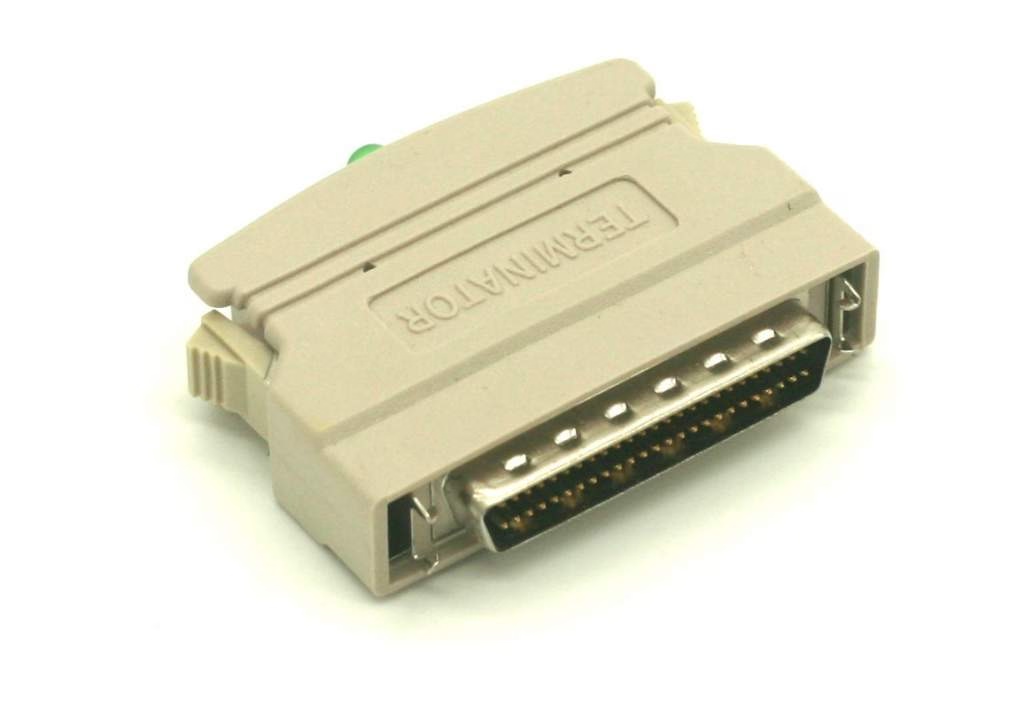
The story ends with:
I am only glad the [hardware] virus was contained and did not spread to the rest of the world! Can you imagine if this sort of thing happened in a big computer assembly plant?
Turns out, it did actually happened at a computer assembly plant, in 1997.
“An extremely minor technical problem”
Sunday, January 18
A fascinating deep dive look at one of the most well-known bugs in computing history, the 1993 Pentium FDIV bug. Ken Shiriff actually grabbed a microscope to analyze the processor and mapped out exactly what happened on the hardware level, and the details of Intel’s (surprising) fix.
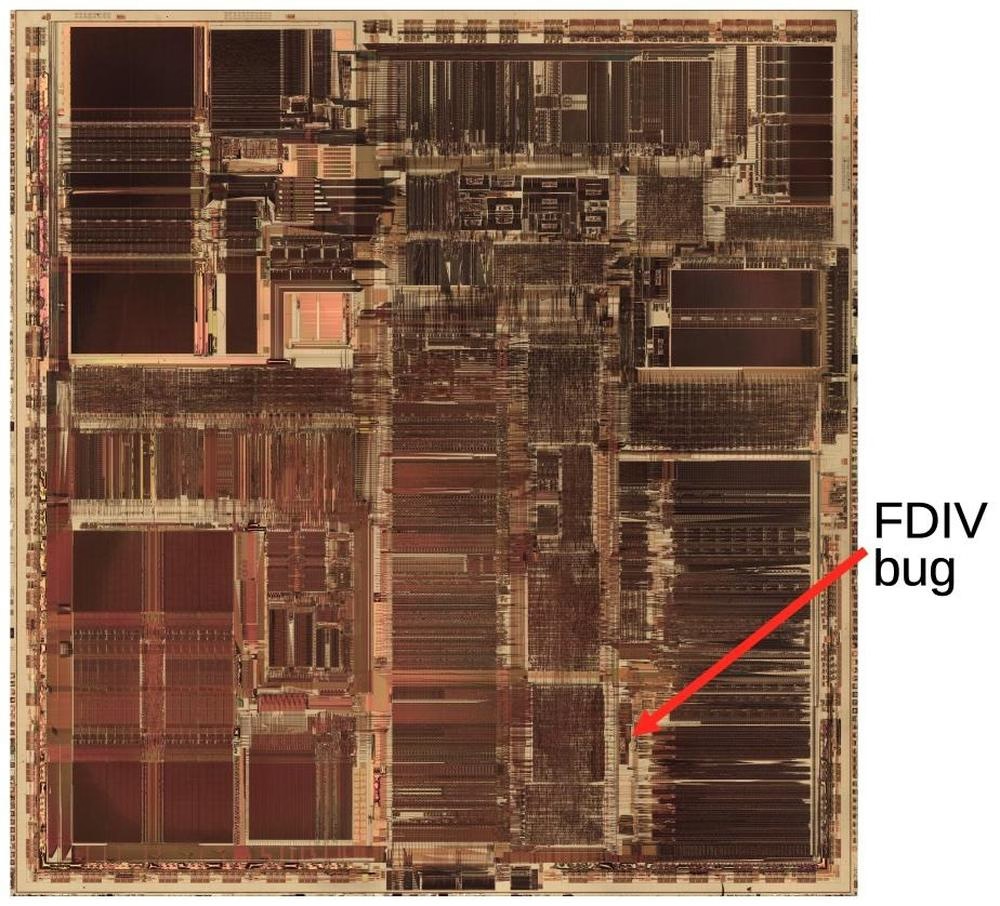
Also, an interesting detail of what ended up being Intel’s self-own:
The problem might have quietly ended here, except that Intel decided to restrict which customers could get a replacement. If a customer couldn't convince an Intel engineer that they needed the accuracy, they couldn't get a fixed Pentium. Users were irate to be stuck with faulty chips so they took their complaints to online groups.
“This glitch didn’t want to be forgotten”
Sunday, January 18
I mentioned speedrunning before in the context of mastery, but there is the other side of speedrunning that’s equally interesting: that utilizing bugs (or, glitches) to get the fastest possible time.
This 17-minute video by Msushi covers “one of the most loved and broken glitches in Portal 2” and the strange relationship the community has in following a bug to its conclusion – which, in this case, is not fixing it, but creatively using it to shave of speedrunning time. (There is an element of mastery there too, with spawning and despawning, but I don’t want to spoil the surprise.)
Designing table of contents
Saturday, January 17
I added a table of contents UI to the most elaborate essays on my site, and then wrote about some of the design details and choices I made there. Let me know if this is an interesting case study! I tried to do something new here with tons of mini videos.
At the bottom, I will also be collecting other implementations I see that are interesting alternatives to my approach.