Happy Hedgehog Day! Let's Talk about Sonic 3.
Introduction
Readers familiar with the deep lore of Sonic the Hedgehog — not the games, but the marketing of them in the US — may recognize that “Hedgehog Day”, Feb. 2, is the anniversary of Sonic 3’s release date in 1994. Recently I was asked what the best way to play Sonic 3 is, and those who know me may not be surprised to hear that I have pretty strong and thorough opinions on this subject. Given the timing, I felt it appropriate to put down my thoughts on the subject in this blog-ish thing. I’m going to work from the assumption that you might never have played Sonic 3 before. Which brings us to…
1. Your First Playthrough
Do you have choice paralysis? Have you never played Sonic 3 before? Please check this part out. If not, you can just skip to section 3.
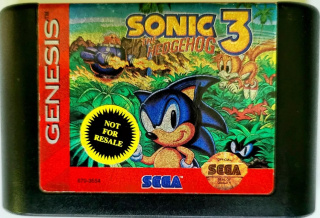
If you’ve never played Sonic 3 before, then I suggest playing it in as close to its original context as possible, as I find for many games this does a lot to make their mechanical and aesthetic decisions make sense. This would of course be with the original cartridge, console (the Sega Genesis, of course), and a compatible television.
I want to be clear that when I say “original cartridge”, I mean that I think you should actually try to play the original Sonic 3 on its own your first playthrough. It’s about half of the full game (the other half being Sonic & Knuckles, released on Oct. 18, of course) and winds up being about the same length as most of the other games in the series, about 45 minutes to an hour if you’re familiar with some of it. Yes, Sonic 3’s levels are actually very large compared to the rest of the series, as we’re talking a game with 6 zones of 2 acts (compare with Sonic 1’s 6 of 3, Sonic CD’s 7 of 2-plus-a-short-boss-level, and Sonic 2’s, uh, 9-ish of mostly-2). You’ll have the easy-to-understand save system (I strongly encourage using the save slots!) and, with it, the ability to play through with multiple character choices.
Sonic 3 is probably best as Sonic, and there’s a nice lead-in cutscene if you pick Sonic (with or without partner Tails) that you can see from the game’s demo sequences. Sonic and Tails gives you Sonic’s moveset with the flexibility of Tails's flight abilities (technically originally in Sonic Chaos but here for the first time on Genesis), though you need a second controller for Tails to airlift Sonic through the levels.
Tails on his own is a little easier most of the time and the complex level design gives him a lot of nearly exclusive optional paths to take through levels. The one thing to be wary of is the act 2 boss of Marble Garden Zone, which is quite unforgiving. Tails needs to fly into the boss from underneath, which can be tricky to do without taking a hit, which will knock you away from your rings. If you reach that part, stay patient and only hit the boss when it crosses the screen vertically to be as safe as possible. I know patience is seen as anathema to the Sonic titles, but I couldn’t ever beat that boss as a kid because I refused to be careful.
I should note that Sonic 3 on its own has a reputation for being a little buggy. For all the features and mechanics that the game offers, it was developed under horrifically tight constraints, and in a way I’m impressed it works as well as it does. That said, there are many fun ways to break the game that don’t require a lot of knowledge or skill, so they can be fun to
I suggest you pay a little attention to some of the incidental music as you play the game. If you don’t like the main theme (or adaptations as invincibility music and the 1-up sting) or the boss music, all our further options for playing the game will free you of those concerns.
Oh yeah, and if this is your first time, and you think you’re stuck in Carnival Night and need to do timed jumps to get around some barrels, you don’t. It’s alternating up-and-down to move the barrel, with some timing sensitivity.
When you beat the game, if you haven’t played all the special stages, the first and sixth stages (angel island and launch base) have special stage entry rings that are very close to the start of the level that you can use to grind for emerald completion. I encourage this as it gives you a potential leg-up for the next section.
2. Lock-On — The rest of the game
This section is also skippable for the people who have played Sonic 3 before, but I detail a fun save feature you might not know about (especially if you only play the game through emulators).
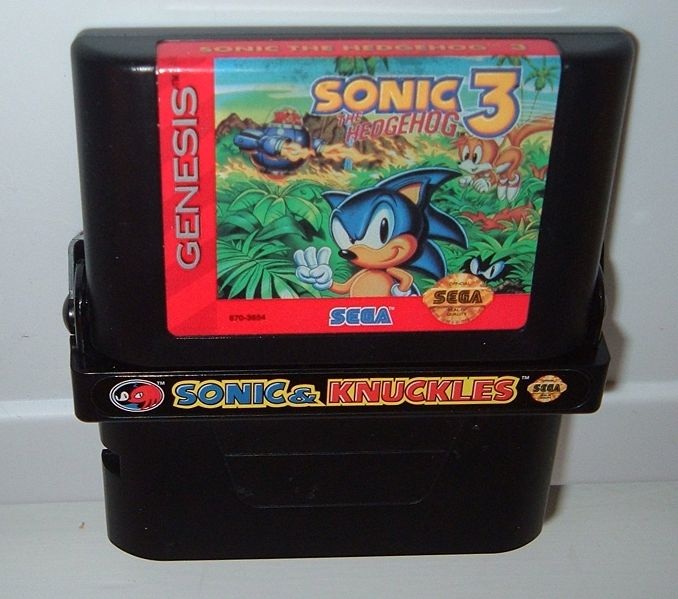
Now that you’ve beaten Sonic 3, it might be time to move on to Sonic & Knuckles. You can play it on its own, but here is my recommendation for doing so: only do it once. Put it in, let the first demo (as Knuckles) play, so you can see how he moves differently. At this point, if playing as Sonic, you’ve now seen everything S&K has to offer that you can’t get with the game locked on. Now, if you were to choose to play as Knuckles at the title screen, you’d get an introductory cutscene for his story leading into his first stage, but I would suggest not to bother if you’re new to the game as Knuckles is harder to play as; you might benefit from a full playthrough as Sonic, or Tails.
That, of course, means that from now on you’re going to play the games locked onto each other, to play Sonic 3 & Knuckles (I will abbreviate this as S3K). There’s a reason I want you to do this: the game was built with a feature that allows you to continue your Sonic 3 saves when locked-on. Sonic 3 & Knuckles uses a different portion of the save ram for its saves. However, if all those saves are ‘NEW’ and there are Sonic 3 saves, those saves will have their completion status copied over to the Sonic & Knuckles side; completed games will be set to the first stage of Sonic & Knuckles, Mushroom Hill, and with all the emeralds you’ve gotten so far.
If you got a pre-owned cartridge, maybe there are some S3K saves already on it. This may be hard to believe, but the game only cares that all the saves on the S3K data side are set to NEW in order to copy data over; the game has no difference between never-initialized and fully-deleted save data. So you can delete all those pre-existing S3K saves and power-cycle the Genesis, and then when you select single-player mode — hey! It’s your old Sonic 3 saves!
Now, if you’re not using real cartridges and you want to retain your old saves, you have a few options. I know that at least Genesis Plus GX (available as a Libretro core) can allow you to specify a Sonic & Knuckles binary and treat it like a lock-on option separate from loading the ROM. Because you’re loading up Sonic 3 otherwise like normal, the game will load the same Sonic 3 save data — so you’ll get to take advantage of this feature.
Lock-on between Sonic 3 and Sonic & Knuckles from a binary perspective is a bit silly. To get an S3K binary you can load into an emulator from the S3 and S&K binaries, take your Sonic & Knuckles binary (which should be 2MB) and append your Sonic 3 binary to it (to give you a 4MB ROM). Now, you can load that up in an emulator and play S3K, but if you want to copy over your Sonic 3 progress in most emulators other than the aforementioned GPGX you’ll either have to manipulate your emulator’s save files, or move the S3K binary into a separate folder and name it the same as your Sonic 3 ROM. Almost all, if not all, emulators will take the binary file’s name for the name of the save data, so you need the names to be the same if you want to share the save file. This is what I do to play the game on MiSTer, if I so choose.
Now, S3K obviously retains the interface scheme of Sonic 3, with the main differentiators being the ‘& Knuckles’ text on the title screen and act intros and the new intro music. Oh yeah, there’s new intro music (and corresponding invincibility and 1-up themes), and the Act 1 boss music is different. Heck, so is Knuckles’ theme. A few changes there, but I much prefer the S3K act 1 boss music to Sonic 3’s in general.
Well, OK, there’s one major remaining difference with S&K and that’s that the intro to Mushroom Hill Zone is a little extended and give you an excuse to play through the Sonic & Knuckles special stages. Since you’ll lose all your collected emeralds in the process, I’d say to go for the emeralds after beating the game. (The ending of Sonic and Tails’s story with the 7 chaos emeralds leads into Knuckles’ story, one of the reasons I’ve suggested holding off on playing as Knuckles so far.) After beating the game, you won’t get recognition on the save screen of 100% completion until after you beat the final stage again, unlike with Sonic 3 showing the 100% completion icon (Super Sonic) immediately.
3. OK. Now never do that again.
Hi, everyone who’s played this game before?
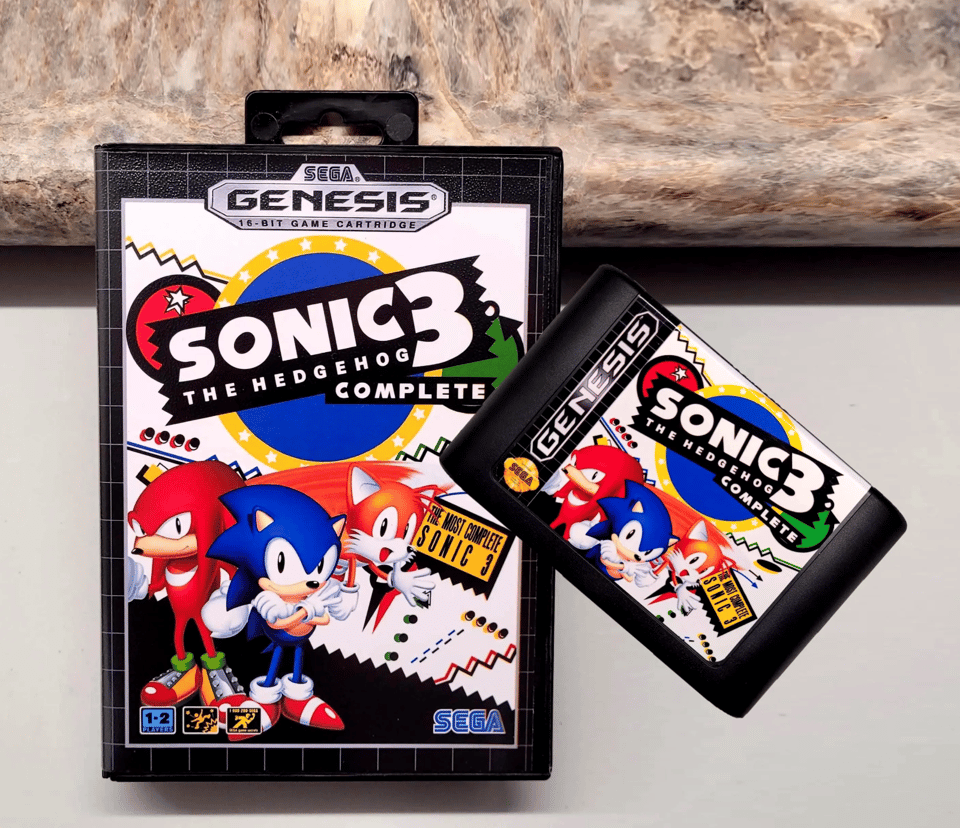
You should probably just get a flash cartridge instead.
Sonic 3 has gotten a number of rereleases over the years. One of the first is a compilation on PC from 1997 called the ‘Sonic and Knuckles Collection’ that features its various lock-on iterations available to play — and some odd arrangements of the soundtrack meant to be played back on OPL3 (FM) or wavetable (General MIDI) sound hardware. A nearly contemporaneous one is Sonic Jam for the Sega Saturn, which packages both halves along with Sonic 1 and 2, and doesn’t quite feel 1:1 with the original game and has a few graphics issues; it does have extra features and modes that make it interesting, but they’re well out-of-scope of this blog post. For playing Sonic 3, I recommend neither; instead, I recommend a mod of the game that includes all their unique features in a single package.
Yeah, it’s Sonic 3 Complete. That’s why the photo’s there. If you’re playing this on an emulator, MiSTer, or with a modern flash cart (i.e., Everdrive), this is the obvious choice. However, I avoided it because it’s without question going to be overwhelming to anyone who suffers from choice paralysis and isn’t pretty familiar with the game already.
I mean, have you seen their download page? Look at the configurable options they have available there! And that’s just the stuff they couldn’t fit into the game’s options menu!
Now, I fully admit that I do in fact use the customizer for my preferred version of the game, though I keep most options at the default. I change the Hidden Palace music to use the Sonic 3 ending theme (this is, I realize, an odd choice, but means the level gets its own musical identity), includes lives and continues on the save screen, have slot machine continues be awarded from a total of 50 rings with the continue progress HUD removed (how it worked in stock S&K, matches the other bonus stages’ HUD), pink Knuckles (consistent with more of his appearances in later 2D games), and use “Mushroom Hill” text (since “Mushroom Valley” brushes up against the per-scanline sprite limit of the system).
You may have noticed “skip big arm boss” as one of the options there. Yeah, if you play Launch Base Zone in S3K, you play with a different layout for rings and obstacles that makes some of the trickier traps easier, and you skip that boss as Sonic and Tails. Don’t worry, that boss is not completely broken in Sonic 3 Complete.
OK, then you download the game and…there’s even more options to configure? Yeah, you can see why I wrote this guide.
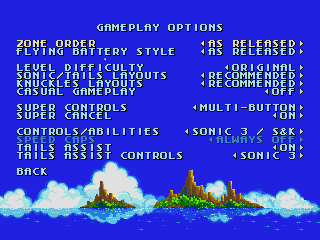
OK. So the first option in the options menu is “Load on Startup”. By default it’s the game selection menu — which lets you pick whether to play S3K (as Sonic 3 Complete), Sonic 3 on its own (as “Part One”), Sonic & Knuckles, or the Blue Sphere bonus game that you can get by locking on Sonic 1 (or, in a limited form, just about any Genesis game) to S&K. I like the menu so usually keep this set to its default, but I won’t blame someone for changing this to Sonic 3 Complete.
Now the gameplay options, as shown in the screenshot, are numerous but easy to make sense of. Zone order gives you the option to put Flying Battery into position between Carnival Night and IceCap, as it was before Sonic 3 was split into two parts. I actually prefer “original design” here, but setting that does affect the Part One and S&K options. I also keep Flying Battery Style as “prototype” as this gives the stage a darker sky background to fit with the previous level being set at night and the next stage at early daytime.
Level difficulty is an option that comes from Sonic Jam; “easy” cuts out a number of obstacles and half of the game, while “normal” cuts out only the most frustrating traps (like the infamous barrel trap). “Original” uses obstacle layouts taken from the original games, with some refined options underneath it per-character. I prefer “Recommended” here — these are layouts that are closer to Sonic 3 (and thus a little more difficult) for the first half of the game, though if you want the slightly smoother experience I won’t blame you for picking Sonic & Knuckles.
Super Controls being multi-button means to turn super, you press one button and while in the air press a different button to turn super. This makes playing as Tails and Knuckles much more enjoyable as you don’t automatically trigger their super abilities when using their unique moves. Super Cancel allows you to do the same thing to go back from super form; I actually think it’s more interesting to keep this off — you can always go into a bonus stage to revert back to normal.
Controls/abilities I keep at Sonic 3, though “max control” adds the super peel out from Sonic CD. I don’t find much use for this so I don’t bother. Sonic 1 and 2 end up removing Tails’s flight, so I don’t bother. I do turn on Tails assist, as it means you can use Tails’ flight with Sonic by pressing up and double-jumping. Tails Assist Controls lets you choose between using the d-pad (Sonic 3, like with the Marble Garden Zone boss) or jump button (Sonic 1 2013, Tails controls like he does when main character). I prefer the default option here.
And now for the music options. There’s more. And submenus. This is why I don’t suggest this for people with choice paralysis. “Music playout” turns off the music (which might be nice if streaming, perhaps?). The theme (title, etc.) and event (knuckles, boss, etc.) control options choose whether the music options you select apply to only Sonic 3 Complete or to all the games.
The zone music option selection requires a little explanation. In 2026 it’s somewhat common knowledge that Sonic 3 had prototype releases with about half of the game’s soundtrack being different, composed by people at Sega and companies that worked closely with it, eventually replaced with music written by Brad Buxer with support from Michael Jackson’s production team (credited in the Sonic 3 credits). The first release of this alternate soundtrack to the public was in Sonic & Knuckles collection for PC, and the options here allow you to select versions of those tracks re-arranged for the Genesis. Compared to their original form on Genesis in the leaked Sonic 3 prototype, these are a bit less impressive, and I tend to leave the 3 stages’ music as original. However, I do choose the Sonic 3C full zone medley (which, using music data taken from a different Sonic 3 prototype, adds the Sonic 3 tracks back into the Sonic 3 Complete credits medley, otherwise made up only of the S&K tracks even when locked-on, something that always disappointed me). I prefer “special theme” for super theme, as I tire of using the invincibility music quickly and it matches better with how Sonic 2 did it.
For theme/event music, I find this is a matter of how I’m feeling at any given moment for some of the tracks, though I only ever pick the Sonic 1&2 option for a laugh. Usually I pick “Sonic 3” for the main theme and extra life, "Sonic 3/S&K” for game over (what you’d normally hear), “Sonic 3” for continue (the S&K option is the same song but slower), “Original” for Sonic 3 credits, “Sonic & Knuckles” for the miniboss (“Sonic 3” is the one that has the “Come on!” voice sample at the start), “Sonic 3 (Original)” for Knuckles (which uses the Sonic 3 miniboss music for his battle). Results I keep at original (this is the song that plays after finishing a level, and the S&K Collection option drops its tempo slightly — a change common to the Genesis version of Sonic 3D Blast). Competition menu I also keep at original (though the S&K Collection version is probably my favorite of these re-arrangements) and competition results at Sonic 3 (this is the continue music, again; the S&K option is the slower tempo).
The remaining options relate to music stopping and starting. I put Fade Before Act Results to “on” (S&K style; “off” is Sonic 3 style), Resume Music After Zone Ends to “off” (Sonic 3 style; on is S&K style — transitions between act 1 and 2, if they do exist, never have music, so having between-zone transitions be silent feels more consistent). Finally, I set “Restart music” for On Level Restart, which is how Sonic games generally do it (“Continue music” does not interrupt the music if you die, which makes it feel less connected to the action of the game, and I don’t like that).
That, to my mind, is the optimal way to play Sonic 3, as long as you want an experience that definitely looks and feels mostly like the original game.
Ah, but what about you guys who want an experience more like the Sonic 1, 2, and CD mobile ports from the 2010s or their associated decompilations? There is, of course, a solution for that (it’s called Sonic 3 AIR) but if you thought this post was getting long-winded, managing the myriad game settings and the vast mod library will probably drive you insane. I will probably write about AIR and how I prefer to enjoy it, but hedgehog day is coming to an end here and I would like to retain my sanity and most of a full night’s sleep, so look for that in the near future.
And if you want that, you might want to subscribe: