
January Update
Hello from Minneapolis! This has been a wild month for the northern half of our team. However: The software continues to software.
Nat here, with the latest news from StoryTime. If you’re reading this, you signed up to get monthly updates about our development process.
You can take a look at StoryTime right now, by logging in with
(Keep in mind that any backlog you create with those credentials will be visible to everyone else with access to the application while in Alpha. If you want a private space, rely to this email!)
This Month
Stories delivered in January include
rapid-repeat reordering shouldn't cause duplication or 500s
easily click into rooms. tweak to the "rooms list” that makes more of the names clickable.
in-app request-access page should go to storytime-team instead of storytime. gotta get those urls right folks
stories should not show start button in Drafts. kindly reported by a newsletter reader, opening and then closing stories in drafts caused them to show a button that, if you press it on a draft, produces an error message.
accepted stories older than seven days should not be showing in our current backlog. accepting stories was causing some markers to get brand new acceptance dates, which forces everything below those markers to be visible
Words should not break on line-wrap. attention to detail in the editor.
[[redacted]] fixed several issues with users being able to see stuff they weren’t supposed to see.
no page should come to rest on a gigalixir page. this shouldn’t affect anyone who wasn’t using the application before we put it up at a proper URL, but if you do somehow try to go to access the app with the old URL, we now redirect you.
Try building basic velocity predictions
see more draft stories in the default state. the story input form no longer includes a “description” field so it takes up less space.
Story activity should appear in reverse chronological order w/ formatting. This was partly true before but there was a bug where updates within a single date would be returned in an arbitrary (database-determined!) order. Now we date-sort this list correctly
On Story Creation
I want to unpack “see more draft stories in the default state” a bit, since it’s a good opportunity to talk about some of the research we have now into how people use StoryTime and tools like it.
Story creation is one of the things that’s the most deliberately different about StoryTime from Pivotal Tracker (beyond “we just don’t have that feature yet”.) Tracker’s story creation workflow was “press a button to create a new story, fill out the form, press another button to save it, the new story goes to the top of the backlog.”
We knew when we started that we wanted stories to be added at the bottom of the backlog, and that we wanted to be able to create stories entirely with the keyboard. So we started with the simplest thing that could possibly work: There’s always a story creation form open, it’s just a regular ol’ web form, and when you submitted the form it created a new story at the bottom of the backlog.
(As an aside: I think of StoryTime as a “web-assed web-app.” Where at all possible we try to use existing web conventions, like forms, scrollbars, and standard selection controls, rather than rebuilding these tools the web platform gives us out of divs and Javascript. This gives the app a few rough edges, and means the app looks a little different on different browsers — look carefully at the middle scrollbar on Safari and you’ll see it’s not quite centered. But it gives us a huge leg up on accessibility, and reduces the amount of code we need to maintain vs. a more conventional web application that’s providing more of its own controls.)
I had originally expected that this would be a temporary solution that we would replace with something more “sophisticated.” Then we started testing the application with other people. Many of them — especially Product Managers — explicitly mentioned the new story form as something that they loved. It makes it pretty clear what to do with a new backlog, and it makes it relatively easy to rapid-fire create many stories at a time. People would see the form, write a title, stop, say, “Oh I wonder if I can…” and then press the enter button and become delighted at the result.
One of the reasons I was personally surprised by this, I realized, is that as a developer, the way I interact with story creation is very different from product managers. When I create a story it’s almost always a one-off — a chore or a bug that I’ve discovered while working on a story. For me, rapid-entry is an interesting novelty. It’s neat, but I rarely use it. Whereas Product Managers primarily create stories in batches. Anything that makes that easier immediately gets their attention. I’ve gotten a much better appreciation in general for how the software engineer, product manager, and designer workflows are different with a tool like this — something we believed was true when we started this project but has been nice to get detailed about.
Next Month
Now that we have a basic velocity projection, I can just show you what StoryTime thinks we’ll get done next month.
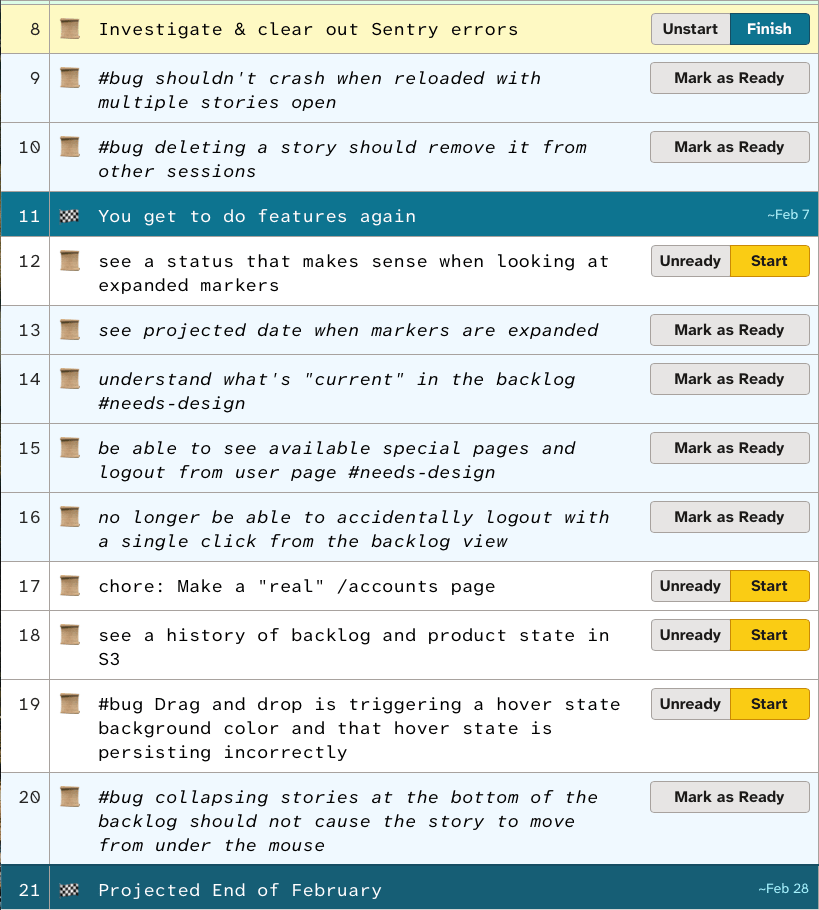
The biggest piece of work there is “understand what’s ‘current’ in the backlog.’” What we’re trying to do here is make the backlog more comprehensible “at a glance” to someone who was used to reading Tracker backlog status. (This is something that, bafflingly, no project tracking software we’re aware of delivers. They all either make the story cards themselves so large that you can’t see everything a team is working on at once, or make projects so customizable that you can’t understand a project without understanding the details of how that particular project works. These tools tend to assume that outside stakeholders want to view projects via statistics, which can often only answer questions you thought to ask in advance.)
More soon—
Nat, Coby & Jesse