🚨 New Setting: One less manual step
Hi there!
Quick update — I just deployed a feature that is going to save you another manual selection on every order.
You can now set a default location for your order imports. Instead of selecting your location every time you import an order, the tool will automatically pre-select it for you.
It takes about 30 seconds to set up:
1. Click your email address in the top-right corner
2. Click Settings
3. Click the Connections drop-down
4. Click POS Connections
5. Scroll to the Import Preferences section under your Point of Sale connection
6. Select your default location from the new "Default Import Location" dropdown
7. Click Save Preferences
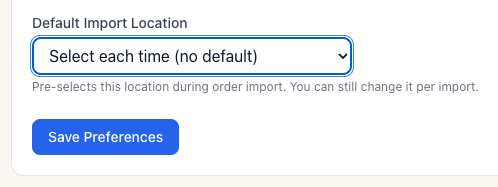
That's it — your next import will have the location pre-selected.
If you ever need to import to a different location, you can still change it on any individual order during the import process. This just saves you a click on the 99% of orders that go to the same place.
Thank you again for all the feedback and support. In the last three weeks, the tool has been used to import 710 orders, automatically creating 2,900 grids without having to manual key them!
As always, please send feedback often!
Kevin Burke
BoutiqueOS
423.619.2869
Add a comment: