Edition 5 – Fetching websites from the Wayback Machine
Recently I (Hey, this is Hakan!) was working through my all but zero inbox after being out of office for quite a while, when I came across this newsletter post by Henk van Ess. Short version: ChatGPT has a share function which was indexed and therefore up for grabs via search engines. More than 100 000 items were archived on the Wayback Machine.
(They don't seem to be accessible any longer at the time of this writing, more on that in the next edition, otherwise this is going to be too long.)
Sidebar: The Washington Post looked more closely at ChatGPT-share as well and recently released an analysis of 47000 chats. Check out this article and this one as well
So today's edition is going to walk you through some scripts to get a list of all archived pages and then download them to your machine. My example is going to be ChatGPT-Share, but this applies (with modifications) to any site, honestly.
If you have ideas of what we should be looking at, happy to read it! Please send any suggestion – and your feedback – to [email protected].
Initial grab
There are a lot of packages out there (I'd recommend waybackpy) that already do what I'm going to describe (they do much more as well!). Also, there's this wonderful 10-minute primer on the Wayback Machine by Benjamin Strick.
Me writing this code just means that I want to use every opportunity I have to not forget how this stuff works. Also, this is dumb, but I tend to look more closely at the results when I had to work for getting them in the first place. So writing a script that fetches all the archived ChatGPT-share pages and then downloads them seemed like a good idea to me.
The Wayback Machine has a CDX server that allows you to grab everything all at once. This is how you'd get the list, using curl, and then store it in a file called chatgpt.json.
curl -o chatgpt.json "https://web.archive.org/cdx/search/cdx?url=chatgpt.com/share*&output=json"
# if you want the file as a csv, then change the URL to '&output=csv'
The * in the URL tells the Wayback Machine that we're not only interested in the domain "chatgpt.com/share" but in everything else that comes after that as well. The resulting json-file is about 31 MB.
Each chat on ChatGPT-share has its own UUID (c7fe9a21-43b8-4040-b968-a116a99fba4d), so this is what we're looking for. Since UUIDs have a clear pattern (8-4-4-4-12, consisting only of 0-9 and letters abcdef), we can use regular expressions to find matches. I have a more love but still a lot of hate relationship with regex and you'll understand why in a second. Also: We'll talk more in depth about these expressions in another newsletter, as they're insanely powerful.
Anyhow, as I said, if you try this at home, the curl-command will not return anything meaningful because these links seem to be deactivated for now. If you want to grab all there is about OpenAI's main page from 2015 to 2016, this one should work, though.
curl -o openai.json "https://web.archive.org/cdx/search/cdx?url=openai.com/*&from=2015&to=2016&output=json"
Filtering and constructing the URL
If you open up the JSON-file, you will see that the initial line will give you the column names: "urlkey","timestamp","original","mimetype","statuscode" etc. Since we're only interested in the actual chats – as opposed to say how the landing page changed throughout the years – we can write a short script that filters for the statuscode 200.
You can modify the curl-command to pre-filter as well, giving you only results with statuscode 200, skipping ahead more quickly, however I like to have all data first (maybe some interesting filenames are in there, who knows) and then filter locally.
Ultimately, we're going to send out a bunch of requests to the Wayback API to fetch all the URLs and save each chat as HTML-file.
If you look at the URL-structure of the Wayback Machine, you'll notice that before the actual page you're interested in, there's a timestamp, e.g. 20250328011447, meaning the page was captured on March 28th, 2025, at 01:14:47. In our json-file, each capture contains this timestamp.
We can open our json-file, go through every line, look for the UUID-pattern and, if we find it, create a new file full of Wayback Machine friendly URLs.
import json
import re

# chatgpt/share has a uuid, this regex is matching it
UUID_PATTERN = "[0-9a-fA-F]{8}-[0-9a-fA-F]{4}-[0-9a-fA-F]{4}-[0-9a-fA-F]{4}-[0-9a-fA-F]{12}"

all_the_chats_go_here = []
with open('chatgpt.json', 'r') as f:

    all_archived_chats = json.load(f)
    for chat in all_archived_chats[1:]:
        # skipping first line: ['urlkey', 'timestamp', 'original', 'mimetype', 'statuscode', 'digest', 'length']
        timestamp           = chat[1]
        original            = chat[2]
        statuscode          = chat[4]

        # a URL will look like this: 20250411081227/https://chatgpt.com/share/UUID
        # if we split the link on the slash and grab the last item, we will have
        # our UUID (if there is one)
        end_of_url          = original.split('/')[-1]

        if statuscode == "200":
            url_with_timestamp  = f'{timestamp}/{original}'

            if re.match(UUID_PATTERN, end_of_url):
                all_the_chats_go_here.append(url_with_timestamp)

    print(count)

with open('gpt_links.json', 'w') as f:
    json.dump(all_the_chats_go_here, f, indent=4)
The file would have looked like this:
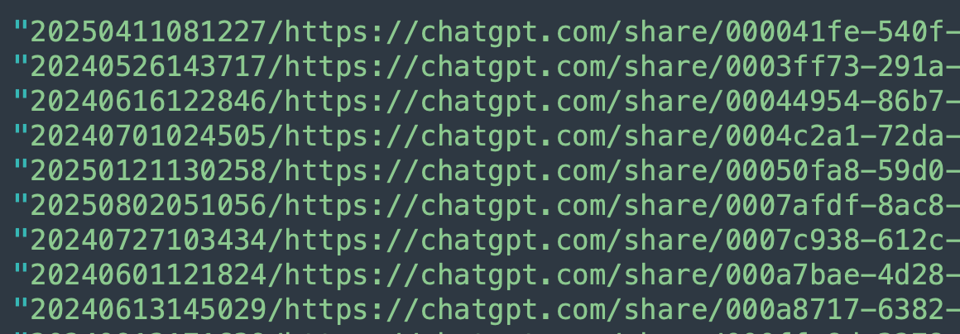
All in all, the script returns 101464 pages I wanted to grab and take a closer look at. I'm not gonna lie, my initial script returned only 20903 results. Because I've used a different regex and my version apparently skipped about 80 (!) percent of the results. When I say I have a love hate relationship with regex this is the "hate it, hate it, ha{a,3}te it"-bit (because I'm apparently failing to write/check them effectively).
Capturing 20903 (or 101464) pages, politely
With everything stored in one-file, this is my attempt to grab all the chats archived at Wayback.
Of course, this code can be improved in so many ways, starting with
- implementing a retry-method
- only using unique URLs
- just storing the failed attempts in a file
- including more error messages and writing them into a log file rather having all errors show up in the terminal
- the opportunities are endless, but I'm gonna stop here
Nevertheless, a slightly modified version of this code ran on my machine for some three days and grabbed around 10k+ pages. At that point in time, I stopped the script. It seemed to be working. When I wanted to grab the rest a few days later, every request returned a 403 error message. I was confused for some time, but then realized that all chats had been removed. The script shown here ran for some seven hours.
In the next edition of this newsletter, I'll walk you through some of the oddities (in my view!) of ChatGPT-share.
If you're familiar with Next.js/Remix.js, I'd love to ask you a question: [email protected]
Before I say goodbye, one quick note:
- If you're new to this and feel a bit overwhelmed by the code and how to do this on your machine, please do reach out – this is why we started the newsletter in the first place.
Here's the code, have a nice day!