Edition 15 - Finding (almost) everything with regex
Hi!
This one is from both of us, as it is a recap of the talk we gave at Netzwerk Recherche conference together this year (here’s a recording of the session). Back in June, we spent an hour trying to convince a room of journalists that it might be worth learning a freak string like this:
/.*([Rr]eg[Ee]x).*/To our surprise, we drew quite a crowd, the room was packed. Thanks to everyone who showed up! If you were there: hi again. If you've got questions (or a regex you're proud of!), write to us: [email protected]
The problem
You have a 1 GB text file with 100 million lines, and you need every email address in it.
You will never read all of it. Ctrl+F won't help, because you don't know what to search for (@gmail.com maybe? But this will miss to many others!). You only know what it looks like.
That was the idea of the whole talk: you search for patterns, not search terms.
What is Regex and is it a tool?
Regex is shorthand for Regular Expression. If used in search or comparison, it describes what you want to match with a pattern, rather than a literal search or filter term. Historically, it started with a mathematician called Stephen Cole Kleene needed a way to describe some other mathematicians neural network invention, but that's not super important for this newsletter. Let's look at the practicalities instead:
Regex isn't a tool: it works inside other tools like Google Sheets, VSCode/VSCodium, Sublime, Notepad++, OpenRefine, grep/ripgrep, and pretty much every programming language.
It also isn't really a programming language either, has no variables, no loops and lacks other features.
It's more like a shared syntax, a way of describing text that most tools happen to understand.
Maybe the best comparison to the non-computer world is a hand gesture like pointing at the thing you want in a shop abroad: Most people will understand, but it's not necessarily enough to call it a conversation.
Finding leaks while searching patterns
There are a few places online where leaked data might show up: The odd Telegram channel, so-called breach sites and forums, or file hosters.
Here's a less obvious one: The internet archive. Not only does the Wayback Machine keep records of websites, it it also keeps links to files. And the API lets you search those URLs using a pattern:
https://web.archive.org/cdx/search/cdx?url=anonfiles.com/*&filter=original:.*\.txt$In human words: "Give me every archived URL on anonfiles.com that ends in .txt." The regex part for this one is very simple:
.*\.txt$We'll get to what that means, character by character. In our example, what came back included files like 100K_HQ_Combo__Fortnite_.txt
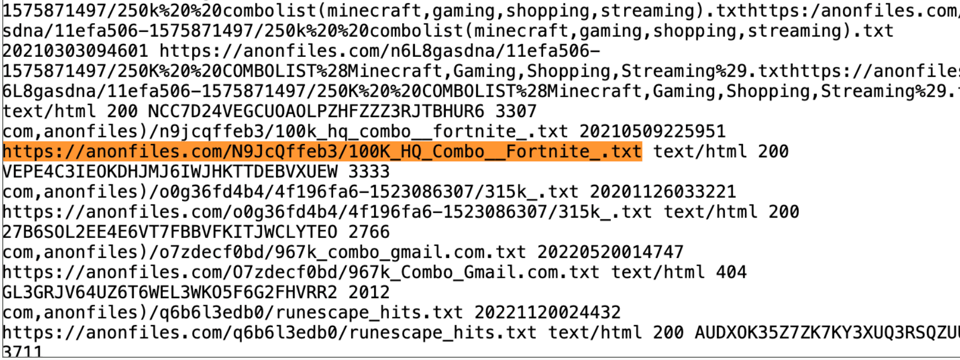
This specific finding wasn't used for any kind of investigation we did, we just include it here to show many different ways to find leaks, data, and, from there, maybe even story leads because of accidental uploads.
Regex basics in 5 minutes
The trick is to think like a computer: everything ends up in a database, databases follow (more or less) consistent patterns, and these patterns are searchable.
The basics:
| a digit |
| whitespace |
| a "normal" word character |
| start or end of a word |
| start of line / end of line |
| any character |
| escape: "I mean the actual character coming next" |
| or |
| a, b or c |
| anything except d, e, f |
| a through j |
| Jan, but also jan |
| 0 or more / 1 or more / 0 or 1 of the pattern before |
| exactly 5 / 5 or more / 5 to 7 |
Here's a more elaborate cheat sheet that I like to use.
So .*\.txt$ from above means: Any character (.) for 0 or more times (*), then a literal dot (\.) - see how it's escaped with a backslash to not mean any character - then txt, and then the line ends ($).
False positives are a thing
When you think about patterns, it helps to visualize the concrete example first and deduct from it: Concretely it's +491721212123. Deducted, it's "a plus sign, then some (more than one) digits". Or as regex: \+49\d+
Or emails: Concretely it's [email protected]. Deducted, it's "blablabla, @, blablabla".
But here's the problem: p@ssword is also "blablabla, @, blablabla", and it isn't an email address.
So we try again: "blablabla, @, blablabla, dot, and then com or de or co.uk".
\S+@\S+\.(com|de|co\.uk)Obviously, in some jobs you need to think very carefully how you want to write a regex that captures every e-mail, with no false positives, and you might land [at this solution]. For us, working with leaks, it's completely fine to keep the pattern simple.
The point we're trying to make is that the first pattern you come up with will (and should be) broad, and then you narrow down from there.
Why bother: it finds things you didn't know were there
Bitcoin addresses look a bit random, but they follow patterns. And wherever there's a pattern, we can search it. Legacy addresses always start with 1 or 3, newer ones with bc1. And to avoid confusion, the protocol disallows certain characters (like 0, O, I and l):
^(bc1|[13])[a-zA-HJ-NP-Z0-9]{25,59}$A stricter version:
^[13][a-km-zA-HJ-NP-Z1-9]{25,34}$|^[bB][cC]1[pPqQ][a-zA-Z0-9]{38,58}$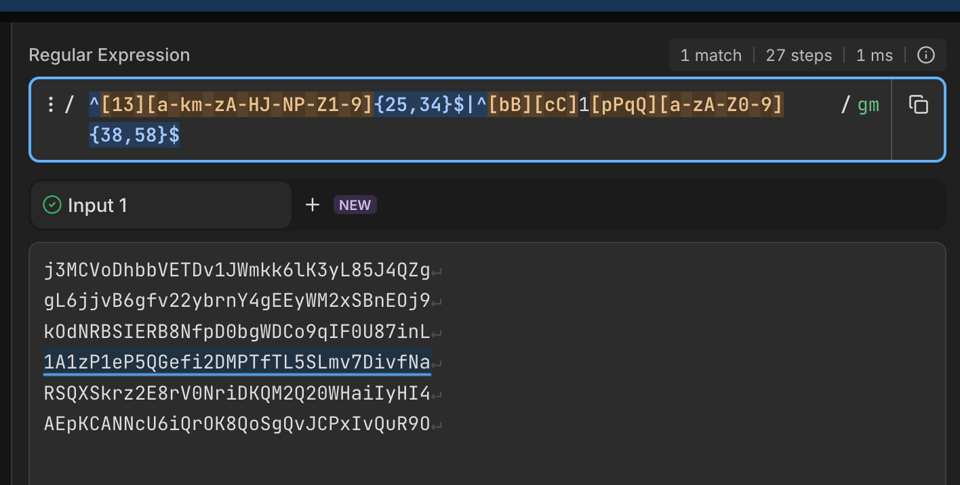
And sometimes it's the other way round
Do we need to worry about all of these things in the age of AI? Can we not just ask a chatbot to find all emails in a document, all IBANs in a csv? Yes. But unlike large language models, regular expressions are deterministic.
And, equally important, they work fully offline and are usually blazingly fast. Even the frontier labs have unterstood this: In spring, Anthropic accidentally published the source code of its coding tool Claude Code. People digging through it found this beatuiful regex pattern (full analysis here):
/\b(wtf|wth|ffs|omfg|shit(ty|tiest)?|dumbass|horrible|awful|piss(ed|ing)? off|piece of (shit|crap|junk)|what the (fuck|hell)|fucking? (broken|useless|terrible|awful|horrible)|fuck you|screw (this|you)|so frustrating|this sucks|damn it)\b/That's how the command line interface of Anthropic's ai coding tool detects when a user is frustrated. One of the most advanced AI companies in the world does not rely on sentiment analysis with neural networks, they use regex. If that ain't a good argument that it won't go away, then I don't know.