
30 Days of Vibe Coding - Day 7 - GitDash
A terminal dashboard for monitoring the status of all your git repositories at a glance, built with Go and Bubble Tea.
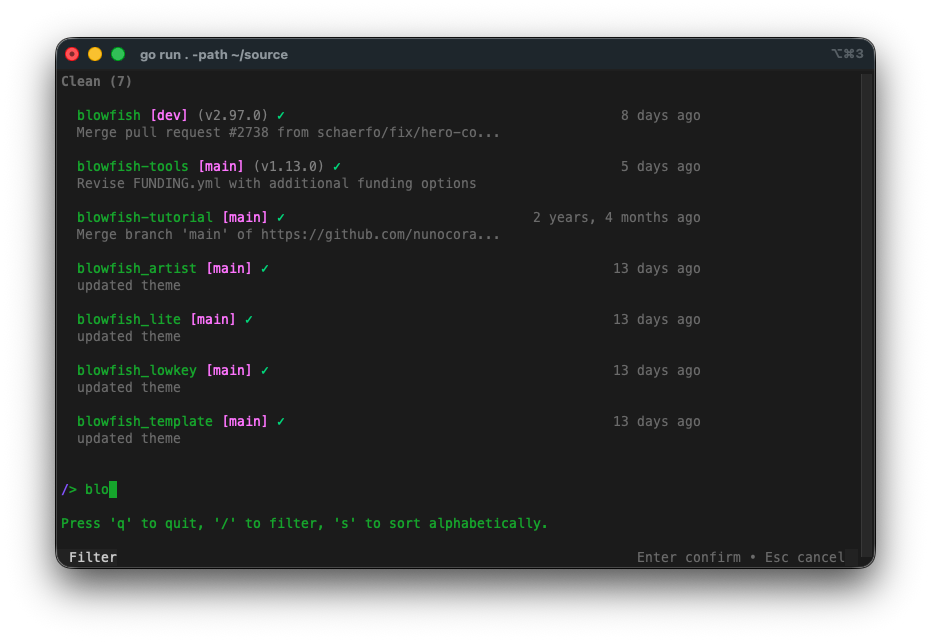
A terminal dashboard for monitoring the status of all your git repositories at a glance, built with Go and Bubble Tea.
Day 7. Same stack as yesterday. Same framework. Not the most original idea either.
After Day 6 proved I could build with Go and Bubble Tea despite never having touched either, I wanted to test something else: what happens when you point the AI at an existing tool and ask it to build a wrapper? In this case, git. I have too many repos and zero idea which ones have uncommitted changes.
The Prompt
> "Build a TUI app in Go that scans a directory tree for git repos and shows their status in a terminal dashboard. Color-coded: green for clean, yellow for dirty, blue for ahead/behind. Let me fetch, pull, and open a shell in any repo. Use Bubble Tea for the UI."
How It Was Built
The interesting part of this build isn't the UI or the framework. It's how the AI interfaced with git. The whole app is essentially a wrapper: it shells out to git for every piece of information it displays. Branch names, commit hashes, ahead/behind counts, stash lists, dirty file tracking. It doesn't use a Go git library. It runs the same commands you'd type by hand and parses the output.
The AI broke the work down into packages that map to concerns: a scanner that walks directory trees looking for .git folders, a git package that wraps CLI commands, a config system using YAML, and a TUI layer built on Charm's Bubble Tea. The scanner skips node_modules, vendor, and hidden directories. The git package handles branch, status, log, rev-list, stash list, and describe. The UI has clean separation between list view, detail view, status bar, help overlay, and styles.
It even came with a Makefile for cross-platform builds (darwin/linux, amd64/arm64) and an install script that auto-detects your OS and architecture.
What I Got
It groups repos by status. Dirty repos with uncommitted changes show up first (yellow dot), then repos that need syncing with remote (ahead/behind counts in blue), then clean repos (green checkmark). At a glance I can see which repos need attention. Press s to toggle between grouped and alphabetical views.
Each repo shows a lot of info on two lines. Name, branch in pink brackets, latest tag in parentheses, clean/dirty indicator, ahead/behind arrows, relative commit time on the right, and the last commit message below. It packs a surprising amount of context into a small space.
...
---
Read the full article →


Add a comment: