
30 Days of Vibe Coding - Day 23 - RetroOS
A Windows 95-inspired desktop environment running entirely in the browser, complete with draggable windows, classic apps, and a boot sequence.
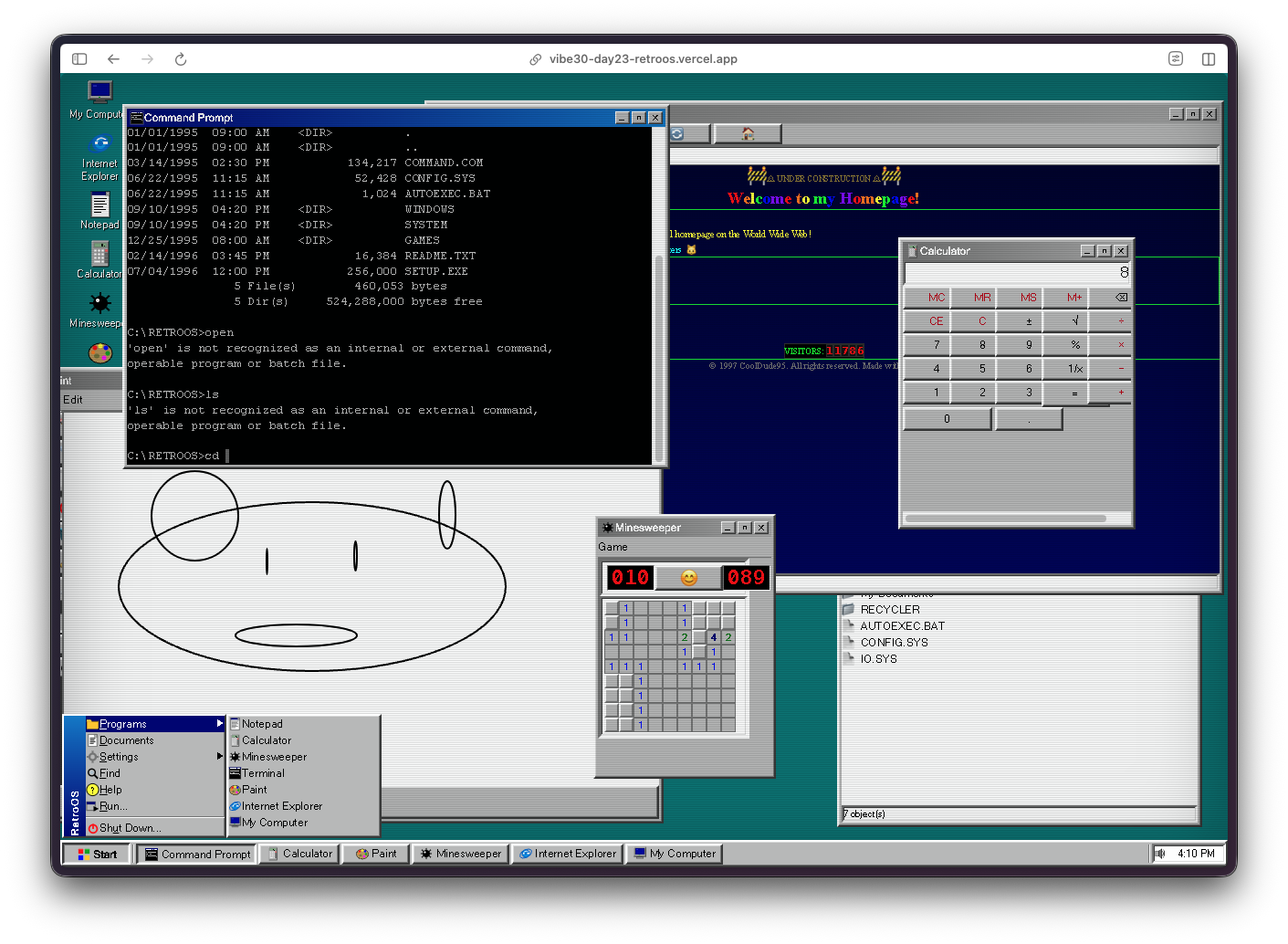
A Windows 95-inspired desktop environment running entirely in the browser, complete with draggable windows, classic apps, and a boot sequence.
Day 23. I told an AI to build me Windows 95.
The Prompt
This one was pure nostalgia:
> "Build a Windows 95-inspired desktop environment that runs in the browser. Include a taskbar, start menu, draggable and resizable windows, and classic apps like Notepad, Calculator, Paint, Minesweeper, Terminal, Internet Explorer, and My Computer. Add a boot sequence, pixel art SVG icons, sound effects, wallpaper selection, a CRT effect, and a BSOD easter egg."
Try it out yourself here
How It Was Built
Watchfire broke this down into 10 tasks. The scope here was wild. This isn't a single app, it's an entire operating system UI with a window manager, a taskbar, a start menu, and seven separate applications all running inside it. Each one needed its own behavior, its own window chrome, its own interactions.
The task list covered the desktop shell first (taskbar, start menu, window management), then each application one by one, then the finishing touches like the boot sequence, BSOD, CRT scanline effect, and sound effects.
What I Got
This thing boots.
You load the page and get a black screen that says "RetroOS 95 - Click anywhere to start." Click it and you get a text-mode POST sequence scrolling by, just like the real thing. Then a progress bar with "Starting RetroOS..." before the desktop loads.
Then the desktop appears and it looks right. That specific shade of teal. The chunky gray taskbar at the bottom. The Start button in the corner. Desktop icons lined up on the left side with pixel art SVG icons that actually look like they belong in 1995.
The Start menu works. Click Start and you get the classic cascading menu with Programs, Documents, Settings, Find, Help, Run, and Shut Down. The apps are listed right there. It even has that beveled 3D border that Win95 was known for.
The Terminal is surprisingly deep. It's not just a visual prop. You can run dir and get a fake file listing with AUTOEXEC.BAT and CONFIG.SYS. The output formatting matches DOS, right down to the date format and byte counts. It even responds to ver with a version string.
The Calculator works. Proper button layout, the recessed display, the beveled frame. It does actual math. It looks exactly like the one you used to open when you were bored in computer class.
...
---
Read the full article →


Add a comment: