
Who are you choosing to exclude, and other topics.
Hello hello,
Welcome to my newsletter, the first of, hopefully many. I promise not to flood your inbox though. I'm aiming for a cadence of once or twice a month.
I cover many different topics, all related to disability, accessibility, and inclusion.
I hope you'll join me on this adventure.
In this newsletter
- Who are you choosing to exclude?
- From the podcast: Sticky elements
- alt tag, or alt attribute?
- In case you missed it: Digital accessibility and the curb cut effect
- Captions or automated craptions?
- Wrapping up
Who are you choosing to exclude?
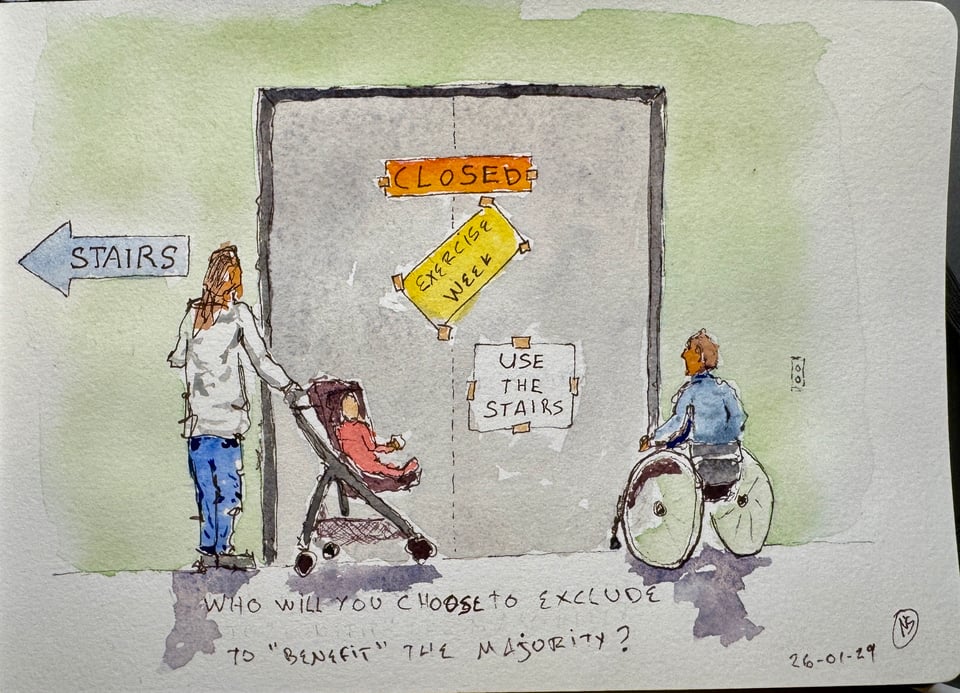
A few years ago, I was at the hospital for some routine tests. The department I was going to was on the second floor. And the hospital decided to lock the elevators because it was "exercise week".
I found this particularly problematic as a wheelchair user. Especially in a hospital, where one assumes there are a lot of people unable to take the stairs.
This thing was all about "the greater good". A great initiative, encouraging people to exercise, turned into excluding people.
Which leads me to this question I like to ask of people: Who are we choosing to exclude?
Not considering accessibility because it might cause issues for the "benefit" of the majority is choosing to exclude people.
It is an active act of exclusion.
I know most people don't think of it that way, but it doesn't make it any less true. I know most people are good people and don't want to exclude anyone. Yet, if we're not making things accessible, we are choosing to exclude.
You probably don't want to tell Bob that you chose not to put a ramp in, which means he can't come into your building.
You probably don't want to tell Sarah that you chose not to have visible outlines on your links, which means she can't easily use your site with only a keyboard.
You probably don't want to tell Taylor that you chose not to have sufficient contrast, which means they can't perceive text on your screen.
You probably don't want to tell Riley that you chose to have rapid animations on your site, which means they can't visit your site without headaches, nausea, and migraines.
The reality is that we don't need words to say we're choosing to exclude people. We just need to build things that aren't accessible.
From the podcast: Sticky elements
Every once in a while I'm part of discussions about sticky headers, or footers, or other sticky elements. Every time, I refer whomever is wanting to use to this kind of pattern to my Podcast episode in which Amy Carney explains how difficult those can be for folks with low vision.
Amy said:
"Well, the biggest pet peeve would be anytime that something is blocked or text is cut off. So anything sticky on the screen, like sticky headers, sticky footers, sometimes even a little help icon on the side that stay in place, it all blocks my view because I have to enlarge my type a little bit sometimes when I’m zooming in through the browser, and it all bumps together really fast, especially when I have smaller screens, like phone or small laptop."
You can listen to the whole episode on the podcast website. Or if you prefer, you can read the whole interview with the (human edited) transcript, on the same page.
alt tag, or alt attribute?
A colleague pointed me to an article about alt text that they'd found useful. Not a bad article, but the hero image used on the page had a big sign with the text "alt tag" on it.
It immediately put my back up. alt is an attribute, not a tag. There's a difference.
"But Nic, people know what I mean when I say alt tag". And sure, most people do. But you still aren't correct.
So much of accessibility is about nuance. It's about the small technical detail. How can I trust you to get the other details right when you aren't even getting terminology correctly on something that's been around for over 3 decades?
Yeah, I'm picky. Yeah, it's a pet peeve of mine. And maybe I shouldn't sweat the small things. But this is a hill I shall die on: Use the right terms if you're an accessibility practitioner.
In case you missed it: Digital accessibility and the curb cut effect
The curb cut effect, or accessibility is good for everyone.
Controversial topic for many of us in the disability world.
What's the curb cut effect? It's the idea that accessibility benefits non-disabled people. It uses curb cuts as an example. Curb cuts were designed for wheelchair users. But they are used by parents with strollers, kids on skates, delivery people with dollies, etc.
I wrote about it a few times. Most recently back in 2023.
I understand the objection to saying accessibility is good for everyone. There's a risk of erasing disabled people and their experiences. The very people for whom we do this work.
I remain convinced that there's an argument to be made around accessibility being a benefit to many people who aren't disabled. I've been using that argument for many years. I will continue to use all the tools in my arsenal to convince people to make things more accessible.
I don't like the idea of erasing the experience of disabled people. I also think we don't have the luxury of things not being accessible.
You can read the whole post on my site. Accessibility. It's good for everyone. Isn't it?
Captions, or automated craptions?
I was recently discussing the content of a slide deck for a training. "No automated captions" was one of the items I pushed for.
The person I was working with said "we're already talking about the need for captions, and our time is limited". They suggested we didn't need to spend time on talking about not using automated captions.
The organization getting the training is strong in the use of AI. I knew they would easily go for automated captions if we didn't warn them against it.
I had to explain why we didn't want automated captions, at least not without human editing. I found myself justifying the inclusion of several other points throughout the presentation. I included those points because they needed to be included. I knew this based on many years of experience in the field of digital accessibility, and training people it. It gets tiring to have to justify your work, all the time. This ties in to accessibility practitioners burnout, that we hear more and more talk about. On the topic of burnout, check out Devon Persing's most excellent The Accessibility Operations Guidebook that discusses burnout in our field.
But I digress. Back to automated captions.
Some of you may be aware that automated captions are often referred to as "craptions". They are captions, but they are crap. They are especially difficult to understand when the speaker doesn't have a fairly standard US Midwest accent.
Are things getting better? Yes. Are automated captions ready for prime time without human supervision? Absolutely not.
Wrapping up
That's it for now! I hope you enjoyed the newsletter. I'd love to get feedback - What was good? What could be improved? What topic would you like me to talk about? I'm not making any promise, but if a topic you suggest catches my fancy, I'll share my opinion on it.
Just hit reply to this email, or send an email at info@nicolas-steenhout.com. I read every response.