How I think a team should stay on the same page
2026-10-08
Any group of people working toward a goal has to solve the same problem: keeping everyone on the same page about what the group is doing, who is doing it, and where it stands. Most organizations handle it with meetings, messages and memory, and spend a large share of their time and energy doing so. ORGCORD is a framework for handling it better. It starts from first principles, with why organizations exist and why they struggle, and works down to the day-to-day practice of running work in a project management tool. The aim is a team that spends less time getting on the same page and more time doing the right work: more focus, more output, and an organization that can grow without drowning in coordination. This writing explains what a coordination system is (the tools, rules and habits a group uses to stay on the same page) and argues that its job is to keep five things in sync across a team: the goal, who owns what, what matters most, where things stand, and what depends on what.
None of this comes from having mastered it. Our team is still far from using these tools perfectly, and there's a lot left to learn and build. But I do spend a lot of time thinking about the problem. I'm an analytical freak: I've tried many task managers, and built custom ones too. Through 2025 and 2026, in the companies I help run, I've watched these ideas work and fail, struggled to get them implemented, and learned how differently people approach organizing their work. The mistakes taught us the most. This writing is my perspective from that experience, written from first principles so that it can be useful beyond our own teams.
How this was written. The ideas grew out of our experience, and with many conversations with the people credited below. I developed them in notes and voice memos, and pressure-tested them in conversation with AI. AI also helped me research the background, organize the material and turn spoken notes into written prose. I reviewed and edited every chapter.
A note on tools and words. There are many project management tools, and many good ways to organize work. The principles here apply to any of them. The tool we use is called Linear, and I'm a big fan of it: it has worked very well for us, and a lot of its published thinking shaped mine. Throughout this writing I use Linear's names for things (initiatives, projects, milestones, cycles, triage), with one exception. What Linear calls an "issue," this writing calls a task, because "issue" can sound like a problem. In the chapters about running the tool, I write "task (issue)" so the two words stay connected.
It reads best on the site at org-cord.com, with the figures and contents laid out properly. You can also keep reading the whole thing right here. The PDF and the cheat sheet are on the site too.
Contributors
This writing is from my perspective, but the thinking behind it isn't. It was shaped by the people I build with, through our experiments, our mistakes and our wins, and especially through the ways we see work differently.
- Gerasimos Galiatsatos (Gerry), our business partner and the CEO of Goblin Gear, sits somewhere between structure and flow. Our back-and-forth about how teams should really work sharpened much of what's here, and we came up with "flow in a box" together.
- Chris Scoleri, the founder of Goblin Gear, who leads brand and product, is a creative free mind. He questioned many of my assumptions and made me bulletproof this framework until it would work for someone who works the way he does.
- Jarod Guerra, a co-founder of Chrono who leads development, is a structured machine, more structured than I am. Working alongside him showed me what this system looks like when someone takes it all the way.
- Everyone on our teams. Every task you created, every update you posted and every time you told me something wasn't working is part of this.
- Linear, the tool we run on. Its names for things and its published thinking, the Linear Method, shaped much of this.
- The authors I've learned from, credited where their ideas appear: Fred Brooks, Alex Hormozi, Greg McKeown, Patrick Lencioni, Ray Dalio and Jonathan Grudin.
Part One. The problem
Part One makes the case for why coordination matters: why organizations are worth having, why being organized matters even for one person, and why keeping a group in sync gets harder with every person added.
1. Why organizations exist
Before building a system for how a team coordinates, it helps to be clear about why being part of an organization is worth it at all. If someone doesn't believe it is, nothing built on top of that belief (system, principles, culture) will matter.
Organizations make a different kind of output possible. Here are seven advantages I can think of that organizations have over individuals:
- Specialization. One person building alone would need to be world-class at everything: development, sales, finance and the rest. A specialized group produces more, and better.
- Parallel execution. A team of five has five times the hours in a day of a team of one. The real power is that things happen in parallel instead of one at a time.
- Cognitive diversity. A single brain has blind spots. Several brains together have far fewer. Different perspectives strengthen the best ideas and knock out the worst ones.
- Resilience. An individual is a single point of failure. A group spreads the risk and is "harder to kill."
- Continuity. A person lives one lifetime. An organization can outlive its founders and keep going across generations.
- Accountability. Your work affects other people and a larger mission. That visibility and interdependence creates positive pressure.
- Scale of ambition. For all these reasons, a team raises the ceiling on what feels possible. People think bigger when others can help them get there.
None of these advantages are automatic. Each depends on people being able to work together well, and working together well takes structure. Building that structure is the purpose of this writing.
Organizations also have a dark side: bureaucracy, politics, groupthink, and room for people to hide. Where all of that comes from is a big question, and one I may come back to in future writing. I suspect part of it is the problem this writing is about: people can't keep what's in their heads in sync efficiently or effectively.
2. Why being organized matters
Before looking at a team, start with one person.
I don't believe anyone works better unorganized than organized, creative people included. Being organized just looks different for different people. Some plan out everything they'll do in a day. Others write down the two topics they're working on for the week. The right level of detail depends on the work and the person. Someone juggling several projects at once, with other people waiting on each of them, needs a detailed plan to keep the threads straight. Someone deep in a single creative project may need little more than a clear starting point and a finish line. Both have an outline, and everyone needs one, because everyone needs focus and clarity.
The reason comes down to bandwidth. Research on working memory suggests people can hold only a handful of things in mind at once: about four, in one well-known estimate from the psychologist Nelson Cowan. Unfinished tasks also tend to keep pulling at attention until they're done or planned. In 2011, the psychologists E.J. Masicampo and Roy Baumeister found that making a specific plan for an unfinished goal reduced how much it intruded on people's thinking. To focus on the work in front of you, everything else has to live somewhere outside your head. An external system, ideally a shared piece of software, is the most reliable way I know to free that bandwidth.
It's easy to see why people resist this. Being unorganized feels good in the moment. Jumping from idea to idea and following wherever the energy goes is fun, and every new idea brings a small hit of excitement. Ideation matters, and a good system leaves room for it. A whole working style built only around that feeling is hard to sustain, though, especially once other people depend on you. A system is what lets someone chase a new idea without losing the one they were in the middle of.
Now extend this from one person to a team. A brilliant individual working alone can live in total "chaos," because no one else ever has to find anything in it. To them it may not be chaos at all: there may be a method to the madness. The trouble starts when other people depend on that work, because they can't see the method, only the mess. There are better and worse ways to organize your own head, but once work is shared, the way it's organized has to make sense to everyone who depends on it.
3. The mental-state problem
Mental state, as I use the term in this writing, is what a person knows, understands and assumes at a given moment: what they think the goal is, what the priorities are, who is working on what, what "done" looks like, and what matters most right now.
Every person on a team carries their own mental state, and nobody else can see it. That is the root reason groups struggle to accomplish things together. There's no automatic way for people to share what's in their heads, so each person works from their own version of the picture.
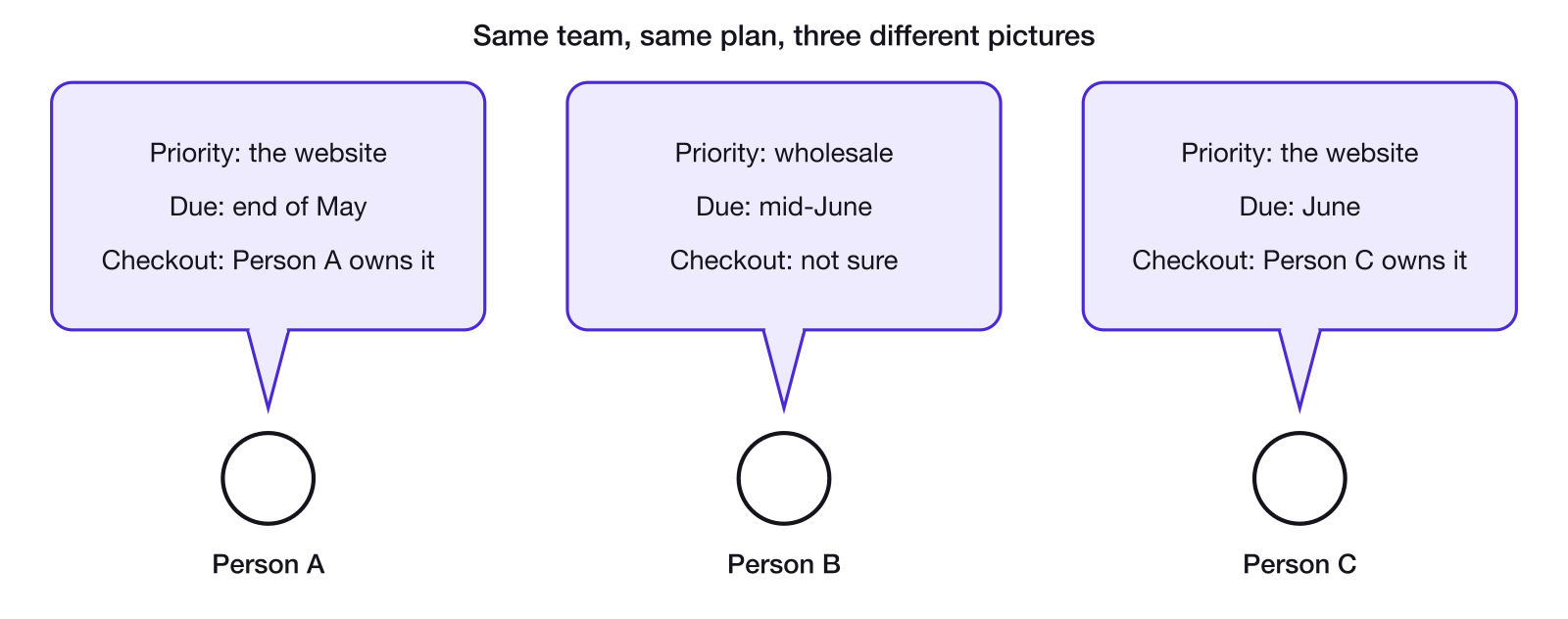
Figure 1. Three people on the same team, working from three different versions of the same plan. None of them can see the others' version.
If everyone on a team knew exactly what everyone else knew, understood the same priorities, saw the same problems and was aware of every decision being made, the team wouldn't need to track work, send status updates or hold most of its meetings. People don't work that way. Each person has their own perspective, their own ideas and their own understanding of what's going on at any given time. They talk to different people, think differently and interpret things differently. Two people can walk out of the same conversation with completely different understandings of what was said, and neither of them knows it. They both believe they're on the same page, and they won't find out otherwise until the gap shows up in the work.
Sharing mental state doesn't mean everyone thinking the same way. Different perspectives and disagreement are an asset: they're the cognitive diversity that makes organizations powerful in the first place. What needs to be shared is the conclusion. After the discussion, the debate and the disagreement, everyone should share one understanding of what we're doing, why, and who is responsible for what. The thinking that got us there can stay varied. Where we landed has to be the same for everyone.
Agreeing on the plan is only the first half. As the plan moves forward, things change: work finishes, priorities shift, new problems appear, someone changes their mind. Staying on the same page while the plan progresses is arguably the harder part.
Meetings seem to be one of the most common ways people handle this, and they work. They put people in the same room to share updates, talk through problems and make decisions, and that has real value. They're also expensive. Four people in a one-hour meeting is four hours of output. And meetings can feed a loop: people are confused, so they meet; meeting leaves less time to do the work; the work falls behind and people are confused again, so they meet again.
4. Why the problem grows with every person
A person working alone has no coordination cost with anyone else. Everything they know is already in one head, so there's nobody to keep in sync. Add a second person, and there are now two mental states that can drift apart, with one line of communication between them that has to be kept current. This isn't only a big-company problem: even two or three people working closely together pay this cost, from the second person on.
Each line of communication is a pair of people who need to keep each other up to date. Not every pair needs one. A designer and a bookkeeper may rarely need to talk about their work at all. The lines that matter are between people whose work depends on each other.
The worst case is a group where everyone's work touches everyone else's. Then every pair needs a line, and the number of lines grows much faster than the number of people:
- 2 people: 1 line
- 5 people: 10 lines
- 10 people: 45 lines
- 20 people: 190 lines
In general, a group of n people has n(n − 1)/2 possible pairs.
Most organizations cut this down with structure. Split 20 people into four teams of five, and have only the four team leads keep in sync across teams. Each team has 10 lines inside it, and the leads have 6 lines between them: 46 lines instead of 190. That's a real improvement, and it's one of the problems teams and team leads help solve. The lines still multiply as people are added, though. Every one of them is still a place where understanding can drift, and keeping each one current still takes time. The leads also become bottlenecks, because every update that crosses teams has to pass through them. As an organization grows, more of everyone's time goes to talking about the work instead of doing it.
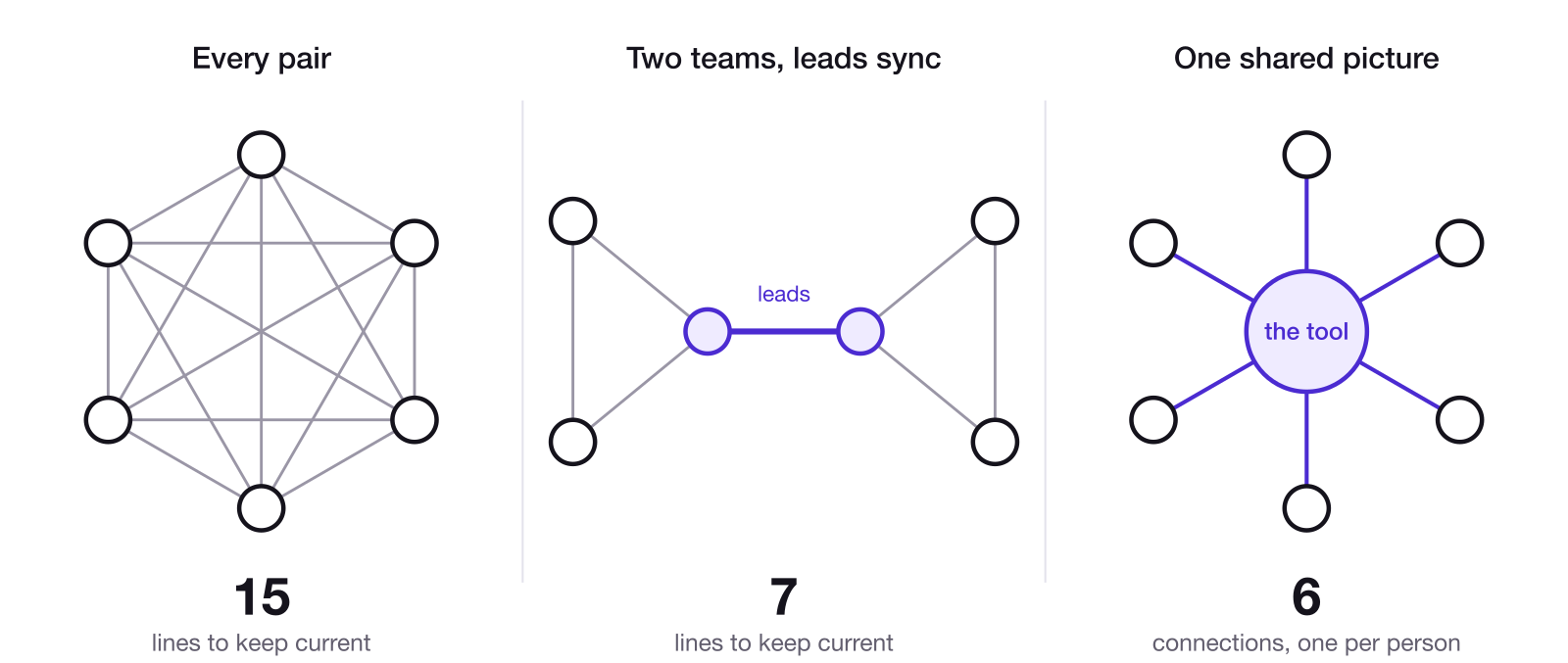
Figure 2. Six people, three ways. If everyone syncs with everyone, there are 15 lines to keep current. Split into two teams whose leads sync with each other, there are 7. With one shared picture, each person keeps a single connection: 6 in total.
Fred Brooks made this point in The Mythical Man-Month (1975), a set of essays drawn from his experience managing the development of IBM's OS/360 operating system in the 1960s. The book is best known for what became Brooks's law: "Adding manpower to a late software project makes it later." Part of his explanation is exactly this math. New people have to be brought up to speed, and then everyone has to stay coordinated with them. In his words: "Intercommunication is worse. If each part of the task must be separately coordinated with each other part, the effort increases as n(n-1)/2."
5. Coordination systems, and the case for a tool
If every line of communication has to be maintained person to person, the cost of keeping everyone in sync eventually swamps the work itself. The alternative is to give everyone one shared place to look.
A coordination system, as I define it, is the set of tools, rules and habits a group uses to keep its shared mental state in sync. Meetings are one kind. Email and chat are others. A project management tool, used well, is the strongest kind I've found. Instead of every person updating every other person, everyone updates one shared picture and reads from it. The job of any coordination system is to create a shared understanding across many brains without requiring every brain to talk to every other brain directly. The best version is a central tool with a simple structure, written in clear, plain language that everyone reads and writes in.
None of these replaces the others. Meetings, chat, email and a project management tool each have their own value, and a good coordination system uses all of them, with the tool at the center.
A project management tool is the strongest option because it does things that meetings, chat and email can't:
- It replaces many lines with one hub. Keeping a group of n people in sync person to person means maintaining up to n(n − 1)/2 lines. When everyone updates one shared place and reads from it, each person maintains a single connection: to the tool. Twenty people have 20 connections, compared with 190 when everyone syncs with everyone, or 46 even with four well-run teams.
- It works without everyone in the room. It's asynchronous: anyone can update it or read it at any time, so staying in sync doesn't depend on schedules lining up.
- It keeps a record. When a meeting ends, its details live in people's memories. The tool keeps what was decided, who owns what and what happened, so the shared picture doesn't fade or drift.
- It forces structure. Every piece of work has an owner, a priority, a status and connections to other work. Those fields match the five things a team has to keep in sync (Part Two), so the tool asks for exactly what coordination needs.
- It shows the whole picture in one place. Anyone can see how a single task connects to a project, and how that project connects to the organization's goals.
Meetings still matter for the things that work better in real time: debating an open question, making a decision on the spot, and building the relationships that make a team trust each other. Those are hard to do well in comments. Everything else (updates, status, who's doing what) can live in the tool, which saves everyone the meeting.
But a coordination system only works when everyone uses it. If one person on a team keeps their work in the project management tool and the rest don't, that person's updates never reach anyone, so they end up repeating them in a group chat, over email or in the next meeting. If others work together without updating the tool, the person who relies on it falls out of the loop and needs a meeting just to catch up. A system that is only partly shared carries the costs of both approaches.
Two terms are used throughout the rest of this writing. The tool means the project management tool. The system means the coordination system as a whole: the tool, plus the rules and habits for using it.
Most organizations aren't missing a coordination system entirely. Many already use a tool. They just don't use it well, and I think that's because they undervalue it: they don't see how much depends on it, or how much depth it takes to get it working. The rest of this writing is about that depth. Part Two covers what the system has to keep in sync, Part Three the principles that keep it alive, Part Four how to run it day to day, Part Five how it breaks, and Part Six how to tell whether it's working and where this goes next.
Part Two. The framework
Part One described the problem: people can't keep what's in their heads in sync, and the cost of trying grows with every person. Part Two describes what a coordination system has to handle. It starts with what has to be true for people to succeed in a group at all, then narrows to the part a system can build: the five things that have to stay in sync.
Both lists in this part came out of the same process. I debated the ideas back and forth, on my own and with AI, and asked it to find loopholes and gaps in the thinking. The goal was the smallest set of pieces that covers everything, with nothing missing and nothing overlapping.
6. What has to be true
For people to succeed in a group, four things have to be true at the same time.
- They need to KNOW what to do. What's the goal, who owns what, what's the priority, what's the current status, and what depends on what. This is the visible, systematic layer, and it's where a tool adds the most value.
- They need to WANT to do it. Buy-in, motivation, and personal incentives lined up with the mission. If people don't want to do something, there's a good chance they won't, and they surely won't do it well.
- They need to be CAPABLE (CAN) of doing it. Skill, judgment, standards and energy, and the time and capacity to do the work well. A perfectly coordinated team that can't do the work is useless, and so is a capable person who's overloaded.
- They need the TRUST to do it together. Trust, transparency, good communication, psychological safety, willingness to disagree, and the ability to give and take hard feedback.
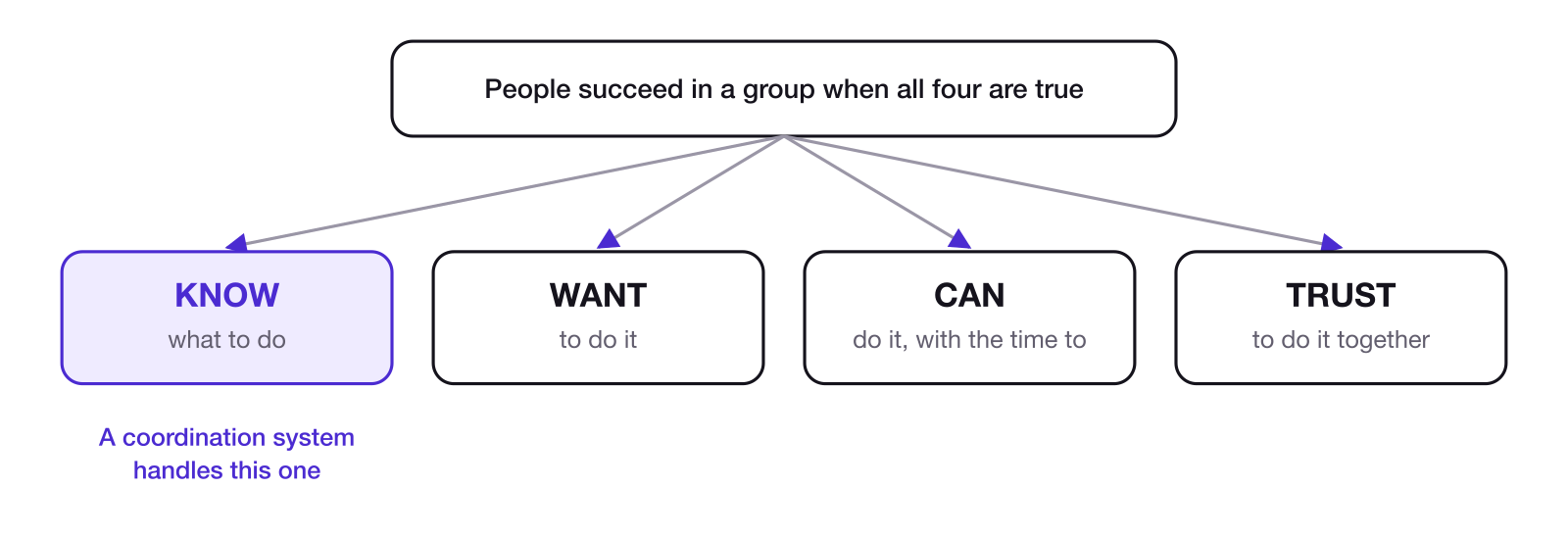
Figure 3. The four prerequisites. A coordination system handles KNOW directly and supports the other three.
This list was inspired by Alex Hormozi's Management Diamond (Acquisition.com), a framework for working out why someone isn't doing what you need. In his version, they don't know what's expected, don't know how to do it, don't know when it's due, lack the incentive, or something is blocking them.
A perfectly coordinated team (KNOW) that doesn't want to be there (no WANT) is useless. A motivated team (WANT) with no system (no KNOW) is chaos. A trusting team (TRUST) without the capability or the time (no CAN) fails with the best intentions.
This writing is about KNOW. A coordination system handles KNOW directly. It can't create motivation, capability or trust on its own, but the four aren't separate. Getting KNOW right supports the others: clear goals and ownership make the work easier to want, make capacity easier to plan, and give people fewer reasons to distrust each other. The other three deserve their own writing (see chapter 30).
KNOW breaks down into five things that have to stay in sync, which the next five chapters cover. They're the answers to five questions every person on a team should be able to answer at any time: What are we trying to achieve? Who owns what? What matters most right now? Where do things stand? What depends on what?
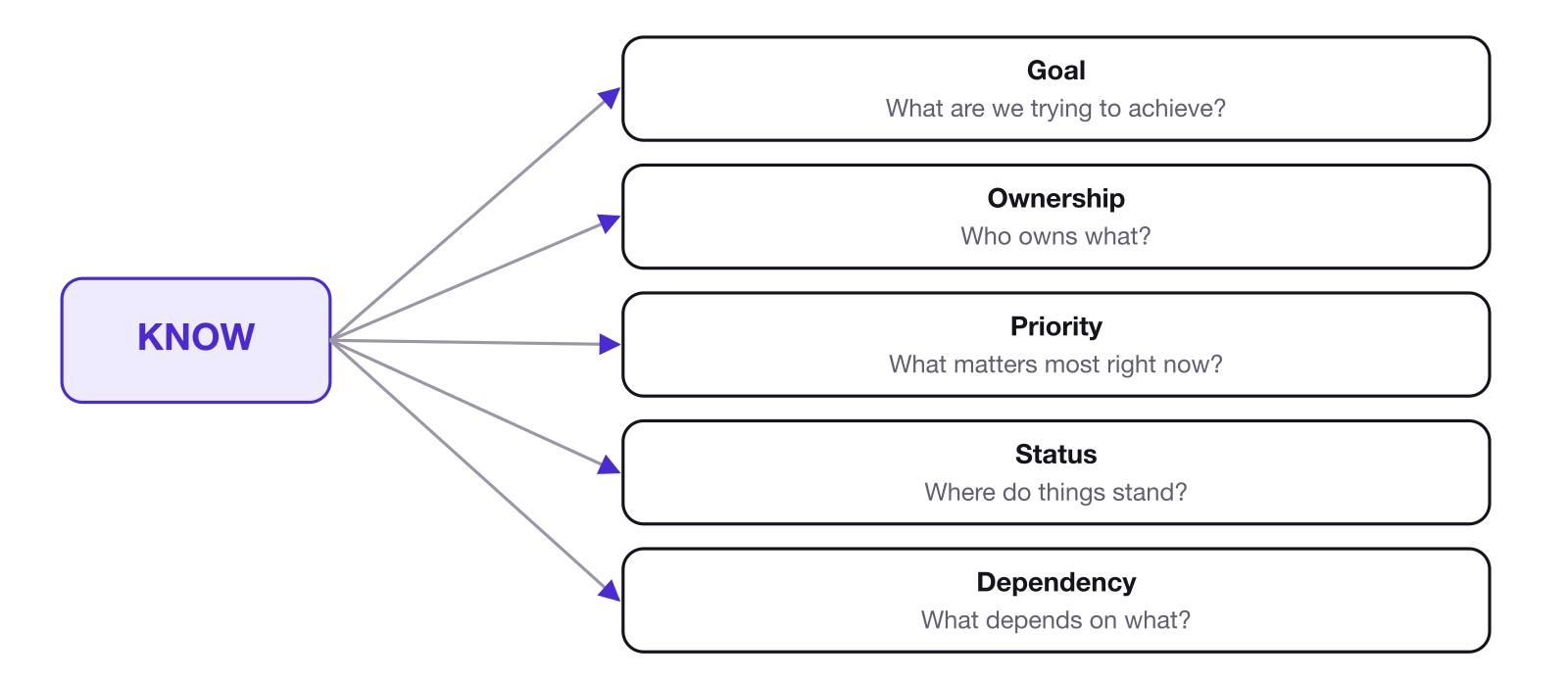
Figure 4. KNOW breaks down into five dimensions, each answering one question.
7. Goal
The goal is the big thing the organization is always working toward: its mission or vision. It's the reason the organization exists, and it tends to last. It can change over time, and there can be more than one, but there are usually very few. Everything else in the system exists to serve it. How to choose a mission or vision is its own subject. What matters here is that all the work traces up to it.
Initiatives are how the organization pursues the goal, and each has metrics that show whether it's working (chapter 19). Sometimes one initiative is enough.
Everyone should be able to say how their work connects to the larger objective, and ideally to its results. Task, to project, to initiative and its metrics, to goal. The system needs a visible hierarchy that runs from the top-level objectives down to individual tasks, and shows how they connect. Without it, you get an organization of local optimizers: people doing great work on things that don't matter.
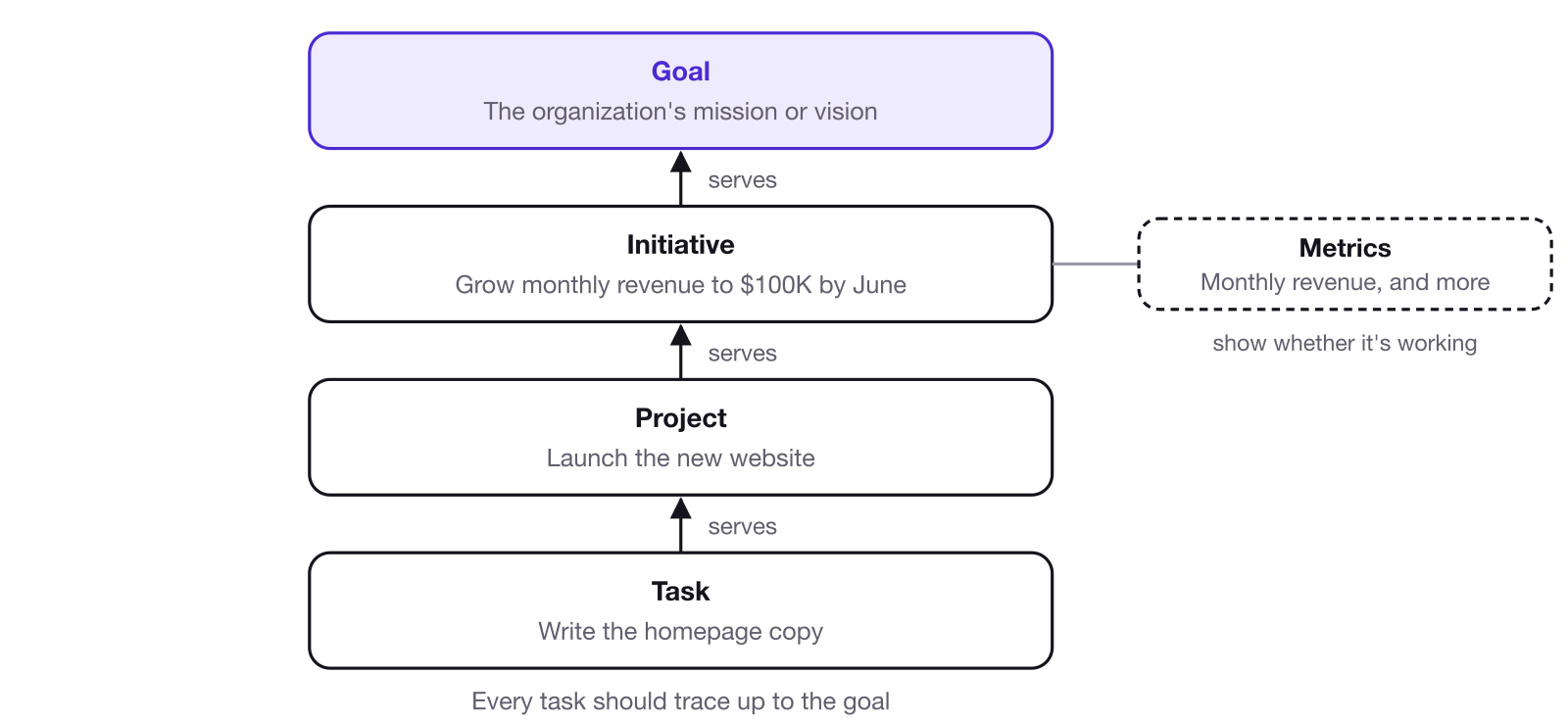
Figure 5. Every task should trace up, step by step, to the goal it serves. The examples are generic.
8. Ownership
Every piece of work is owned by a person. Always one human. It might be a team member or a team lead, but it's always one person. A team can be responsible for an area of work, but within that team, one specific person is responsible for each piece of it, and one person, the team lead, is responsible for the team as a whole.
Ownership is singular at each level and layered across levels. One person owns an initiative, someone else owns each project within it, and someone else owns each task within those projects, or the same person owns several layers. Leaders and team leads also do work of their own, so they own projects and tasks too. In a small company there may be no team leads at all, just leadership and the team. Then leadership acts as the team leads. Everyone owns something.
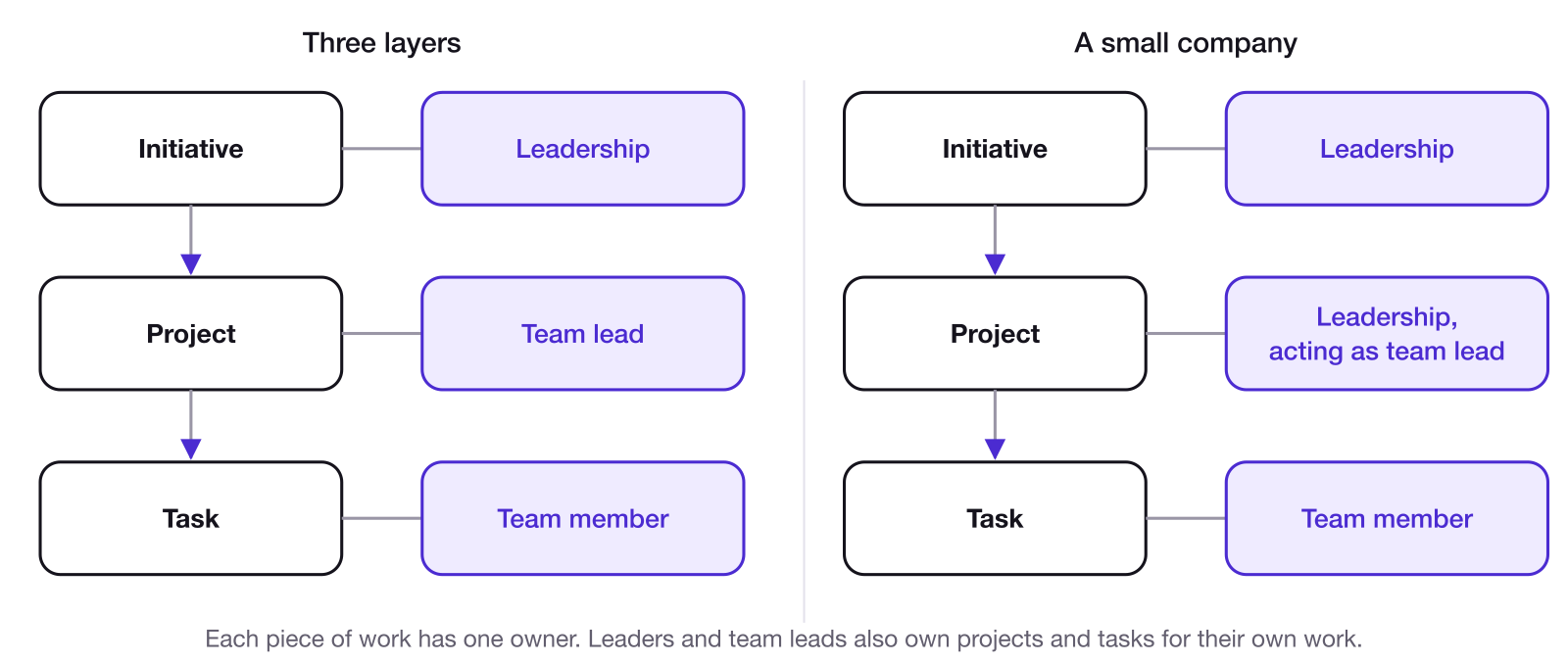
Figure 6. Ownership is layered. In a small company, one person often owns more than one layer.
To own a piece of work, a person needs three things:
- It's clearly theirs.
- They have the context to do it.
- They have the authority to make the decisions within it.
When any of the three is missing, the person has been assigned the work without owning it. People who are only assigned work do the minimum needed to avoid blame. People who own it do what it takes to make it excellent.
The third condition, the authority to decide, is the easiest one to leave out. When nobody is sure a decision is theirs to make, it doesn't get made, and the work stalls.
There's also a limit to how much one person can own. When one reliable person keeps taking on more, ownership stops being layered and collapses onto a single name, and that person becomes the bottleneck for everything.
9. Priority
Priority is about relative importance, not labels. "High priority" means nothing on its own. It only means something if a meaningful amount of work is marked lower priority. If ten tasks need doing and you mark all ten high, congratulations, your work now has zero prioritization.
So the system needs forced ranking. If you add something to the top, what moves down?
An interesting aside: Greg McKeown notes in Essentialism (2014) that "priority" came into English in the 1400s as a singular word, meaning the very first or prior thing. It stayed singular for about five hundred years. Only in the 1900s did people start talking about "priorities."
Priority is also about opportunity cost. Every hour spent on one thing is an hour not spent on anything else, and the cost of a choice is the best option you gave up to make it. Seen that way, setting a priority means choosing what to give up.
Priority is also a question of capacity. Priority is what you're doing at the expense of everything else, and capacity is how much room that leaves. Working on fewer things means more energy for each one.
10. Status
Everyone should know where things stand, at the small and large scale, without scheduling a meeting. The moment updating status becomes its own task, you've lost. Status has to be a byproduct of doing the work (the entropy principle, in chapter 13).
Status is only useful when it's clear what finished looks like. A good task is simple to know when it's complete. A good project has a clear finish line, instead of ongoing work that stays open forever. When work is defined that clearly, its status means the same thing to everyone who reads it.
Status also depends on language. If a task says "almost done" or "working on it," different people will read it differently, and their pictures drift apart again. Clear, plain wording is part of what keeps everyone's picture the same, and chapter 20 comes back to it.
11. Dependency
A dependency is a link between two pieces of work: one can't start or finish until the other is done. This one is underrated. Dependencies ripple across and up an organization. Task A depends on Task B, which blocks a project, which blocks an initiative, which limits an outcome, which constrains the whole business. That's easier to see than to read.
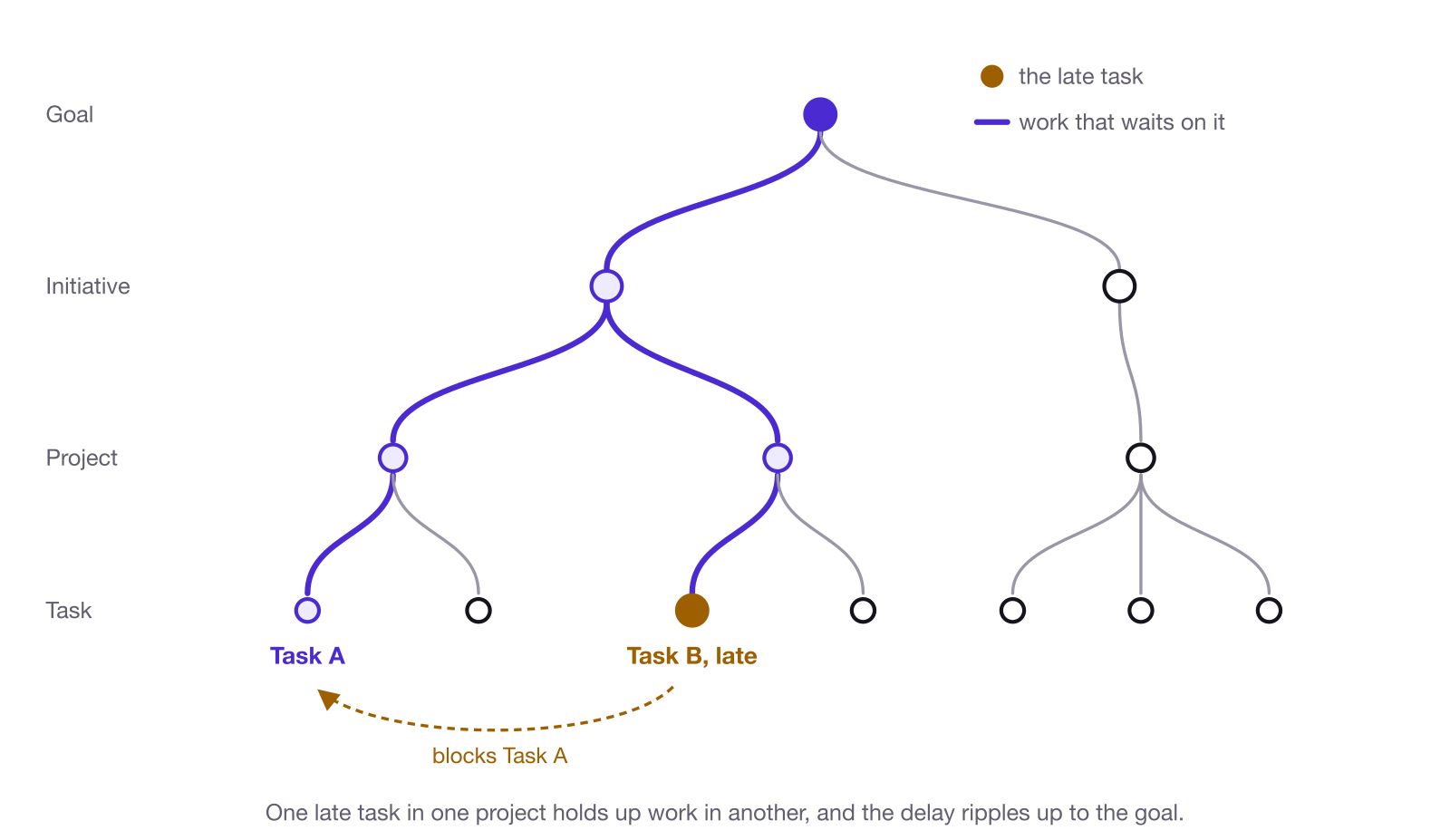
Figure 7. How one dependency ripples up through an organization.
Most dependencies live in people's heads. That's why teammates keep following up with each other asking when work will be done. Nobody can do their part without knowing when the work they depend on will be ready. A website or a product launch needs creative, fulfillment, manufacturing and more. A logistics coordinator shouldn't have to call the creative lead, the fulfillment lead and the manufacturer just to figure out when to start. They need one central place to look. And when one of those people changes their mind, the whole group shouldn't have to get back in a meeting.
Everyone who works inside the system is a participant in it. Every organization also depends on people outside it: contractors, vendors, clients. Call them external participants. They aren't in the system, so they need someone inside to represent them. The dependency has to exist in the system and be owned by a participant.
12. Who's in the system, and how they use it
One simple way to divide an organization for this purpose is into three building blocks: leadership, team leads and team members.
- Leadership sets the goals and makes the calls that affect the whole organization.
- Team leads run a team's work and make decisions for their team.
- Team members own and do the work.
Leadership plans the work with the team leads, and team leads plan and execute it with their teams. Anyone can still talk to anyone, and team members often coordinate across teams directly, but those are the main lines of planning.
Everyone also uses the tool in two ways. Doing is working in it: moving tasks forward, commenting with another team, posting updates. Seeing is stepping back to look at timelines, milestones and how the work went. Seeing isn't only for leaders; anyone can look at their own work this way.
Part Three. Principles
Part Two described what a coordination system has to keep in sync. Part Three covers the principles that keep it working over time. A system can be set up perfectly and still stop matching reality within a month. These six principles are what prevent that.
13. Entropy
Every project management tool takes some work to keep up to date. No tool runs itself. The goal is to make that work as small and as useful as possible.
The best way to do that is to make updating the tool part of doing the work. When you start a task, you mark it in progress. When you finish, you mark it done. That is the status update, and nobody needs a separate message or report.
When updating the tool becomes a separate chore, people put it off. The tool drifts away from what's really happening, and once people notice, they stop trusting it. That slow decay is what this writing calls entropy.
AI makes keeping the tool current much easier. Many people already work through an AI assistant, and when that assistant is connected to the tool, asking it to update the tool takes one prompt. Many project management tools can be connected through MCP (the Model Context Protocol, a standard way for AI assistants to work with other software). The responsibility stays with the person: review what it writes (chapter 28).
Even with good habits, things get messy. Work comes up in the middle of other work, and nobody can keep everything perfectly organized in the moment. So set up a short weekly cleanup: check for tasks that are stale, unowned or out of date. A one-off cleanup doesn't hold for long, so make it a recurring one.
14. Keep it lightweight
Every task you create is a task you have to keep up to date. The fewer and better the items, the easier the tool is to read and the less it costs to maintain.
If I can condense five tasks into one, I'll do it. Planning well takes some finesse, a real craft to building projects and tasks so that someone opening the tool isn't overwhelmed about what to do. Don't make four projects when one will do, or thirty tasks when five will. The aim is the fewest, clearest units that represent the work.
Fast work is a good example. If a team is going to finish a packaging run in one late-night session and pivot ten times along the way, writing ten tasks for the steps ahead of time costs more than the plan is worth. One task that names the action ("Finish the packaging run"), marked in progress at the start, with a short note at the end on what got done and what changed, keeps the record without slowing anyone down.
How organized is organized enough? There's no definitive answer. This is what I've come up with while writing this:
- The internal test: are you working on the work that actually needs doing? Are you working on the things that move the needle the most? If not, you're not planning well enough or deeply enough.
- The external test: can the people around you keep up with a basic idea of what you're working on at any given time? This isn't about leaders keeping tabs on you. What you do affects other people, and the timelines you're on affect other timelines.
The detail in the tool serves both. Other people need enough to understand what you're doing and stay updated. And it should help you: you want to know where you left off and what the next steps are, so you can stay focused.
A sign someone has over-planned is frustration with how much maintenance it takes to keep their plans up to date. That's subjective too. Someone who loves planning might never feel it, so the absence of frustration doesn't prove the plan is the right size.
Avoid redundancy. A lightweight system doesn't record the same thing twice, and dates are a clear example. Projects have deadlines, and milestones carry dates. Say a project has a milestone, "Design complete," due at the end of the month, with six tasks inside it. Most of those tasks don't need their own date, because the milestone's date already covers them. A task gets its own date when it genuinely needs one: when it has to happen on a specific day, like paying a credit card, or when it has to be done before the rest of the milestone can move. Hundreds of tasks, each with its own due date, can be a sign the plan has become too heavy. If it gets to the point that dates stop meaning anything, people stop trusting and adhering to them.
15. Flow in a box
Flow in a box is a phrase Gerry and I came up with for how creative people can stay organized without losing their flow.
Say someone wants to build a new website over a three-day sprint, working hours a day with their creative flow completely uninterrupted. They can do something as simple as create one task in the project management tool for the entire site, mark it in progress when they start, comment on it once a day or once at the end, and mark it complete. That's all the system needs from them. If you also want project-level tracking, such as a timeline or project updates, make it a small project with one or two tasks inside it instead. Either way, the middle stays free.
The system sets the edges of the work (what it is, who owns it, when it starts and when it's done) and leaves the middle alone. That's the answer to anyone who says structure kills creativity.
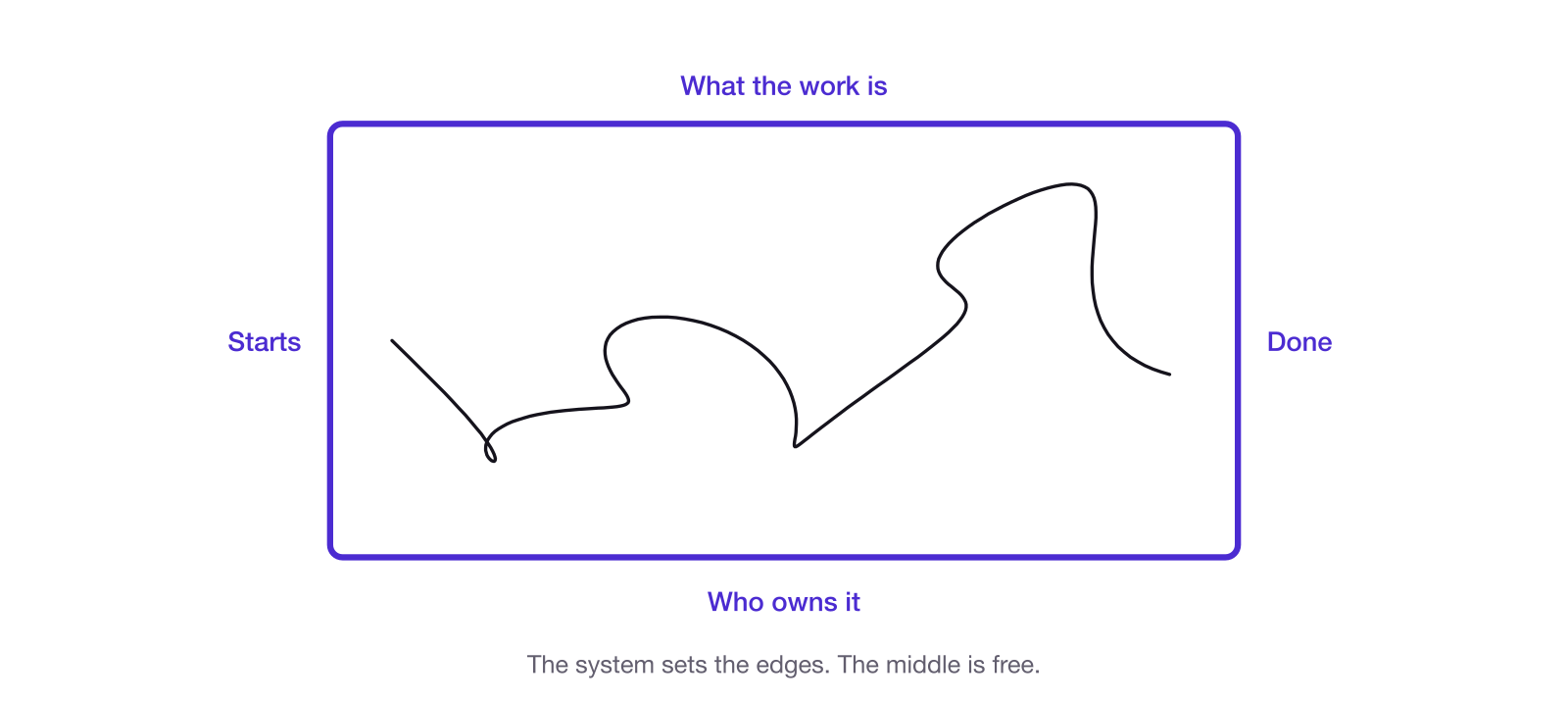
Figure 8. Flow in a box: the system sets the edges, and the middle is free.
The same idea guides what goes into the tool. Tasks and projects should represent the actual nature of the work. If you have an idea for another department, don't rush to put it into motion before it's thought through. Instead, represent what the work really is right now: a task for yourself to explore the idea and come up with a plan, or to build it into a proper project. Exploring and brainstorming are real work too, with an owner and a finish line.
For everything in between, most tools have an intake inbox. Linear calls it triage: a holding area where new, unprocessed work lands before it joins the organized work. Put things there messy, then clean them up and decide where they go before they enter the main system. Chapter 22 covers triage in detail.
16. Visibility needs a reason
Visibility is good. Visibility without trust feels bad, and so does visibility without believing the tool is valuable.
If you think I'm asking you to put your work into the tool to micromanage you, you're going to resent it. If you understand that we want it there as a team, because your work affects other people and working as one unit is the whole reason an organization is effective in the first place, it feels completely different. And it helps you too: as chapter 2 argued, even working alone, structure is what gives you focus.
One way to see this is a simple two-by-two of trust and visibility. High trust with high visibility is accountability with support. Low trust with high visibility is surveillance with anxiety. The visibility is the same in both; trust is what changes how it feels.
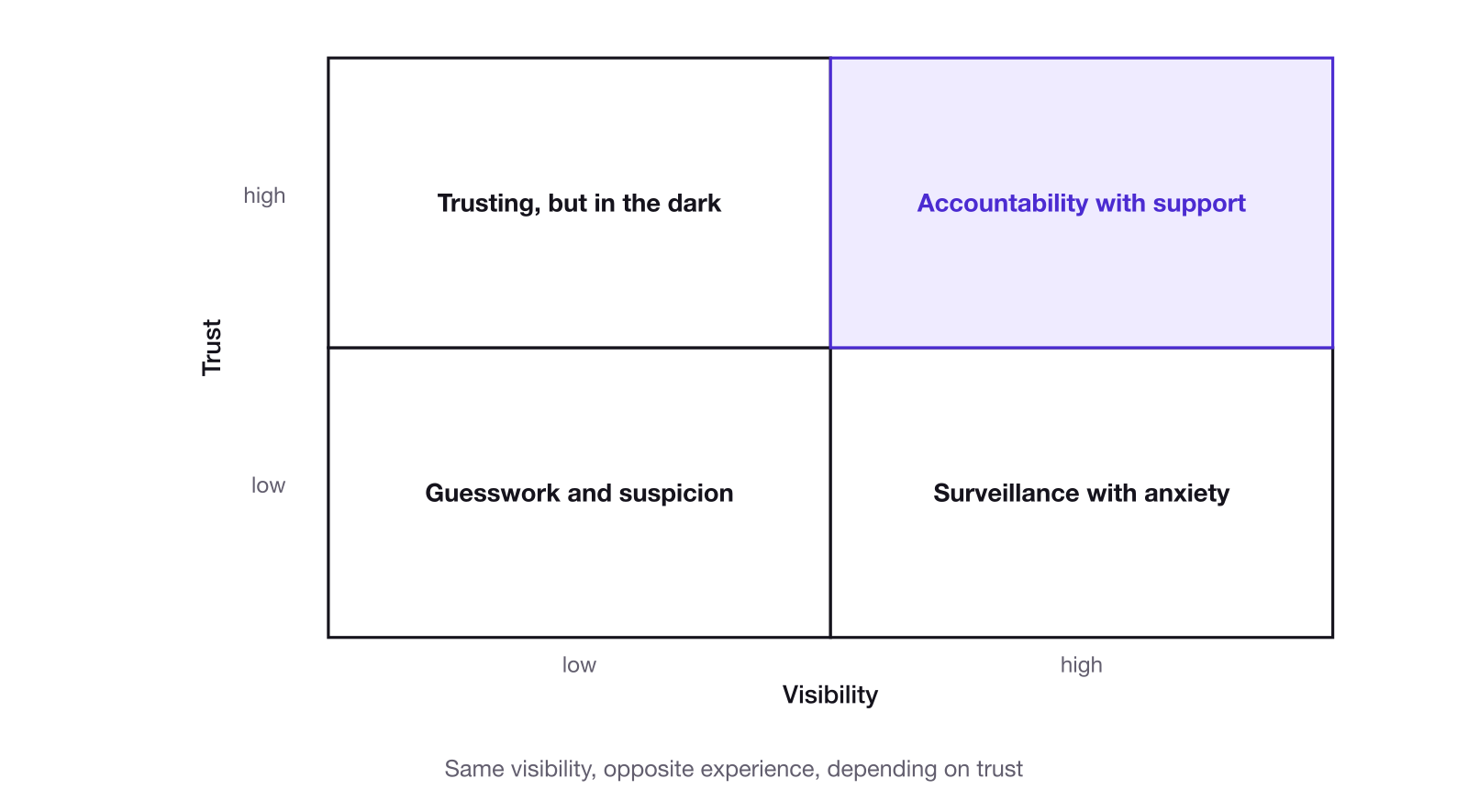
Figure 9. Trust and visibility.
Leaders do need oversight. They don't need oversight just to watch you.
Access follows the same logic: people should see what they need to see. Most work can be open to everyone. Some work, such as finance, customer data or leadership's own planning, needs to be restricted to the people it concerns.
I've read parts of Ray Dalio's Principles, and one of his principles makes a strong case for radical transparency inside an organization: sharing information openly by default, with a few exceptions such as private personal information, so that problems surface and everyone can help solve them. The practical lesson I take from it for a coordination system is that visibility works best when people understand why it's there.
17. Measure outcomes, not activity
Be careful which numbers you track, because people will play to them.
Start with the most tempting number in any project management tool: tasks completed. It's a poor measure on its own, before anyone games it. People structure their work differently. One person might write one task where someone else writes four for the same amount of work. The second person looks four times as productive, even though the first may simply be condensing their work, or spending their time on higher-leverage work that fits in fewer, bigger tasks. Comparing people by tasks completed rewards whoever splits their work the finest.
Tracking it makes it worse. This is Goodhart's law, named after the economist Charles Goodhart. The anthropologist Marilyn Strathern put it in the form most people quote: "When a measure becomes a target, it ceases to be a good measure." Once people know a number is being watched, they change their behavior to move the number instead of the thing it was meant to reflect. If people know tasks completed is being tracked, they'll create more tasks for the same amount of work. It may not even be deliberate. Someone might just decide they should be more organized and start splitting their work finer. Either way, the number goes up and the work doesn't change. So never tell someone "we're tracking the number of tasks you complete."
Numbers are still useful though. A few uses I've found valuable:
- Comparing a team or person against its own past. This week against last week. The same people structure their work the same way, so the comparison means something.
- Planning capacity. Estimates compared with what actually got done show how much a team can really take on (chapter 23).
- Finding where work piles up. Counting tasks by status shows the bottlenecks.
And because the record of what was done lives in the tool, AI can analyze it and summarize the patterns. Even then, the numbers that matter most live in the business, not in the tool, and measuring people well takes judgment alongside the numbers. Chapter 29 comes back to this.
Patrick Lencioni (The Table Group) gets at one right use of measurement in The Truth About Employee Engagement (first published as The Three Signs of a Miserable Job). He names three causes of a miserable job: anonymity, irrelevance and "immeasurement." Immeasurement is the inability of employees to assess for themselves their contribution or success, which leaves them relying on someone else's opinion to know how they're doing. That points to one purpose of measurement in a coordination system: helping people see their own progress. It isn't the only purpose. Part of leadership's job is making sure the organization is flowing, and they can't do that without seeing the work. What matters is how the numbers are used: to understand and improve the system. Turning one analytic in the tool into a person's target can be where it goes wrong.
18. One source of truth
If it's not in the tool, it's not happening. That can feel strict at first, but the logic is simple: work that isn't in the tool is invisible to everyone who depends on it. If someone hands you work outside the tool, the right move is to get it into the tool before you act on it.
I believe everyone should be in the tool, leaders included. It has never been easier. An AI assistant with access to the tool can add or update work in seconds, and so can an executive assistant. Leaders who also do hands-on work need that work in the system for two reasons: to set the example, and so the team knows what's going on. How the work gets in matters less than that it gets there.
Leaders who don't do hands-on work still need to be in the tool, because that's where the leadership view lives: initiatives, project timelines and project updates. A leader who reads those before meeting with the team walks in already knowing where things stand, and doesn't have to relay updates to everyone else who needs them. The meeting can go to decisions instead of catching up.
Having someone else keep the tool updated for you can work, and hiring help for it is valuable. There's a known trap, though. While having AI do background research on the history and science behind some of these ideas, we came across a 1988 paper by Jonathan Grudin, a researcher who studied why software built for groups so often failed. One of the main reasons he found was "the disparity between those who will benefit from an application and those who must do additional work to support it." His example was automatic meeting scheduling. For it to work, everyone had to keep an electronic calendar up to date. The benefit went mainly to the managers scheduling meetings, while everyone else did the extra work of maintaining their calendars. In practice, many people didn't, and without everyone's calendar the feature couldn't do its job.
The same thing can happen when an assistant carries all of a leader's updates: the assistant does the extra work, and everyone else gets the benefit. It works when that work is recognized and kept small, when the leader still uses the tool themselves, and when the leader shows the assistant how much value their work creates. That's Lencioni's point about irrelevance again: people need to see that their work matters.
Part Four. Running it
Parts One to Three covered why coordination matters, what a system has to keep in sync, and the principles that keep it alive. Part Four covers how to run it day to day. It follows Linear's structure because that's the tool we know best. Most tools have an equivalent for each piece, and the principles don't depend on any of them.
19. The structure of work
Everything sits in one hierarchy: initiatives, then projects (with milestones inside them), then tasks (issues). Initiatives and projects can span several teams. A task belongs to exactly one team.
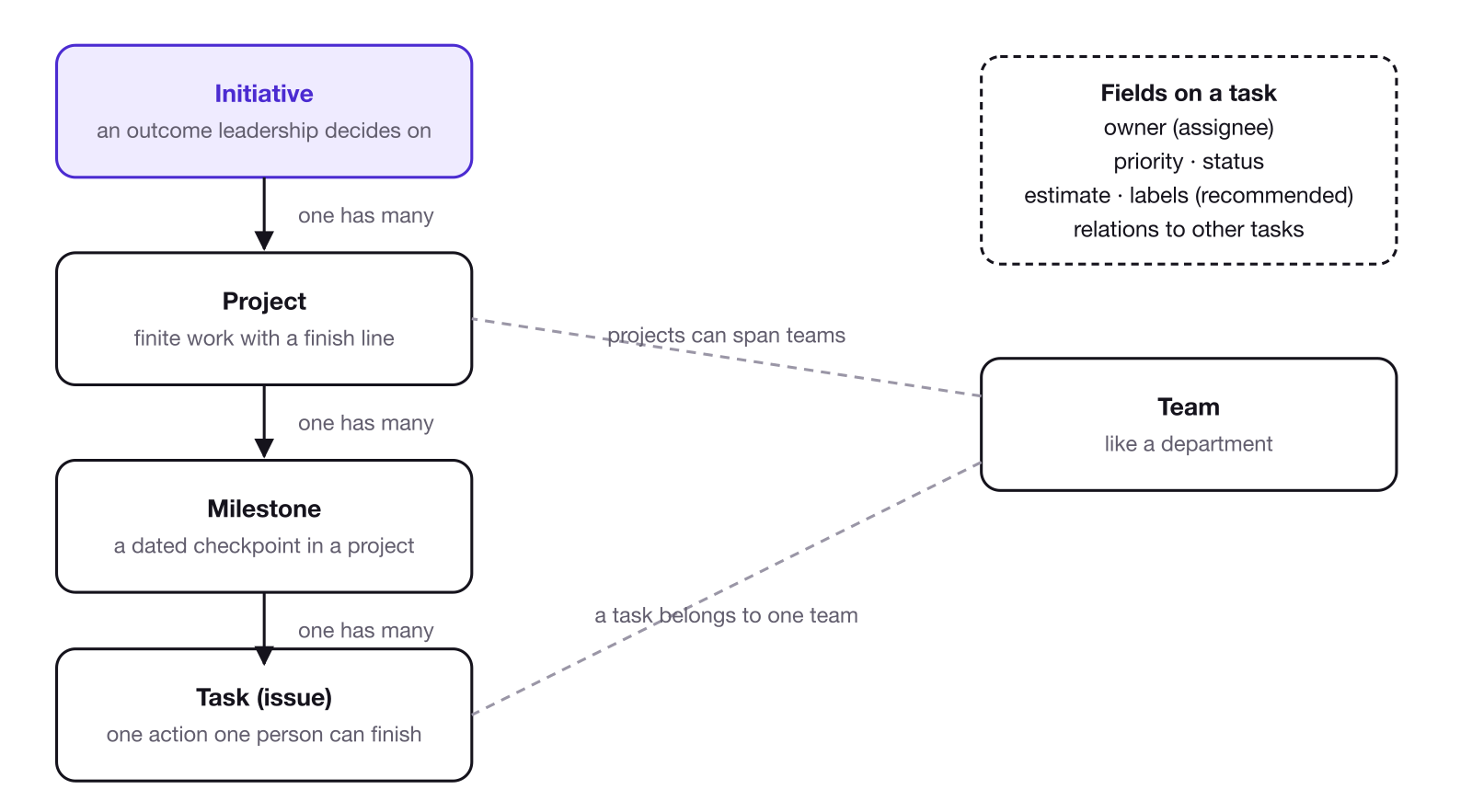
Figure 10. The structure of work, drawn like a simple data model. Each level holds many of the level below it.
Initiatives are the highest-level objectives, and they're how the organization pursues its goal (chapter 7): outcomes leadership would decide to continue or stop on their own. A good test: would leadership debate whether to keep doing it at all, or only talk about how it's going? If it's the first, it's an initiative. If it's the second, it's a project. Each initiative has one owner, a measure of success and a target. "Grow monthly revenue to $100K by June" is an initiative: it's an outcome, it has a number, and leadership would decide whether to keep pursuing it. Keep the number of initiatives small.
Deciding what an organization should work on is its own subject, and it overlaps with finding the constraint (chapter 30). What follows is a rough guide to what makes a good initiative.
Deciding what counts as an initiative is harder than it sounds. A few ways to find them:
- Start from the goal. Ask what has to happen to move toward the goal. Each major outcome on that list is a candidate.
- Start from the constraint. Ask what's holding the goal back the most (chapter 30). Clearing it is often an initiative.
- Start from the projects you already have. If several projects serve the same outcome, that outcome may be the initiative they belong to.
Then test each candidate. Would leadership decide on its own whether to continue it? Does it have one owner, a measure of success and a target? Is it too big for a single project? If the answer to all three is yes, it's an initiative.
Fewer is better, and it's fine to start with one. When we restructured our own tool, the whole company was driving at one goal, so we started with a single initiative for it and rolled everything up into it. More can come later, once there are team leads to own them. Linear's docs describe initiatives as a way to "group projects around company objectives," and Linear supports sub-initiatives that "ladder up to broader company goals," so the structure can grow with you.
To define an initiative, ask two questions. What are the biggest constraints holding the organization back from its goals? And what outcome, or better, what specific metric, would mean the constraint is solved? They're easy to write down and hard to answer well.
Projects are bodies of work that serve an initiative. A project must be discrete: it has a start and an end, or at least a condition that makes it complete.
Don't use projects as bins for work. A bin is a project for an ongoing area, like "Marketing" or "Operations," that never finishes. Bins pile up, because there's always another area, and each one shows as in progress forever. Eventually there are so many open projects that they stop meaning anything, and nobody can tell which ones matter most. Projects only help people focus when each one is a finite piece of work that can actually be finished.
I learned this with my own work. I handle finances, and finance has lots of recurring tasks: paying credit cards, running financial models and so on. When I started using projects properly, I wanted to put all of those recurring tasks into a "Financial Management" project. It would have shown as in progress forever. Instead, recurring work stays off projects as standalone, properly labeled recurring tasks, and I still group most of my other work into projects.
A good project is lightweight: a clear name, a couple of milestones, and a few tasks under each. It has one lead who owns the outcome. When a project closes, whatever is still open in it gets a quick decision (done, canceled or moved) instead of being left behind.
Milestones are checkpoints inside a project. They're outcomes, not tasks: "Design complete," "Beta shipped." I prefer to put dates on milestones rather than on individual tasks, so the timeline lives in one place. That's a personal preference, but it keeps things simple (chapter 14).
Tasks (issues) are the units of work, the actual doing. A task should be completable by one person. Once it needs several people, it's either several tasks or a project. Every task has an owner (the assignee), a priority and a status, and it can belong to a project and a milestone. Two more fields are recommended:
- Estimates are a rough size for the work. Linear's docs describe them as a way "to describe the complexity or size of an issue," and note that larger estimates usually mean uncertainty, which is a cue to break the work into smaller pieces. I find them more useful than hours for exactly that reason: they capture how hard and how uncertain the work is, not only how long it might take. Over time they also show a team how much it can really take on in a cycle (chapter 23).
- Labels are tags for the type of work. They make it easy to filter the tool and to see where time actually goes (chapter 17).
A good task makes the next move clear. The title is one specific action, clear enough to understand from a list. The description scales with the work. One or two sentences is plenty for something simple. Important or cross-team work also covers why it matters, the context the owner needs, what done looks like, timing, and anything blocking it.
Subtasks (sub-issues) are for when you need them, and only then. A list of steps one person works through is a checklist inside the task. A piece that needs its own owner, its own status or its own dependency is a separate task.
How much structure a team needs depends heavily on the team. The simpler the better: use the fewest and simplest units that do the job.
20. Naming
Good names do a lot of the coordinating. Use one simple pattern for each level:
- Initiative: a verb, the outcome, and a target or timeframe. "Grow monthly revenue to $100K by June."
- Project: a verb and the concrete thing it delivers. "Launch the new website."
- Task (issue): a verb and a specific action someone can finish and check off. "Write the homepage copy."
Read from the top down, the names answer three questions: why we're doing this, what we're delivering, and what someone needs to do next.
A few more habits help. Keep internal codenames and program labels out of names. Write names the way a person would say them out loud. And keep em dashes out of names. That one is a personal preference, and here's the reasoning: AI models tend to write with the same habits, and em dashes have become one of the most recognizable. Writing that reads like AI gets associated with AI slop, and with the fatigue of reading it. Even when AI helps you write, keeping its habits out makes the writing feel more human, and a plain name reads better anyway (just my opinion).
21. Teams
Teams in the tool are groups of people who work together and need to see each other's work. In Linear, a team has its own tasks, its own workflow and, if it uses them, its own cycles; other tools organize this differently. Recommendations:
- One lead per team in the tool. The lead is responsible for the team's work, and for keeping the team's part of the tool organized.
- Start with as few teams as you need. The simpler, the better.
- Teams request work from each other. If you need something from another team, create a task (issue) in that team's triage (chapter 22). Don't drop it straight into their plan. Let them decide how to take it on.
22. Triage and requests
Triage is one of the most useful features in Linear, and one of the most useful ideas in general. Linear describes it as "a special inbox for your team." It's the entry gate to the system: anything can be dropped there quickly and messily without cluttering the organized work, which keeps the rest of the system in order. Later, it gets cleaned up and moved to where it belongs.
There are three main ways to use it:
- An inbox for messy work. When something comes to mind in the middle of a meeting or another task, drop it into triage without worrying about making it clean.
- Handing work to someone else. When you need something from someone, create the task (issue) in their triage. If you drop it straight into their tasks as Todo, or into their current cycle, you've committed their time without asking and pushed it into a plan they already set. That interrupts their flow. Triage lets them see the request, accept it and decide where it fits in their own work.
- A default for recurring tasks. A recurring task is one the tool creates automatically on a schedule, like a monthly bill payment or a weekly report. Setting recurring tasks to land in triage means each one shows up in your inbox and gets accepted into your work, so nothing appears unnoticed.
Process the triage every day, down to zero. Give each item a clear title, a description, a priority and an owner, plus an estimate and a label if you use them. Then decide where it goes (chapter 23): into the current plan if it has to happen now, into the backlog if it's not now, or closed if it doesn't matter. Nothing should live in triage.
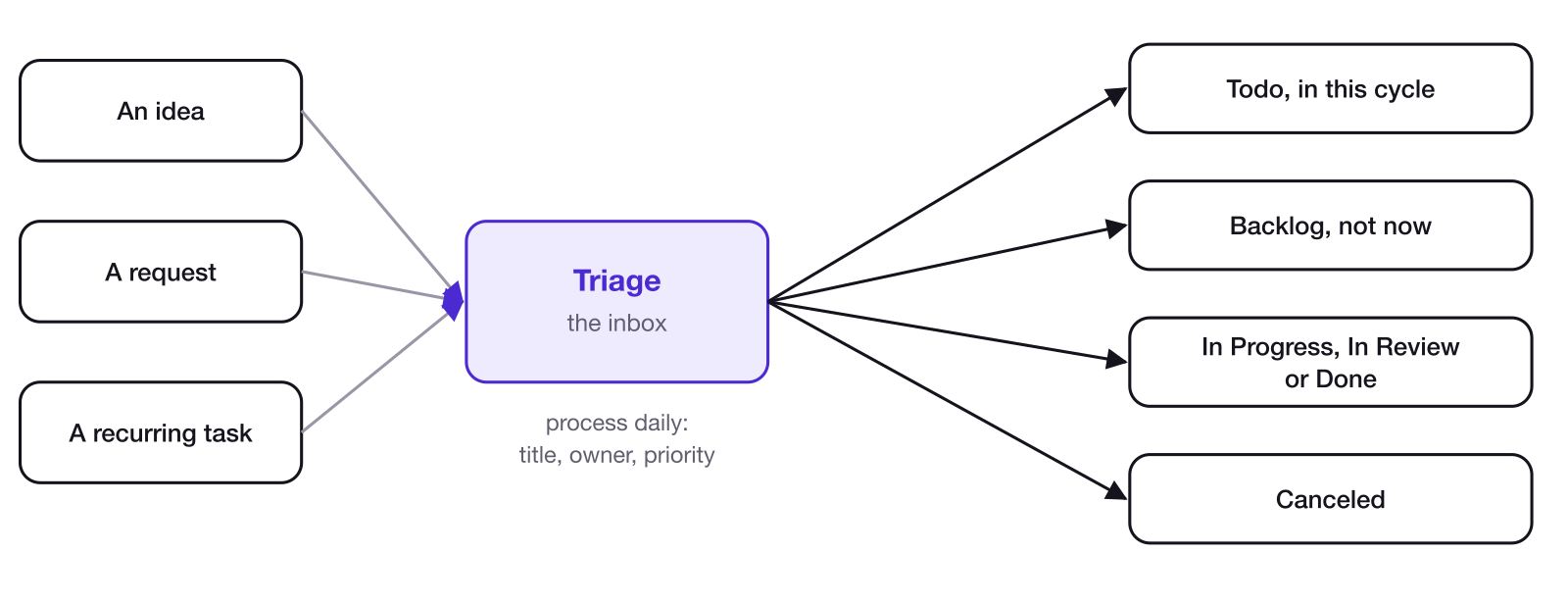
Figure 11. Triage is the entry gate. Work lands there messy and leaves it clean, headed for any status.
Who handles triage depends on the request. If you know exactly who on another team should do the work, send it to that person's triage. When you're not sure, it goes to the team's triage, and the team lead, or whoever the team has chosen, routes it.
The habit behind triage is useful far beyond a work tool. Capturing everything in one inbox, then processing it on a regular schedule, works for a whole life as well as for a team.
An inbox makes it easy to create work, which also makes it easy to create too much. Chapter 28 covers the worst version of that: AI slop grenades.
23. Statuses, backlog and cycles
A task moves through a small set of statuses. The names vary by tool; the common ones are:
- Triage: just arrived, not yet processed.
- Backlog: real work, but not now.
- Todo: ready, and committed to.
- In Progress: someone is actively working on it.
- Done: finished.
- Canceled: no longer needed.
Most tools let you add custom statuses too. A team might add In Review between In Progress and Done, for example. And work doesn't have to go through every step: something in triage can go straight to In Progress, or straight to Done if it takes two minutes.
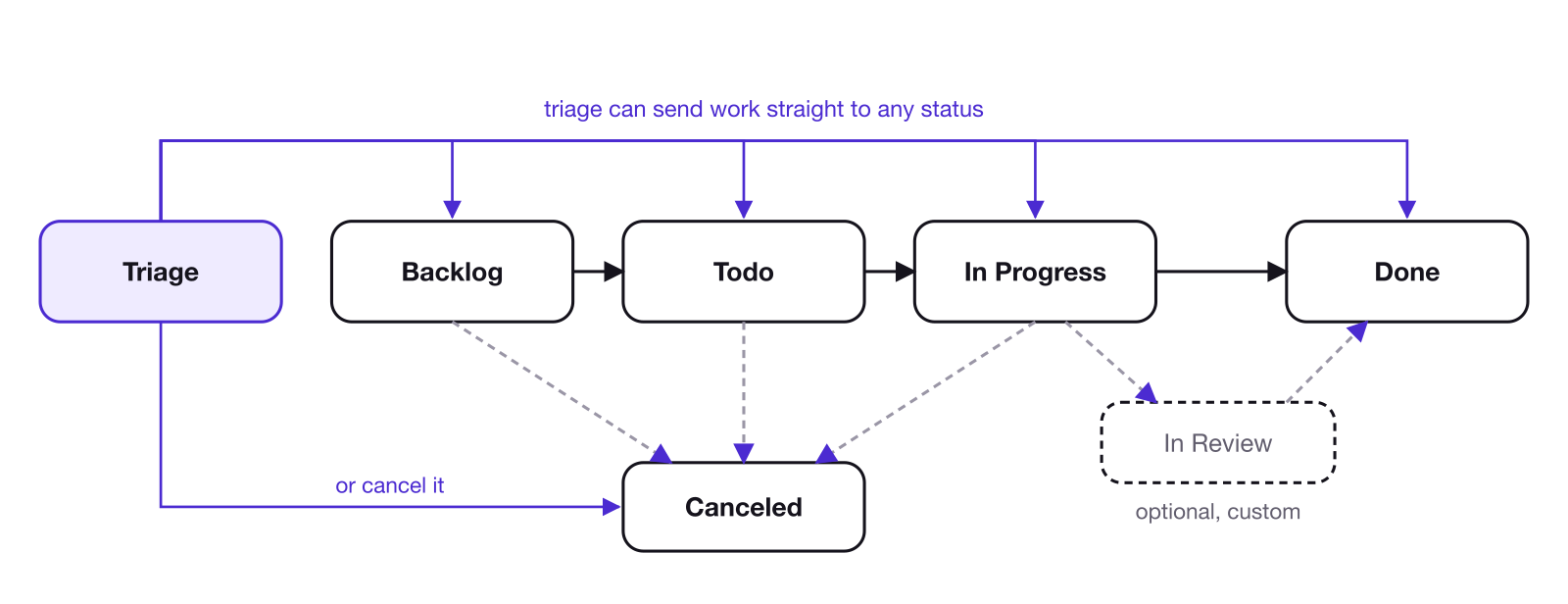
Figure 12. The life of a task. Triage can send work straight to any status, and moving a task forward is the status update.
The backlog is one of the most useful ideas in the tool. It holds work that's real but not current. That work isn't forgotten; it just isn't competing for attention. Without a backlog, everything looks urgent. But you don't need to save everything in it. The Linear Method puts it plainly: "Important ones will resurface, low priority ones will never get fixed." Basecamp's Shape Up makes the same point: really important ideas come back.
Moving a task from the backlog to Todo is a commitment. If your team uses cycles, that's also the moment the task goes into a cycle. A cycle is a fixed window of time for work. One week is a good starting point, because people already plan their work by the week. Not everyone has worked in cycles, especially outside software, but almost everyone already chunks their work into a week to make it manageable. Any length that suits the team works: Linear allows cycles of one to eight weeks, and its Method notes that two weeks is the most common in software. Pulling a task into the current cycle means the team intends to finish it in that window, and anything outside the cycle is "not now." The end of a cycle is a natural point to look back: what was planned against what got done, what was added mid-cycle, and where work got stuck.
A cycle only helps you prioritize if it has a ceiling. Linear's cycle graph helps here: it shows how much work, in estimate points, was scoped into the cycle against how much got completed, and Linear can suggest a capacity based on the last three cycles. Over time that teaches a team how much it can really finish. It matters beyond one team, too. If a team plans double what it can do, every team that depends on it gets thrown off.
A weekly rhythm we're working toward. At the start of each cycle, each team plans its week, and AI in the tool, or a person, drafts a short plan document to share. During the week, the team does the work and posts project and initiative updates, which are one of the most important parts of the whole system. At the end of the week, AI or a person pulls the statuses and updates into a report document to hand off to everyone else.
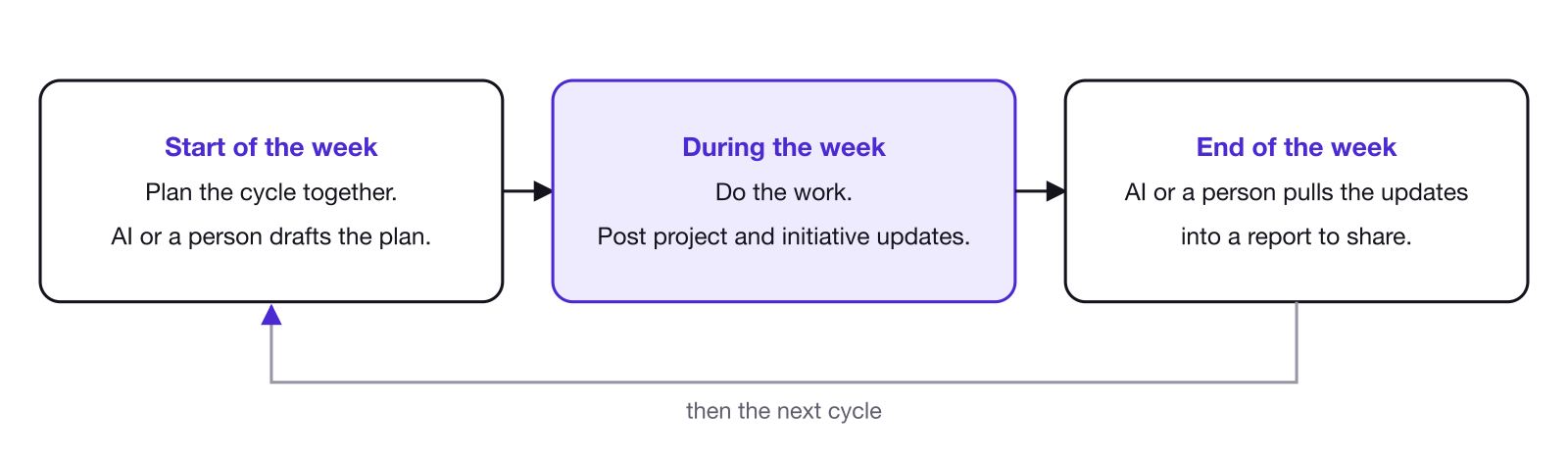
Figure 13. A weekly rhythm: plan, work and update, report, repeat.
In Progress should mean someone is actually working on it. When you start something, move it to In Progress. When you finish, move it to Done. That's the status update. If something worth noting comes up while you work (a decision, a question, something that didn't work), put it in a comment on the task. The task is the single source of truth for that piece of work.
Stale work needs a decision. When a task has sat untouched for weeks, close it, reassign it, or move it back to the backlog. My own rule of thumb: if something has been stale for 30 days and isn't urgent, delete it.
Priority in the tool (urgent, high, medium, low or none) only works if it's honest. If most of the work is marked urgent or high, none of it is (chapter 9).
24. Dependencies and getting unstuck
Linear lets you link tasks to each other with explicit relations, which is one of its most distinctive features:
- Blocks means someone is waiting on you.
- Blocked by means you're waiting on someone else.
- Related connects two pieces of work without a dependency.
Relations surface bottlenecks that would otherwise stay hidden, and they show why something matters. When three tasks are blocked by yours, you know people are waiting, and that changes how you prioritize.
You can mark your own work as blocking someone else's, so it's clear which of your tasks will unblock other people. Use relations when they matter: when a task is actually blocked, or about to be. Linking every distant dependency far down the line only adds noise.
When you're stuck, don't go silent. Comment on the task with what's blocking you, what you've tried, and who or what you need, and tag the person who can help. A blocked task nobody knows about is invisible.
If the blocker is an external participant, comment on your task and tag whoever internally owns that relationship (chapter 11).
25. Meetings, updates and documents
Meetings are great for decisions. Meetings held only to share updates are often unnecessary, because the tool can carry the updates. When you do meet, build the meeting around the tool: pull it up and work from it. A leadership meeting can run on the initiatives, walking through each one and the projects underneath it to drive the discussion.
Project updates carry the updates instead, and they're one of Linear's best ideas; much of this section follows its guidance. Each project lead posts a short written update on a regular cadence, usually weekly. Linear's advice is that a good update should be brief and to the point, "almost like a tweet": part summary of what happened, part educated guess about what comes next. A good update says whether the project is on track, at risk or off track, what changed, what's blocked, what decision is needed, and what happens next. Different projects need different updates. A launch might need dates and risks; a long research project might need what was learned. The point is to explain to everyone else what's going on. "Working on it" isn't an update, and a project with no recent update is worth checking on. Initiatives get updates too, from their owners, summarizing what the projects underneath are doing.
Documents in the tool keep the thinking next to the work. Most tools, Linear included, let you write documents inside the tool. Keep working documents there: plans, meeting agendas, notes on decisions. They can link directly to the tasks, projects and initiatives they're about, so the thinking and the work stay connected. More permanent documentation, like SOPs, policies and files, can live in a separate knowledge base, or in the tool if it handles that well. Use your judgment.
Part Five. When it breaks
Everything so far describes the system working. Part Five is about how it breaks.
26. Three ways it breaks
Picture three people.
- A closes 40 tasks, and nothing moves. They're using the tool for the sake of the tool, not to get work done. The tool looks busy and nothing changes. This is theater.
- B isn't using the tool at all. They may be doing good work, or not much at all. Nobody can tell. This is invisible work.
- C is using the tool, and everything is late. There's too much on their plate: either too much work, or too much planning. This is overload.
Each one needs a different fix.
27. Procrastinating in the tool
A system can decay from neglect, when people stop using it. It can also decay from use.
A tool makes it easy to procrastinate while looking busy. Instead of making a call, someone opens a task, pushes it back to the other person, or asks a clarifying question they could have answered themselves by making a reasonable assumption and doing the work. The task looks like it's in progress. The work isn't moving.
Part of this comes from the format. Comments are slow and back-and-forth. In a meeting, someone can push for a decision on the spot; in a comment thread, it's easy to reply and wait. That's one reason meetings still matter for decisions (chapter 25).
The deeper cause is usually ownership. The third condition of ownership is the authority to make the decisions within the work (chapter 8). When people aren't sure they're allowed to make a call, they push it back. The fix is giving each role clear autonomy: a plain understanding of which decisions are theirs to make. One simple habit helps too: before bringing a question to someone else, say what you would do. That way you learn how to make better decisions over time.
28. AI slop
AI is now part of the system. It writes tasks, drafts updates and processes meeting notes, and it can make keeping the tool current far easier (chapter 13). It can also flood the tool.
I'm very pro-AI. I use it constantly, and I wrote this with its help.
AI slop is really a lack of attention to detail. Thought through from first principles, it comes from taking shortcuts, taking the easy way, and not reviewing the output the way you know you should. The problem is the missing review. Behind it is a wish to skip work that can't be skipped yet: AI can't do all of the work for you flawlessly, at least not today. Whoever puts the work into the system owns it and is responsible for it, however it was produced.
Slop also creates fatigue, and the fatigue lands on the reader, not the writer. That's why it keeps happening: the person generating it doesn't feel the cost. I'd go further and call it unfair, even immoral. Clarifying your own thinking is the writer's job. Handing that work to the person receiving it wastes their time and energy and leaves them confused.
Avoid AI slop grenades. The tool makes it easy to create work, and AI makes it easy to create a lot of it. Don't spam tasks, and don't let AI spam tasks into your team. Don't create four tasks when one will do. Name every task properly. Put requests into the other team's triage instead of straight into someone's plan. And watch the defaults: one AI assistant we used marked nearly everything high or urgent until we tightened its instructions.
The fix is plain responsibility. Review what your AI writes before it goes into the tool. If it's writing poorly, fix it yourself, or change how you're using it. I've been building my own instructions for AI (skills) to help it write more naturally, and it's an ongoing project.
Part Six. Knowing it works, and what's next
Part Six covers how to tell whether a coordination system is working, and where this thinking goes next.
29. Measuring the system
What follows are ideas and examples, not a definitive method. We're still actively working on this ourselves. The general shape holds up, though: measure whether the system is healthy, whether work is flowing, and whether any of it produced results.
Layer A: system health. Is the structure being kept up?
- Goal traceability: the share of active tasks connected to a project.
- Ownership clarity: the number of active tasks with no owner.
- Staleness: active tasks untouched past a threshold.
- Dependency visibility: open tasks that are blocked by other open tasks.
- Priority hygiene: how active tasks spread across priority levels.
Layer B: flow. Is work moving?
- Lead time: how long tasks take from creation to completion, per cycle and by type of work.
- Work clustering: active tasks by status, per team, to see where work piles up.
- Planned versus unplanned: work added after a cycle started, compared with what got done.
- Throughput: tasks completed per cycle, over time, for the same team.
Layer C: outcomes. Did any of it matter?
- Initiative achievement: the actual result against the stated success criteria.
- Trajectory: whether outcomes are improving, declining or flat over time.
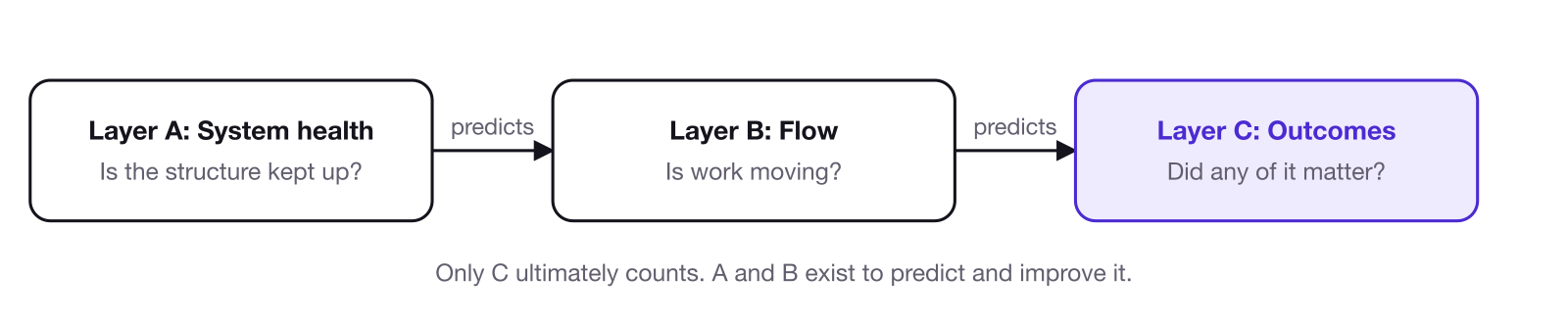
Figure 14. The three measurement layers.
Layer A shows whether the system is set up correctly. Layer B shows whether work is flowing. Layer C shows whether any of it mattered. A team can have perfect health and great flow and still miss its outcomes, which is why C is the only layer that ultimately counts. A and B exist to predict and improve it. The hard part is that outcomes usually live in business data outside the tool, and the feedback loop is slow. For now, much of Layer C happens in regular conversations.
What the numbers can't see. Every measurement in the tool only sees what's been entered. If work isn't captured in the tool, most of these analytics simply won't work, and the system can look healthier than it is. There's no metric for what you don't know. That's why the human layer matters as much as the numbers. The best check is people: team leads assign and direct the work, so they usually know what's happening that the tool doesn't show. Ask them.
Comparing people. Numbers from the tool can't fairly compare one person with another, because people structure their work differently (chapter 17). Compare each person and team against their own past. Across people, performance has to be judged on results, together with the judgment of the leads who see the work every day. The tool's numbers are an input to that conversation, not the verdict.
30. What's next
This is a first version. Three areas deserve more room than this writing gives them.
Finding the constraint. Initiatives should come from the biggest constraint holding an organization back. Finding constraints is central to my work, and it deserves its own piece of writing: it needs more time and space than it gets here. Eliyahu Goldratt built a whole discipline around the idea with his Theory of Constraints, starting with The Goal (1984), and I first came to it through Alex Hormozi. A few mental models I use day to day:
- A constraint is always against something. You can't be constrained against nothing. A pipe constrains the flow of water. A business is constrained against what it's aiming for: revenue, profit, clients, whatever it chooses.
- Zoom out. When you're deep in one department, step back to the organization's goal. The size of the goal doesn't matter; the method is the same. I think of zooming out as peeling back a layer, or climbing a rung, to get a wider view, and it's something I want to write about properly.
- Work backward to the drivers. Ask what drives the goal, then which of those drivers moves the needle the most. That's usually where the constraint is.
WANT, CAN and TRUST. This writing covers KNOW. The other three prerequisites from chapter 6 (motivation, capability and capacity, and the relationships that let people work together) deserve the same treatment.
Scale. The framework was built in small companies, and it's written from first principles so that it applies well beyond them, to larger organizations and to groups that aren't businesses at all. Some of the practices in Part Four will need adapting as an organization grows. The first principles shouldn't.
Appendix: Making leverage useful
Everybody talks about leverage: getting more out of your time than the hours you put in. From what I've come across, though, I haven't seen it explained in a way you can act on. Here is my attempt.
I worked through this with AI, trying to turn it into something practical, and came up with two approaches.
The first sorts work into three kinds of leverage:
- People: work that gets other people doing work, like hiring, training or delegating. People keep working when you're not there.
- Systems: work that makes something repeatable without you, like a process, a template or an automation.
- Decisions: work that sets direction, so everyone knows what to do without asking.
All three multiply your time, because they keep working after you stop.
The second approach scored work on a five-level scale, from level 1, basic execution, up to level 5, work that multiplies capability.
I prefer the first. Scoring how much leverage something has is hard and subjective, and it changes with every situation. As a way of thinking, a scale of leverage points you in the right direction. As an actual score, it doesn't hold up. The categories only ask what kind of leverage something has. Many entrepreneurs have their own lists of types of leverage, and people, systems and decisions show up in almost all of them in some form.
In practice, this becomes labels in the tool. Tag tasks that build people, systems or decisions, and make sure that work gets priority. It also explains one of the measurement traps in chapter 17: someone doing high-leverage work may complete far fewer tasks than someone who isn't.
Appendix: The ORGCORD cheat sheet
Some books collect their rules in one place at the end. Rob Fitzpatrick's The Mom Test does this well, and it makes the whole book easy to put into practice. This is ORGCORD's version: the principles and recommendations from this writing, in one list. The number after each one is the chapter it comes from.
The problem
- Get organized, whatever your style. The right level of detail depends on the work and the person. (2)
- Keep what you're not working on outside your head, in a shared system. (2)
- Agree on the conclusion, not the thinking. Then stay in sync as the plan changes. (3)
- Split a large group into teams, and have the team leads keep in sync across teams. (4)
- Put the tool at the center, use meetings, chat and email around it, and get everyone into it. A system that is only partly shared carries the costs of both approaches. (5)
- Save meetings for what works better in real time: debating an open question, deciding on the spot and building relationships. (5)
The framework
- Check the four prerequisites: KNOW, WANT, CAN, TRUST. (6)
- Keep five things in sync: goal, ownership, priority, status, dependency. (6)
- Make every task trace up to the goal. (7)
- Give every piece of work one owner, with the context to do it and the authority to decide. (8)
- Watch how much one person owns: one reliable person who keeps taking on more becomes the bottleneck. In a small company, leadership acts as the team leads. (8)
- Rank your priorities. If everything is high, nothing is, so when something goes to the top, decide what moves down. (9)
- Work on fewer things, so each one gets more energy. (9)
- Give every task and project a clear finish line in plain language, and avoid vague status words like "almost done" and "working on it". (10)
- Keep dependencies in one central place in the system, and give every external participant an internal owner. (11)
- Use the tool two ways: doing the work in it, and stepping back to see timelines, milestones and how the work went. (12)
Principles
- Make updating the tool part of doing the work: mark a task in progress when you start and done when you finish. That is the status update. (13)
- Connect your AI assistant to the tool, so updating it takes one prompt, and review what it writes. (13)
- Run a short cleanup every week for tasks that are stale, unowned or out of date. (13)
- Use the fewest, clearest units that represent the work. Don't make four projects when one will do, or thirty tasks when five will. (14)
- For fast work, use one task that names the action, mark it in progress at the start, and leave a short note at the end on what got done and what changed. (14)
- Check your planning with two tests. Internal: are you working on what moves the needle most? External: can the people around you keep up with what you're working on? Frustration with upkeep is a sign of over-planning. (14)
- Avoid redundancy: put dates on milestones, and give a task its own date only when it has to happen on a specific day or before the rest of the milestone can move. (14)
- Set the edges and leave the middle free (flow in a box). (15)
- For a creative sprint, create one task, mark it in progress, comment once a day or at the end, and mark it done. For project-level tracking, make it a small project with one or two tasks. (15)
- Represent the work as it really is right now. An idea for another department starts as a task to explore it and come up with a plan. (15)
- Explain why the work is visible. (16)
- Open most work to everyone. Restrict finance, customer data and leadership's own planning to the people it concerns. (16)
- Never turn one number into a person's target, and never tell someone you're tracking the number of tasks they complete. (17)
- Use numbers to compare a team or person against its own past, plan capacity, find where work piles up and help people see their own progress. AI can summarize the patterns. (17)
- If it's not in the tool, it's not happening, for everyone, leaders included. (18)
- If someone hands you work outside the tool, get it into the tool before you act on it. (18)
- As a leader, read the initiatives, project timelines and project updates before meeting with the team. (18)
- If an assistant keeps the tool updated for you, keep that work small and recognized, still use the tool yourself, and show them the value their work creates. (18)
Running it
- Make initiatives outcomes leadership decides on. Keep them few; it's fine to start with one. (19)
- Find initiatives by starting from the goal, from the constraint, or from the projects you already have. (19)
- Test each candidate initiative. Would leadership decide on its own whether to continue it? Does it have one owner, a measure of success and a target? Is it too big for a single project? (19)
- Give every project a finish line. No bins: keep recurring work off projects, as standalone, labeled recurring tasks. (19)
- Keep projects lightweight: a clear name, a couple of milestones that are outcomes, a few tasks under each, and one lead. When a project closes, decide on everything still open in it. (19)
- Make each task completable by one person. Once it needs several people, it's several tasks or a project. (19)
- Use estimates for the size of the work (a large estimate is a cue to break it down) and labels for the type of work. (19)
- Keep simple task descriptions to a sentence or two. For important or cross-team work, cover why it matters, the context, what done looks like, timing and blockers. (19)
- Use a checklist for steps one person works through. Make a separate task when a piece needs its own owner, status or dependency. (19)
- Name every level with a verb: initiatives with the outcome and a target, projects with the thing they deliver, tasks with a specific action. Write names the way a person would say them out loud, without codenames or em dashes. (20)
- Start with as few teams as you need, each with one lead. (21)
- Process triage to zero every day. (22)
- When you process triage, give each item a title, a description, a priority and an owner, then send it to the current plan, the backlog, or close it. (22)
- Use triage for messy work, for requests and for recurring tasks. Send a request to a person's triage when you know who should do it, and to the team's triage when you don't. (22)
- Keep the backlog small. Important things resurface. (23)
- Treat moving a task from the backlog to Todo as a commitment. (23)
- Start with one-week cycles, and plan to your real capacity. (23)
- At the end of each cycle, look at what was planned against what got done, what was added mid-cycle and where work got stuck. (23)
- Plan each week at the start of the cycle, post updates during it, and hand off a report at the end. AI can draft the plan and the report. (23)
- Mark a task In Progress only while someone is working on it. When a task sits untouched for weeks, close it, reassign it or move it back to the backlog. My rule of thumb: stale for 30 days and not urgent, delete it. (23)
- Put decisions, questions and things that didn't work in a comment on the task. (23)
- Link a dependency when a task is actually blocked or about to be, using blocks, blocked by and related. (24)
- When you're stuck, don't go silent. Comment with what's blocking you, what you've tried and who or what you need, and tag the person who can help, or whoever owns the outside relationship. (24)
- Use meetings for decisions, and build them around the tool. A leadership meeting can walk through the initiatives and the projects under each one. (25)
- Post short project updates on a regular cadence: on track, at risk or off track, what changed, what's blocked, what decision is needed and what happens next. Initiative owners post updates too, and a project with no recent update is worth checking on. (25)
- Keep working documents (plans, agendas, decision notes) in the tool, linked to the work. Permanent documentation can live in a knowledge base. (25)
When it breaks
- Watch for theater, invisible work and overload. (26)
- Before asking someone else to decide, say what you would do. (27)
- Give each role clear autonomy: a plain understanding of which decisions are theirs to make. (27)
- Review everything AI writes before it goes into the tool. If it writes poorly, fix it or change how you use it. (28)
- Don't spam tasks, and don't let AI spam them into your team. Watch the defaults, like AI marking everything high priority. (28)
Knowing it works
- Measure system health, flow and outcomes. Only outcomes ultimately count. (29)
- For system health, track goal traceability, tasks with no owner, stale tasks, blocked tasks and how work spreads across priorities. (29)
- For flow, track lead time, where work clusters by status, planned versus unplanned work, and throughput for the same team over time. (29)
- For outcomes, track each initiative's result against its success criteria, and the trajectory over time. (29)
- Compare people against their own past, not against each other. (29)
- Ask team leads what the tool can't see. (29)
- To find the constraint, remember it's always against something, zoom out to the goal, and work backward to the driver that moves it most. (30)
- Label work that builds people, systems or decisions, and give it priority. (appendix on leverage)
Read it on the site: org-cord.com
Download the PDF: orgcord.pdf
Just the cheat sheet: orgcord-cheat-sheet.pdf
Don't miss what's next. Subscribe to Justin's Newsletter: