Site Seeing: test your site in the browser contexts you forget about
A tool to test your site with docked developer tools, vertical tabs, split views, and much more.
Hey everyone,
When I work on the frontend of a website or a web app, I often test in unusual contexts, such as:
- Having the developer tools docked to the bottom, which will reduce the page's height.
- Switching to vertical tabs.
- Using split views.
- Resizing the browser window to work on multiple things on my big screen.
Testing all of that is time-consuming. So, I built a tool and I call it: Site Seeing. You can check it out here.
How it works
Play with the demo, or enter a localhost or a live website, and it will preview it.
Here is an example of the Developer Tools. You can dock it on the left, right, or bottom.
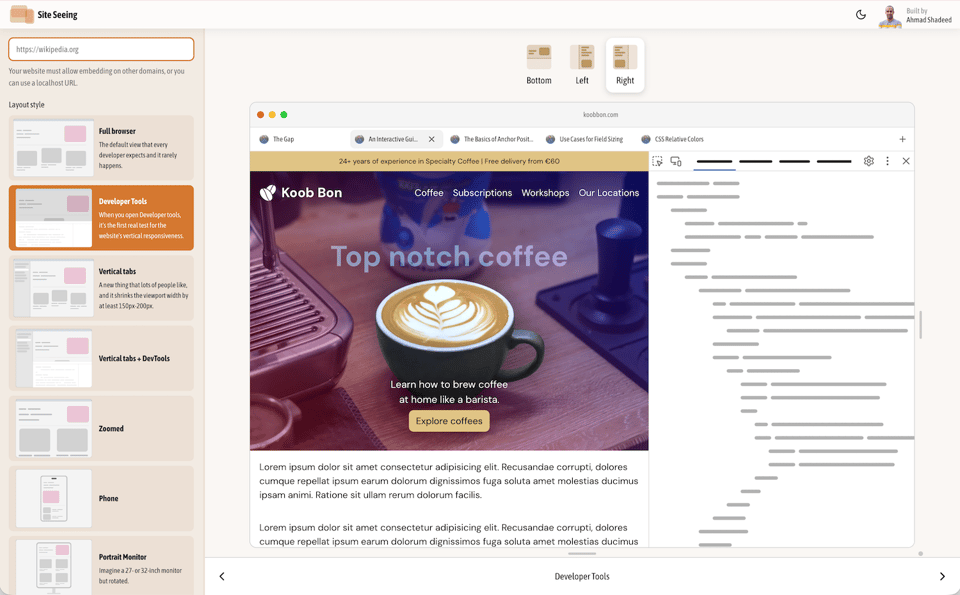
Please give it a try and let me know what you think, or if I missed an important option to include.
I also wrote about it on the blog, if you want to get an idea of the scenes.
Fun bits
On the tool's home page, try refreshing the browser multiple times. Can you spot what's changing? I used a cutting-edge CSS feature that is supported in Chrome and Safari for now.
Keep learning
If you enjoyed this, you might like The Layout Maestro, my interactive CSS layout course. I built it to help you understand layout and know which method to use, and when.
Check out The Layout Maestro and enroll for $169 (No coupon needed).
Thanks for reading.
Ahmad


Add a comment: