Inclusive Android Apps #2: The Problem of Non-Inclusive Gender Selection Forms
Second issue of Inclusive Android Apps discusses forms asking for users gender, and how to make them more inclusive.
There are so many forms asking users' gender. Like, so many. And as a non-binary person, most of them don't let me accurately select my gender. So, in this second issue of Inclusive Android Apps, I wanted to explore how to build more inclusive gender selection forms.
The Problem of Non-Inclusive Gender Selection Forms
Many forms, which ask for gender information, have only two options: Woman or man (or female or male), and you can select only one, and usually must select one. If you don't fit into that binary, filling those forms can feel stressful. What should you choose when none of the options describe you?
Here's an example of a typical binary gender form. It has only two options, single selection required, and no way to opt out:
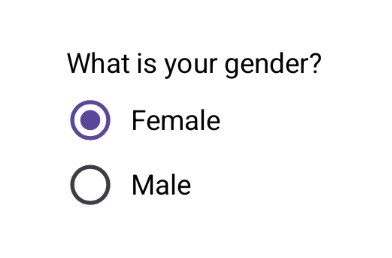
Being forced to choose between two options that don't describe you means the system is telling you that you don't exist. That feeling of invisibility is exhausting.
Then there's privacy. For trans people who aren't fully out, whether due to safety concerns, discrimination risks, or personal choice, being forced to select a gender creates a data point that could be exposed through data breaches, shared with third parties, or accessed by others with system access. That could lead to many serious consequences. Some examples include job discrimination, family rejection, or even physical danger.
Who This Hurts
Non-binary, genderqueer, and agender people who don't fit the binary
Trans people who may not want to disclose their gender for safety/privacy reasons
Anyone questioning their gender identity
People who simply don't want to share this personal information
Intersex individuals whose experiences may not align with binary options
Why Developers (or Designers) Do This
Many developers and designers just haven't questioned the binary default. If you're cisgender (so, your gender matches the sex assigned to you at birth) and haven't had these conversations, it's easy to assume 'male' and 'female' covers everyone. It's what you've seen in forms your whole life.
There's also often pressure from databases designed decades ago with binary gender fields, or legal/medical requirements that genuinely do require binary data for specific purposes. But for most apps? There's no real reason to force this choice.
The Solution
Do You Really Need That Info?
The first question you should ask is "Do you really need that information?" If you don't really need it, don't ask it.
If You Do Need It
If you do need the information, then there are some things to consider. In the solution we're looking at today, there are:
Multiple options beyond binary: More identities represented more accurately, not just as "other".
Custom text field: No list can capture everyone's identity. Let people define themselves.
Checkboxes, not radio buttons: Some people's gender is fluid or spans multiple genders.
Possibility of not disclosing gender: Respects privacy and takes into account safety concerns.
One version of this form could look like this:
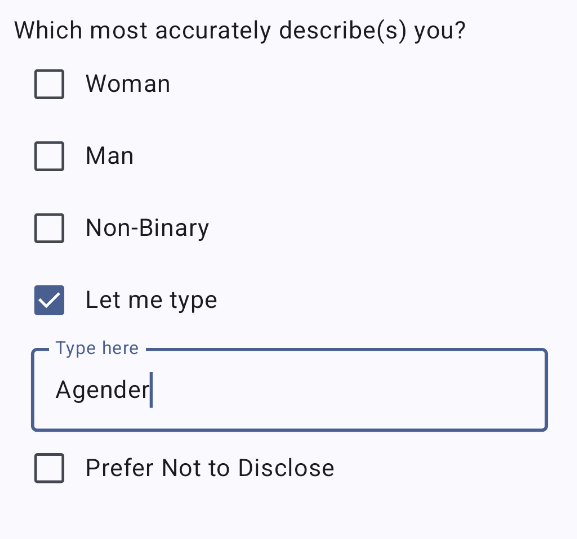
This approach uses checkboxes instead of radio buttons, allowing users to select all options that apply. If none of the provided options fit, users can choose 'Let me type' to enter their own gender identity in a text field.
I've written a blog post with a guide on implementing this form pattern in Jetpack Compose, including code examples for handling state, different input types, and making the checkboxes more accessible. You can find the link to the blog post from the Read More section.
What About Systems That Require Binary Data?
There are legitimate cases where binary gender data is required. In countries with only two official genders, this could mean official documentation, certain medical records, insurance forms, and similar documents, to name a few.
If you're integrating with these systems:
Be transparent about why you're asking
If possible, collect inclusive data for your use, but map it to required binary fields only when submitting to external systems
Never store less inclusive data than what the user provided
Common Mistakes To Avoid
Using "Other" as a catch-all third option. It reduces identities to an afterthought.
Dropdown menus with all the possible options. It's hard to maintain, and can be really overwhelming for users.
Making gender required when it's not actually necessary.
Asking for both "sex" and "gender" when you only need one.
Read More
Beyond the Binary - More Inclusive Gender Options with Compose
Author: Eevis Panula
This blog post is something I wrote in 2024, explaining how to build more inclusive gender options with Compose. The example for the solution in this newsletter is also from this blog post. So, if you want to know the technical details of building it, check them out in this post!
How to Ask About Gender in Forms Respectfully
Author: Ruth Dillon-Mansfield
This article by Ruth Dillon-Mansfield is an excellent resource for diving deeper into respectful gender discussion, especially from the perspective of the forms. Ruth shows examples of how to build inclusive forms, starting with bad examples, improving them, and explaining why some things are problematic. I highly recommend checking out the article!
That's a wrap for the second edition of Inclusive Android Apps. Are you going to update a gender form in your app after reading this? Reply and tell me what you're changing—I'd love to feature reader wins in future issues.
Next month: We'll get back to accessibility topics, talk about color, and how it shouldn't be the only way to convey information.
Thanks for reading!
-Eevis
eevis.codes

