Inclusive Android Apps #11: The Problem of Missing Offline Support
Eleventh issue covers how missing offline support excludes users without reliable network connections.
I visited a friend in an area where the internet doesn’t work that well. During the visit, I had to access an app, and it turned out the app needs a working internet connection to open. From a functionality standpoint, it wouldn’t have needed it for everything, but it still didn’t work.
The Problem of Missing Offline Support
Without offline support, the experience can range from mildly frustrating to completely broken. You mostly see an empty screen or an infinitely spinning loading indicator as the app waits for a network response that won’t arrive.
But there are more subtle problems too. Even if the app doesn’t crash, previously loaded content might disappear completely when the connection drops. And if it’s not clear that the app doesn’t work without a network connection, a user might try to take an action, like send a message or submit a form, and it either fails silently or shows an error without a way to retry when they’re back online.
Who This Hurts
- Users with poor connectivity
- Users with limited data plans
- Users in places like tunnels or basements
- Travelers without roaming and access to WiFi
Why Developers (or Designers) Do This
Building for offline is easy to skip when you’re developing on a fast office or home wifi connection. Everything loads instantly without errors, and the app feels great. It’s, for example, when you’re on a train going through a tunnel, or in a basement, or traveling without a data plan, that the problems become visible.
There’s also this notion that offline support is rather a nice-to-have than a requirement. Caching data, queuing actions, and handling sync conflicts take extra work, and when deadlines are tight, it’s easy to cut it from the feature list.
The Solution
Communicate connection status
The first step is making sure users know when they’re offline. An empty screen or an infinite spinner with no explanation is frustrating. Users deserve to know what’s happening and why.
This means two things: showing a meaningful offline state when there’s no connection, and making sure that state is accessible. A visible “You’re offline” message is a good start, but it also needs to work for screen reader users, so the message should be announced when the connection state changes. A live region works well for this:
Text(
    text = "You are offline",
    modifier = Modifier.semantics {
        liveRegion = LiveRegionMode.Polite
    }
)
Cache data
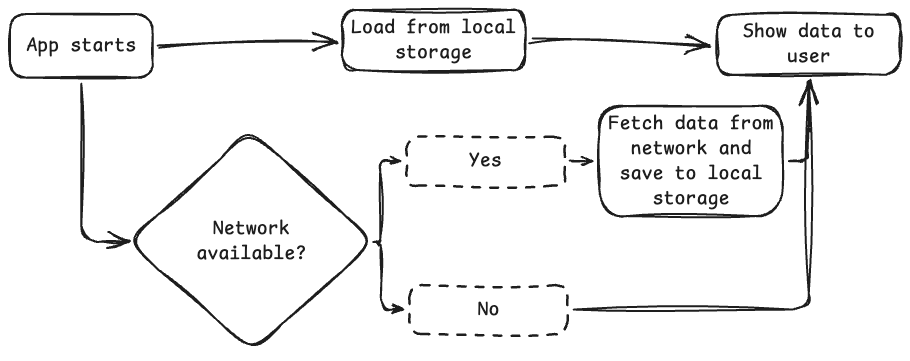
Caching means storing data locally so it’s available even without a network connection. When the app loads data from the network, it should save a copy locally. The next time the user opens the app or loses connection, the app shows the locally stored data instead of an empty screen.
The implementation depends on your app’s architecture. Room, DataStore, and other local storage solutions all work. The key principle is the same regardless: always try to show something rather than nothing.
So, in an image format, it would look like this:
Sync data when connection returns
If a user takes an action while offline, like sending a message, submitting a form, or making a change, that action shouldn’t just fail silently. Instead, queue it locally and sync it when the connection returns.
This way, the user can continue using the app normally without worrying about whether their actions went through. When the connection is restored, the queued actions are sent automatically in the background.
As with caching, the actual implementation depends on your architecture. For example, WorkManager is a good fit for Android because it handles scheduling and retry logic for background work. This could look, for example, something like this:
class SyncWorker(
    context: Context,
    params: WorkerParameters
) : CoroutineWorker(context, params) {

    override suspend fun doWork(): Result {
        return try {
            // Sync queued actions to the network
            syncPendingActions()
            Result.success()
        } catch (e: Exception) {
            Result.retry()
        }
    }
}

// Enqueue when connection returns:
val syncRequest = OneTimeWorkRequestBuilder<SyncWorker>().build()
WorkManager.getInstance(context).enqueue(syncRequest)
Read More
Build an offline-first app
Android Developer's guide on building offline-first apps. It contains a lot of technical information and different scenarios. It also explains how WorkManager should work in offline-first apps.
Connectivity Is Not a Given: Offline Mobile App Design
Author: Joanna Miśtak
A great blog post where Joanna explains the key UX challenges of offline mobile app design and offers strategies to improve offline UX.
That's a wrap for Issue #11 of Inclusive Android Apps. How have you solved offline states for your apps? Hit reply and let me know!
Next month: Holiday assumptions in apps.
Thanks for reading!
-Eevis
PS. If you need help with mobile app accessibility or training for your team, I’d love to chat. Reach me at [email protected] or eevis.codes.

