
The greatest AI model in history (so far)
Hi there,
October brought another wave of new models: OpenAI, Google and the Chinese labs all shipped. And the model I wrote about last time, Claude Opus 5.5, is still the one everyone talks about in the communities I follow on X and Reddit. That doesn't happen often. Usually a model is old news within three weeks.
So this edition is about why I think Opus 5.5 matters more than a usual release, what Anthropic is building around it, a company website I rebuilt for Halloween from one image and one prompt, and a game I'd like you to test.
🧠 Capable and cheap enough at the same time
Opus 5.5 is extremely capable, and that alone wouldn't be news. What's new is that it's also efficient enough that the $20 Pro plan gives you enough usage to actually carry a project, not just ask a few questions before you hit the limit. I built most of my See What's Possible section (check it out, it’s fun!) on my private Pro plan, and most entries didn't even use up one five-hour usage window. Many took about half. Until now you usually had to pick one: the best model, or enough of it.
It's also very good at operating other software. That's how it makes things that aren't text: through code and other tools it now makes films, 3D scenes, music and more. On my site, Claude made a 44-second animated film from two prompts of mine, and a sailing yacht at sea that renders in 3D live in your browser, with four kinds of weather and no image files at all.
The cheap end moved too. Anthropic's smallest model, Haiku 5.5, costs a twentieth of Sonnet and is good enough for most text work, which is how I use it: for the small jobs inside bigger ones. The updated Think Expensive, Execute Cheap has the whole price ladder.
🖥️ Your next document might not be a document
Anthropic is clearly trying to make the Claude desktop app the main work tool of the future. Artifacts, Claude Design, Slides, Docs and Dashboards now all live in one app. And it's working: my company is feeling the pull. A year ago, we discussed a topic by passing around a document or writing a boring-looking Notion page. Now people share beautiful interactive artifacts, carefully made pages you can click through, filter and change, to discuss it.
I wanted to see how far this goes with the files most of us still work in every day, so I asked Claude Code for three of them, one prompt each, inside a project that already had my guides, style and colours to read:
The Pitch: a 17-slide PowerPoint with speaker notes, a chart and a QR code.
The Blueprint: one of my longest guides as a designed 26-page Word document, with eight new figures.
The Budget: a project budget in Excel with nine sheets and 3,303 formulas, not one typed-in result. Change an assumption on the page and watch everything move.
All three are on the site to flip through and download. Two things I learned:
Start from scratch in one tool, keep working in another. For building a file from nothing, I'd use Cowork or Claude Code. To edit a file you already have, Anthropic's add-ins that work inside the app, Excel, PowerPoint and Word, are likely the better choice: your template, your styles, tracked changes.
Check as hard as a mistake would hurt. That’s one of my core principles at work, and it applies to AI outputs as well. For the examples mentioned above, I didn’t go for perfection as they are just showcases for what’s possible. For real use cases I would spend more time iterating over them. These days, most AI tools come with quite good self-checks, though.
If your company gives you Copilot instead, the lesson still carries over: ask for the finished file, not for help with one paragraph, and decide before you start how much checking it deserves.
🎃 One image, one prompt, a Halloween website
GPT-Image-2.5 keeps blowing my mind, especially its precision mode, Sunburst, which is the best I've seen for both making and editing images. One tip: you can't pick Sunburst in ChatGPT, which doesn't tell you which version it uses. In Higgsfield or Poe you can choose it yourself. It's slower, and worth the wait for edits where every detail has to stay put.
Here's what it can do with the right partner. Over the Halloween weekend, I gave our company website a Halloween theme. Sunburst made the design as a single image. I pasted that image into Antigravity, Google's coding tool, running Gemini 4 Argon on its High setting, and told it to build it. It worked for about 20 minutes, generated and edited the images it needed through my Higgsfield account, and the result looked pretty much like the design. One simple prompt and two small corrections.
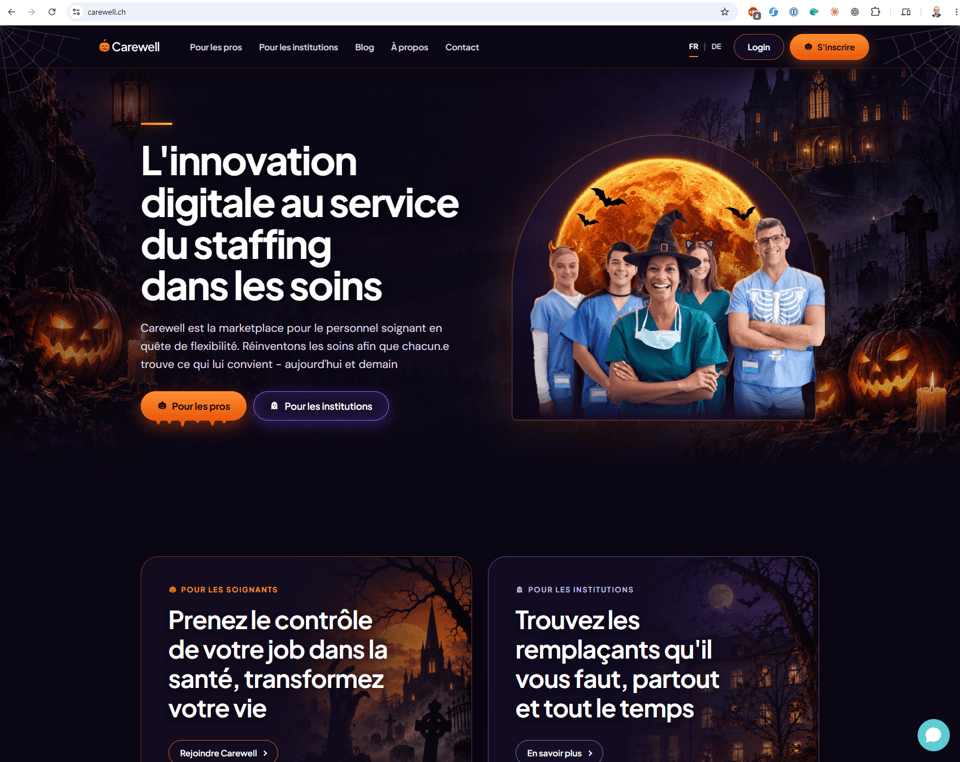
I used to build websites myself, so I know what this used to take. It's hard to believe how capable and fast these models have become at it. A talented web designer still does better than I do. But AI lifted everyone up, and knowing what a good website looks like is what let me judge the result.
🔭 The rest of the field
Google: In my first tests, Gemini 4 Argon is technically very capable, but it takes instructions too literally and isn't as creative as Opus. Give it something exact to follow, like the Halloween design, and that literal streak helps. Google has also announced Gemini 4 Carbon, but so far only cybersecurity defenders get to use it, so I haven't tried it.
Chinese labs: still impressively close to the frontier, but a step behind, and at a much lower price. DeepSeek's small open-weight model runs my personal assistant, through a provider that hosts it outside China (DeepSeek's own service stores data there). Its daily routine went from about five dollars a day on a big lab's mid-tier model to about five cents.
Europe: For language models, Mistral is the only real European contender. It's a decent model, but far from the frontier. For a lot of everyday business work in Europe, that may still make it a good pick.
World models: Google DeepMind just showed Genie 4, which builds a world you can explore from a single prompt and simulates how things in it behave: collisions, airflow, things falling. It's an early research preview. Scenes stay consistent for about two minutes so far. What I find exciting is what it means for video: clips where the physics could finally hold up. For now it's something to watch, not to use.
What I'm waiting for: Claude Duet, Anthropic's personal assistant that works through your email and calendar on its own and messages you when it needs a decision. It's in preview for US subscribers only, so not for me in Switzerland yet. Anthropic is the last of the big labs to ship one, so it has had time to learn from the others, and I have high hopes. One thing to check before you rely on it: its background checks count against your Claude usage allowance.
🏔️ A game I'd like you to test
Out of Office is the new version of my company simulator, playfully teaching AI operating systems. You've run your grandmother's mountain hotel for two years without a day off, everything lives in your head, and your sister has given you a train ticket for Saturday, 07:12. You have one week to get the hotel to run without you. It plays in real time, and it's in English, German and French.
At the end there's a short box with four questions. If you play it, copy them, hit reply and tell me what you think.
And if you'd rather compare models than run a hotel: I gave five models the same brief for a browser game, and four models the same prompt for an artillery game. You can play all of them in Same brief, different models and Artillery, four ways.
📇 Quick GoodAIGuide hits
The Deep End: scroll from a calm sea to the bottom of the Mariana Trench, 10,935 metres down. Keep going all the way to the bottom. Beautiful work by Opus!
All my tool reviews are now in one searchable list with a quick look at my take. I also checked 32 older reviews against the providers' own pages and fixed prices, plans and claims that had gone stale.
Wispr Flow's new meeting note taker beat every other note taker I've used.
I cut what to read from 26 recommendations to ten, and rebuilt who to follow. Fewer, better, and each read comes with a sample so you can judge before you subscribe.
One question, answerable in a line: which AI tool did your company give you, and does it do what you need? Just hit reply. It helps me write for the setup you actually have, not the one I have.
Best,
Fabian
