Best Amazon Seller Tool: Why Helium 10 Wins
Disclosure: I'm an official Helium 10 affiliate. If you sign up through my link, I earn a commission at no extra cost to you. I only recommend what I'd tell a friend to try, and I've listed the downsides too.
Most new Amazon sellers don't fail because Amazon is too hard. They fail because they pick the wrong product, and nobody warned them until the money was already spent.
Here is how it usually goes. Someone watches a video, gets excited, finds a product that "looks like it sells well," pays a supplier, ships a few hundred units to Amazon, and waits. Then the real numbers show up. The fees are higher than expected. The competition has thousands of reviews. The keywords they guessed at don't match what buyers actually type. Six months later the inventory is still sitting in a warehouse.
The painful part is that almost all of this is predictable before you spend a cent. That is what an Amazon seller tool is for, and it is why this article exists.
I'm going to explain what the best Amazon seller tool actually does, why I think Helium 10 is the strongest choice for most beginners, how it compares with the alternatives, and exactly how to use it to go from "I have no idea what to sell" to a launched product. I'll also share the things new sellers almost never hear until it's too late.
If you only want the short version, read the next section and click through. If you want the full picture, keep going. It's a long read on purpose.
The Short Answer: What Is the Best Amazon Seller Tool?
For most beginners, the best Amazon seller tool is Helium 10. It covers the whole journey in one place: finding a product, checking whether it can make money, researching the keywords buyers use, writing a listing that ranks, and running your account after launch.
Other tools are good at specific things. Keepa is excellent at price history. Jungle Scout is a polished product research platform. AMZScout is simple and affordable. SellerSprite packs in a lot of data for the price. But none of them match Helium 10 for breadth, and breadth matters when you are new and don't yet know which part of the process will trip you up.
How to get a discount on Helium 10: You have two options, and they don't stack, so pick one.
- Use my link: Click here to open Helium 10 through my link. At the time of writing, it applies 30% off for your first 6 months automatically.
- Use the code FLEXOBA10: Enter it at checkout for 10% off for as long as you stay subscribed. It's the better pick if you plan to keep Helium 10 beyond about a year and a half. I explain the math later.
You can also start with Helium 10's free plan to look around before paying anything. More on that below.
Why Beginners Need an Amazon Seller Tool (and Why Guessing Is Expensive)
Amazon has hundreds of millions of listings. Amazon itself doesn't hand you a clean, honest answer to the question every new seller asks: "What should I sell?"
What you can see on Amazon's website is limited. You can see prices, reviews and a Best Sellers Rank. What you can't easily see is estimated monthly revenue, how many units a competitor really moves, how fast new products are gaining reviews, which keywords drive their traffic, how many sellers entered a niche last quarter, or what your profit will be once every fee is counted.
A seller tool collects, estimates and organizes that information. Think of it as the difference between walking into a new city with a map and walking in blindfolded.
Here is what a good tool lets you do:
- Search for products by demand, competition, price, and review count instead of scrolling Amazon and hoping.
- Check how much money a competitor is estimated to make and how that has changed.
- Discover the exact words buyers type, so your listing shows up in search.
- Calculate profit before you place a supplier order.
- Watch your listing, your inventory and your ads after launch.
The key word is estimates. No third-party tool knows Amazon's exact internal sales numbers. Every tool, including Helium 10, models them. The best ones model them well and give you enough different data points to cross-check. I'll show you how to do that in the secrets section.
The Math Most Beginners Ignore: What Selling on Amazon Really Costs
Before we talk about tools, you need to understand the cost structure, because it is the reason so many first products lose money. This is the first "secret": the price you sell at is not what you keep.
Amazon offers two selling plans. The Individual plan has no monthly fee but charges $0.99 per item sold. The Professional plan costs $39.99 per month, and it's the better option once you sell more than roughly 40 units a month. It also gives you access to advertising and the tools most serious sellers use.
On top of the plan, you pay:
- A referral fee on every sale. For most categories this lands somewhere between about 8% and 15% of the sale price, though a few categories charge more.
- FBA fulfillment fees if Amazon picks, packs and ships for you. The amount depends on the size and weight of your product.
- Storage fees for inventory sitting in Amazon's warehouses, which climb during the fourth quarter.
- Advertising costs if you run Sponsored Products, which most new listings need to get early traction.
- Returns and refunds, which vary by category but are never zero.
- Your own costs: the product itself, shipping to Amazon, packaging, samples, inspection, and any photography or design.
Add all that up and a product you sell for $30 might leave you with a few dollars in profit, or nothing, or a loss. Beginners who skip this step often discover their margin only after the first shipment lands. Amazon's own numbers can change, so always confirm the current fee schedule inside Seller Central before you commit.
The good news is that a decent tool bakes this calculation into your research, which is one of the reasons I rate Helium 10 so highly. You can see margin estimates while you browse products instead of finding out afterward.
What Is Helium 10?
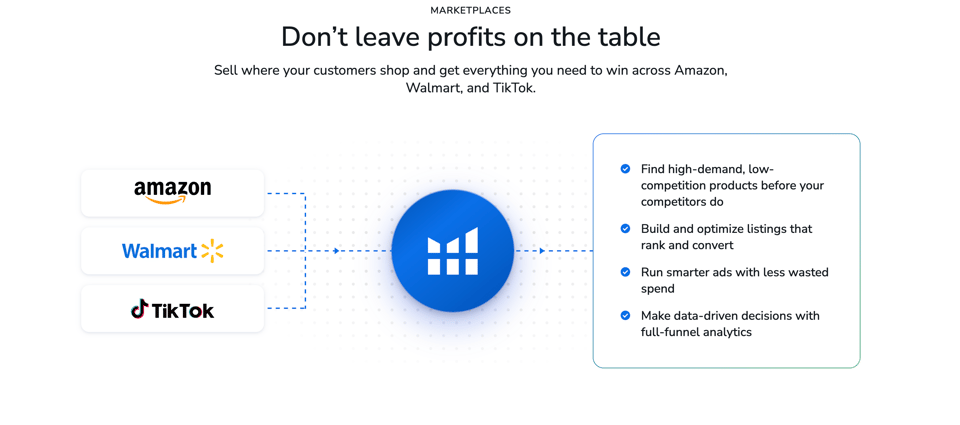
Helium 10 is a software suite built for Amazon sellers (and Walmart and, more recently, TikTok Shop sellers too). It started as a collection of research tools and has grown into a platform that covers the entire selling lifecycle.
The simplest way to think about it: it is a dashboard of specialized tools, each designed to answer one question a seller has.
- What should I sell? Black Box, Xray, Market Tracker
- What will it cost, and will I profit? Profitability Calculator
- What do buyers search for? Cerebro, Magnet
- How do I write a listing that ranks? Scribbles, Listing Builder, Frankenstein, Index Checker
- How do I run the business after launch? Alerts, Inventory tools, Refund tools, Ads and Profits dashboards
- How do I learn all this? Freedom Ticket, Helium 10's training course for new sellers
You don't need to use every tool. Most beginners get the majority of their value from three or four, and I'll show you which ones.
Helium 10 Tool by Tool: What Each One Does for a Beginner
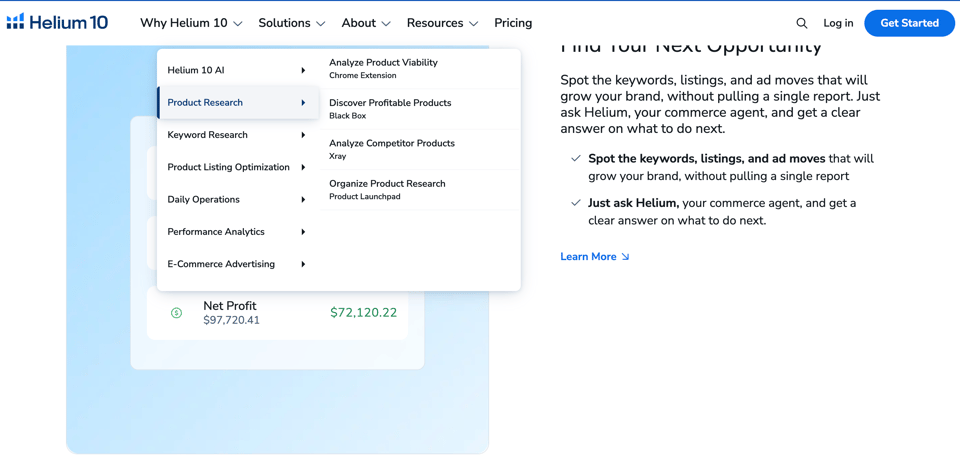
This is the part I'd read carefully if you've never touched the platform. I'm describing these in plain language, in the order a beginner would actually use them.
Black Box: Your Product Finder
Black Box is a searchable database of Amazon products. Instead of guessing, you set filters and Black Box returns products that match.
You can filter by category, price range, estimated monthly sales, estimated monthly revenue, number of reviews, review rating, size and weight, and more. A beginner might search for products that sell at a healthy price, have a manageable number of reviews, sell steadily, and aren't too heavy to ship cheaply.
In my own experience, product research is where Helium 10 pays for itself fastest. You can narrow thousands of possibilities to a short list in an afternoon, something that would take weeks of manual browsing. The data also feels current, which matters because Amazon changes quickly.
Want to see it for yourself? Open Helium 10 through my link and try a Black Box search on a category you like.
Xray: Instant Analysis While You Browse
Xray is a Chrome extension that sits on top of Amazon's search results and product pages. When you search for something like "silicone baking mat," Xray overlays estimated monthly sales, estimated revenue, review counts, price, and fees for every listing on the page.
This is incredibly useful for quick validation. Found a product idea? Search for it on Amazon with Xray running, and within seconds you can see whether the top ten listings make good money, how many are dominated by a single brand, and whether newer products with few reviews are breaking in. That last point is a big clue for beginners: if low-review products are selling well, the niche is open to newcomers.
Cerebro: Reverse ASIN Keyword Research
Every Amazon product has a unique ID called an ASIN. Cerebro lets you paste in a competitor's ASIN and see the keywords that product ranks for, along with estimated search volume and how competitive each keyword is.
Why is this powerful? Because it tells you what buyers actually type. Instead of guessing at keywords, you steal the playbook from products that already sell. It's the single biggest edge new sellers have against listings written on gut feeling.
Magnet: Keyword Research From a Seed Word
Where Cerebro starts from a competitor, Magnet starts from an idea. Type in a word or phrase and Magnet returns hundreds of related keywords with estimated volume. It's how you discover alternative terms and long-tail phrases you wouldn't have thought of, including the less competitive ones where a new listing can realistically rank.
Profitability Calculator: Know Your Margin Before You Order
This is the tool beginners underuse and veterans swear by. You enter your estimated product cost, shipping, and selling price, and it works out Amazon's fees and your expected profit and return on investment. Run this before every supplier conversation. If the margin only works in a perfect world, walk away.
Scribbles and Listing Builder: Writing Listings That Rank
Once you've picked keywords, you need to place them in your title, bullet points and description in a way that reads well and fits Amazon's character limits. Scribbles helps you organize your keywords and track which ones you've used, so nothing important gets forgotten or stuffed in clumsily.
Helium 10 has also added AI-assisted listing tools, which can help you draft listing copy faster. I'd treat any AI draft as a first pass: read it, correct anything inaccurate about your product, and make sure it sounds like something a real person would want to read. Amazon's buyers (and its search system) respond best to clear, accurate listings.
Frankenstein and Index Checker: Cleaning and Verifying Your Keywords
Frankenstein is a keyword processor. You dump in a long list of keywords, and it cleans duplicates and organizes them. Index Checker answers a crucial question most beginners never ask: is Amazon actually indexing my keywords? If a keyword isn't indexed, your listing won't appear for it no matter how good it is. Checking this is one of the cheapest ways to find a hidden ranking problem.
Market Tracker: Watch a Niche Before You Enter
Market Tracker lets you follow a group of competing products and watch how the niche moves over time: sales trends, price changes, new entrants, market share. It's especially useful for spotting seasonal swings. A product that looks perfect in November can be dead in February, and you'd rather learn that before you buy inventory.
Alerts, Inventory and Refund Tools: Running the Business
After launch, small problems can quietly drain money. Helium 10 includes alerts that notify you when something changes on your listing (a hijacker, a suspended listing, a lost Buy Box, a competitor price drop), along with tools to help you manage inventory so you don't run out of stock or overpay in storage fees, and refund tools designed to help recover money Amazon may owe you on lost or damaged inventory.
These aren't glamorous, but they protect your margin. Some of the refund-recovery services take a percentage of what's recovered, so read the terms before you use them.
Ads and Profits: Seeing Where Your Money Goes
Advertising is where many new sellers burn cash. Helium 10 offers advertising management and a profit dashboard so you can see what each product actually earns after all costs, not just revenue. On the higher plan, the advertising management carries a small percentage fee on managed ad spend, so factor that in.
Freedom Ticket: Learning the Process
Freedom Ticket is Helium 10's training course for new sellers, and it comes bundled with the paid plans. It's not a substitute for doing the work, but if you're starting from zero, having a structured walk-through from product research to launch beats piecing it together from random videos.
The AI Layer: Helium 10's Newer Tools
Helium 10 has been investing heavily in AI, including an AI assistant and, on the top plan, a connector that lets you work with your Helium 10 data through AI chat tools. These are newer features, and the details and limits change, so check the current plan page. The reason I mention them: the platform keeps improving, and what you're subscribing to today is better than what existed a couple of years ago.
Seven Secrets New Amazon Sellers Don't Know (and How Helium 10 Solves Them)
These are the lessons that cost experienced sellers real money to learn. I'm sharing them so you don't have to pay the same tuition.
Secret 1: Sales Estimates Are Estimates, So Cross-Check Them
No tool sees Amazon's private data. Every sales number is a model. The professional move is never to rely on one number. Compare Helium 10's estimate against the product's Best Sellers Rank, its review growth over time, and a price history chart. If all of them tell the same story, trust it. If they disagree, dig deeper before you buy.
Secret 2: Low Reviews Plus Strong Sales Is the Beginner's Sweet Spot
Many beginners chase "high demand" and land in niches dominated by brands with thousands of reviews. The better signal is demand combined with accessible competition: products that sell well but have relatively few reviews, and where newer listings are succeeding. Xray and Black Box make this pattern easy to spot, because you can filter by review count and see which listings are climbing.
Secret 3: The Best Keyword Isn't the One With the Most Searches
High-volume keywords are crowded. A new listing usually can't rank for them early on. The smarter play is to build a keyword mix: a few strong head terms, plus many specific long-tail phrases where the competition is lighter and the buyer intent is clear. Cerebro and Magnet show you volume and competition side by side so you can choose realistically.
Secret 4: Your Margin Must Survive the Bad Months
Don't calculate profit using your best case. Include returns, storage in the fourth quarter, a realistic advertising budget, and a cushion for price pressure. Run your numbers in the Profitability Calculator with conservative inputs. If it still works, you've got a real product.
Secret 5: Seasonality Can Make or Break You
A product can look incredible in a snapshot and be a seasonal spike. Look at the trend over twelve months, not twelve days. Market Tracker and price and rank history help you see whether demand is steady, growing, or about to fall off a cliff.
Secret 6: A Listing That Isn't Indexed Is Invisible
New sellers pour effort into titles and bullets and never verify that Amazon actually indexed their keywords. Run an index check after you publish. If something isn't indexed, fix it. It's one of the highest-return five-minute checks in the business.
Secret 7: The Real Cost of Starting Is Cash Flow, Not Software
Software is cheap compared to inventory. The expensive mistake isn't a monthly subscription, it's a first order of the wrong product. Spending a few weeks and a modest subscription to validate a product before you buy stock is the best insurance you can buy. That's the entire reason a tool like Helium 10 exists.
How to Go From Zero to Your First Profitable Product, Step by Step
Let me be straight with you about expectations. No tool can promise instant profit, and anyone who does is selling you a dream. Amazon is a real business: you have to find a supplier, wait on production and shipping (often weeks), and give a new listing time to gain traction. What a good tool can do is dramatically shorten the learning curve, reduce the odds you pick a loser, and let you move with confidence.
Here is the process I'd follow as a beginner.
Step 1: Set up your accounts. Create your Amazon seller account (Professional plan once you're serious) and open your Helium 10 account. Start on the free plan if you want to explore first.
Step 2: Build a shortlist in Black Box. Choose a category, set a price range that leaves room for margin (many beginners aim for products that sell at a decent price point so fees don't swallow everything), filter for steady sales and a manageable review count, and exclude anything heavy, fragile, regulated or complicated. Save ten to twenty candidates.
Step 3: Validate with Xray on Amazon. Search each candidate on Amazon with Xray running. Eliminate niches where one brand owns everything or where nobody is making meaningful revenue. Keep the ones where newer listings are selling.
Step 4: Run the numbers. Use the Profitability Calculator with conservative estimates. Cut anything where profit disappears under realistic assumptions.
Step 5: Check the trend. Use Market Tracker and price and rank history to confirm demand is steady and not a one-season spike.
Step 6: Research keywords. Drop your top competitor ASINs into Cerebro, and use Magnet with your core phrases. Build a list of the keywords buyers actually use.
Step 7: Find a supplier and order samples. Always inspect samples before a bulk order. Ask about minimum order quantities, lead times and quality checks.
Step 8: Write your listing. Use Scribbles to organize keywords, draft your title and bullets, and use the AI tools for a first pass if you like. Focus on clarity and honesty.
Step 9: Publish and verify indexing. After you go live, use Index Checker to confirm your priority keywords are indexed.
Step 10: Launch carefully and watch the numbers. Start with a controlled advertising budget, track your ads and profit, and use alerts to catch problems early. Adjust based on data, not hope.
Step 11: Reinvest and repeat. Once one product works, use the same process for the next.
Notice how many of those steps happen before you spend serious money. That's the point. The tool front-loads the thinking so your capital goes into products with a fighting chance.
Helium 10 vs the Alternatives: An Honest Comparison
I said I'd compare, and I want to be fair, because a one-sided comparison isn't useful to you. Prices below come from public pages and third-party sources and change often, so always confirm on each company's official site.
Helium 10 vs Jungle Scout
Jungle Scout is a well-known, polished product research platform and a genuine competitor. Its plans have started around $49 a month at times, with annual billing bringing it lower, and the company has been reshaping its plan structure, so check its current pricing page. People often praise its interface and its product-focused approach.
Where Helium 10 pulls ahead for me: the breadth of the toolkit (keyword research, listing tools, indexing checks, alerts, ads and profit tools all under one roof), a free plan you can use to explore, and the pace of new features. Where Jungle Scout can win: some sellers simply prefer its look and feel, and its pricing can be lower at the entry level.
Helium 10 vs AMZScout
AMZScout is popular with beginners who want something simple and affordable, with bundles often listed at around $45 to $50 a month and options for longer commitments. It's a solid choice if all you want is quick product validation and sourcing.
Where Helium 10 wins: the depth of keyword research, listing optimization, and post-launch tools. AMZScout is easier to learn in a day, but you may outgrow it faster.
Helium 10 vs SellerSprite
SellerSprite is a strong data-rich option, often priced a little below the big names, and it has a loyal following, particularly among sellers who sell across multiple marketplaces. It's a legitimate alternative.
Where Helium 10 wins for beginners: the ecosystem, the training that comes with it, and the sheer number of tutorials, communities and third-party guides built around it. When you're stuck at 11 p.m., there is usually a walkthrough for the exact thing you're trying to do.
Helium 10 vs Keepa
This one isn't a fair fight, because they do different jobs. Keepa specializes in price and sales rank history, and it does that extremely well. Most serious sellers use it alongside a full suite, not instead of one. It doesn't do keyword research or listing optimization. My advice: if you pick Helium 10, you can add Keepa later for extra price-history depth if you want it.
The Bottom Line on Comparisons
Every tool above is legitimate, and the right one depends on your situation. But if you want a single platform that grows with you from first product to a real business, Helium 10 is the one I'd choose. Beginners especially benefit from not having to stitch together four subscriptions before they've made a single sale.
Helium 10 Pricing and Plans, Explained Simply
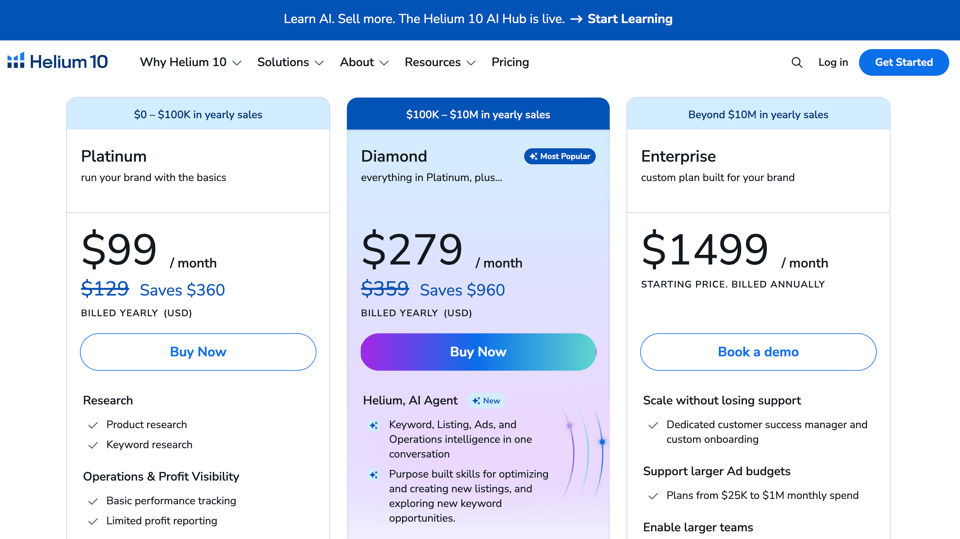
Helium 10 raised its prices in 2026 and retired its old Starter plan, according to multiple sources, so older articles may show outdated numbers. Here is the current picture as best I can verify. Confirm on the official pricing page before you buy.
- Free plan: $0. You get limited use of several core tools, with capped usage on things like Black Box, Xray, Cerebro and Magnet, plus the Freedom Ticket intro material. It's enough to explore the platform and validate an early idea, but not enough to run a business.
- Platinum: Listed at roughly $129 a month on monthly billing, or around $99 a month when billed annually (about $1,188 a year). It unlocks full access to the main research and listing tools with much higher daily limits.
- Diamond: Listed at roughly $359 a month on monthly billing, or around $279 a month billed annually (about $3,348 a year). It adds higher limits, extra capacity, and the advanced and AI features aimed at growing sellers.
- Enterprise: Custom pricing for agencies and large operations.
Which Plan Should a Beginner Choose?
Honestly, it depends on your budget and how seriously you're treating this.
If you're completely new, tight on cash, and still deciding whether Amazon is for you, start on the free plan, learn the tools, and upgrade when you're ready to commit.
If you're committed to launching a product, Platinum covers the core toolkit for most first-time sellers. If you plan to run multiple products, rely on heavy research volume, or want the most advanced and AI-powered features, Diamond is built for you. Many sellers who are serious about scaling go straight to Diamond, because higher limits and extra features save time once you're researching at volume. Whichever you choose, you can always change plans later.
Compare the plans and start through my link
The Helium 10 Discount: Link Versus Code (Which Saves You More?)
This is the part that can save you real money, so let me explain it plainly.
There are two ways to pay less, and you can't combine them.
- Option A: My tracked link. Open Helium 10 through this link and the 30% discount is applied automatically, for your first 6 months.
- Option B: The code FLEXOBA10. Enter it at checkout for 10% off for as long as your subscription lasts.
Here's the simple math. Option A gives you 30% off for 6 months, which is 180 "percentage-months" of savings (30 times 6). Option B gives you 10% off every month, so it earns 10 percentage-months of savings per month. They are equal at 18 months. If you expect to stay subscribed for fewer than 18 months, the link saves you more. If you plan to stay longer, FLEXOBA10 wins over the long run.
Using round numbers as an illustration, a plan billed at $129 a month would cost roughly $90 a month under the 30% offer for six months, then return to full price. The same plan with a 10% lifetime code would cost roughly $116 a month, and stay there. Your actual savings depend on your plan, your billing cycle and the offers live when you sign up, so check the final price at checkout.
My practical advice: if you want the biggest immediate saving and aren't sure how long you'll stay, use the link. If you're confident this is a long-term business tool, use FLEXOBA10. Either way, you're paying less than the sticker price.
Black Friday is close, and sellers naturally wonder whether to wait for it. I can't confirm what Helium 10 will announce, and promotions can change. What I can say is that the offer through my link is live as I write this, and waiting means losing weeks of research time in the exact season when Q4 demand is highest. If a better offer appears later, you can reassess then.
The Honest Downsides of Helium 10
I promised honesty, and a review without drawbacks isn't worth trusting.
- It isn't the cheapest. Prices rose in 2026 and the Starter plan is gone. Cheaper tools exist.
- There's a learning curve. With so many tools, a beginner can feel overwhelmed at first. Start with Black Box, Xray and Cerebro and ignore the rest until you need it.
- Data is estimated. As with every tool, sales and search volume numbers are models. Cross-check them.
- Some services carry extra fees. Managed ad spend and refund recovery services take a percentage, so read the terms.
- A tool can't make a bad product good. Software helps you choose and optimize. It doesn't replace supplier quality, good photos, and patience.
Helium 10 has also been shipping upgrades, including AI features and wider platform support, which is the direction I'd want a tool to be heading in.
Is Helium 10 Worth It?
Consider what a mistake costs. A single wrong first order of inventory can run into thousands of dollars. A month of Helium 10 costs a fraction of that, and if it steers you away from even one bad product, it has paid for itself many times over.
It's worth it if you're serious about launching, want one platform instead of several, value time over pennies, and are willing to follow a process. It's probably not worth it if you aren't planning to sell yet, only want a single narrow function (Keepa-style price history, say), or expect software to do the work for you.
If you're on the fence, the free plan removes the risk of testing it. And if you decide to upgrade, remember you're not locked in forever: try it for a month with the discount, build your shortlist, and decide whether to continue.
Frequently Asked Questions
What is the best Amazon seller tool for beginners?
Helium 10 is my top pick, because it covers product research, keywords, listing optimization and account management in one place, with a free plan for exploring and training material included on paid plans.
Is Helium 10 free?
There is a free plan with limited usage of several core tools. It's useful for testing and early validation, but paid plans unlock the full toolkit.
Is Helium 10 legit?
Yes. It's a widely used, long-established platform among Amazon sellers. Like any tool, results depend on how you use it.
How much does Helium 10 cost?
Free is $0. Platinum is listed around $99 a month billed annually ($129 monthly), and Diamond around $279 a month billed annually ($359 monthly). Prices change, so confirm on the official page.
Does Helium 10 work for Walmart and TikTok Shop?
Helium 10 includes tools for Walmart and has been adding TikTok Shop support. Check the current plan page for exactly what each plan includes.
Can Helium 10 find profitable products?
It helps you find products with strong demand and accessible competition, and calculate expected profit. It can't guarantee any product will succeed, so validate carefully.
Can I cancel Helium 10 anytime?
Plans can be changed or cancelled according to Helium 10's terms. Check the current policy and any money-back guarantee at checkout.
Which is better, Helium 10 or Jungle Scout?
Both are strong. I prefer Helium 10 for its breadth and free plan, while some sellers prefer Jungle Scout's interface or entry pricing. Try the free plan and compare.
Do I need a paid plan to start selling on Amazon?
No, but you do need an Amazon seller account. A paid Helium 10 plan isn't mandatory, though it speeds up research and reduces costly mistakes.
Is the discount code real?
Yes. FLEXOBA10 gives 10% off for as long as you stay subscribed, and my link applies 30% off for the first 6 months. They don't combine, so choose one.
Final Thoughts: Stop Guessing and Start Researching
Amazon rewards sellers who make informed decisions and punishes those who guess. The difference between the two groups is rarely talent or luck. It's information, gathered before the money is spent.
That's what Helium 10 gives you: a way to see demand, competition, keywords and margins before you commit, and tools to run your listing once you've launched. It won't remove the work or the risk, and nothing honest can. But it can swap blind guessing for a clear process, and that's the biggest advantage a beginner can have.
Here's what I'd do today:
- Open Helium 10 through my link to get 30% off your first 6 months, or enter code FLEXOBA10 at checkout for 10% off for as long as you subscribe.
- Run your first Black Box search in a category you understand.
- Validate your top three products with Xray and the Profitability Calculator.
- Only then talk to suppliers.
You can start free, look around, and upgrade when you're ready. The sellers who win in Q4 and beyond are usually the ones who started their research before everyone else did.
Start with Helium 10 now, using my link and the FLEXOBA10 code
Sources: Helium 10's pricing and plans pages; Capterra and TrustRadius listings; RevenueGeeks and Sellersprite comparison guides; Amazon selling-fee guides from TechRepublic, SupplyKick and others. Prices and plan details change frequently, so confirm everything on the official sites before purchasing.
