
Hi and welcome back to “Trust the Process”. The weekly newsletter where I share my own progress over the week and interesting links I found along the way.
This week, I was back to work after my week off. Which meant that I had to get back into my workflow of working on my projects here and there whenever I have time. As always, small steps still accumulate, so there was of course some progress.
Process
With Morgenblau now being my sole RSS reader and in daily use, I’m starting to notice small things that I wouldn’t have noticed if I’d just developed this product for others.
One particular feature that I implemented this week turned out to be a very good idea. I haven’t seen it in any other reader yet, but after only a few days, I couldn’t use Morgenblau without it.
My problem was that I subscribe to certain sources that publish multiple times a day. Since Morgenblau works with daily digests, this quickly cluttered them up and buried posts from other sources that were published on the same day.
My solution was to simply group posts by source for the ones that publish more than once a day. Only the latest one shows up like a regular post, with the others hidden behind a “+N more” accordion.
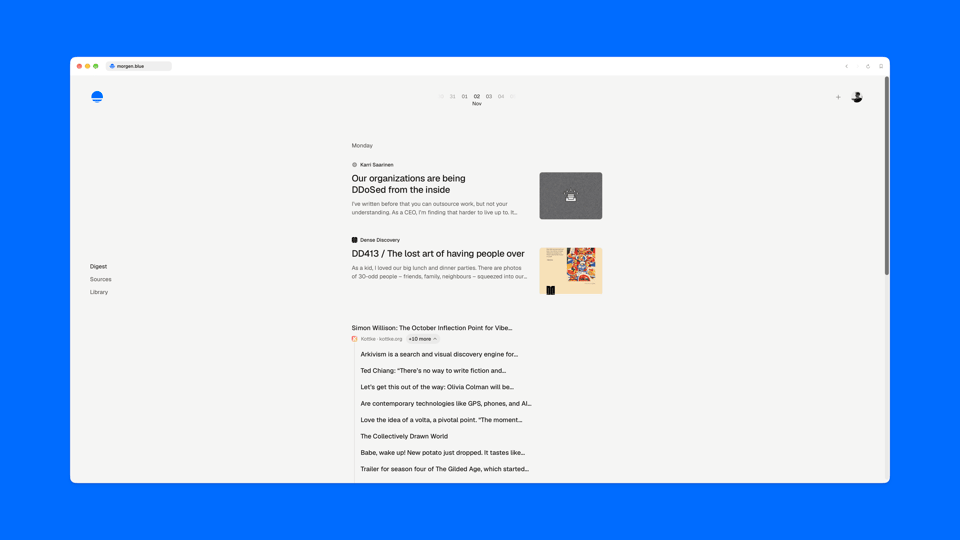
In combination with the primary sources’ special treatment from last week, the daily digests now have quite a pleasant and calm format, even if you have some noisy feeds in them.
Like in every other modern app, Morgenblau now also has a ⌘K menu that allows users to take pretty much any action within the app with just the keyboard. It’s contextual and shows different options depending on which page you open it on: On a source page, you can for example rename it or mark it as primary. On the digest, you can jump to a specific day.
There are still a couple of tweaks to be made to the keyboard-driven setup, but it’s all coming together nicely.
If you know my personal website, you’ve maybe seen my blogroll page there. Previously, I always had to manually download an OPML file from my RSS reader and upload it there to update the list. Morgenblau now has a feature that exposes the subscriptions of a user via a URL (opt-in, but subscriptions are public anyways because of ATProto) in either .opml or .json. It even supports some parameters to, for example, exclude YouTube subscriptions. My personal website now uses this feature and pulls the data directly from Morgenblau at build time. It also serves the OPML file for FollowSpec’s following.opml standard.
Another change from this week is a small one, but it feels very nice. One of my favorite design engineers released a skeleton library called “Skullet”. At work, we already implemented it for Billow and it worked nicely there. So I also added it to Morgenblau. Its main advantages are synchronized loading animations and skeletons that are actually based on the content they replace instead of being hand-drawn. Both pretty small details, but once you notice them, you can’t unsee them.
Last week, Marcel called me out (for lack of a better term) on the fact that I don’t post simultaneously to both Bluesky and Mastodon and that I should use something like Indigo to do that. I’ve tried crossposting tools in the past, but they were either not that nice to use or required another subscription, which made me discard them.
To be fair, Indigo is a great suggestion and a very nicely designed app. But since I could only use it on my Mac (it’s not available for Android), where I visit Bluesky and Mastodon via the browser anyways, subscribing to it didn’t feel justified either. It is a full client, so if you use it for that, it’s another story.
As one does in the year 2026, I quickly whipped up my own little local-only crossposting tool. It’s very minimal and fits perfectly into my “Ding” toolset. Here’s how it looks:

It’s essentially just a blank screen where you can type, split a text into multiple posts via keyboard, tag different accounts on both platforms and upload images that automatically get an alt text. Everything is local only, so nothing ever touches my server. I even removed the analytics from Ding to not have any external scripts on the site.
I’m happy to report that the tool works as expected. Click here to view a cute photo of my dog.
On a non-tech note, after my recovery week last week, I started to get back into training this week. Not running yet, though. I’m still a bit too worried about my knee for that. Instead, I started to strength train again.
In the past, I often used pre-defined training plans. But my problem with them always was that I wasn’t paying enough attention to using progressive overload (i.e. using more weight as you get stronger).
I’ve used the app Hevy for quite some time already but was very pleased to find out that they offer a Trainer feature for exactly my problem. It’s not one of these AI-powered workout generators but simply a proprietary algorithm that selects the optimal exercises and weights for your session.
Nothing fancy, but it solves exactly my problem and I love it when an app does that.
Finds
Cool things I discovered this week:
- The two types of quality: My favorite quote from the piece: “As with anything in life, when you invest extra time in an area typically neglected by others, you generate an element of surprise and enchant. That’s what miryokuteki hinshitsu is all about.”
- Stageshow: A skill for creating these dummy UIs on landing pages. I might try it out for the Morgenblau one.
- Skullet: The skeleton loader library I’m now using for Morgenblau.
- knobs: test your site on any device, locale and time: Testing UIs properly is always difficult, and this makes it a bit easier to quickly test different scenarios.
- Harness 2: executing agent code as it streams: Interesting technical deep dive on how Framer optimized its agent harness.
- The Afterlife of Pi: I wish I had the same grit that William Shanks showed when calculating digits of π. Even if you’re not into maths, this is a weirdly interesting read.
- lo-pi radio: Speaking of which, turns out you can make lo-fi music that never repeats by using π as the randomizer.
- Twombly: UI design remains one of the hardest things to do right in agentic development, and this tool increases the number of attempts to solve the problem by one.
- Social Browser - browse the social web of open websites: SocialSpec seems to be gaining a bit of traction (at least in my circles). This tool allows you to browse the profiles that implement it (type in dominikhofer.me to test it out)…
- FollowDraw: …and this one shows you random followings of these profiles (again, type in my domain dominikhofer.me to try it out).
From the blog
I didn’t publish any posts since the last issue.
That’s it for this issue. Thanks for sticking around! If you have any questions, feedback, or just want to say hi, reply to this email and it will land straight in my inbox.
Until the next one,
Dominik
You just read issue #8 of Trust the Process. You can also browse the full archives of this newsletter.
Add a comment: